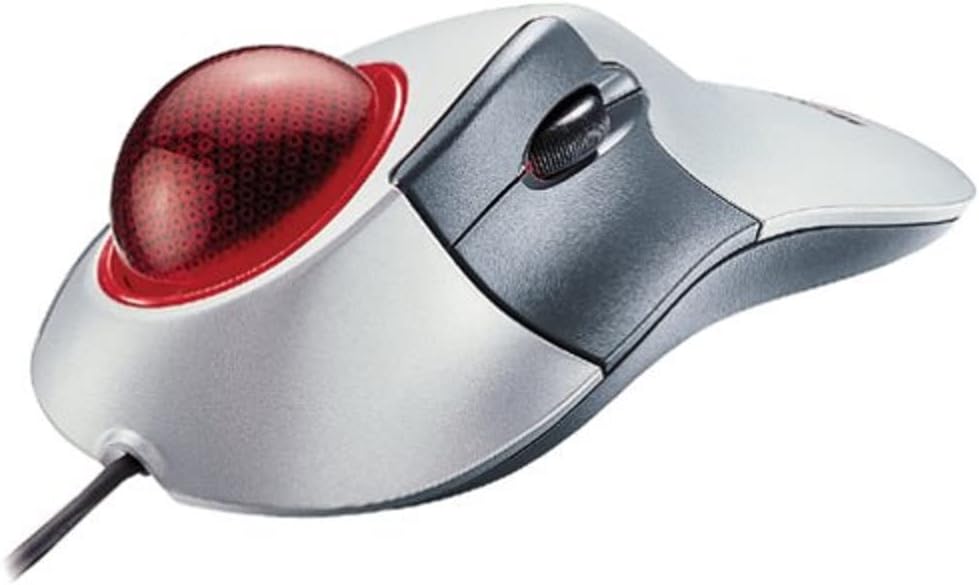

Microsoft Trackball Explorer
Product ID: 1780309
Details
- BrandMicrosoft
- Colorsilver and
- Connectivity TechnologyPS/2 USB
- Special FeaturePortable
- Movement Detection TechnologyOptical
📏10m range
🔋Battery powered
🖱️Trackball precision
Buy anything from 5,000+ international stores. One checkout price. No surprise fees. Join 2M+ shoppers on Desertcart.
Desertcart purchases this item on your behalf and handles shipping, customs, and support to Romania.
🖥️ Elevate your workspace with precision and style!
The Microsoft Trackball Explorer combines ergonomic design with advanced IntelliEye optical technology, featuring 5 customizable buttons and a scrolling wheel, all in a sleek silver and gray finish. Perfect for right-handed users, this portable trackball offers a 10-meter range and is compatible with various Windows operating systems.
| Style | Modern |
| Color | silver and gray |
| Range | 10.0 meters |
| Power Source | Battery Powered |
| Hardware Platform | PC |
| Button Quantity | 2 |
| Hand Orientation | Right |
| Compatible Devices | Personal Computer |
| Operating System | Windows 95, Windows 2000, Windows 98 |
| Connectivity Technology | PS/2, USB |
| Special Features | Portable |
| Movement Detection | Trackball, Optical |
| Unit Count | 1.0 Count |
| Item Weight | 1.3 Pounds |
E**H
Best trackball or mouse ever
I've been using trackballs since they came out and have tried out a good number of them. The MS Trackball Explorer tops all of them. I believe this so much, that I own four of them and will likely buy more of them.It's set up extremely ergonomically for right hand users. Just plop your hand on top of the trackball and your fingers are already over almost all of the buttons. Left click being directly under your thumb, the scroll wheel being just to the right of it and two of the extra buttons being under your pinky and ring fingers. With your pointer and middle fingers on the trackball, you're set to go. The only button that takes any effort whatsoever is the default right click button, which is located just over the scroll wheel. You just lift the thumb a centimeter and then click it. If you need to use right click frequently, it may not be in an ideal location for you.However, the configuration software makes swapping out button configurations simple. My layout changes the pinky button to right click and the ring and secondary thumb buttons to back and forwards, respectively. It ends up working out very well for me. As far as I know, the package doesn't include any software for linux or mac machines. Then again, I'm not sure I could really expect a microsoft product to support macs or linux.As a heavy computer gamer, I can tell you that the responsiveness of this trackball is top-notch and unlike all thumb-based trackballs, you're at no disadvantage as compared to a mouse-user.The buttons are pretty damn durable. I have one trackball explorer that I bought around 2001 and it's only now starting to wear out. It's still responsibe after 4 years of heavy use, but the buttons are starting to feel mushy. In fact, I took one of my Trackball Explorers to Iraq when I deployed there last year. While everything was feeling the pain of an extremely sandy environment, this thing kept on working.If it has any faults, it's not laid out very well for left handed users and that the trackball gets dirty fairly often. Our fingers aren't as clean as we think they are, it seems. At any rate, the ball comes out easily, and cleaning it involves sweeping the inside of the ball with a finger and then wiping off the ball on a shirt or something. It takes about 10-15 seconds about every three days or so for heavy users that eat at the keyboard, your mileage may vary.All in all, this is the best input device of its kind that I've ever used and I'm disappointed to see that Microsoft isn't still cranking them out.
R**R
Not bad
I own a Logitech Marble Mouse and a Microsoft Trackball optical mouse.I've been using Microsoft's trackball optical mouse (a thumb trackball) for over a year now, and it's starting to hurt my thumb joint.So I bought this one.So far it's working great for me. The egronomic design is great and the trackball fits my palm perfectly and comfortably. The optical ball is smooth and percise.If you're considering this item, there are a couple of issues you might want to consider:1- fitting your palm: in addition to this item, I also tried Logitech's Cordless Trackman (Index-finger trackball) and Trackman Wheel (Thumb trackball). In comparison to Trackball Explorer, Cordless Trackman's ergonomic design isn't as good; with my carpel tunnel syndrome symptoms, I find it uncomfortable to "grab" the entire trackball; Trackman Wheel on the other hand, is a little too small for my palm, again, CTS makes grabbing a small trackball quite uncomfortable. So it really depends on how you like to hold the trackball, if you like to lay your own out like I do, this might be the one for you, but nonetheless, go to Bestbuy or RadioShack to get a feel of the trackball before purchasing it - that's the safest way.2 - Buttons: In this trackball's defense, there is a sealed, brand new Intellipoint CD right under the trackball that contains the updated software for mice configurations, if you don't like the setting of the buttons, you can change them anytime, to ANY confiruation you want. I too found the default configuration awkward, and I changed it, now it works just fine. (I just resent those who diss a good product because they don't know how to install the included software.)3 - left-handedness: this trackball is for right-hand only.This is a great product overall, it's definitely worth my price. I am not here to promote this product, but to share my experiences. I have not yet seen a trackball that truly "sucked", just ones that don't fit my palm. So, before purchasing the trackball I suggest that you see a sample at BestBuy or stores a like. :)
O**Y
the best pointing tool I've ever used!
Mice suck. They just do. How many times do you reach the end of your mouse pad before you get the pointer where you want it? Then you have to pick up your mouse, move it to the middle of the pad, and keep going. What a pain. The solution is the trackball. Of the trackballs I have tried, this one is by far the most ergonomic and comfortable to use. The layout of the ball versus the buttons is brilliant, and the contour of the device fits the hand perfectly. You don't want a trackball where the thumb controls the ball. You're just begging for tendon problems. The thumb is not for pointing. This one puts the click button under the thumb, and the index finger controls the ball. It's great. However, its ergo-ness is designed for righties. South-paws probably won't like it (though Logitech has some that are ambidextrous).And what's really cool is that you can reassign the buttons if you don't like the defaults (though the defaults are pretty good).This is easily the best pointing device I've ever used.
B**R
A phenomenon!!
Is this trackball popular because it’s great? Or is it great because it’s popular? Yes—I own one and, while it’s comfortable, I am not blown away by it. It’s completely subjective. The build quality is poor compared to modern electronics. Plus, my boots are licking the asphalt with pickle juice and sulphuric acid! So that’s always a friggin’ positive? Am I right?!?!
C**S
Best trackball not to be sold by Microsoft idiots.
It fits my hand and being new old stock it's like brand new. Super smooth and fits my carpal tunnel injured wrists and I can operate for hours with it. I actually have 4 because the bearings on the others are worn out and I can't find anyone to replace them. That's why I bought this one. If another one comes on the market I'll probably buy it too.
Trustpilot
2 weeks ago
1 month ago