

Buy anything from 5,000+ international stores. One checkout price. No surprise fees. Join 2M+ shoppers on Desertcart.
Desertcart purchases this item on your behalf and handles shipping, customs, and support to Romania.
🎮 Level up your PC gaming with wireless freedom and squad-ready power!
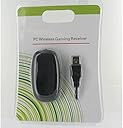
The Xbox 360 Wireless Gaming Receiver for Windows is a compact, USB 2.0 powered adapter that connects up to four Xbox 360 wireless controllers simultaneously via 2.4GHz technology. Compatible with Windows XP, Vista, and 7, it offers a reliable 30-foot wireless range, enabling seamless multiplayer gaming on PC with official Microsoft driver support.
| ASIN | B000HZFCT2 |
| Batteries | 1 AAA batteries required. |
| Customer Reviews | 4.2 4.2 out of 5 stars (3,695) |
| Date First Available | November 12, 2006 |
| Is Discontinued By Manufacturer | Yes |
| Item Weight | 3.52 ounces |
| Item model number | 9Z2-00001 |
| Manufacturer | Microsoft |
| Product Dimensions | 9.25 x 7.01 x 2.01 inches; 3.53 ounces |
| Rated | Everyone |
| Release date | February 6, 2007 |
| Type of item | Accessory |
D**K
Buy it now!
Summary: the product is great, works as expected, and WILL OPERATE UP TO 4 CONTROLLERS. Look past my auction site tip of the hat and have this shipped to you right now. I am a recent convert to PC gaming; my 360 and P$3 are slowly fading away. As my steamy pile of games increases I found myself wanting more and more to be able to use a trigger button as opposed to an awkward reach of the finger on the keyboard. After looking at a few different sellers of similar products I chose this one. Other listings seem to be knock off copies. I was willing to pay for the real deal. As other reviewers have pointed out, this product seems to be genuine M$. If it is a knock off, it is a first rate clone. There was a lack of proper retail packaging, BUT the product was secured in a proper electronics bag, inside bubble wrap with a software disc and literature; all appearing to be genuine and finally shrink wrapped. That's it; no clam shell or UPC. No big deal. As other reviewers have recommend, I did NOT utilize the included install disc, but instead did a search for basically the item description to locate the most recent software/driver. There are updates that were made to the driver/software since the release of the disc. INSTRUCTIONS: 1) Search for and install the official M$ driver/software available from their website. 2) Plug the hardware into your PC's USB port. 3) The device should be recognized. 4) UNPLUG ANY 360 that might be in range. Previously synced controllers will turn it on. 5) Push the button on the receiver. 6) Push the little button on the top of the controller (near the charger plug). . 7) The devices will sync. The little software HUD style display (when running) will show you if a controller is connected; in the same style of the 360. Cool. No problems so far with games, the bigger titles didn't even need adjustments to control input settings. By the way the device WILL work with up to four controllers. This makes the value proposition much better in my opinion. The listing pictures make it seem like it is the size of a common corded computer mouse. It is about half that size. What are you waiting for, stop reading this and buy it.
H**Y
Works Instantly (On windows 7)
I wanted to use my 360 controller to play Games on my Steam account on my Laptop. I have a 17 inch Asus G74 ROG. As soon as I got the product, I inserted the CD it came with to install all the software. You can find all the downloads you need without the CD online, but the CD makes it easy for complete noobs. Anyway, I easily installed everything with the CD and then plugged in the receiver to my laptop via USB connection. I then synced my 360 controller by clicking the button on the receiver and then clicking on the sync button on the controller (the sync button isn't the same as the big xbox button on the center of the controller). After that, assuming you are familiar with how 360 controllers work, you should be able to have everything working after that easily. If you happen to be "new" to doing things like this, it doesn't matter because the receiver comes with a mini instruction manual. *note: you don't have to keep syncing the controller after the first time you do it. After the first time, you just have to press the big xbox button on the center of the controller to connect. I've been using this receiver for a while now, and it still works like new. I have also connected multiple controllers in order to play co-op with friends, so that's great. You can connect up to 4 controllers, so just like on a normal xbox 360. This product works, is easy to use, and durable. The only problems I assume people will encounter is maybe if you have a different Operating System (OS) besides windows 7. Apparently people had issues with the receiver on Vista and XP, but seriously, if you are still using Vista by now, just kill yourself, or catch up to the rest of mankind. There are ways to make the receiver work on Vista and such, but it takes longer. You can find instructions for that either somewhere among these reviews, or anywhere on Google. I love this receiver. Now I can play steam games with a controller with no problem.
W**T
I've ordered the receiver on two separate occasions now, the first order I received a white receiver and the second time a black receiver. They have both been genuine Microsoft products and work without a problem. With the end of a console era there are undoubtedly millions of wireless Xbox controllers lying around and this is the perfect way to keep them useful after upgrading consoles. I've been using mine to connect a controller to my media center for many months now and haven't had a problem with it at all. It reaches about 20 feet without a connection problem, further than that I have not tried. Anyone who is getting a new console and will be having some extra controllers left around should definitely consider buying one of these. If one doesn't have any controllers than I recommend buying a couple used ones for a heavily discounted price.
A**B
Works perfectly
S**N
Tut was er soll, sofort von Win 8.1 erkannt, Controller gefunden und los gehts... Auf Win 7 auch ausprobiert, auch sofort erkannt und mit dem Controller verbunden.
A**ー
設置方法が難しいけど、いいと思う。
F**O
non aspettatevi l'originale microsoft, ma non aspettatevi nemmeno che funzioni. il mio ha funzionato per 7 giorni a scatti poi ha smesso. per non parlare dell'istallazione su win7 64bit che è da fare in modo completamente manuale. PESSIMO
Trustpilot
2 weeks ago
1 day ago