Buy anything from 5,000+ international stores. One checkout price. No surprise fees. Join 2M+ shoppers on Desertcart.
Desertcart purchases this item on your behalf and handles shipping, customs, and support to Romania.
🎵 Elevate your vinyl game—digitize, control, and own your sound!
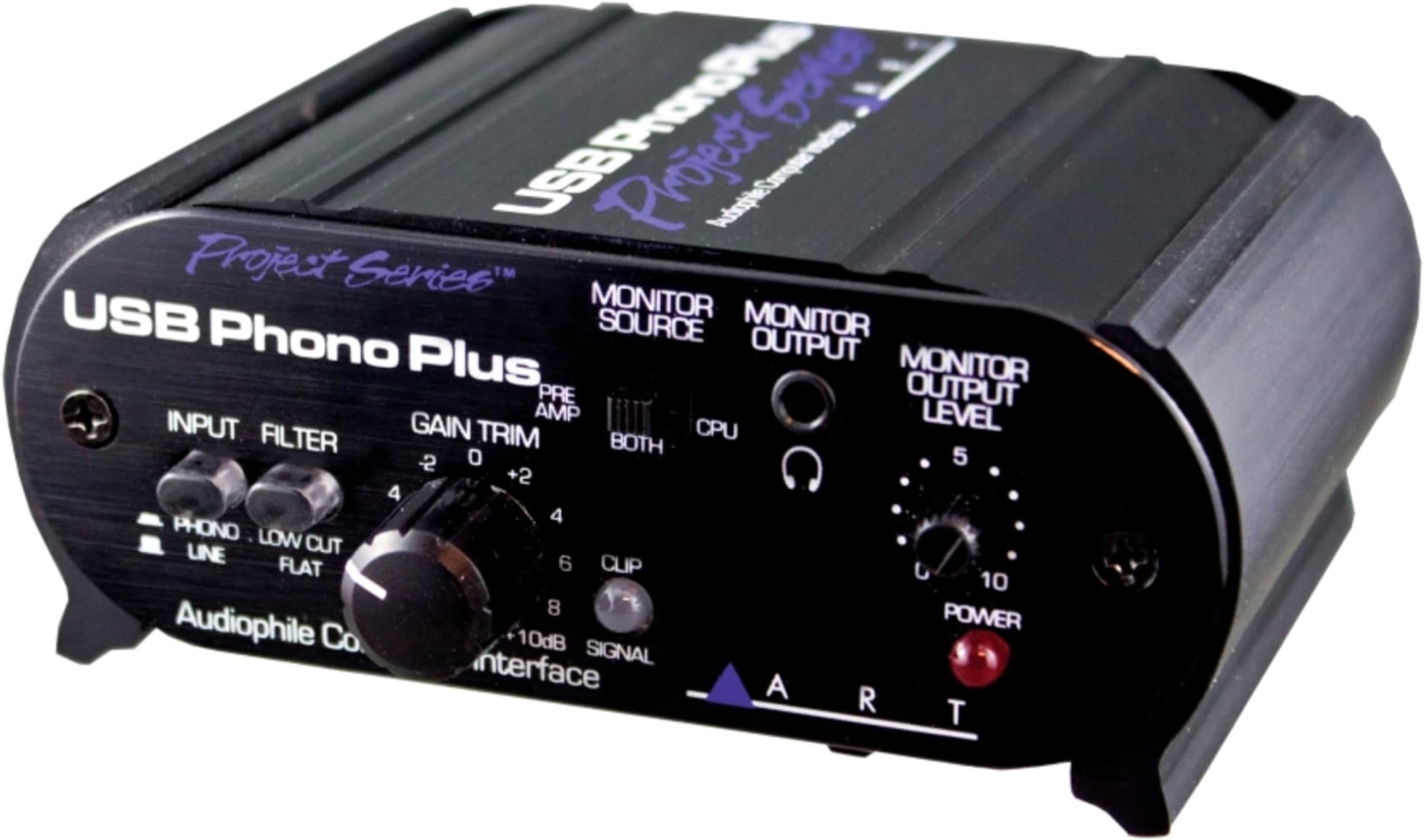
The Art USB Phono Plus is a high-performance USB 2.0 phono preamp and audio interface designed to convert vinyl records into digital files effortlessly. Featuring a low-noise RIAA preamp with low cut filters, front gain control, and signal/clip LED, it ensures pristine audio capture and real-time monitoring. Compatible with a wide range of Windows and Mac OS systems, it offers versatile connectivity powered via USB or external supply, all housed in a sleek aluminum case.
| ASIN | B000BBGCCI |
| Best Sellers Rank | #50,442 in Electronics ( See Top 100 in Electronics ) #7 in Home Audio Phono Preamps |
| Brand | ART |
| Brand Name | ART |
| Compatible Devices | Laptop, Personal Computer |
| Connectivity Technology | USB |
| Customer Reviews | 4.4 out of 5 stars 431 Reviews |
| Global Trade Identification Number | 00840402019527 |
| Included Components | ["RCA Input", "USB Port"] |
| Item Dimensions D x W x H | 11.4"D x 11.7"W x 4.7"H |
| Item Weight | 0.6 Kilograms |
| Manufacturer | ART |
| Manufacturer Part Number | USB Phono Plus PS |
| Maximum Sample Rate | 48 KHz |
| Model Number | USB Phono Plus PS |
| Operating System | Windows 98SE/ME/2000/XP/Vista/7, macOS |
| Product Dimensions | 11.4"D x 11.7"W x 4.7"H |
| Supported Software | Sound Saver Express |
| UPC | 840402018216 840402019527 840402016465 |
| Warranty Description | 2-year warranty. |
G**L
Works Perfectly and Easy Set Up
I purchased and received the ARTcssories USB Phono Plus in the past 2 weeks and used it today. It was easy to set up and I will not go into detail about specs as others have covered it well. I will instead use simple and plain lingo on my experience in using this product. I unpacked the unit, plugged in my Technics SL-1200M3D RCA plugs and the ground wire (yes, there is a place on this unit for a ground wire) to the back of the unit. I then plugged in an extra set of RCA wires to my mixer so I could hear LP's as I played them. I flicked the switch on the front so I could hear what was playing and then connected the USB plug to a USB port on my desktop. I downloaded Audacity from the internet for the newest version and opened it. This unit is powered by USB which is nice and does also have AC Adapter bundled. My computer recognized the unit and my computer automatically switched my audio to 'USB Audio Codec' and I was set to go. I put on an album and started to record the song in the middle in order to get sound level correct in the Audacity program. This Phono Plus also has a volume/gain knob so you can adjust volume input to your computer program that you choose to use. I set my input level very low on the Audacity software program so I can use the phono Plus's volume knob. Once I got the volume level I wanted, I erased what was recorded in Audacity and reset the stylus to beginning of track and hit record in Audacity again to record the song. (The Audacity program is one of many that you can use, but since I have Nero for editing my WAV files, I use Audacity only for just going from vinyl to digital. Audacity will also allow you to edit what you recorded). I exported my newly recorded song to a file on one of my hard drives as a WAV file. I then edit in Nero and cut out the silence and maybe adjust volume levels more. I leave in the abnormalities from my albums like small clicks or pops that happen here and there as my albums are in good condition and I enjoy the natural sound and do not want to edit this out. I then encode the WAV files to MP3-320 and MP3 Pro so I can play them on different portable devices. I save the WAV files too for making cd's. I am very happy with this unit and works as intended. Hell, I may even take out my 8-track player and record 8-tracks with this thing and record the tapes as they are but have them on cd. This unit will allow you to hook up about anything with RCA plugs. I also have an ION USB turntable that actually works very well, but it feels like a toy compared to my Technics. By the way, this Phono Plus unit does not feel cheap and seems quite solid. It is made with aluminum and rubburized sides, not plastic.
R**4
Easy To Use, But...
My goal: to convert vinyl records into CDs. After looking at the available USB turntables, I realized my old Technics linear tracking turntable is way better than any of them. So the solution for me was to buy a USB interface, which, it turns out, means a USB phono preamp. I did some comparison shopping before buying the ART Phono Plus 2. There are a couple of similar products. One in particular has good specs. It claims USB 2.0, whereas the Phono Plus 2 only claims USB 1.1. However, that unit made no claim to having a monitor output, whereas the Phono Plus has quite a nice monitor interface. In particular, it lets you monitor the sound coming right off the preamp. This is necessary if you want to do any manual fading when recording, because the sound coming out the computer speakers has at least a 2 second delay from what's coming off the needle. The Phono Plus has a screw connection for the phono ground. Neither of the other units mentioned having this. On my turntable, leaving the ground wire floating creates a large amount of 60Hz hum in the output. Finally, although the ART is the most expensive of the three, almost twice the cost of the second, and three times that of the third, I found absolutely no reviews of any kind of the other two, whereas the ART has been reviewed extensively, both by customers and magazines. And everyone, including me, loves it. This is a well-built unit, from a durability standpoint, definitely not a cheap piece of junk. Ergonomically, it has some down points, as well as some good ones. Plusses: . Monitor allows routing from the preamp, from the USB, or both. (The rationale for the "both" setting is that you will never be playing a record and a digital sound file at the same time, so it allows you to hear either without having to change the switch setting.) . There is a block diagram of the internal signal routing on the bottom of the unit, which could prove valuable if it is used portably. . The unit will run off USB power when hooked to a desktop computer. For portable laptop operation, plugging in the A/C power adapter (included) overrides USB power, preventing drain on laptop batteries. Minuses: . Gain control has too small a diameter to be easily moved small amounts, like you need to do in the Level Setting Wizard in Spin-It-Again. . Jacks and ports on the back are labeled either in pine green or purple. All are virtually illegible. I had to use a magnifying glass and a flashlight to see where to hook up my turntable to it. It's hard to read the Phono/Line and Rumble Filter In/Out labels. But each has a light that lights up when the button is pressed, so at least you can easily tell what state the button is in, even if you can't tell what it means. I was very surprised that in a unit this expensive, no USB cable was included. It requires the "printer" type, with a square connector on the preamp end and a flat rectangular connector on the computer end. With my computer powered on, I plugged in the USB cable from the Phono Plus. Lights on the preamp lit up! In a couple of minutes, everything was magically configured. I didn't have to do or install anything. However, as I discovered later, this process "broke" my computer speakers. No sound would come out of them any more at all, from any source! I had to go into Settings -> Control Panel -> Sounds and Audio Devices, Audio tab, and change the Default Device back to my on-board sound. Hooking up the Phono Plus had changed this so all sound was routed through the USB back to the preamp! This includes the Windows startup music, and the "beep" that occurs when you hit a wrong key. (I am using Windows XP, the most basic Home Edition.) When I was comparison shopping, I was unable to find the specs for this unit, even on the manufacturer's web site, so I thought I'd post them here. Frequency Response: 10Hz - 50kHz, +/- 0.5dB THD: .01% Typical @ 1kHz Hum and Noise: >90dB below clipping Input Impedance: 47k Ohms/100pF (phono); 270k Ohms (line) Maximum Input Level: 40mVrms @ 1kHz (phono); +19dBu (line) Maximum Gain: 45dB @1kHz (phono); +6dB (line) Analog Output Connections: RCA (preamp line output); 1/8" (monitor/headphone output) Maximum Output Level: +6dBu (1.4Vrms) Filter Type/Response: Switchable, High Pass, -3dB @ 22Hz A/D & D/A: 16 bit, 44.1kHz or 48kHz, USB selectable Digital Audio Interface: TOSLINK in and out; S/PDIF coax (RCA) in Computer Interface: USB 1.2 compliant, Windows 98SE or newer, Mac OS9.1 or newer Power Requirements: 7-12VDC or 9-12VAC @ 150mA, or USB bus powered Dimensions: 1.75"H x 4.2"W x 3.5"D (44.5mm x 107mm x 89mm) Weight: 1.35 lbs. (0.61kg) (Note: 0dBu = 0.775Vrms) Additional spec-type information: . Uses USB adaptive mode for playback and USB asynchronous mode for record. . Preamp equalization is RIAA (although no spec or version number is given). . Although I bought it to use with my turntable, it is also quite possible to digitize cassette tapes with it, using the Line inputs. It comes with Audacity software on a CD-ROM. Using the Phono Plus is extremely simple. Basically, hook up the two phono outputs and the phono ground wire. Hook up the USB cable to the computer. At this point, fire up Spin-It-Again, hit Record A Vinyl LP, put a record on the turntable, and you're converting a record into a CD!
R**E
Rather well done
I found this unit when looking for a phono pre-amp that I could use to connect my turntable to a new Yamaha receiver (the only receivers with built in phono pre-amps are the very expensive ones, and I didn't want to go that high end this time). The fact that it has the analog-digital converter to put the audio out on a USB was most intriguing, as I was in the process of moving my CD collection from a 400 CD carousel changer that was getting tired onto a laptop (in iTunes) which would be integrated into my entertainment center. This would allow me to digitize my old LPs directly into the iTune library on the laptop without having to move anything into my home office where my main computer is, or having to buy a digitizing turntable. When it arrived (right on time or a bit early), I discovered that it also allows switching off the RIAA compensation curve so that it can be used to digitize other sources, like the old cassette tapes I still have. The unit is very well constructed. It can be powered either by a wall plug adapter or the USB line (I'm inclined to use the wall plug adapter so that I'm not drawing additional power through my little laptop). The unit comes with a Freeware software application (Audacity) for interfacing the computer with the unit and doing some basic editing of the digitized tracks. Its capabilities are quite adequate for my purposes. I have used it to record one LP, just to get familiar with it. I would note, however, that I would have had a considerable amount of trouble getting all of the Windows7 input defaults and applications set up to work with the unit and the laptop (a Sony 15.5 inch with an i5 processor) had my son, who is a professional audio engineer, not been on hand to work through several of the little kinks. It works fine, now that all the software setup has been done properly. My one critique of the unit itself is that I wish it had a power switch (on/off); to get it 'off' so its status lights (which are appropriate and useful) to turn off (they are a bit bright) aren't glowing it is necessary to unplug both the wall adapter and the USB line.
L**A
This is THE preamp for any serious vinyl collector.
This little preamp is in itself a sound marvel. It has a superb phono preamp built in, which can be disabled if you like to use the preamp as a transfer device for a cassette player, or a Reel To Reel, for instance. It has an USB port to connect the preamp to the computer, so you can transfer any sound source to your computer without using the computer sound card. It has a output for headphones, with an integrated volume control for the output. You can even hear the sounds of your computer with it if you like, and it also has a switch which allows you to compare what you are recording in real time vs. the source. As you can see, this preamp is more like an external USB sound card, with a built in RIAA phono input. The gain of the preamp is fully adjustable via a gain pot and the help of a led indicator. If in some passages of the track the led turns red, that means that the gain is set up too high, so you can decrease the gain a little to avoid distortion. It has also a ground post to connect the ground wire of the turntable, in order to decrease any unwanted hum. It also comes with a free recording software, but I personally preferred to use Nero Wave Editor to do my transfers. All in all, you can't go wrong by buying this preamp. Even if you don't plan to do any LP to CD transfer, this amp is worth buying because it's superb RIAA phono input. It is really better than the other preamp I had previously, a Pyle Pro one, with better gain and better sound too.
J**B
Listening to old vinyl and cassettes as MP3s
I purchased this over 6 years ago and have transferred over 150 vinyl records and over 30 cassette tapes using this preamp, with Audacity (freeware) on a laptop. Still in the process of editing/converting all the Audacity files to mp3, but the system worked great. I used slight differences in in the settings/input for vinyl vs. cassettes, but I believe this was an excellent purchase. Cleaning up the pops and clicks from old vinyl, and adding track labels does take some time, which is why I am still in the process. If you do not want to do this, then it is just a matter of playing each album all the way through on the preamp, then converting to mp3. Definitely need to ground the preamp when using a turntable, though not with a cassette player. Just happened to notice that it is still being sold. which I think speaks for itself, and wanted to confirm my very positive experience vs. the negative reviews.
A**R
Awesome Product!
This USB phone preamp has resurrected my long-dormant project to transfer old records and reel-to-reel tapes to MP3 files. My previous method was to connect my turntable to the phono inputs of an old stereo receiver; and connect the line-out jacks of the receiver to my computer's sound card via RCA cables and RCA to mini-phone plug adapters. This involved draping cables all over my office, and produced questionable quality. With the ART preamp, I can either connect the low level output of my turntable or the line output of my reel-to-reel recorder to the preamp, and then plug directly into my computer (laptop) USB input. Much simpler! I use Spin It Again software to capture the audio to WAV format, as well as doing automatic track detection and conversion to MP3s. The track detection usually requires a little help, but it works on 75% to 90% of the tracks. In between, I use the long-out-of-production Cool Edit 2000 (which runs fine on Windows 7 even though it was produced in the Windows 98 era) or various audio clean-up functions. I did run into one problem with the ART preamp when I recently upgraded from Windows XP to Windows 7. Even with the gain trim on the ART preamp turned all the way down, I was still in full clipping on my reel-to-reel line outputs with almost any music level. At first I though the ART preamp had failed; but I finally figured out that I had to go into the Audio settings in the Windows 7 Control panel and turn the input level down from 100 to around 5 to 7. Why the gain is so much higher in Win7 than it was in WinXP isn't clear, but I think it might be a clue that Win7 insists on calling this a microphone input. The ART preamp has a low cut filter, which eliminates one step of audio processing, because for some reason my turntable introduces some low frequency artifacts. It can be powered from the USB connection, which eliminates one wall wart. All in all, it has far exceeded my admittedly somewhat modest expectations.
C**E
ART USB Phono Plus v2 rocks!
I have a huge collection of older format music, including vinyl, tape, and MiniDisc. In the collection are a lot of my own recordings, either tapes of albums that belonged to others or live recordings. The live stuff on MiniDisc is especially important to me, because it represents years of irreplaceable records. With the combination of the Phono Plus and Audacity, I have been transferring loads of recordings to digital files. I have a MiniDisc stereo component that has optical out, and the Phono Plus makes the transfer quick and easy. The component is getting old and I have more than once had to open the thing up and do some jury rigging. The Phono Plus is a life-saver for moving me away from the MiniDisc format. (MiniDisc is awesome, but it just isn't practical anymore.) I have used the Phono Plus for transferring all of my old formats, and I haven't had any problems at all. The built-in pre-amp is great, and the monitor control is wonderful, if a bit tiny. I really like being able to set up source equipment somewhere other than my stereo stack. I have done transfers with other external soundcards/devices, like the SoundBlaster Extigy (long gone; good and with every hookup imaginable), but they were mostly quirky and didn't play well with my computers. The ART USB Phono Plus v2 is a well-designed, well-constructed, and affordable professional device that just works. I hope others will have the same pleasant experience that I have had.
A**R
Not bad, but did not work for me
My search for a way to digitize my albums began about a month ago when I saw an ad for a product for $16. I was intrigued, but knew that it could not be very good for that price. Some research resulted in a purchase through Amazon of the ART USB Phono Plus. The box that I received had a defect (the head-phone jack had a short and I had to wiggle the plug to allow me to hear without buzz, hum and feedback). I was able to get past this and transfer some music. (It also appeared that the package had been opened so there may have been more problems). My first recording had some very fast musical riffs and was a challenging piece to record. The ART unit was easy to set up as was Audacity, the recording software that comes with it. The initial quality of the recording was good, certainly acceptable. However, I experienced a slurring problem. That is, the tempo of the music slowed then sped up, as though it was catching up with itself. I rerecorded the song several times and continued to experience this problem. This could be hardware problem with my desktop (Dell Pentium 4 - 2.4 with 512mb of memory). I was concerned that I may not have enough memory to keep up with the recording. I decided to upgrade my memory, but I needed to return the product due to the defective head-phone jack. I found out that because this shipped not from Amazon but from a 3rd party firm, I could only return the ART box, not get a replacement. I would need to purchase another. This led me to look to other products (e.g. a digital turntable or other digitizing products). There are not many high-end alternatives to the ART box, but I did not want to buy a new turntable since I had a pretty good one already. As an alternative, I found the PRO-JECT Phono Box II USB. This was significantly more expensive ($170 vs. $70 for the ART box) but seemed to be focused at the higher end audiophile. I took a chance and bought the PRO-JECT box. I added one gig of memory to my Dell. So the results of using the PRO-JECT box cannot be directly compared to the results of using the ART box. The PRO-JECT box is much studier than the ART box (metal vs. plastic). It is heavier and feels industrial strength (but it should for an additional $100. The ART box has volume control - I'm not sure if this affects recording levels or just the headphones; the PRO-JECT box did not have this feature. Also, the PRO-JECT box did not have a head-phone jack. I had to use the phono-out RCA jacks with a couple of adapters (which fortunately I had laying around) to get my headphones to work with PRO-JECT box. Bottom line: the recordings from the PRO-JECT box are great, which in the end, is what I was looking for. No slurring (which may be due to the increased memory, or because it is a better box than the ART - I can't tell). If you have the ART box and experience the slurring problem, try upgrading the memory in your PC. If you are a true audiophile, go for the PRO-JECT box because it is a nice piece of equipment. Otherwise, the ART box is a good solution (exclusive of the slurring problem - has any else had this problem?). On a final note, another reviewer noted that their desktop speakers could not be used while the ART box was plugged into the USB port. I had the same problem but did not take the time to find a solution. Not surprisingly, I found the same situation with the PRO-JECT box. The solution is in the configuration of sound and audio processing on the PC. Go to control panel, select "Sounds and Audio Devices", then click on the `Audio" tab. In the sound playback section, select your sound card, in the sound recording section, select the USB (ART or PRO-JECT) input device. When you are recording, Audacity will pump the sound to your speakers. (Note - in the Audacity set up, you need to select that you want the recording to be simultaneously played-back). When not recording, Audacity will not play the input from the turntable. So if you just want to play an album on the turntable and hear it on your PC's speakers, you should just buy a digital turntable.
E**R
rip de lp's naar de computer
Eenvoudige bediening door zelfstart zodra je de usb aansluit op de computer. De phono-ingang is van uitstekende kwaliteit.
T**R
Fantastic sound and excellent value for money
I have a collection of over 500 LP's that I love to listen to while I digitize them. The ART USB Phono Plus is the perfect tool for just that job. Previously I used a McLelland USB Preamp interface for this purpose. This kit really needed to be replaced as it was showing its age, both from a design and deterioration perspective. I am truly amazed at how much better the ART USB Phono Plus sounds compared to the McLelland or any other Pre-Amplifier I have used. The ART USB Phono Plus has a wonderfully open, rich and detailed sound (and I speak as someone who worked in HiFi sales back in the day). Setup could not have been simpler with no driver installation needed on my Windows 11 computer. It even looks good in the flesh. Highly recommended.
C**N
Nickel pour numériser les disques vinyles
Je souhaitais numériser mes vinyles. Franchement, associé au logiciel audacity, ce système est vraiment facile à utiliser et de très bonne qualité acoustique. Il faut appliquer le filtre RIAA disponible dans ce joli système dans le boîtier alu. Je recommande
S**.
Un clásico imbatible.
Aún estoy por usar la función de USB, pero el sonido que sale de este aparato es muy bueno, aunque no análogo como uno de bulbos. El poder controlar la ganancia y el volumen, además de poder conectarle audifonos, aparte de poder digitalizar tus vinilos, lo hace un aparato completísimo. Recomendable.
A**4
art pre phono
l ho comprato incuriosito dalle recensioni..in quanto possessore di un nad pp2i,del quale,non ero per niente soddisfatto,e pagato più del doppio di questo!...devo dire che sono rimasto stupefatto,dal suono e la dinamica di questo Art pre phono plus. lo consiglio,perché paragonato al prezzo e un prodotto stupefacente. una pecca per questo non ho dato 5 stelle,il fatto che non forniscano alimentatore,ed ho dovuto fare,un attenta ricerca,per trovarne uno adeguato. cmq il risultato è stato ottimo.
Trustpilot
1 month ago
2 weeks ago