Buy anything from 5,000+ international stores. One checkout price. No surprise fees. Join 2M+ shoppers on Desertcart.
Desertcart purchases this item on your behalf and handles shipping, customs, and support to Romania.
🧭 Navigate Boldly, Connect Globally, Adventure Fearlessly!
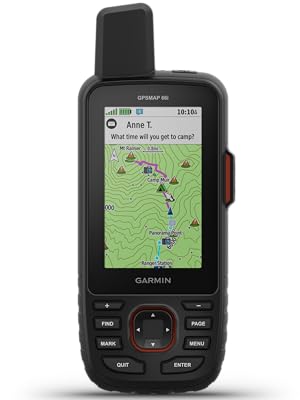
The Garmin GPSMAP 66i is a rugged handheld GPS and satellite communicator featuring a sunlight-readable 3-inch color display, preloaded TopoActive maps, and Birdseye satellite imagery downloads without annual fees. It supports multi-GNSS navigation (GPS + Galileo), offers two-way messaging and interactive SOS via the global Iridium satellite network, and provides active weather updates. With up to 35 hours of battery life in tracking mode and compatibility with Garmin Explore app, it’s designed for serious outdoor professionals and adventurers seeking reliable navigation and safety in remote environments.


| ASIN | B07S5GK8NL |
| Additional Features | 100% Global Iridium® Satellite Network, ABC Sensors, Active Weather, Birdseye Satellite Imagery, Interactive SOS Alerts, Location Sharing, Multi-GNSS Support, Preloaded Topo Maps, Two-Way Messaging, Wikiloc Trails |
| Are Batteries Included | Yes |
| Audio Output Mode | Digital |
| Battery Average Life | 16 Hours |
| Best Sellers Rank | #159,165 in Electronics ( See Top 100 in Electronics ) #176 in Handheld GPS Units |
| Brand | Garmin |
| Built-In Media | GPSMAP 66i; Access to Birdseye Satellite Imagery; USB Cable; Carabiner Clip; Documentation |
| Compatible Devices | Smartphone |
| Compatible with Vehicle Type | Car |
| Connectivity Protocol | Bluetooth, Wi-Fi |
| Connectivity Technology | Bluetooth, ANT+, Wi-Fi |
| Control Method | Touch |
| Customer Reviews | 4.6 out of 5 stars 750 Reviews |
| Display Type | Color TFT |
| Global Trade Identification Number | 00753759218737 |
| Human-Interface Input | Buttons |
| Item Dimensions L x W x H | 2.5"L x 1.4"W x 6.4"H |
| Item Type Name | Handheld GPS |
| Item Weight | 0.08 Pounds |
| Manufacturer | Garmin |
| Map Types | Topographical |
| Memory Storage Capacity | 16 GB |
| Mfr Part Number | 010-02088-01 |
| Model Name | GRGPSMAP66I |
| Model Number | 010-02088-01 |
| Mounting Type | Wrist Mount, found in image |
| Operating System | Android |
| Resolution | 240 x 400 |
| Screen Size | 3 Inches |
| Special Feature | 100% Global Iridium® Satellite Network, ABC Sensors, Active Weather, Birdseye Satellite Imagery, Interactive SOS Alerts, Location Sharing, Multi-GNSS Support, Preloaded Topo Maps, Two-Way Messaging, Wikiloc Trails Special Feature 100% Global Iridium® Satellite Network, ABC Sensors, Active Weather, Birdseye Satellite Imagery, Interactive SOS Alerts, Location Sharing, Multi-GNSS Support, Preloaded Topo Maps, Two-Way Messaging, Wikiloc Trails See more |
| Sport Type | Camping & Hiking |
| Supported Satellite Navigation System | GPS |
| Touch Screen Type | Capacitive |
| UPC | 753759218737 |
| Unit Count | 1.0 Count |
| Vehicle Service Type | Car |
| Warranty Description | 1 year limited warranty |
J**W
SOS Function Worked Perfectly 10 of 10!
On June 20th, 2024 @ 1031 Mountain Time, I initiated an emergency SOS message to basecamp using a Garmin inReach 66i satellite communicating GPS from the Greenwood Tract trail intersection due to a scout injuring his ankle on a rock. At the time, we were approximately 5 miles from the nearest camp with a radio and obviously there wasn't cell service. Within two hours, a hasty response Philmont Scout Ranch team had been organized, dispatched and arrived at our location. This was accomplished by relaying data via SMS text to the Garmin emergency center who in turn relayed the data to basecamp which then continued the shot with line of sight FM radios. In fact, the two rescuers arrived within 75 minutes of the original call for assistance after hiking with crutches and first aid equipment for many miles. Had it not been for the Garmin inReach, we'd have had to send runners on a 10 mile round trip. During the entire endeavor from the initiation of the call for help, to the arrival of the rescue party, the Garmin inReach performed exactly as advertised and expected. Do not hike into the back country without one of these.
T**0
You need to know what you’re getting into.
This is the first true full-featured GPS navigator with a satellite communicator built in. Realize what you’re buying into, and it’s a fantastic device. The original InReach devices were ostensibly marginal at being GPS navigators, that being a secondary trait of what they do. That isn’t the case with the 66i. The 66i has all of the top-of-the-line features of Garmin’s best handheld units. That being said, there has been a lot of talk of the “pros” and “cons” of this device. Let’s go through them one by one. 1. Price: This thing is expensive for a GPS unit, but in my mind it is NOT expensive for what it does. I used to carry a Globalstar satellite phone when going in remote areas. That was a $350 phone with a $60/month plan - and it didn’t do much but make phone calls, and it wasn’t great at that. No location updates, no SMS. Purely for emergencies. Of course, I also carried a $350 eTrex at the same time. For $700 and $60/mo, I got SOME of the features that the 66i gives me in one device - for $600, $25/mo, and LESS WEIGHT, being key. Add in the weather reports (more on that below), location broadcast, and general utility of non-emergency SMS, and the utility is so much higher. All that and a better screen than the eTrex. Don’t compare the price of the 66i against one device, you need to compare it against two devices at once - a high end GPS AND a satellite communicator. 2. Battery Life: The 35 hour claim is accurate, and Expedition Mode is a must. 20-30 minute track points are perfectly adequate, and you shouldn’t be leaving this on overnight anyway. You can get about 3-4 active days from the unit with moderate settings, and that’s good for most outings. Going longer? A simple power bank is something you should have with you anyways as essential gear. No, it doesn’t take AAs. Outdoors folk seem to have this obsession with AA batteries. 15-20 years ago it made sense, but it just doesn’t anymore and people need to change their mindset. I also carry a flashlight with a lithium battery and USB charging port (Acebeam and Thrunite have excellent models) that is brighter and lighter than an old fashioned AA model. The long and short of it is this: AA batteries have extremely poor power density. The power density (power per gram) of lithium simply isn’t beatable. 35 hours on the 66i can be doubled with juice to spare for other devices by taking along a power bank. That power bank is the equivalent of 20-30 AAs. Lighter, less weight, more power, more versatility. Cheaper after a couple of outings, too. The battery life of the 66i is perfectly good considering you can easily charge it back up overnight and go another 3-4 days. By the way, the issue is that this thing transmits - hundreds of miles into space - whereas your ordinary GPS is only a receiver. This takes an order of magnitude more power than receiving. A lithium rechargeable is the only practical way to go, and life will depend on how often you transmit. 3. Firmware: Garmin is working on merging their acquired InReach (from DeLorme) infrastructure into their own. The 66i is the first unit released after that transition started, and it’s intended to be a native Garmin device. With that, some software features were delayed. These have now mostly ALL been fixed. You CAN now receive weather over InReach. The branding (“InReach Weather” vs “Active Weather”) is a little confusing - but all you need to know is the first is satellite and is text/table based, and the second is WiFi or via your phone Bluetooth and has radar maps. Radar maps are not currently a thing over satellite - but the detailed hourly satellite forecast is nearly as useful, as it derives from DarkSky which specializes in “hyper local” weather. Expect continued firmware updates, as Garmin has historically been excellent about this (the 66i is the 14th Garmin device I’ve owned over 25 years) - and make sure to keep your device up to date. I always check for updates a couple of days before I go out. 4. Multi-GNSS: This is a little confusing right now, but as someone who actually works in the satellite industry and has specifically worked on the GPS program, I hope I can clarify a little. Right now there are four primary satellite navigation systems out there, each with their own satellite constellations run by different govenrments. The USA’s GPS is obviously the oldest, but there is also Beidou from China, GLONASS from Russia, and Galileo from the EU. GLONASS was the second system to be available to consumer devices, and Galileo is the most recent. Being more modern, Beidou and Galileo claim to have slightly better accuracy than GPS, but we’re talking a matter of a couple of meters. Additionally, the US’s GPS has traditionally been augmented by a secondary system, WAAS/EGNOS, which is a GPS accuracy enhancement system that largely makes up for that difference. In order to enhance reliability and accuracy, in the last few years consumer devices have supported receiving signals from multiple systems, as backup/redundancy and an accuracy enhancement. Whereas most early multi-system GPS’s supported GPS+GLONASS (such as the eTrex line), some now support there (the eTrex X series supports GPS+GALILEO+GLONASS). The GPSMap 66i supports GPS+GALILEO - but surprisingly to many, not GLONASS. In short: the reason this is the case according to Garmin is that the Iridium satellite network uses frequencies very close to that of GLONASS, and optimizing a receive / antenna system for GLONASS and Iridium proved too difficult. Even shorter: you’re not going to miss it. Yes, GLONASS is a more mature system than Galileo, but GPS+WAAS/EGNOS by itself is perfectly quick-acquiring and accurate by itself. Adding GALILEO makes this even more so, and as someone who literally builds radios for satellites for the military as his day job, a three-system unit is pretty much overkill. We’re talking literal inches here. You’re hiking, not flying a surgical strike with a drone. It’s not worth the battery drain. Could Garmin have done something like a dynamic notch filter to switch GLONASS on and off during iridium reception? Sure. Would it be worth cost, complexity and battery impact it could add to the device? No. You’ve already got a device that can use GPS, Galileo, WAAS, Iridium, Wifi and Bluetooth. That’s a lot of radios in one device, and it integrates them well. And last, some clarifications: - Garmin doesn’t word it well at all, but with the freedom plans you can suspend your subscription indefinitely. Their marketing material says you can suspend on a “monthly basis” which makes it sound like you have to sign in every month and suspend or it’ll renew again. That is not true. It stays off until you turn it back on. By “monthly basis” it just means that’s the smallest amount you’ll get charged for when you turn it on. - The ability to send preset messages that don’t count against your plan is huge. This will cover 80% of messaging use cases for most people I’d guess. You get three messages.. and you can attach your current location to all of them. Setting them to something like “Heading out” “Everything is OK” “Stopping for the night” covers most of your check-ins. - I have noticed a bug in the 5.90 firmware where the device restarts when switching WiFi networks or turning WiFi on and off. Not a big deal, but if you see it don’t think your device is broken. - The ability to download the BirdsEye imagery, which is free with the device (and got a major quality improvement in February) is super convenient. This lets you download without having to return home to a computer, so if plans change on the way, you can add images. - In addition to the built in topo maps, The 66i supports OpenStreetMap as well - which is gotten massively better in the past few years. - The SOS feature is backed by GEOS, an actual organization that coordinates rescues - so you aren’t just sending an SOS to your friends or to the local park ranger. This is a professional group. That being said, there is an option to pay $24.95 a year for $100,000 of “rescue insurance”, and options to upgrade for even more. If you’re the type of person who can justify this device, I’d highly consider it. It could save your financial life if you need to use it, and it supports an important organization if you do not. Summary: Overall, this is a wonderfully integrated and convenient unit with a few early-release quirks. It’s definitely not for the casual day-hiker and with so much technology integration, there is a learning curve. But that’s okay. The battery life is manageable and easily augmented, and the InReach feature can literally be a life saver. To be honest, this is the kind of device I had been waiting for. If you’re going to spend time in truly remote areas, I think it’s a must.
A**N
Great tool for peace of mind
This is an amazing tool for the price. Holds charge for extended periods of time. It's a standard part of my kit regardless of if I'm hiking, exploring back country or running offshore as a backup. Easy to use. Wouldn't leave home without it.
A**A
Best Handheld GPS
One of the best handheld GPS units available. Once you get it set up and learn it, it’s a handy tool. I will caution you, early firmware versions are buggy, and Garmin still has a few bugs to squash, but all in all it’s a decent unit. I had to return my first unit due to bugs, and would encourage anyone who has issues to do the same. My replacement has worked flawlessly. It’s no iPhone, but It’s very accurate, and acquires the sat signals quickly. Battery life seems to be decent, although I would say slightly under their 35 hour estimate. Figure to have a battery pack to charge this if you will be days away from power. The inreach portion was the main reason I got this. Sure, I could have bought an inreach mini, but this all in one is perfect. I can’t imagine being out on an ATV stuck without help, now with the 66i you’re always in reach.
R**Z
Outstanding capabilities hampered by the user interface
Generally, this is an excellent backcountry navigation device. Having turn-by-turn trail directions in an unfamiliar area can be invaluable. The UI is dated and takes quite a lot of getting used to. I also found myself in situations when I knew the device could do something, I just couldn’t remember how to do it. Eventually, you get used to it and with regular use it becomes much less of an issue. I can see having to refresh my memory on the interface after it sits over the winter, though. The UI issues extend to the computer and smartphone software as well. The web app is missing a lot of features and I found the Basecamp app (generally not documented in the manual) to be far superior, especially if you are planning your own routes. Importing GPX files is hit-and-miss. Depending on the source, you may just get a series of (lots of) pins instead of an actually route (even with a GPX route file) which fails when you exceed the max number of pins. I typically end up recreating the route manually in Basecamp. Not too difficult because it follow the trail for you, but it is an annoying and unnecessary complication. The satellite tracking and messaging works well and at the expected (relatively slow) speed. It is great to be able to have family and friends track you in near real-time. Note that a subscription is required for this, but with the monthly service options you can upgrade to the Expedition plan for just the months you need it and leave it at the much cheaper Safety plan for other months. Your experience will be much more satisfactory if you watch one of the many YouTube tutorialsand device review videos while following along with your device. Expect a rather long learning curve to learn all the capabilities (btw, I am a software developer and I didn’t find it easy, but perhaps have high expectations.) Net/net, it has some issues but I’ll probably never go on a long hike without it again and certainly never go backpacking without it.
R**N
FINALLY ACTIVATED
I received this unit quickly. I bought a subscription, but it did not activate. I was flumixed........(no, actually pi...). I depleted the battery twice trying to activate. Finally, I went to the activation sign in, and found that I missed a step. I filled it in, and am now up and running. P.S. Worth mentioning. During my kerfuffle with the activation, I was reading the box looking for whatever. Then I see that this unit is for IOS, not Android ! PANIC (once you register the Sat. plan, you cannot change units). So does that mean that I just blew ~ $230.00? NAH! That couldn't be! So, I started reading the ink off the instruction book. it turns out that you HAVE to load Garmin Explore, AND Garmin Connect on your smart phone before you can access the unit for updates, and to be able to connect to your Windows / Android devices. You also must synch your phone with the Garmin Connect app. (MIGRANE!) It also helps to add GARMIN EXPRESS to your Windows computer. Plug the GPS into your windows laptop, and let Garmin Express do it's thing. HAVE FUN! UPDATE; UNIT FAILED ! It used to lock on satellites in less than 30 seconds. then, after I had a service plan for rescue, etc. I turned on the unit and it kept timing out trying to locate satellites ! I hard booted, dumped all info and re activated, etc. NO GO, still could not locate satellites. The unit is being returned. So, now I am out for a months service on my sat plan. NOT A HAPPY CAMPER. WARNING.....I put a hold on my sat plan when the unit failed, they are NOT HOLDING THE PLAN UNTIL SEPT 8 !!! SO, I AM SCREWED FOR WEEKS OF SERVICE THAT CANNOT BE ACCESSED BECAUSE OF A FAILED UNIT. I ORDERED A 750 I, PAID FOR IT, AND HAVE NOT HEARD A WORD ABOUT IT SINCE ORDERING ON 8/8/20 ! WHHAT'S UP GARMIN??? Ron
A**R
SOS, text, and e-mail with very impressive GPS capabilities.
So far I am really liking my Garmin GPSMap 66i. There is definitely a learning curve if you want to figure out everything this unit has to offer. The basics of planning a route and making tracks is pretty straight-forward. I would suggest that you take a week or so of playing with it close to home before taking it into the field. Like most GPS units, figuring it out "on the fly" can prove to be disappointing. Plan a route using the Basecamp app (free download from Garmin) and record some routes and mark some waypoints. You can do a lot right on the unit, but Basecamp greatly simplifies the process and makes it easier to visualize. And, of course, the reason you would want this unit is for the InReach capability of satellite communications. There is a learning curve to this also. I was able to start my subscription, set up the pre-set text communications, and test all of this without any calls or communications with Garmin or InReach. That being said, I spent quite a bit of time noodling around the Garmin/InReach sites, Google, and of course, the University of YouTube. I am not the brightest bulb in the closet, so it did take quite a few hours for me to put it all together. But, the info is definitely out there to get it done. When I tested it at home and in the field, the text messages came through pretty quickly (around a minute). Overall, I am impressed and am going to press on and figure all that this unit has to offer. Next, Geocaching.....
B**N
GreatGreat safety device and portable navigation
I primarily bought this for the Inreach 2-way satellite messaging capabilities, and it works well for that purpose. The navigation is also a decent backup option for when your phone doesn't have cell service. The device is very rugged and appears to very well made. It's running on older legacy software, so don't expect it to be like a smart phone. Are there fancier options with likely better interfaces, probably. But this is a very reliable platform, and likely a secondary backup device that you can rely on
R**O
Muy bueno
Artículo excelente!...Solo un exigente extremo, muy profesional y con recursos económicos podría objetarle algo!..muy recomendable!..
F**O
Produto de ótima qualidade.
O produto me surpreendeu bastante. Super prático, várias funções e armazenamento bastante coisas. Boa aquisição.
G**N
The 66i is hard to start with especially if you haven't brushed up on how it works before hand
I thought the Map66i GPS would be easy to use and have a usable manual. It is not. The manual and quite poor and getting to use the unit is tricky. Note that I have been using an Oregon 650 which was very much easier to learn. But its early days yet. I did one 10Km walk with the device last week and I was able to extract the track gpx and waypoint data after a long and painful search on the unit. A 13 page guide written by John Evans of the Canberra Bushwalking Club helped me get going.
A**R
Super Gerät
Das Navi macht was es soll. Ausgepackt nach Norwegen gefahren und es hat top funktioniert. Kann ich nur empfehlen.
P**L
Bought in uk usa device sent....
Could be 5 star as the device is brilliant but garmin customer service terrible. I've bought the device on amazon.co.uk but the device has been sent with usa maps. Contacted garmin several times and they told me to return the device and buy one directly from uk's garmin website which much more expensive. I've asked if they will match the price ... No answer to the several emails. At the end I had to use third party maps.
Trustpilot
2 weeks ago
5 days ago