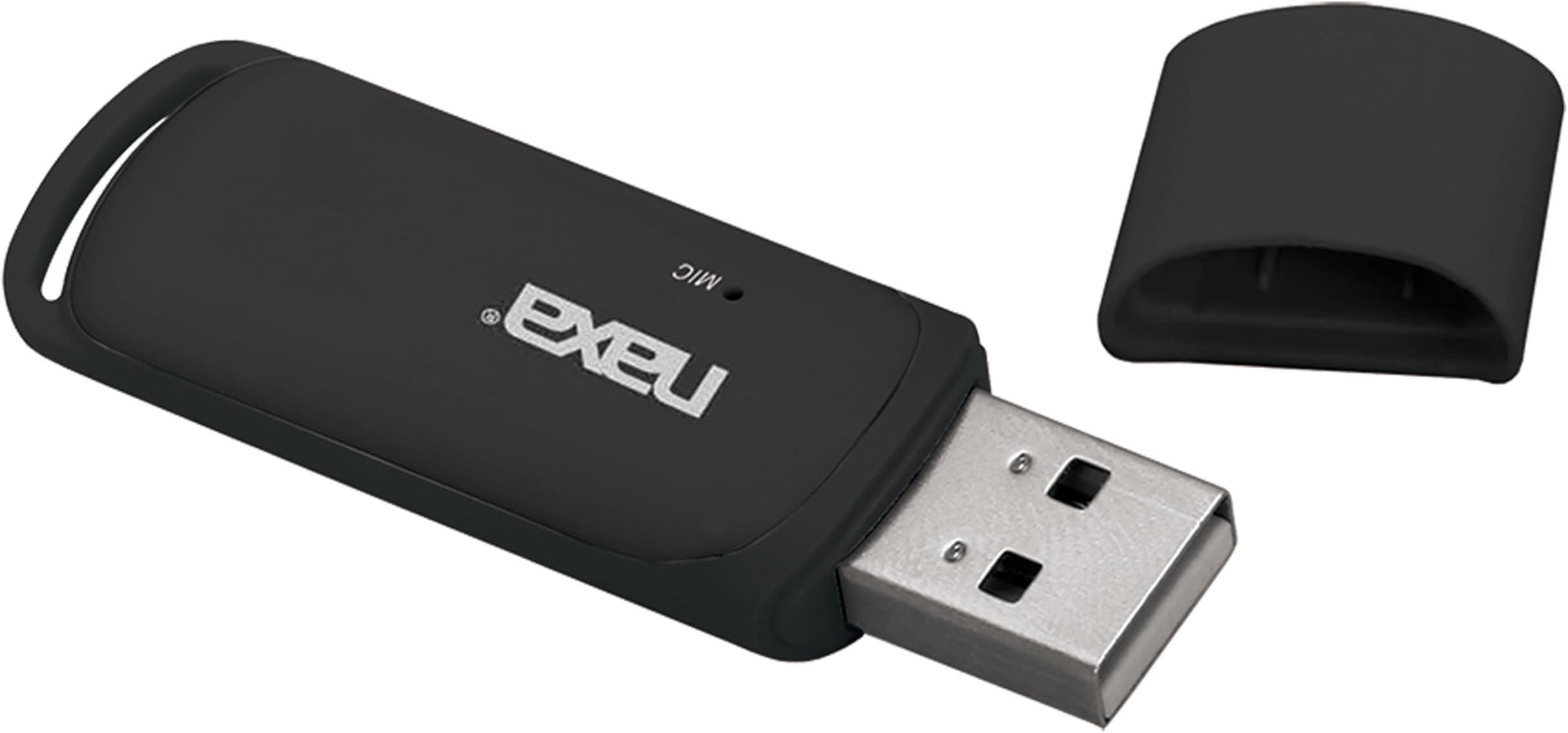

Naxa Electronics NAB-4003 Wireless Audio Adapter with Bluetooth® for USB Connectors
Product ID: 15948628
🎵High-fidelity stereo streaming
📶Bluetooth A2DP tech
🔌USB plug & play
Desertcart purchases this item on your behalf and handles shipping, customs, and support to Romania.
🎧 Elevate your audio game—ditch cables, keep the vibe flowing!
The Naxa NAB-4003 Wireless Audio Adapter instantly adds Bluetooth streaming capability to any device with a USB audio port. Supporting high-fidelity stereo sound via A2DP, it offers plug-and-play simplicity with no drivers required. Compatible with smartphones, tablets, and other Bluetooth-enabled devices, this compact black adapter is the perfect upgrade for professionals seeking wireless convenience and quality audio on the move.


| ASIN | B00J4YU7II |
| Best Sellers Rank | #1,297 in USB Computer Network Adapters |
| Brand | Naxa |
| Built-In Media | Bluetooth Audio Adapter For Usb Connectors |
| Color | Black |
| Compatible Devices | Smartphone, Tablet |
| Customer Reviews | 2.9 out of 5 stars 208 Reviews |
| Data Link Protocol | Bluetooth, USB |
| Global Trade Identification Number | 00840005008416 |
| Hardware Interface | USB |
| Item Type Name | Naxa Bluetooth Audio Adapter For Usb Connectors |
| Item Weight | 9.07 g |
| Manufacturer | Naxa Electronics, Inc. |
| Mfr Part Number | NAB-4003 |
| Model Number | NAB-4003 |
| Number of Items | 1 |
| UPC | 840005008416 |
| Unit Count | 1 Count |
| Warranty Description | Please contact the manufacturer |
M**N
May or may not work well enough to use
Using to stream prime music from my phone. Kind of works in one car but songs have spurts of speed up while playing. It's tolerable but annoying. Basically does not work in my other car as it will skip over entire portions of songs and is so erratic it's not usable. At $10 so not a huge waste of money but very disappointing.
D**T
NAXA NAB-4003: Infiniti G non-navigation drivers rejoice! Best ~$10 I EVER spent!!!
I own a 2013 Infiniti G37x Coupe without navigation (I can't vouch for any other Infiniti year/model) and a Samsung Galaxy S7 running the Android Nougat OS. I paired them together the first day for phone calls. (iPhone users get lucky with these Infinitis, as they don't need the following music streaming solution, since the internal, original USB port can just be connected to their phone via a Lightning(?) USB cable). My free trial XM subscription was nice, but 90 days later it was done and I didn't want to continue by purchasing a subscription. Thus, began my hunt for a streaming music solution that would use my phone's music apps and play them through my car's speakers. It's taken months of searching. Those with similar non-navi Infinitis unfortunately (or eventually) understand that the car's internal BT ONLY allows BT phone calls. After extensive research, I found the NAXA Electronics NAB-4003 Wireless Audio Adapter with Bluetooth for USB Connectors (Black) referenced in a forum. I ordered it the day after I ordered the Roav VIVA, by Anker, Alexa-Enabled 2-Port USB Car Charger for In-Car Navigation, Hands-Free Calling and Music Streaming. iPhone Users: Update to the latest iOS (11.3) . This Alexa unit worked fine (separate review directly under the Alexa product forthcoming), but only played back through my phone. The next day, my NAXA NAB-4003 arrived. Love that PRIME! You don't need to do everything I'm about to describe, but it's made my drive more pleasurable and automatic. When pairing the NAXA, I initially made the mistake of plugging it into one of my spare USB connectors. My phone didn't see it. However, once I plugged the NAXA into the original USB port located inside the center console, it was easily recognized and paired (the ignition must be on). The BT in my Infiniti turns on automatically when the car is started, but I initially had to also open the phone's BT Settings and click on the NAXA to connect to the NAXA manually as a 2nd connection. Wonderful! Now, after starting the car I just had to press the AUX button below the Infiniti's non-navigation screen and either ask Alexa to play music or manually open my streaming music app and get on my way. That can take a minute or five to get it all going. Since then, I discovered on another forum an app named Bluetooth Auto Connect. In the app I configured My Car (Infiniti BT default name) as top priority, followed by the NAXA and finally, the Alexa device. Now, all my BT devices automatically inter-connected. But then, I realized I also owned the Tasker app. I'm in the process of writing a Tasker script that once everything's connected will launch my music app (Tune-In Pro in Car Mode which automatically plays the last station) and launches Google Maps for my navigation to/from work/home, but just on working weekdays. I also use the IFTTT app to automatically turn off my wi-fi when I leave home and on when arriving home; as well as turning off my BT when I arrive at work. Many reviewers have mentioned "skipping" or a long delay before they hear any audio. I don't believe this is the fault of the adapter itself, which may have minimal, if any, internal memory (or cache). These delays are actually what is known as buffering. All streaming stations use it and you might find your music/audio app allows you to set the amount of time to "build" the memory buffer's size. Buffering is intended to be helpful by downloading your streaming audio into your smartphone's local memory in advance, in an attempt to eliminate further delays or "skips". However, there are many factors that determine whether your personal buffering experience will be brief or longer or whether it continues to occur as you drive. Among the factors: When you're driving, you're no longer connected to your home's high-speed internet. You are using mobile data instead. So, now it depends upon how close you are to any given mobile tower, signal strength, topography (hills/valleys, etc.), your phone's RAM/processor speed, operating system, weather, cell provider coverage "dead zones", etc. So, those of us who live in good/excellent cell coverage areas are less likely to experience these delays. Oh, BTW: the audio quality may not match the finest audio units out there, but it plays through ALL of my speakers (stereo; front and rear) and sounds very good. Finally!!! My commutes are so much more enjoyable now and I can ask Alexa questions as I wish. The streaming music automatically either mutes or reduces volume when receiving navigation instructions, making/receiving calls or talking with Alexa. Best ~$10 I EVER spent!!!
J**R
Not too bad.
For the price, it's probably the best solution. I also have a G37(2011) and this device seems to work ok. I say ok because like the rest of the people using it there is a delay on the initial start of music or when you skip the track. The good news is that the track skipping does work. I am not sure if its the phone or the device but there are times when it skips. Kind of like a scratched CD. The audio quality is pretty good. Better than some other bluetooth streaming stereos. On a side note, I am on my second one. Not because the first one didn't work but because the the first one did not look like what is pictured. I decided to return that it and see if the second one looked like what is pictured. When I received the replacement It looked more like what is pictured but still not the same. The first unit looked way different(sorry didn't get a picture) I have noticed that some people say that their's does not skip and that it is perfect. I am curious if they have the one that is pictured. Another thing that I noticed when I connected the second unit to phone is that it had a different name. The first unit was "NAXA-4003", as where the second unit says "NAB-4003". I do feel that the second unit skips less and maybe it has something to do with variants that we are receiving. I have attached a picture of the second unit. I hope other's post pictures of theirs as well. Reason I only gave it 3 stars was because of overall quality and mine looked used.
A**E
Only Wireless Solution: Imperfect but I'll take it
I should lead with this: I had to replace mine after about a year. My phone wouldn't connect to it anymore. Fortunately, at $10, it's simple enough to replace. I have 2011 GMC Acadia, and found this little device to add BT audio. I searched high and low, and this is about the only product like it. All other BT car adapters are wired. The device isn't perfect, but as it's the only completely wireless option (not counting kits that need professionally mounted behind the dash), and only $10 (at the time I purchased it), I'll take it. What I like about it: it's simple, no wires, and technically it does the job. What I don't like about it: * As everyone has stated, there is a lag between changing the audio (start, next track, changing volume), but in my experience it's not nearly as long as everyone else says. A few seconds...maybe 10 at most, but usually more like 3-5. Stopping is more or less instant. Maybe it's the Acadia, I don't know. * As most everyone has stated, the playback can be a little choppy. Some days it's more noticeable than others. It can be kind of annoying when you're rocking out in the car by yourself, and the beats suddenly change tempo. It's not as bad when the music is at a more ambient level. * As a few have stated, the sound quality is kind of bad. It sounds like highly compressed MP3s from back in the day...it's not terrible and I have a hard time pointing it out to my girlfriend, but it's in the sibilances; they get a little swishy. This is probably my biggest gripe. My phone sounds 10 times better when I plug it in directly to the USB port. But then I've got a USB cable running down the dash. * For my car at least, I don't get the usual USB display on the stereo. If I plug the phone in directly, I can control it using the stereo buttons, and I get title and artist info on the display. Via the Naxa, however, none of that. No display, and for some reason the button to pause does in fact turn off the audio...but it doesn't actually pause the phone. It just mutes the audio. So, there's that. * The first one I had would auto play the phone once it started up. My second one doesn't. Not sure what the deal is, but I personally prefer auto play. I'm always listening to music on my phone, so I want it to default to playing. I don't see why there isn't a bigger market for this kind of device, and why a manufacturer couldn't dump a little R&D into making one that actually worked well. I'd pay for that. Personally, I'm willing to put up with the foibles for the sake of not having any wires to contend with, and as this is the only option, and for only $10, I'm pretty happy with it.
A**Y
It technically works, but is overall trash
Let me start this review out by stating that I'm a network engineer for the man, and am very tech savvy. With that out of the way, I will say that it does connect to my car (2017 Infiniti QX50 W/O NAV) and I am able to play music using any app. Unfortunately, there is a great deal of lag between starting your song, skipping your song, pausing, etc. The sound quality is also noticeably trash. I can also say with 100% certainty that the above issues are unrelated to poor network performance or buffering.
J**.
So far so good. Does what it is supposed to do
Initially when i first plugged it in to the USB port, it failed to pair but I think I might have done something wrong. After I cleared out old devices that were in my paired list, it worked so maybe there is some limit to the number of devices the iphone allows to be paired idk. The sound quality is great, even when iphone volume is at max. There is no distortion like i had with my FM transmitter.
M**T
Doesn't work well. Do not buy NAXA NAB-4003 Wireless Audio Adapter with Bluetooth for USB
Most people get these to make an attempt at streaming music via bluetooth because they have an Infiniti G37 without Navigation. I found out the hard way that the 2010 model I purchased did not have a traditional aux port like my older Altima does! The bluetooth can only be used to make phone calls in non-navigation G37's and there is NO simple aux port only a USB! How stupid is that! The BOSE system sounds so amazing through the FM radio or CD. What a waste!... I found this product hoping that it would be an awesome solution, but it ended up being a total failure. The music constantly skips AHEAD every few seconds rendering it unlistenable and there is a five-second delay when you are changing through songs. This product is total garbage if you demand acceptable audio quality. Therefore, I gave up and just connect my iPhone to the USB port. That's the only thing I can do as of now until something more reliable is developed. Do yourself a favor and DON'T order this product! I believe that I ended up throwing it in the garbage. It wasn't worth my time.
S**H
Basically Unusable
Tried using it in my 2011 G37 non-nav. Took forever for my phone to discover and pair, once connected there was a huge delay before anything on the phone would translate to the receiver. Audio skipping started pretty fast too.
L**Z
Falla mucho
No se conecta de manera adecuada, tiene retraso, toca una canción y se para. Se desconecta constantemente y dice leyendo formato.
S**R
It works. sort of
this device is a good idea, it allows you to link your bluetooth phones or devices to a audio system that will play mp3 files off of a usb drive. IT works, the biggest issue is there is about a 6 to 10 second delay between what your doing and what you hear. It also had problems with alot of clicks and pops in audio playback.
S**Z
Five Stars
Works with my Infiniti EX37. There's a 7-8 second delay but everyone has this
A**3
Funciona y nada mas
Funciona relativamente bien, se conecta solo al usb y no necesita otra coneccion de audio. Tiene microfono y funciona como manos libres. Lo malo es que tiene un retraso y a veces se acelera la reproduccion de la musica, se corta, no es muy estable la coneccion mediante Bluetooth con el celular.
K**C
Good audio quality if you can live with the delay.
I've tried a couple of these with my '12 chevy. I really wanted to get rid of the audio cable from the front of the deck to the phone, and there is a usb port in the dash compartment which this works great in. I listen to audiobooks as I drive, so the 6-8 second delay at startup isn't a deal breaker. The cars deck has a pause button for USB playback which stops playback instantly, which is great for border crossings, drive throughs etc. Unpause exhibits the same delay, but once your used to that, it's not a big deal. This has better audio quality than any of the others I've tried, and I've yet to here any skipping in the playback, I suspect it may depend heavily on the source audio. Removed a star, poor longevity, 1st one I purchased lasted 11 months before just dying. They aren't expensive so I ordered a new one, this one worked great for just under 6 months and has now died just like the 1st. I'm now looking as other options.
Trustpilot
3 weeks ago
1 month ago