🚀 Elevate your home network to pro-level speed and control!
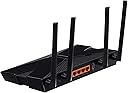
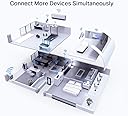
The TP-Link Archer AX50 is a sleek, black WiFi 6 router delivering up to 3000 Mbps combined speed across dual bands. Featuring OFDMA and MU-MIMO technologies, it supports simultaneous connections with ultra-low latency, ideal for gaming and streaming. Four external antennas with Beamforming ensure expanded coverage, while TP-Link HomeCare enhances security. Alexa compatibility adds smart voice control, making it a future-ready router for modern homes.


| ASIN | B07Z8833C7 |
| Antenna Location | Home |
| Box Contents | Wireless Router Archer AX50, Power Adapter, RJ45 Ethernet Cable, Quick Installation Guide |
| Brand | TP-Link |
| Brand Name | TP-Link |
| Colour | Black |
| Compatible Devices | Personal Computer |
| Connectivity Protocol | Wi-Fi, Ethernet |
| Connectivity Technology | Ethernet |
| Control Method | Voice |
| Controller Type | Amazon Alexa |
| Coverage | Home coverage |
| Customer Reviews | 4.2 out of 5 stars 2,189 Reviews |
| Data Transfer Rate | 3000 Gigabits Per Second |
| Frequency | 5 GHz |
| Frequency Band Class | Dual-Band |
| Global Trade Identification Number | 06935364089252 |
| Importer Contact Information | TP-LINK India Private Limited,Green Industrial Park, Dongri Pada, Poman, Kaman-Bhiwandi Road, Vasai East, Palghar, Maharashtra – 401208 |
| Is Modem Compatible | No |
| Item Dimensions L x W x H | 12.6L x 26W x 3.3H Centimeters |
| Item Type Name | Router |
| Item Weight Unit of Measure | 560 g |
| Manufacturer | TP-Link Technologies Co., Ltd, South Building, No.5 Keyuan Road, Central Zone, Science & Technology Park, Nanshan, Shenzhen, P.R. China, TP-link |
| Manufacturer Contact Information | TP-Link Technologies Co., Ltd, South Building, No.5 Keyuan Road, Central Zone, Science & Technology Park, Nanshan, Shenzhen, P.R. China |
| Manufacturer Part Number | Archer AX50 |
| Maximum Upstream Data Transfer Rate | 2402 Megabits Per Second |
| Model Name | Archer |
| Model Number | Archer AX50 |
| Number of Ports | 4 |
| Operating System | Windows |
| Other Special Features of the Product | Guest Mode |
| Packer Contact Information | TP-Link Technologies Co., Ltd, South Building, No.5 Keyuan Road, Central Zone, Science & Technology Park, Nanshan, Shenzhen, P.R. China |
| Security Protocol | WPA2-PSK |
| Special Feature | Guest Mode |
| Unit Count | 1 Count |
| Voltage | 12 Volts |
| Wireless Communication Standard | 802.11ac, 802.11ax |
| Wireless Compability | 802.11ac, 802.11ax |
T**S
Good router, giving almost 100% speed, good range, heats up a bit. no available stock if rma needed
Very good router. Strong signal, good speed. I am getting around 79mbps down and up when ping is 1ms and jitter around 2ms of my 80mbps siti broadband connection. This is most of the time. Sometimes when the ping becomes high around 30ms, speed drops to 50mbps over wifi. Did a speed test with 2 4k tvs connected over lan, 2 laptos running 1440p video and one phone running 4k video. Speedtest under such situation showed 40mbps. The router processor usage was 40 percent on both cores and memory consumption was 50%. The router heats up a bit but no performance lag noticed as of now. P.S - router is wall mounted. Heats more if kept on a table as vents are below. Update 1: today its 14th oct, 7 months after purchase date. The router used to remain on 24/7 and went kaput last month around 1st sept. Had given for rma on 2nd sept. City service centre guy came back after a month yesterday stating the mumbai main warehouse does not have any stock at the moment. So will have to wait for 10 days for further update. Stocks will come after that from china. Not sure but maybe have to wait for another one month without router. Previously i used a dlink router and that used to be on 24/7 without any issues. This got damaged within 6 months. Maybe this will be my first and last tplink. :(
V**A
Good Replacement and Meets my expectations
I purchased this Router to replace the Netgear Nighthawk R7000 AC1900 Router. Here is a listing of the Pros and Cons. Pros: 1. Sleek Design and Form Factor is compact in comparison to my earlier Netgear Router 2. Future Proof given that it supports Wi-Fi 6 (ax) Standard. 3. No Over heating issues observed - the Router does become warm but not hot. 4. Comes with a 3 Year Warranty 5. Tether App on Playstore makes it very easy to Setup the Router Cons: 1. The Power Cord is very small and the length of the RJ45 Cable provided is also too small. 2. Does not support the TP-Link Mesh Technology 3. Price is on the higher side. (Purchased at ₹6120/- after Card Discounts in 2021) The Router provides a stable signal and I have not faced any issues in watching 4K content on my Smart TV or when using Laptop for work. Now coming to the topic of Wi-Fi Range - I would like to call out that this has the same range as my outgoing Netgear Router. 5 Ghz Band has its issues when it comes to range and do not expect any magic from that perspective. I would recommend people to plan and place the Router in a central place so that most of the rooms get covered or position it closer to that particular room where you need the benefit of the hi-speed Wi-Fi - for example near your Smart TV or your Work Room.
U**Z
Unlike the reviews.
If WireCutter and most review channels and technology reviewers had to nominate AX50/AX3000 as one of the best WiFi 6 router in the market, then it must have had something going for it. But the reviews on Amazon were speaking another story. Hence I cancelled my order twice, worried if I am going to get a lemon. So, I’ve been using TpLink Archer C7 (AC1750) for close to 4 years now and with the increased demand of always connected devices it was handing (thanks to WFH) and other IOT products, it was struggling often. Nothing major that a restart could not fix. But, it was time to upgrade. So I took the plunge for the third time with full trust in the return/replacement policy of Amazon. And I’ve never been so wrong. The device is unlike the reviews. The negative ones primarily. I am writing this review after a 12 hours runtime since I set it up and this is what I’ve to share: - Setup took only a bit over ten minutes and it was a breeze to do so. I did so by hardwiring the router to my laptop for that period. If you’ve had a TP Link in the past this is a familiar territory. - Speed. I am on ACT Fibernet 250mbps plan. The router is configured on “SmartConnect” mode so it only broadcasts one SSID and auto allocates the band based on device connected and its proximity to the router. Up to 10 mtrs I was getting anywhere from 85%-100% of the speed. And it dropped by ~10% in the next 5 mtrs. Testing Netflix, Prime video, conference calls over teams etc, I faced no struggle with speed or connectivity. - Range. It’s decent. Almost the same as my C7. Corner spots in my bedroom (with almost 3 walls in between) it was down to 2 bars on both phone and laptop. Speed was about ~50% of my broadband but nothing that I could not work with. Yes, only gripe would be that my devices would run out of charge much sooner. - Heating? A bit. Overheating? None. It’s warm to touch. After ~8 hours of use, I kept my palm over it for 15 seconds or so, and only felt it as warm with no urge to pull my hand back. Almost comparable to a laptop running for 3-4 hours. The product I received is AX50, v1, manufactured in the month of Sept, 2020. It came with firmware version 1.0.8 out of the box and I upgrade it to v1.0.9 as soon as it was connected online. I am fully satisfied with the product and considering how reliable my Archer C7 had been, I am confident about this one too. I will edit/update this review if any behaviour changes from what I’ve listed above. I recommend this product if you are in the market for a WiFi 6 router.
R**I
Honest review of AX3000 Archer AX50
TP-Link is the only brand that is offering an affordable Wifi 6 device. Thank you Tp-Link for that. Writing the review after using the router for 2 weeks: Suggestion: Opt for a Wifi 6 router only if your usage is so high or you want to be future-ready, else go for a cheaper Wifi 5 router which would come in less than half the rate. Do not go with the negative reviews with say the router is heating up a lot. Yes, the router warms up a bit, but it is not at all a show stopper. I have upgraded from 7-Year-old Wifi 5 TPLINK AC750 Archer C20i to Wifi 6 AX3000 Archer AX50 and am happy with my decision. I have set it up with a router UPS to avoid disconnection during power switch between the generator and the grid. I have close to 25 IOT (Internet of Things) devices connected to this router and have not experienced even single disconnections or drop. 5 GHz signal range is pretty good (I sometimes saw speeds more than my subscription plan during my testes) and the speed difference is significant when compared to 2.4 GHz. Generating a Certificate for setting up an Open VPN failed a couple of times but was successful the third time. Setting up Antivirus and Firewall was pretty simple and they seem to be working pretty good. Fyi you may not have Antivirus/VPN/firewall settings available in AX1500 Final verdict: just go for it.
R**U
Awesome product in this segment😍
I have been using this product (TP-Link WiFi 6 AX3000 Archer AX 50) with Rail-ware network. The working of this router is pretty impressive. pros:✔ 1. Easy to install 👌 2. wifi 6 with high speed data transfer with two 2.4GHz and two 5GHz antennas.👌 3. USB option to access file from anywhere 👍 4. LED controls ✌ 5. Tether- one app controls all😎 6.power full data transfer from 5GHz and 2.4GHz🤞 cons:😒 1. a little bit of heating issues during day time, could be summer time. (can be controlled via cool pads or AC)🤷♂️ Overall the Router is Excellent for this price Range.🎉🎉
A**R
I wonder, how this product is approved for production
Four words to define this router - A piece of garbage! I don't even understand how the QC department of TP-Link approved this router for sales. I mainly bought this router to use it as a network attached storage (NAS) as it had USB 3.0 port and wifi 6 seemed to be future proof. I observed the following issues in the 6 days I used this router. 1. Heats up extremely! I know routers heat up, but this one heats up abnormally which at some point would definitely cause thermal throttling. 2. USB 3.0 works at a speed SLOWER THAN USB 2.0! R/W speed never goes beyond 22MBPS over Wifi even after disabling "USB 3.0 Interference" in the settings. I tried with different USB 3.0 devices including pendrive and external HDDs, same results. 3. Wifi never comes up after scheduled wireless ON/OFF timing ends. I've had to login to the router via LAN connection or over mobile internet to turn on wireless manually again. 4. TP-Link tech support never attends the call. I wonder if someone is there on the other end at all! 5. There are N number of issues reported by other users for this router in TP-Link forums. Just search for TP-Link AX-50 issues online and you will know. This would be my first and last TP-Link purchase. I appreciate Amazon for sending a replacement and again accepting it back with full refund understanding the issues with this router.
S**D
Shutdown after 3 years of working
Stopped working exactly after 3 years today, I bought it on Feb 28 2023 and it stopped working exactly today on March 05 2026, worked absolutely beautifully for 3 years and then dead, disappointed that it didn't last long.
B**U
Not good as Router, but works fine as ACCESS point
My Initial feedback was very bad, post that I opened a ticket with TP link support team and they helped me to resolve the network port throttling down the bandwidth issues by updating system software. Also I realised that it works better in AP mode compared to Router mode but you will lose out on many features in AP mode. The internet throughput is better on AP mode. I get 900mbps on LAN and 800mbps on my WiFi 6 enabled mobile devices. My initial review- Absolutely waste of Money, I have 1Gbps Internet link, I purchased this product after reading the reviews and hoping to get good speed over wireless. But looks like it was a bad choice, its not moving over 250Mbps and more worse case not going beyond 94Mb on LAN. I am getting 800Mb over lAN and 600M over wireless through a NON wifi 6 device.
C**N
Muy completo, buena cobertura (si usas wifi6, claro). Homecare gratuito.
El router es muy completo, con una interfaz web sencilla y fácil de configurar con muchas opciones. Cobertura excelente (bueno eso depende de cada escenario, en el mio muy bien). Conecta a 2400mb mis portatiles y PCs que les instalé una Intel AX200 (wifi6) y se nota. HomeCare de TrendMicro gratuito. El modelos superiores TP-Link lleva HomeShield de Avira y es de pago. Como defectillo, de momento en la interfaz web no deja editar el nombre de los dispositivos conectados. Pero bueno, defectillo menor. Eso si, tener en cuenta que si activas HomeCare y QoS, al llevar chipset Intel y conectar muchos dispositivos (admite hasta 256 reales), tienda a calentarse. Es recomendable sobre-elevarlo para que corra el aire por debajo y se ventile mejor. En general muy buen router a un precio excelente. Yo pague 79€ y ahora está a 66€ en oferta. Lo recomiendo para hogar y oficina.
V**Y
zeer goed
werkt perfect en simpele installatie
S**N
Difficult to setup as Access Point on existing (Virgin) Home Network
This is a great router to extend the range, speed and concurrent clients on a home network (VirgiinMedia in my case), but getting there was tricky: It is counter intuitive to connect your existing network (as per setup guide) to the WAN port of the AX50, but that’s what you must do (normally you would connect switches and extenders to a LAN port). I was replacing an on TP-Link N600 router. The AX50 is connected to the internet using the Tether App, and scanning the barcode under the AX50 to connect. I setup a password, entered the required static IP address, subnet mask, gateway, DNS servers, etc as prompted and sure enough “Success message” I was connected to the internet. Initially everything looked fine, but I soon realised it was not. WiFi devices worked, but IP cameras with static IP addresses were not. The second PC was working, but couldn’t map drives from the “server”. Media players (e.g. PLEX and my Pioneer Media Player) could access any media from the PC. I was not on the correct subnet, so couldn’t share media and access other devices. Also I could not access the AX50 with the IP address I has assigned it and http://tplinkwifi.net didn’t work. I was finally able to connect to the AX50 Web interface from my Android Smartphone by clicking “Manage Router” from the WiFi settings. Once you can access the AX50 Web interface you can switch to Access Point Mode and disable DHCP. Then the router reboots and everything is almost perfect. Now, everything works fine. I can stream multiple video security cameras (one at the far end on the garden). We can also stream a movie while on a Zoom meeting. Performance is so good, I decided it was better to disable the VirginMedia Router’s WiFi and only use the AX50 for the whole house. The only remaining problem is there is a red light on the front of the AX50. This is because WAN port cannot access the internet. However, you do have internet through the gateway, and also by using the WAN port as a LAN port, you effectively have an extra LAN port, so overall I am very happy. This is a great router, and my old problems with flaky connectivity with iPlayer, Zoom and Web Cameras disconnecting are gone. I just wish the setup was better!
A**E
Snabb och bar, lätt att installera
Bra wifi
P**A
feinste, neue Technik für das Heimnetz
Ich schwöre ja bereits seit langem auf die hochwertige Qualität der AVM Produkte, wenn es um den Internetanschluss. Gerade in der Zeit von HomeOffice und HomeScholling oder deren Kombination bringt die heimischen Netzwerke an die Grenzen. Immer mehr Geräte sind mit dem Internet verbunden, aus den Zeiten wo es hier nur den PC oder Laptop gab sind wir längst heraus. Nun bin ich jedoch als Software Entwickler gerade in diesem Bereich auf eine stabile Leistung angewiesen, selbst wenn man nur per Citrix oder VPN auf den PC in der Arbeit eingewählt ist. In sofern bin ich mit meiner treuen, aber leistungstechnisch bereits etwas in die Jahre gekommenen FritzBox 7390 irgendwo am Ende, möchte aber deren Funktionen gerade in Verbindung mit der Telefonie nicht missen. Was mich an der FritzBox mittlerweile deutlich gestört hat, ist der richtig langsame USB-Anschluss. Hier werden durchaus schonmal USB Sticks mit den Filmen der Kinder angeschaut, die ja mit den heimischen Camcordern in HD Qualtät schon mal etwas größer sind. Somit stand eine Entscheidung ins Haus - das Heimnetz muss schneller und stabiler werden. Ich hatte mir aus einem Amazon Warehouse Deal einmal eine aktuellere FritzBox 7490 mit ähnlichem Funktionsumfang der bei mir eingesetzten gekauft. Da ich hier absolut keine Leistungssteigerung oder wesentliche Funktionsverbesserungen empfand habe ich diese kurzerhand wieder zurück geschickt. Also ein kleiner negativer Beigeschmack für AVM. Ich meine der Preis lag zu diesem Zeitpunkt noch über 250 € für die 7490! Nun gibt es aktuell die FritzBox 7590 für 230 € und in Verbindung mit dem MESH Set für 299 € und das ist verdammt viel Geld. Die Alternative war demnach zu einem ganz aktuellen Router zu greifen und der Blick ist recht schnell auf den TP-Link Archer AX50 gefallen. Preislich derzeit bei 89 € auf jeden Fall top in dem gesetzten Kostenbereich und die Leistungsmerkmale mit dem aktuellen Wi-Fi 6 Standard und theoretischen Geschwindigkeiten von 2.402 Mbit/s im 5 GHz Band und 574 Mbit/s im 2,4 GHz Band schon ganz gut unterwegs. Die 4 × Gigabit LAN-Ports reichen aus, der USB 3.0 Port ist standesgemäß und demnach besser als der USB 2.0 Port der aktuellen FritzBox. HomeCare und die Kompatibilität mit Alexa sind für mich ein nice to have. Vergleichbare Fritz Produkte mit WiFi 6 (also Zusatz AX) sind scheinbar aktuell noch nicht verfügbar. AVM, was macht ihr denn?!? Demnach habe ich mit den TP-Link AX50 / AX3000 bestellt und ausprobiert. Durch Verkauf und Lieferung von Amazon wurde der TP-Link AX50 wie gewohnt am nächsten Tag nach der Bestellung schnell und sicher vom netten Amazon Lieferdienst nach Hause gebracht. Bereits beim Auspacken war ich freudig üeberrascht. Der Router macht einen optisch hochwertigen und von der Verarbeitung guten Eindruck. Zugegeben, die Abmessungen sind etwas größer als bei der alten FritzBox, aber mit ca. 26 x 14 x 4 cm vollkommen okay. Ich hatte mir vorgenommen den TP-Link erstmal stand alone - also ohne Internet und ohne Integration in das Heimnetz - in Betrieb zu nehmen um ihn einzurichten. Hierbei wollte ich dann mit dem Handy/Laptop einfach nach dem Einschalten des neuen Routers die Einrichtung komplett vornehmen, also Netzwerk- und Sicherheitseinstellungen, W-LAN Namen und Passwörter etc. pp. einstellen und dann schauen was noch notwendig ist. Die W-LAN Namen habe ich einfach mit dem Anhang AX versehen, so dass die aktuellen Geräte im Heimnetz nicht versehentlich auf den neuen Router zugreifen und dann kein Internet haben. Gesagt getan, Router mit dem Netzkabel verbunden und gewartet, dass er hochfährt. Hierbei ist mir ein seit langem nicht mehr gesehenes Detail bei solchen Geräten aufgefallen: Der AX50 hat einen Einschalter auf der Rückseite - nett :-) Die Einrichtung ging sehr benutzerfreundlich und schnell von statten. Man findet sich mit der Bedienung - egal ob in der Tether-App (Android) oder über die WebOberfläche ganz problemlos zurecht. Die Tether-App ist ganz nett, damit habe ich die Basiseinrichtung fast schon unerwartet komplett abgeschlossen. Über die WebOberfläche stehen hier noch mehr Funktionen und Einstellungen zur Verfügung. We möchte sollte sich die Sprache auf Deutsch umstellen, fast alles ist dann im allgemein verständlichen Deutsch gehalten. Die Hilfe ist über ein Fragezeichen erreichbar und gibt weitere, nützliche Infos. Klickt man in der WebOberfläche oben auf den Reiter Erweitert, so erscheinen deutlich mehr Menü's und Einstellmöglichkeiten als in den Basiseinstellungen - die schon eher etwas für die Profi's oder erfahrenen Einrichter sind. Zugegeben, hier ist so manche Hilfe nicht gut gefüllt und auch auf Englisch, aber das kann man verzeihen. In sofern macht der TP-Link AX50 nicht nur optisch einen guten und hochwertigen Eindruck, die Einrichtung und Funktionsvielfalt schließen sich hier positiv an. Da fand ich im Vergleich so manche FritzBox Einstellung im Profi Modus deutlich technischer/unverständlicher - aber gut, das sollte hier jetzt egal sein. Einrichtung abgeschlossen, jetzt geht's an die Integration ins Heimnetz. Wie gesagt, die W-LAN Namen (SSIDs) und Passwörter hatte ich genau so gehalten wie die derzeitig in Betrieb befindlichen, lediglich bei den Namen habe ich ein AX angehangen. Sowohl in der FritzBox , als auch im TP Link AX50 habe ich für 2,4 GHz und 5 GHz die gleichen SSIDs verwendet, so dass die Geräte sich auf die entsprechenden Bänder/Funkfrequenzen einigen können. Beim TP-Link heißt die Einstellung "Smart Connect" und in der Hilfe wird die optimale Verteilung der Netzwerklast an Hand der tatsächlichen Verhältnisse und Auslastung hervorgehoben. Technische Instalation: Für das Internet wird eine Glasfaser Leitung genutzt, somit ist der Glasfaser Router im Haus fix. An diesen hatte ich per LAN Kabel die FritzBox angeschlossen, die dann auf dem ersten Netzwerk Anschluss mit dem Glasfaser Router verbunden wurde und darüber das Internet bezog. Somit hatte diese bisher auch nichts mit der Einwahl zu tun. Um den TP-Link AX50 nun in Betrieb zu nehmen musste ich lediglich das LAN Kabel aus dem Glasfaser Router in den WAN Port des TP-Link AX50 einstecken, somit hat dieser Internet. In den ersten Netzwerk Port habe ich dann die FritzBox angeschlossen, wodurch diese auch sofort wieder Internet bekam und direkt wieder online war. Somit stand auch hier das bestehende W-LAN wieder für alle Geräte zur Verfügung und auch die VoIP Telefonie mit dem angeschlossenen Telefon funktionierte direkt wieder absolut problemlos - sehr schön! Um nun nicht alle Geräte auf den neuen W-LAN Namen umstellen zu müssen habe ich das W-LAN in der FritzBox ausgeschaltet und im W-LAN Namen des TP-Link AX50 den Anhang AX entfernt, so dass hier nun der gleiche W-LAN Name inkl. des identischen Passwortes wie es den Geräten zu Hause bekannt ist vorliegt und alle Geräte gingen nach und nach online. Um weiterhin auf die FritzBox zuzugreifen wäre hier entweder das W-LAN umzubenennen oder ein LAN Kabel zu nutzen. Diese benutze ich jetzt jedoch nur noch für die Telefonie und brauche nicht unbedingt ein W-LAN. Fazit nach dem ersten Tag: Mit dem TP-Link AX50 Router auf aktuellem Stand der Technik merkt man dann doch wie alt die gute FritzBox 7390 geworden ist. Die Lastverteilung im Heimnetz ist durch den neuen Router viel besser. Internetseiten laden schneller, kein Laden/Ruckeln/Zucken beim Streamen über Amazon Fire TV mehr, selbst wenn zeitgleich noch die Playstation und der Laptop in Betrieb sind. Auch der Zugriff auf den angehängten USB-Stick ist wunderbar schnell. Es spielt keine Rolle mehr, ob ich den USB-Stick am Laptop mit Dateien bestücke oder über die Freigabe am Router. Videos vom Kindergeburtstag laden davon in HD jetzt einwandfrei und ohne große Ladezeiten oder Nachladen - es ist ein Träumchen! Einzig von der Reichweite des W-LAN hätte ich mir ein ganz klein wenig mehr versprochen (obwohl es schon etwas weiter als vorher ist). Das sind meine bisher ersten Erfahrungen mit dem neuen Router. Ich hoffe, ich war verständlich und nicht zu technisch mit meinen Ausführungen und konnte vielleicht dem ein oder anderen die Bedenken einer großen Umstellung nehmen. Denn die Integration ins Heimnetz bzw. der Tausch als W-LAN Lieferant war in einer halben Stunden bis Stunde wirklich erledigt. Top Preis, tolles Gerät, ich glaube ich werde daran lange Freude haben! Von mir gerne volle 5 Sterne und eine Kaufempfehlung!
Trustpilot
1 week ago
1 month ago