🎧 Elevate your audio game—wireless freedom, zero compromise!
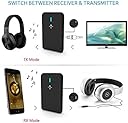
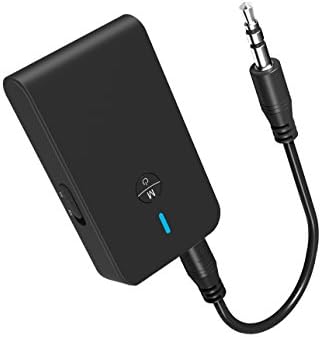
The ZIIDOO Bluetooth 5.0 Transmitter and Receiver is a sleek, portable 2-in-1 adapter that delivers low-latency, high-fidelity stereo sound. Compatible with a wide range of Bluetooth-enabled devices, it supports seamless switching between transmitter and receiver modes, powered by a rechargeable lithium-polymer battery for on-the-go convenience.


| ASIN | B0829S6K1X |
| Additional Features | Portable,Bluetooth 5 . 0,Bluetooth Transmitter,Lightweight,Compact,Bluetooth Receiver |
| Audio Input | 3.5mm AUX, RCA |
| Audio Output Mode | Stereo |
| Audio Output Type | Bluetooth |
| Battery Type | Lithium-Ion |
| Battery Weight | 2.8 Grams |
| Best Sellers Rank | #185 in MP3 Player Bluetooth Transmitters |
| Bluetooth support? | Yes |
| Brand | ziidoo |
| Compatibility Options | Smartphones, tablets, laptops, headphones, speakers, car stereo systems, home stereo systems, and TVs |
| Compatible Devices | Bluetooth-enabled devices including smartphones, tablets, laptops, headphones, speakers, car stereo systems, home stereo systems, and TVs |
| Compatible with Vehicle Type | Car |
| Connectivity Technology | Bluetooth |
| Connector Type Used on Cable | 3.5mm Auxiliary |
| Control Method | Touch |
| Control Type | touch-based |
| Controller Type | Button Control |
| Customer Reviews | 3.9 out of 5 stars 10,503 Reviews |
| Data Link Protocol | Bluetooth |
| Enclosure Material | Plastic |
| Hardware Interface | Bluetooth, Bluetooth 5 |
| Human Interface Input | Buttons |
| Includes Remote | No |
| Installation Type | Plug In |
| Item Weight | 0.07 Kilograms |
| Lithium Battery Weight | 0.85 Grams |
| Lithium-Battery Energy Content | 1 Watt Hours |
| Lithium-Battery Voltage | 3.7 Volts |
| Manufacturer | Zido Tech |
| Material | Plastic |
| Model Name | Bluetooth 5.0 Transmitter and Receiver |
| Number of Batteries | 1 Lithium Polymer batteries required. (included) |
| Number of Channels | 2 |
| Number of Lithium-ion Cells | 1 |
| Power Source | Adapter |
| Rechargeable Battery Included | Yes |
| Special Feature | Portable, Bluetooth 5 . 0 , Bluetooth Transmitter, Lightweight, Compact, Bluetooth Receiver |
| Supported Application | [ANY] |
| Supported Media Type | MP3, WAV, AAC, FLAC |
| Supported Standards | Bluetooth 5.0 |
| UPC | 734830491119 |
| Voltage | 3.7 Volts |
| Wireless Compability | Bluetooth |
M**C
durable
It has lasted 5 years and still working, I don't use it every day but to connect some device that doesn't have Bluetooth function.
W**T
Nice little unit
This thing works as expected - in fact, one unexpected thing is that it seamlessly re-syncs with my iPhone automatically when I turn the device on - I have some other devices that require me to manually reconnect for some reason each time but this one just does it all by itself - to which I say, yay! I added this to my car that does not have Bluetooth but does have an audio AUX jack - added a cig lighter adapter, short USB cable, and Bob's your uncle with Bluetooth connectivity - easy peasy. One thing; this device does go to sleep when not in use. There may be a setting to prevent this (haven't checked) but in my case, this is perfect since this is in my car and it helps prevent my battery from being drained. The flip side is if I don't use it for a little while and am still in the car, I need to turn it back on to resume audio. But, a fair tradeoff I think. Seems the sleep timeout is 30 mins or something so for sure not a big deal. overall: I like this device - quick and easy to set up and it works.
M**N
Audio from TV to Bluetooth ear buds works!
UPDATE: 1 MONTH LATER (Nov 11, 2020) I've learned that I didn't really need to purchase this item after all. I use a Roku device which means I can download the official Roku app and use the Remote Control feature in the app which allows me to control the Roku as I would with the physical Roku remote. The benefit of using the Roku Remote in the app is that I can select to have the audio pipe through the phone. This means that I can have my bluetooth earphones connected to the phone to privately listen to whatever programming I have streaming on the Roku. There's no need to have a bluetooth transmitter just to privately listen to audio. There's still a lag in audio but it's much less than when using the Ziidoo bluetooth transmitter. Conclusion: Don't buy any bluetooth transmitter if you're using any Roku device. Just download the Roku app and use the Roku Remote in the app. Click the button with the headphones icon. Your audio will pipe through your phone allowing you to connect with your bluetooth headphones (or wired) for private listening. UPDATE: 24 HRS LATER This bluetooth device is good and as I stated in my original review there is a noticeable lag when between video & audio. I went ahead and purchased an RCA to 3.5mm adapter after the fact rather than connect with the 3.5mm adapter that came with the device to compare the lag. Using the RCA-to-3.5mm to connect the TV to the device lessened the lag considerably to an almost imperceptible amount. I guess I'll keep the device. ORIGINAL REVIEW: The device works meaning I was able to hear audio from the TV using my Samsung Buds Live. My TV lacks Bluetooth. I am using Roku attached to an HDMI splitter. I use my phone to Miracast videos in the browser or other apps to the Roku. The audio is clear and the volume can be controlled using the Roku remote. The drawback is that there is a noticeable delay or lag with audio syncing with the video. You will definitely notice dialog not in sync with moving lips. I have the TV's earphone out plugged into the device. I'm going to try to connect using and RCA to 3.5mm adapter to see if that makes a difference with audio. I'll update this review shortly. Overall this does provide the ability to privately listen to what I watch on TV which is the main reason I purchased it. A few ovservations: - You'll have to pair your earphones each time you want to use the device. It won't remember your ear phones. - make sure you don't have any other bluetooth devices on when you're ready to pair with your earphones. - make sure your aux cord is fully pushed into the earphone socket of the TV (see pic). Make sure you turn the device off by holding down the control button until the light goes off. The device stays on even when you disconnect your earphones.
R**S
Tx doesn't work at all
Hooked it up to an audio source and followed the instructions: set it to Tx and turned it on. The blue light flashes. Turned on the speaker bar, making sure the bluetooth input was selected. It made its usual beeps and boops but never played anything. Turned the volume up all the way on both ends, nada. Tried another bluetooth speaker, similar beeps and notes, but no joy. Tried yet a third speaker, it doesn't make beeps, it said "powering on" then "ready to pair." That was the end of that. Never paired. Made sure that all my other bluetooth devices nearby were off. Tried pushing buttons, turning things on in different order, nothing. But now in RX mode, my phone could see it just fine and paired right up when told to do so. I hooked this dongle to the AUX input of the speaker bar and it played well what was coming off the phone, although both the phone and the speaker had to be turned all the way up to get "fair" volume. But that's not what I got it for. I want to play from a NON-bluetooth audio source TO a bluetooth enabled speaker. Which has NO SCREEN. This dongle is supposed to pair AUTOMATICALLY to such. IT DOES NOT. Will give the vendor til next week to respond to this review then I am returning it. I can already run a WIRE from the non-bluetooth source to the AUX input of the speaker bar, so I don't really have to have this thing anyway. And my bluetooth sources can pair directly to the speaker bar, so no need of it there either. Update: the picture on the box shows HEADPHONES as the intended use, So I thought, what about my new earbuds? So I connected everything back up and turned it on, and put my earbuds in. They said, as usual, "powering on" and "pairing." (I had turned bluetooth off on my phone so it wouldn't take it.) Then: nothing. But right then I got a text and was busy replying to that when all of a sudden, a full minute after starting, I was blasted with the music coming from the source. It had connected! Then I put away the earbuds, the blue light started flashing again, and I turned on the speaker (less than 1 foot away.) And waited. Nope. Well bummer. I suppose at this price, using the earbuds is better than nothing, but it's not what I expected. Edit 2: That didn't last long. I thought to try the earbuds again just to check the sound quality, but I pulled them out before I turned on the dongle and forgot I had one of the speakers still powered up. So with earbuds in my ears I turned on the dongle, they said "pairing" and then the music started coming from the speaker! I put the earbuds away and the speaker kept playing. Then I turned everything off, and started over. Now nothing works, not even the earbuds. I enabled BT on the phone again just to check the earbuds were OK (yes). What a mess. I quit, you can have it back now.
D**U
Just be aware of what you are getting.
Listing that this was a BT 5.0 device with LL capability caused me to give this a try, since it is very inexpensive. It woks fine in SBC RX mode, with expected latency. However, did not connect with my Anker SoundCore Boost A3145 speaker on TX. Speaker connects fine with Visoud B22, which was also recently purchaced from Amazon. This was bit of a chance, and reading the listing carefully this may be an issue with BT spec itself, and not the hardware. Just beware that this unit did not connect on TX at all, and performs as SBC RX only - and latency actually worse than the Anker A3145 speaker's internal BT receiver. Bottom line: I will be using a hard-wired connection for our church setup, which plays beautifully with no echo. As a retired DSP engineer, my long-term preference for hard-wiring [if you can] stands. Just compare the propagation delay of cable [approx 10-100 nS per foot, depending on cable and frequeny] versus the best LL BT codec latency. That's nanoSeconds, not milliSeconds. Factor of 1 million - hard to beat.
E**W
Wow, I'm impressed
I bought a small Bluetooth amp to use with speakers by the pool. We can stream music from our phones. A couple of months ago, I bought a screen and a projector. The projector doesn't have Bluetooth. Why would it need Bluetooth? It has built in speakers. Well, the speakers are horrible. So, we just use a cord to plug it into a portable speaker. No big deal. Then, I saw this transmitter. It never even occurred to me to use a transmitter to play over the speakers we already have by the pool. Duh. Honestly, I didn't have high hopes for this. I have a hard enough time pairing my phone to this cheap amp when I can select the amp from a list. How it this thing going to pair just by pushing a button? Plan B is ..... this is also a receiver. I have a car that doesn't have Bluetooth. Well, this thing paired right away and, it even works at a greater distance than my phone. I may buy another one for the car.
T**R
Works with AirPods
At first I was worried because I saw a lot of negative reviews about not being able to connect to AirPods but these reviewers are very wrong. I have an old Phillips CD Player that can only play sound if you connect it to a speaker and this has always been a downside because I don’t have any good speakers so I try to just use headphones but it always needs to be plugged in. Anyway I bought this Ziidoo transmitter/receiver to see if I I could connect it to my AirPods. It was also the more affordable of the other products like this. After buying the product I saw a lot of reviewers and answered questions stating AirPods are NOT compatible with the device. I was going to return it but I wanted to see if they were right first. I put the device into transmitter mode. Turned off Bluetooth on my iPhone so my AirPods wouldn’t be connected. I then put my AirPods into pairing mode and the Transmitter into pairing mode so they were both blinking. I didn’t work. I was about to box it up thinking they were right but I tried one more time putting them closer together and voila it worked. My AirPod’s light went from blinking white to solid green and the transmitter from blinking blue to solid blue. Now I will say AirPods don’t have a solo volume feature and sadly neither does this transmitter but if you make sure your AirPods had good volume settings before connecting to the transmitter it should be fine.
T**E
Not for TV
I have been using a Bluetooth module to attach my TV to a Bose portable speaker for a couple of years now and the one I was using stopped working so I bought 2 more, this one because it was cheap and another newer version of the brand I had been using. My TV is an older Samsung with Soundshare which I believe is bluetooth but this model TV only connects with Samsung products so I need a Bluetooth TX device to connect with other brands of bluetooth devices. I opened this one first and attached it to an MP3 player for a quick test. It connected with my Bose speaker very quickly but the volume was very low. That was addressed with the volume control on both the MP3 player and the Bose. I then connected it with my TV the same way I connected my original worn-out Bluetooth device. This unit was still connected to the Bose and when I brought up a TV show the sound blasted out of the Bose. I had to adjust the volume levels again and once it was at a comfortable level I immediately noticed a delay between the actors lips and the audio coming from the speaker. I unplugged this device to make sure it was not my TV content provider and voice was sync'd locally on the TV so I determined this device as what introduced the delay. I tried the 2nd, more expensive device and it worked with no delay, audio was in sync with the actors dialogue. If you were only going to use this with an audio device to listen to music with no video, this unit would work fine. The delay would still be there but it does not have to sync to video so it would not be noticed. I did not test any of the device control functions to control a device's play/pause or volume. And I am not sure why the volume levels were so different between the input devices being transmitted. I also did not test the RX function. TV audio connectivity is my only purpose for using a Bluetooth device so I am returning this unit as defective since it did not support my needs.
Trustpilot
2 days ago
2 weeks ago