Buy anything from 5,000+ international stores. One checkout price. No surprise fees. Join 2M+ shoppers on Desertcart.
Desertcart purchases this item on your behalf and handles shipping, customs, and support to Romania.
๐ Elevate your home network to enterprise power โ all in one sleek Dream Machine!
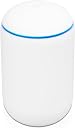
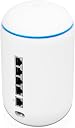
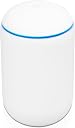
The UbiQuiti UniFi Dream Machine (UDM) is a compact, all-in-one router designed for homes and small businesses, combining a high-performance 4x4 Wi-Fi access point, advanced security gateway with IPS/IDS, an integrated UniFi Cloud Key for network management, and a 4-port Gigabit switch. It supports dual-band 802.11ac Wi-Fi with beamforming, offers robust VLAN customization, and delivers reliable connectivity for 20+ devices, making it a top-tier solution for tech-savvy users seeking enterprise features without complexity.
| ASIN | B082QMR5ML |
| Antenna Location | Home |
| Antenna Type | Internal |
| Best Sellers Rank | 20,717 in Computers & Accessories ( See Top 100 in Computers & Accessories ) 58 in Wireless Access Points |
| Box Contents | Dream Router, 128 GB internal storage, pre-installed UniFi Network application |
| Brand | Ubiquiti |
| Brand Name | Ubiquiti |
| Colour | White |
| Compatible Devices | Gaming Console, Personal Computer, Printer, Security Camera, Smart Television, Smartphone, Tablet |
| Compatible devices | Gaming Console, Personal Computer, Printer, Security Camera, Smart Television, Smartphone, Tablet |
| Connectivity Protocol | Wi-Fi |
| Connectivity Technology | Wi-Fi |
| Control Method | App |
| Controller Type | Switch |
| Country of Origin | China |
| Coverage | Single-family home |
| Customer Reviews | 4.4 out of 5 stars 741 Reviews |
| Data Transfer Rate | 1733 Megabits Per Second |
| Frequency | 5 GHz |
| Frequency Band Class | Dual-Band |
| Frequency band class | Dual-Band |
| Global Trade Identification Number | 00817882025966 |
| Has Internet Connectivity | Yes |
| Is Modem Compatible | Yes |
| Item Dimensions L x W x H | 11L x 11W x 18.4H centimetres |
| Item Weight | 1050 Grams |
| LAN Port Bandwidth | 1733 megabits_per_second |
| Manufacturer | UbiQuiti |
| Manufacturer Part Number | UDM |
| Maximum Upstream Data Transfer Rate | 2400 Megabits Per Second |
| Model Name | Dream Machine |
| Model Number | UDM-EU |
| Model name | Dream Machine |
| Number of Antennas | 1 |
| Number of Ports | 5 |
| Operating System | UniFi OS |
| Other Special Features of the Product | Beamforming |
| Product Warranty | 2 years |
| RAM Memory Installed | 128 GB |
| Router Network Type | Wireless |
| Security Protocol | WPA3 |
| Special feature | Beamforming |
| UPC | 817882025966 |
| Unit Count | 1.0 count |
| Voltage | 220 Volts |
| Wireless Compability | 802.11ac |
| Wireless communication standard | 802.11ac |
L**0
Perfect for home network
My home network has been neglected over the years with just my ISP Wi-Fi router and the odd Wi-Fi router to take over Wi-Fi and add Ethernet ports. My house is partially hardwired but none of the points suit current locations of equipment nor appeals to have them on show. Being tech savvy I knew full enterprise equipment was going to be overkill but I needed a robust system due to the ever increasing Wi-Fi devices in my house. 3 kids, wife and myself and smart IoT devices meant 20+ devices. I had purchased recently the Google Wi-Fi mesh solution with 3 points but lacked customisation and the backhaul network is not great when on different floors of my house with solid brick walls etc. I had thought about a switch and multiple access points dotted around the house, but would either need a PoE switch or powered APs. Did I want a managed or unmanaged switch. My conundrum continued for several months. I work in buildings which are littered with APs and I have access to server rooms and know the kinds of kit you can buy. Everything overkill. I knew of Ubiquiti and there line up of kit and Unifi seemed the best solution for me. I didnโt want multiple boxes (the wife) nor the cost of them. Although extending my ISO coax to my loft is doable, and may still consider but theyโll charge me if I have to call them out to a fault. So the Unifi Dream Machine was my solution, well, a good part of it. Move the ISP box to point of entry to my house, pop it into modem mode. Take external Ethernet from Port1 to outside around the front and back in, hidden behind skirting boards to UDM WAN port. From Port1 of UDM back outside with second cable up to my loft to a UAP via a PoE injector. Drop the cable through the ceiling at the top of my stairs. This will be the AP for upstairs and front of house IoTs and mobile devices, whilst all media/lounge equipment via the UDM. Fairly streamlined compared to full rack mounts and less patchy the mesh Wi-Fi. Total cost less than ยฃ450 for devices and cables etc. It works. The Unifi GUI isnโt anything I havenโt come across before ad there are plenty of tutorials online/YouTube etc. setup was easy either via the iOS app of via web browser IP or unifi.ui.com. Pros Setting up VLANS to separate different types of equipment. IoTs on one, kids iPads on another and medial devices and work devices on others. Great threat management Good GUI The wife requires a secure connection for work, although she connects via a work VPN, this separates her laptop from all devices. I did once connect to her laptop by mistake and saw stuff I shouldnโt have. This stops mistakes. The kids iPads are setup fairly well via iOS but this gives better security over what they access as I sometimes forget to enable restrictions after Iโve used their iPads. Again, keeps them safe from getting attacks. IoT devices can be easily accessed/hacked should anyone want. Although my network is more for leisure than business, this allows me to isolated these easily hacked devices from all other devices and put firewalls up to stop them access other LANs. Assigning dedicated VLANs and Wi-Fi bands to each group is great. Anything that can happily run on 2.4ghz means my media devices donโt get bogged down on 5ghz. The fan noise on startup is just that, ramps up full and then drops down to quieter than a whisper. Cons Iโm constantly looking at the GUI as the information of my network is amazing. For home enthusiasts to SMBs, Iโd recommend Ubiquiti Unifi Dream Machine.
G**E
Unbeatable all-rounder
Packed full of features and outstanding performance and wi-fi range. Techies will get those most out of the features and be able to appreciate the bang for buck when compared to other small business setups, the UDM has it all in one box. Yes, there is no wifi6 but to me that isnโt important, not for a few years at least for home. Easy to setup and configure, despite my comment about techies - just download the app, plug it in and follow the instructions. I have mine setup to FTTP (300/50) and it doesnโt miss a beat. Been installed for 3 weeks now and hasnโt dropped out once. GUI is simple to use and, again, use the app to comprehensively monitor your entire network. Bought another three for work, ticks all the boxes.
A**R
Best entry into the Unifi world for a prosumer
This is a great product, yes its looks are definitely an acquired taste but frankly its the best way into a unifi environment for a prosumer. The management platform is truly excellent and offers all the customization and depth you could want for looking after your environment. The four port switch has good throughput, but not PoE. The device is silent, apart from a fan ramp up check upon boot for the first time. After running it for a month I've had zero crashes of the device. The statistics offered are excellent and allow quick network diagnosis and troubleshooting. Highly recommended as a router if you're looking for the best way to manage your network.
M**N
Device is very good let down by no UK plug
Well the device is excellent and is a very good compromise between better then normal purchased home router with good enterprise type of elements but not at the price that will break the bank. I am not sure whos fault it is but the device came with no UK plug so I am going to assume it was Amazon doing a european / american import of the device but that is just an asthetic thing as I could not get a white cable with plug so will just buy a uk plug and wire up the cable. My only issue with the device itself is you had to have an online account to setup the device but once setup you can create an offline acccount and disable the online account. Also would have been nice to have a manual even if in PDF format explaining all the various options that are avaliable to you as a user.
N**L
Really nice idea... just didn't work my home tech that well
A really nice product - interesting (and cool) design: - easy to set up, just switch on, download the app on mobile (or via web browser) and that's pretty much it - provides a great insight into network performance traffic, usage, etc. - reasonably quiet (you can hear the fan upon startup but beyond that it's almost silent) - well made, feels like a quality product. I would advise considering this if you want a router and firewall in one device (together with some excellent network configuration features - e.g. different wifi networks, etc.). It's much easier to set up than other Unifi devices. The only physical downside is the small number of ethernet ports - if you want more then you'll need to invest in a network switch. My setup is BT smart hub (home broadband), then the Dream Machine ("UDM") and then a Unifi network switch which worked really well. Most of my wifi devices connected directly to this UDM - I had 3 wifi networks - the main one, one for IoT devices and one for guests. My network switch has a couple of Unifi Access Points, all of which worked really well with the UDM (I used the UDM to manage everything). So...unfortunately I ran into an issue I wasn't expecting - the UDM doesn't work so well with Sonos music products - I have a SONOS system (wired and wireless) and I had all sorts of problems with it. One of the causes was the iPhone IP masking feature that Apple really introduced (very easy to switch off so not a problem) but it just wasn't happy. There are various workarounds out there but it looks like it involves advanced config/ssh which is too complex for me. In the end I switched off the UDM and Sonos was back to normal and worked perfectly. Overall highly recommended, not much more than the Unifi USG so work serious consideration - providing you don't have a Sonos system!
D**R
Easy and reliable!
I had been using a Security Gateway, AC Pro, and a Raspberry Pi as a Cloud Key previously but eventually decided to put up the dosh for an all-in-one unit, and I'm very glad that I did. LOOKS The unit is small, quite a bit smaller than I thought it'd be. But it looks clean, so much so that I took it out of my network cab and placed it on a cabinet. There's quite a bright blue light on top, which will flash or change colour depending on the state of the UDM. If you find the light annoying it can be disabled via the console. SETUP The setup was surprisingly smooth, so much so that I was able to complete the entire process on my phone! By the time I had finished the process on my phone the unit was fully configured and there was very little for me to do on my PC besides just renaming devices. As I previously already had a Security Gateway I did have the option of exporting and importing a backup, but I opted to start fresh. PERFORMANCE It's not Wi-Fi 6 but with the equivalent of a Nano HD inside I found that it's more than powerful enough. And the unit itself is strong enough to provide coverage all over the house! The signal is still strong upstairs so I've been able to sell off my old AP. ISSUES Everything with the UDM has been smooth sailing, so I'm quite hard-pressed to think of anything to complain about. The only thing I've noticed is that if I'm downloading something and then attempt to log onto the console, the fans on the unit will kick up to 100%. It's not too much hassle as I'm rarely on the console for very long, but it's something to keep in mind if noise would be an issue for you. ANYTHING ELSE? I'm really pleased with the unit, and I hadn't realised how much nicer having everything under the one dashboard was. Updates are completely automatic (although you can change these settings), and backups are too. I never have to restart it, never have to check on it, it just chugs along.
E**S
What a great Router!!
Cannot say how impressed I am with the Ubiquiti devices. I have ordered both the UAC AC LR and a UDM as the base router to replace my struggling virgin media setup. With the UDM serving the downstairs where the Virgin router is (now setup as just a modem) and the UAC serving the upstairs. Was very easy to setup and configure. The management of UniFi products are fantastic, maybe a bit overkill for those that want plug and play. But for some like myself who has an IT background, this system is brilliant. Goodbye to those horrible dead spots in the house and hello to great stability, greatly increased signal and throughout and fantastic device and system management. Not the cheapest to buy but now when both myself and wife are working from home, as well as 2 children having home online lessons it has been a saving grace. Cannot speak highly enough about it.
L**T
Almost great but with two flaws which should make you think twice before buying
The Dream Machine is almost a very great router, with an excellent feature set, but it has two major problems: 1) The documentation is sparse and what little does exist is terrible: I can't think of an equivalent product whose documentation is so poor. Fortunately, much of the configuration is somewhat obvious if you're familiar with networking terminology and concepts. However, there are some very quirky bits that are close to unguessable. For example, I had to find a user submitted YouTube video to work out how to set-up multiple wireless networks: without it, I'd probably have spent hours randomly pressing buttons until I found the correct sequence of interlocking parts. For a ยฃ30 device this might be tolerable, but this device is over ยฃ300, and that should pay for someone to document at least the major features properly. 2) It ships with a EU plug and a cheap, crap UK travel adapter that doesn't sit properly and from which you will occasionally see a little blue arc, which is worrying. This is illegal, for a very good reason. If it wasn't for these two issues, I'd rate this 5 stars. Because of #1 I'd rate it 3.5 stars; because of #2, I rate it 1 star. Ubiquiti and Amazon should be ashamed that they keep selling such an expensive device with an illegal plug.
Trustpilot
1 month ago
2 months ago