Desertcart purchases this item on your behalf and handles shipping, customs, and support to Romania.
🎯 Master your media kingdom with the ultimate jumbo remote!
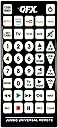
The QFX REM-115 is a large, universal remote control designed to manage up to 8 devices including HDTVs and soundbars. Featuring glow-in-the-dark buttons and five dedicated streaming service shortcuts, it offers seamless access to Netflix, Prime Video, YouTube, Hulu, and Disney+. Compatible with major TV brands and equipped with Bluetooth connectivity, this jumbo remote combines convenience, visibility, and broad compatibility in one sleek device.


| ASIN | B003CSXQLW |
| Additional Features | Universal |
| Battery Type | AA |
| Best Sellers Rank | #6,369 in Electronics ( See Top 100 in Electronics ) #273 in Remote Controls (Electronics) |
| Brand | QFX |
| Button Quantity | 8 |
| Color | Black |
| Compatible Devices | VCR |
| Compatible Television Models | Sharp 4T-C50EQ3EM2AG, Sharp 4T-C70BK2UD, Sharp 8M-B80AX1E, Sharp LC-32HI3322E, Sharp LC-40CFE6242E, Sharp LC-40CFE6351E, Sharp LC-40CFG4042E, Sharp LC-40CFG6022E, Sharp LC-40CFG6352E, Sharp LC-40CFG6452E, Sharp LC-40FG3342E, Sharp LC-40FI3012E |
| Connectivity Technology | Bluetooth |
| Controller Type | Button Control |
| Customer Reviews | 3.8 out of 5 stars 1,654 Reviews |
| Global Trade Identification Number | 00606540002582 |
| Item Weight | 9.6 ounces |
| Manufacturer | QFX USA |
| Max Number of Supported Devices | 8 |
| Maximum Number of Supported Devices | 8 |
| Maximum Range | 30 feet |
| Mfr Part Number | REM-115 |
| Model Name | REM-115 |
| Model Number | REM-115 |
| Number of Batteries | 2 AA batteries required. |
| Number of Items | 1 |
| Special Feature | Universal |
| UPC | 606540002582 |
| Unit Count | 1 Count |
| Warranty Description | mfg |
B**B
giant jumbo teevee remote
eye love it its sew fun & was easy 2 connect worth the price good size lightweight looks nice smells nice get it buy it u need it
Z**H
Geriatric remote of shame, +10 to eyesight.
Finally got tired of the gf losing the remote, turning on the blinding surgical overhead light mid show to find the volume button, and generally operating the TV like a geriatric potato. She must now use her own special giant remote of shame and she's not even 50 yet. Smdh. She loves it.
B**.
DO NOT BUY!!!!
If I could give 0 stars I would! Apparently this remote has to be synced every time you turn the tv off! We got sick of syncing it and now it’s just wasted money!
L**N
The person who needs this will struggle to read the device codes
This thing is BIG, which is just what was needed. Two things keep it from being 5 stars: 1. There's no eject button on the remote 2. The list of programming codes is (no joke) written in a 4 point font (see picture).
N**A
10/10
Easy to setup, works great
K**A
Pain to connect
Way too much of a pain to connect. Maybe I just don’t understand the convoluted directions but I tried all different ways, went to google, and it’s still a nightmare.
C**O
The best remote
Absolutely need if you always lose your remote. Wish there was a back button on it but it’s still worth it to not lose the remote. Super easy to pair to the tv
D**L
Won’t lose it
Buy one
R**T
Works great but a few of the buttons have moved from the older version.
shipped fast and worked perfectly with the devises I needed to control. This is the second one that I have purchased, the first one needed to be replaced after years of my 90+ year old father dropping it on the floor. The old one still works but is held together with multiple layers of tape and I am afraid that it will stop working at the worst possible moment so this new one is programmed and ready to go when it does. He will continue to use the old one until it dies as a couple of the buttons on the new device are in slightly different positions.
I**N
Defective Jumbo Product received
I ordered 2 of these devices from CRES&SIRI - the first one worked perfectly, meeting all of my requirements. However, when I unpacked the 2nd unit when I needed it some time later, it proved defective. Amazon wouldn't do anything about this due to their 'time window'. Connected me to Seller, CRES&SIRI who has remained unresponsive. I want to buy more, but will not if this example represents their lack of market professionalism.
E**O
útil para la 3era edad
útil para una persona de la 3era edad ve bien todo y fácil de usar
J**N
I have one word for this.... behemoth.
I mean... Okay, I knew it would be big, but... it's BIG. To get an idea of how big it is, grab a sheet of 8.5"x11" paper. Now fold it in half to make the width of it smaller. You should now have 4.25"x11" in your hand. That's roughly how big it is! While the width is actually closer to 5", this will give you a good idea of what you are dealing with. Yes it's big. VERY big. If you have an elderly or sight impaired person in mind, you'll need to be sure they are able to handle this remote. There are two considerations. First off, only members of the Harlem Globetrotters likely have the hand width necessary to wrap their fingers around the remote. This means most people will need one hand to support the back of the remote, and then use their other hand to operate it. If they lay the remote in their lap, it may not work, since the remote needs to be pointed at the device. Make sure they understand that. One other issue that I had with this remote is that it can operate 5 devices. While it's not a BAD thing, if you are looking to replace just ONE remote, they may accidentally hit one of the other device mode buttons. If they do, the remote won't work until they press the right mode button again. To get around this, you can program the remote manually. You need to find the 4-digit code for your device first. Use the instructions, find your device manufacturer, and try the codes provided. Once you find a code that works, write it down. Now go through the process to manually enter a code for each device, and use the SAME code for all 5 devices. It doesn't matter if you use a 'TV' code on the 'DVD' button, it will work just the same. If you program all 5 modes with the same code, they won't be able to accidentally hit another mode button and cause it to not work. (If they need to use two devices, you could program two modes with one code, and the rest with the other code. It just reduces the chance that they may hit the wrong button.) Buy the best batteries you can afford for this, to reduce battery changes. The reason being is that the instruction manual says that it needs to be reprogrammed after a battery change. In the end, it's the biggest remote I've ever seen for this purpose. If this doesn't help, I don't know what will.
E**Z
Feliz
Bueno
Trustpilot
1 day ago
3 weeks ago