🔒 Stay connected, stay secure—your home’s silent guardian.
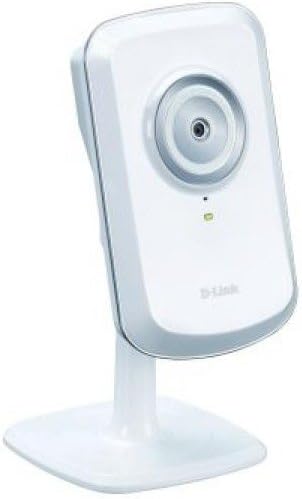
The D-Link Wireless N Home Network Camera (DCS-930L) offers reliable 802.11n Wi-Fi and Ethernet connectivity for versatile placement. Featuring customizable motion detection with instant email alerts, it enables remote live viewing on iOS, Android, and Windows devices via the MyD-Link app. Its compact design fits discreetly in any space, and setup is streamlined into three easy steps. Ideal for day-time indoor monitoring, this cost-effective camera delivers peace of mind with straightforward functionality tailored for busy professionals.
| ASIN | B00452V66G |
| Alert Type | Motion Only |
| Batteries Required? | No |
| Best Sellers Rank | #52 in Complete Surveillance Systems #4,397 in Dome Surveillance Cameras |
| Color | White |
| Compatible Devices | iOS_compatible |
| Connectivity Protocol | Ethernet, Wi-Fi |
| Control Method | App |
| Controller Type | Android, Vera, iOS |
| Customer Reviews | 4.1 4.1 out of 5 stars (2,154) |
| Date First Available | September 23, 2010 |
| Effective Still Resolution | 0.3 MP |
| Effective Video Resolution | 480 Pixels |
| Global Trade Identification Number | 00790069342691, 00790069355325, 03015220460043, 04052305759998, 04054842443620 |
| Included Components | 1 Year Warranty, Camera Mounting Kit, Ethernet Cable, Manual, Power Adapter |
| Indoor/Outdoor Usage | Indoor |
| International Protection Rating | IP54 |
| Is Discontinued By Manufacturer | No |
| Item Weight | 2.54 ounces |
| Item dimensions L x W x H | 3.66 x 2.36 x 0.98 inches |
| Item model number | DCS-930L |
| Manufacturer | D-Link Systems, Inc. |
| Mounting Type | Wall Mount |
| Number of Channels | 1 |
| Number of Items | 1 |
| Power Source | Ac/dc |
| Product Dimensions | 3.66 x 2.36 x 0.98 inches |
| Room Type | Office |
| Specific Uses For Product | personal |
| UPC | 790069355318 778890626876 778888252735 790069343070 790069342691 777779649937 803982739230 777779976033 777786338848 790069355325 |
| Unit Count | 1 Count |
| Video Capture Format | MPEG-4 |
| Video Capture Resolution | 720p |
| Voltage | 240 Volts |
| Wattage | 2 watts |
| Wireless Communication Technology | Wi-Fi |
S**N
Perfect for my needs!
I was looking for something simple to view my front door. My primary purpose was to let me know when the UPS/Fedex/Ontrac guy dropped my packages off. I didn't want to have to run cables to an AV source or rewire my entire house in order to do this. This fits my needs perfectly. Setup was pretty straightforward. Do yourself a favor and skip the CD they give you and just download the software off the website. Apparently the software they provide is out of date and you're going to have to go to the website any way. Same thing with the firmware update. Just download the file from the website. Figuring that out took the majority of my time. I'm pretty tech savvy and I had it up and running in 30 minutes flat (mind you most of that time was fiddling around with the CD.) It comes with screws and washers and a wall plug. I mounted in my front window and had a great view of my driveway and front walk. The video quality is not going to blow you away. It's okay. I don't think I'd be able to use this to give to the police to identify a criminal by their face. But for being able to tell if/when someone came up to your door it's great. The Ontrac guy came today and I could read the Ontrac on his van and I could see him walking up the walk but I couldn't make out any of his features. Setting up the email notifications was pretty easy. Just google the proper settings for your email provider and type them in. Motion detection works pretty well. I've been having to tweak it to get it to just pick up the movement I want. It's pretty easy just takes some trial and error to get the setting right. I had it too low and it didn't pick up my car leaving the driveway. I had it too high and it picked up a leaf blowing across the driveway. I'm pretty sure I found the sweet spot now though. Take your time to find the right sensitivity for your needs. I have mine set up to email me when motion is detected. You can have it take pictures every .5 or 1 second. When it detects motion it can send you the pic instantly or send you 3 frames before and 3 frames after. That's the one I chose. The iPad and Android apps work great. On my iPad and tablet it's almost real time video. On my Android phone (using the cell phone data) there is about a 10-20 second delay. All that being said, I actually ordered the night vision model (the 932L I believe.) I plan on keeping this and moving it to view my backyard and I will use the new one in my front window. This one is pretty worthless once the sun goes down (unless you leave a porch light on all night or have some other sort or light source in the area.) I knew this was only the day model so I'm not upset but I just realized I'd rather have the night vision ability. Keep that in mind when deciding. Once I get the night vision one up and running I might pick up another one of these to use when I go out of town to just monitor the inside of my house. In my opinion it's a pretty inexpensive investment for the peace of mind.
A**W
Good Basic Camera for the Cheap Price
Overview: This camera is what it is. It does exactly what it says and does it well. If you expect gourmet for McDonald's price, then you're gonna be disappointed. This device is good for a basic security camera. It gives enough details to make someone out (see attached pic). Many people will use this to stalk their cats while they are at work and this will do exactly that. Sure, you won't be able to differentiate hairs on the cat, but you'll definitely see them. The general settings are easy to use, but I feel the advanced settings will be harder for non-technical people to use (but not impossible). The apps work great for setting up and general viewing. Details: The resolution is up to 640x480, which is essentially very basic. Sure it's 2015 and there are some really awesome high resolution cameras out there, but they cost significantly more. For under 30 dollars, you get what you pay: a simple camera to do simple things that's very cost effective. This can be set to capture photos and email you when there's a trigger. The amazon listing shows only motion, but the box and settings show that motion and/or sound can trigger the captures. It's nice because you can have them sent to your email, so if someone steals your camera, the pictures are already sent. You can also set it up to send you 6 pictures at a time (a few before and after the triggering event). There is no night vision on this model. However, other dlink models have pretty good night vision (check them out). The apps are great for viewing and setting up the camera, but you can't change the settings from the app. Overall, I believe this is a good buy since it's so cheap. Perhaps someday I'll write a review on one of their top cameras if I find one. Hopefully this has helped!
M**S
Great little networking camera. It has many extra functions that you need to pay mega prices on CCTV units. I bought this camera as an observation device not really aiming to record (although I believe it does take photos when motion is detected and store it online on the cloud - even better if burgled to stop them stealing the footage and therefore proof as well!). I have an alarm system which rings me when triggered. I then have teh worry of a 40 minute rush home to check the flat in which time it would be totally deserted. I wanted to be able to log into a camera online and check the interior of the property following a notification. So far it is relatively easy to setup following instruction. Functions: 1. It is wireless - Fantastic start. Most wireless CCTV is much more expensive than (300-odd-pounds at time of review). Place this anywhere in the house (near a power point) and it will work , although best not to be near electrics like microwaves. 2. Live viewing online - setup your dlink account and log in on your iphone using their app to watch the footage online - including taking snap shots AND even more usefully listening to the sound. 3. Sound - Following the previous point. Most basic CCTV doesn't allow you to listen to the sound live online so if you have a dog which you want to check on and see if he is crying or barking when leaving the house then this is perfect. 4. LED switch off - okay, maybe not a huge function but it does allow more discretion if you want to hide this away without it being seen. 5. Email notifications - At time of writing I havent been able to get this to work but there are settings for it so I have probably entered something wrong - In theory it will email you if it notices movement. 6. Boundary setting - You can set the motion boundary allowing you to exclude areas where your pets may walk to stop you getting emails about people being in the flat. 7. Online storage - again not fully tested but in theory it is meant to store the motion trigger footage online preventing any thieves from stealing your evidence (even if they do take your camera). Not so great elements: 1. You MUST have the internet for this camera. It simply will have no use if you cant connect it to the internet. (Not an issue for most). 2. It can be a bit fiddly to set up. It took me a while to get the sync of the wireless as I tried it from scratch but I think it wanted a wired connection initially and then a wireless pairing after - although maybe that was my mistake. 3. THE POWER CABLE LENGTH - This is my biggest annoyance! The power cable must be about a meter long. I wanted to put this at high level to get a good view but the power cable is just far too short to reach from the socket to a high enough level. 4. POWER HEAD - okay, not a massive issue but it has an American (clarification needed) pin which plugs into a UK or EU adaptor. This hasn't really been executed with a great amount of effort. The head sits at a 90 degree direction to the plug meaning if its in a cable splitter / extender it can clash with other plugs and it also feels fairly cheaply put together for a dlink product. 5. Programming - You can program what time you want the motion sensor to trigger and what days but I wish you could have different times ON different days not just Monday - Friday 8am - 6pm for example. On Fridays I may not work until 6 and then I am likely to get emails when I move around. If the function is there it would have been good to set times or each day. Overall I am happy with the purchase. The issues are small and for the price you cant complain (although I would be annoyed at the £70 RRP). It works well and so far even my workmates are getting a couple to check their homes.
C**N
Para su módico precio cumple su cometido, ademas de ser muy fácil de configurar. El unico problema es que tiene que estar en un lugar bien iluminado.
C**R
Typical D-Link garbage. Two hours and still at it. I have spend two hours trying to get this camera to work. In two hours, I can assemble a PC, install Windows, and have it up and running. A plug-and-play camera should work in 5 minutes. I should not have purchased this given my experience with D-Link in the past - I previously owned a D-Link N router and wireless USB dongle. The router needed to be rebooted at least once a week. The USB dongle never worked properly, and was eventually replaced with a cheap ASUS dongle that has worked perfectly plug-and-play. Anyway, this D-Link camera is even worse than my previous experiences with D-Link. The best I can manage after two hours or messing around is a green-light on the back of the camera, which is better than a red light, but I don't know why. I honestly don't know how D-Link remains in business. The instructions are minimal, the 'software' doesn't work. I suppose the entire user experience was designed to be easy and performed by someone with zero technical knowledge, but I guarantee that grandma doesn't know her router and modem configuration in order to complete the install - not that it matters, the install will fail regardless. So, after two hours of clicking 'next', trying all the various wired/wireless/local and internet connection options, and STILL not getting the software to connect properly, I guess I'll scour the D-Link forums and see if any of the other 1000's of D-Link suckers have managed to get this working. I'm sure it involves a lot of little hacks. Spend a little more money and buy a different brand. Save yourself time and frustration and an ultimately defective productive from a terrible company that pumps out crap.
P**M
I had some initial problems configuring it but it is working fine. The indication whether A or B is not clear on the name plate till you try out both. It is not what is printed there
J**R
The Perfect low cost alternative to monthly contracts. They install and configure without hassle and have great reception.
Trustpilot
2 days ago
3 weeks ago