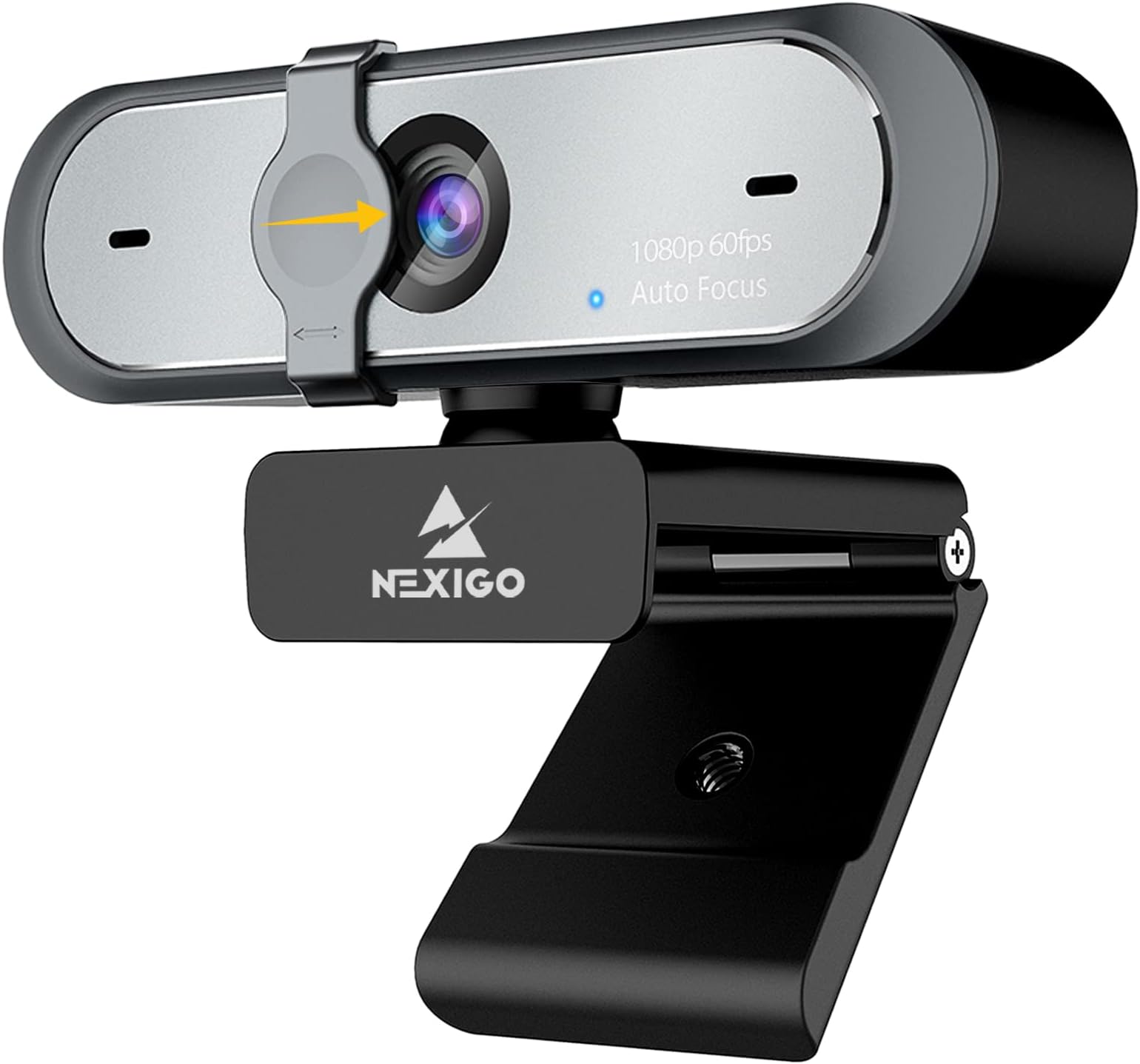
🎥 Elevate your presence—stream, meet, and create like a pro with NexiGo N660P!
The NexiGo N660P is a high-definition 1080p webcam delivering smooth 60fps video with intelligent exposure and white balance. Equipped with dual noise-cancelling microphones and a privacy cover, it ensures crystal-clear audio and secure use. Plug-and-play with a 6.5ft USB cable, it supports a wide range of operating systems, making it ideal for professional streaming, video conferencing, and content creation.


| Standing screen display size | 3 |
| Max Screen Resolution | FHD |
| Brand | NexiGo |
| Series | n660p |
| Item model number | N660P |
| Hardware Platform | Mac, PC |
| Operating System | Windows, macOS |
| Item Weight | 7.1 ounces |
| Product Dimensions | 3.62 x 4.86 x 2.36 inches |
| Item Dimensions LxWxH | 3.62 x 4.86 x 2.36 inches |
| Color | Black |
| Manufacturer | NexiGo |
| ASIN | B08L7ZLNHB |
| Date First Available | October 15, 2020 |
E**M
I'm a Happy Camper!
I've been using an old HP webcam for years. I don't even know what the specs were on it as far as resolution of frames per second. The picture was OK as long as you didn't move, but with any motion at all, the video was very streaky and choppy. I've been doing more Zoom calls lately so decided I needed something more up to date. I was thinking of going Logitech but saw the different NexiGo webcams online and the mostly favorable reviews so thought I'd give it a shot.Boy, what a difference! To me the picture is awesome, very clear and any motion is quite smooth. Autofocus works perfectly fine for my needs and you can adjust, resolution/fps, brightness and auto or manual focus. It has a lens cover that you just slide over for privacy and dual microphones. The clip works very well either sitting atop my monitor or I have a small tripod that I can use that screws into the camera's bracket. Installation was plug and play so I was up and running in less than a minute.I ordered on Amazon and got free Prime delivery the same day which was pretty awesome. At this price point, I don't see how one could do any better. I'm thinking of ordering another one and sending it to my parents in CA so I can do video calls with them from here in TX. They're not tech oriented at all but with the plug and play ease, I'm pretty sure I can get them set up over the phone.
☁**☀
Video Quality A+
Video quality is great! Super easy to use, simply plug and play for my purposes. I like how I'm able to clip and unclip it with ease from my monitor, and the fact it has a privacy cover. Great for the price, and my needs!
D**H
Decent starter cam
Not as good quality as my cheaper cam model. The mic doesn’t work for all the apps I need to use it for so I use a separate mic. It’s decently long cord wise. Easy to install, just plug and set up in your apps settings. Not sure if it zooms, I haven’t seen it able to do that function. I like it has a cam cover in case you want to not show your cam in an app that doesn’t disconnect in settings.
P**S
Good picture quality
For the price point, the camera is very functional giving good picture quality even with in somewhat not to brightly lit room in comparison with camera from a laptop. It is an very good upgrade.For people using this for working from home conferencing, it is better than using laptop camera as it gives flexibility to mount on other place to give you better position than straight on if you choose. In addition, the it can rotate horizontal and can slightly tilt up and down to further give more flexibility.The camera is also compatible with Linux at least on Ubuntu right out of the box. It simply is plug and play on Linux as well. That is a bit surprising.A couple of small things that I would like to see improved on are:1. When it is active, there is a blue LED light lit inside the camera. This is only seen through a cluster of tiny holes (looks like a microphone screen mesh). This is not eye catching attention. You need to pay attention to see and be right in front of the camera. It would be nice to have this active indicator very noticeable. Having mechanical camera shutter does not negate the need for camera active indicator.2. the FOV spec. The spec. on the web and what being indicated on the box do not seem to be the same. Both places should have consistent info. Perhaps, the info. is there but I missed seeing clearly.
J**D
It's a good webcam compared to others which cost more
The media could not be loaded. I almost went with a Logitech Webcam, but a lot of reviews said it wasn't good quality even for the cost. Good thing I found this webcam which had mostly good reviews, and hey, the quality is great!Video Quality: Its 1080p HD, it's not 4k quality but its still amazing quality for the price.Built-in Mic Quality: Hmm, maybe not the best, but also not the worst.Plug-in & Play: Yes, I plugged it in and it instantly worked, no issues at all. I am using a Macbook, so I don't know about for Windows or Linux.It also comes with a convenient built in slide-able Webcam cover which I is nice for people who care about privacy.My video attached has a more in-depth review.5 Stars.
N**Y
Excellent webcam for work and personal use
I recently purchased this webcam and have been thoroughly impressed.Installation was a breeze, taking only a few minutes to set up. It integrated seamlessly with Windows, and I didn't encounter any compatibility issues.The video quality is outstanding, providing clear and sharp images. It's a noticeable improvement over my previous webcam. Similarly, the audio quality is excellent, capturing sound crisply without any distortion.There are numerous settings available, allowing you to customize the webcam to your preferences, which I found particularly useful.I've been using it for work, and it has exceeded my expectations. I'm very happy with my purchase and highly recommend it to anyone in need of a reliable and high-quality webcam.
M**L
Better Than Some Of The More Costly Cameras
The N660P webcam offers full HD (1080p) resolution @ 60fps, fast autofocus, accurate auto white balance, very low latency, and a high-quality picture at a great price. It's perfect for Zoom and Teams meetings. In fact, I just ordered a 2nd one for my laptop. Previously I was trying out the 4K Logitech Brio. Great camera, but the picture was grainy even when using an external ring light. Honestly, with the N660P, normal room lighting is all you need for an impressive picture. In Windows 10/11 the NexiGo software isn't required, but it does come in handy as a standalone solution for quickly adjusting the settings. For video meetings I normally link the camera through YouCam 9 which brings additional features such as automatic face tracking, manual zoom, skin smoothing, text overlay, etc to the party. It also works well with OBS Studio. The N660P is a solid choice if you don't need a 4K camera.
Trustpilot
3 weeks ago
2 weeks ago
3 weeks ago
2 months ago