

Desertcart purchases this item on your behalf and handles shipping, customs, and support to Romania.
🎨 Small Tablet, Big Impact: Elevate your creativity and gameplay with precision on the go!
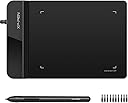
The XPPen G430S is an ultra-thin, compact 4x3 inch graphic tablet featuring 8192 levels of pen pressure sensitivity and a battery-free stylus for uninterrupted use. Designed for OSU gameplay, digital art, and online teaching, it offers a 266 RPS report rate for smooth, responsive input. Compatible with Windows and Mac (adapter may be required), it supports both left and right-handed users, making it a versatile tool for professionals and creatives seeking portable precision.


| ASIN | B01BA6XQI0 |
| Active Surface Area | 4 x 3 inch |
| Additional Features | Stylus |
| Best Sellers Rank | #8 in Computer Graphics Tablets |
| Brand | XP-Pen |
| Built-In Media | Tablet, Passive Pen, Quick Guide, Replacement Nibs, Pen-Clipper |
| Color | Black |
| Compatible Devices | Windows 7 and above, Mac OS X 10.10 (or later) |
| Connectivity Technology | USB |
| Customer Reviews | 4.2 out of 5 stars 10,013 Reviews |
| Display Type | LED |
| External Testing Certification | Não aplicável |
| Item Dimensions L x W | 4.21"L x 5.12"W |
| Item Weight | 4 ounces |
| Manufacturer | XP-PEN |
| Mfr Part Number | StarG430 |
| Model Name | Star G430S |
| Model Number | StarG430 |
| Native Resolution | 5080 line_per_inch |
| Number of Items | 1 |
| Operating System | Windows 7 and above, Mac OS X version 10.10 or later |
| Pressure Sensitivity | 8192 levels |
| Screen Size | 4 inches |
| Special Feature | Stylus |
| Specific Uses For Product | OSU Game, Online Teaching, remote working |
| Target Audience | Teacher |
| UPC | 602258815575 |
| Unit Count | 1 Count |
| Warranty Description | 12-month warranty |
M**S
A nice, small drawing tablet!
I bought this tablet for an alternative for now, as I purchased a Huion Kamvas display tablet and found myself unable to use it until I upgrade my PC (no USB-C port and no extra HDMI display ports for second monitors). I bought the smallest and cheapest one as I didn’t need anything fancy if this was going to be an alternative for me right now. I chose XP Pen as I always hear the brand be regarded in a very positive light by other artists. The tablet itself is slim, sleek, and doesn’t take up much space. Included in the box was the stylus itself, replacement tips and a tool to remove the pen’s tip, it also came with a manual as well. Setting up the tablet was very easy, finding which driver I needed on the website wasn’t a hassle either. The XP Pen tablet program is also very easy to use and is very direct. You can customize the pen tablet’s area of coverage on your screen or customize the pen pressure and buttons of the stylus. You can customize the buttons to act as a mouse with a double left click and right click, keyboard controls like shift or alt, or can be used within a drawing program as either an eraser or pen buttons to switch between. Using the tablet within an art program after customizing my preferred settings, I found the tablet to be very responsive to the stylus. I do feel a slight delay in my real movement and the movement of the stylus in an app, but I’m sure that can be fixed or customized within the app itself. Even though I bought a small size, it is not difficult to draw with. It’s a good tablet for the price and I am very glad I chose this brand for it!
C**B
Small and mighty: very responsive, no batteries, no BS!
I had no idea if this would work for the application I had intended it for. That is, being a mechanical designer, sometimes advantageous to mark something up on screen by hand in a natural fashion. As it turns out, it worked perfectly and continues to do so no matter what application I use it with. You can even use it as an extremely precise mouse if you want to, hovering the stylus over the pad. It’s small enough at 4 x 6“, to easily get stashed somewhere when you’re not using it and not have it take up half an acre of desk space. And I really like the little things that went into the design and function such as it knows immediately when you pull the stylist out and self activates ready to use. I also really like the fact that it comes with probably half a dozen stylist tips doesn’t use those tiny quadruple-A batteries that are in some Bluetooth stylus pens, and has all kinds of customizable function buttons and so forth that I could probably burn more time than I care to consider tailoring them if I want to. If like me, and you don’t need a full a size or bigger surface to draw on, this is ideal. It has an app interface that allows you to customize all different kinds of things, including stylus, pressure and angle, and on, and on and on, and probably most important of all at least for me it works, and it works well. I didn’t have to break the bank getting something bigger or more than I needed, and was able to blindly pick and win the lottery for exactly what I need. Probably the most difficult thing from starting out and it’s normal I expect, is tailoring the sensitivity and so forth to your writing style. Hand position, elevation of the stylus on the pad, stylus angle and pressure. It is extremely sensitive, which I think is fantastic, but it will take a little bit of getting used to and adjusting, so you’re not over or under correcting. Zero regrets: I should’ve gotten something like this years ago.
P**E
Affordable and easy to use
The XP-Pen G 430 is my very first drawing tablet. I’m not really a visual artist, but I wanted to doodle while using my laptop. Like most people, I find drawing with the mouse hard and awkward so I decided to buy the G 430 because it was very affordable, and just in case I didn’t stick with drawing, I didn’t want to feel like I had wasted too much money on a tablet I was not going to use. This little drawing tablet is great for newbies like me. The device is 6.5” long and 4” wide. The working area, however, is only 4” by 3.” The tablet comes with one pen, additional pen tips and a pen clip to help you remove and insert pen tips. If you’re using the tablet to play the game, it doesn’t need additional steps once it’s plug to your computer. If you want to use it for drawing, however, you have to go to the XP-Pen’s website and download the latest Star Series G430 driver. The manual can also be downloaded from there. Once the driver is installed, you can change the tablet settings to your needs. You can set up the tablet to work with two monitors, assign functions such as double click, right click, etc. to the two buttons on the pen, adjust the size of the working area on the tablet and change the pen pressure settings. I’m using Microsoft Paint with the tablet, and I’m still getting used to working with the pen. I keep hitting the two buttons by accident when I’m drawing. Also, the pen/eraser toggle mystifies me since I haven’t figured out yet how to keep it in pen or eraser modes long enough to use either of them. I wouldn’t say it replaces the mouse, but it’s certainly much easier to draw with the pen. And yet it’s not like a regular pen. I have to be aware of how much pressure I’m applying and how I’m holding it. Otherwise, the tablet may not respond. As for the size of the working area, I think it’s okay once I got used to drawing while looking at the monitor and not at my hand. Since I’m using the G 430 solely for drawing, I can’t say anything of its performance as a game tablet. But as a drawing tablet, it’s a nice one for beginners. It’s light, doesn’t take up too much space and it’s easy to use. One more thing, I suggest investing on an artist glove, the kind that covers your pinky and ring fingers only, to prevent your hand from leaving sweat and oil smudges on your tablet.
T**K
Reliable, easy to use, sturdy and no software, drivers or registration required!
For such a cheap price, this is a really nice pen tablet to write or control the pointer with. And what is also nice is that you don't' need any software like Gameon or Wacom to update with for compatibility. Another brand requires you to register it from China every time you try to use it from a start up of your computer. I don't want to register the product and don't trust a product that requires it, so that is why this XPPen G430S OSU product is much less restrictive in that way and doesn't require any tracking of your product. It's also immediately more responsive than my Wacom tablet, which now has issues with delayed feedback. But this is instant and responds right away. No delays. It's a tiny pad but covers the entire screen. Just that you'll have a little less space to test it, but there is a larger version I'll consider if this continues to operate so well over the months, years. So far though, it's good and I really like it. This also gives you 10 replacement tips if they eventually wear down. That's very generous compared to other brands. This pen is also very nice and for a larger hand, it's comfortable and the tab buttons near the tip are very well placed and responsive. No issues and a nice click to them. Only limitations would be the pad, as far as I can see, doesn't offer a way to have the corded side face left OR right, and so the corded side always faces left on my Mac computer. Being right handed, I would've preferred the cord to face and hang off to the right as my keyboard is on the left. But not a big deal. This cord is part of the pad too, so if the cord ever had issues, there's no way to replace it as with other brand pads. And because there is no software, there is no way to change the orientation of the pad. But not a big deal and I can handle it. Overall, I really like this small pen tablet so far. The pad is light but has nice grips to keep it from sliding on a smooth surface. My Wacom tablet's underpads already wore out so this is much nicer and seems like it'll last longer to stay put from sliding while writing or moving the pen. Recommended.
L**A
Having some problems now that it's been used for awhile
When I first purchased the tablet, I was in love! It's perfect for if you're new to digital art and if you need something light and easy to take with you. I take animation classes where we use drawing tablets and this is easy to use because I can fit it in my bag to take between classes. Very easy to set up, no buttons or anything to learn how to work, and you can also enable and disable certain pen features to your own tastes. However! I bought this December 28th, 2017. It hasn't been a full year yet, but I'm running into some problems with it. The pen and tablet randomly haven't been working, I tried everything the support website told me to do, and still no resolution. The pen randomly decides to draw when it's not pressing onto the tablet piece, or will randomly click and drag things? Until I unplug it. For the money, you get what you pay for. This is a cheaper alternative to Wacom, kind of like the tablet that you buy so you can start making art, but when you're financially able to, you buy a nicer one. If it didn't start having these issues, I would rate it 5 stars, but because it hasn't even been a year yet and I can't even use it, that's what makes me place it at 3 stars.
L**D
The price is fantastic!
Just opened and used for my work as signature pad! Works perfectly ❤️ great and affordable
K**K
Just what i wanted!!
This product is super helpful with my math assignments, especially with documents where I need to write on. The product is able to scroll click and maneuver just like a regular mouse, but when I go to right, it’s exceptionally good when applied pressure and writing as shown in the video. The buttons feel comfortable. The pen is sleek, but not too sleek so I can grip onto it. The sensitivity is just right it’s not too sensitive or hard to maneuver with the pen. There’s hardly ever any lag as I write and the design as well executed it allows me to write across the paper without getting off of the pad. If you’re thinking about getting this product for the same reason, I did I suggest going with this one it’s affordable and well worth your money.
C**.
First time size DOES matter for a tablet...
I've been working in the digital design and visual FX industry for over 2 decades.. I've owned and used tablets for my illustration and Zbrush work for MANY of those.. I have ALWAYS preached to new artists and illustrators that, despite me owning a LOT of Wacom products, you DO NOT NEED a large expensive tablet to produce quality art. THIS tablet has proven me WRONG!! Do you NEED a big and expensive fancy tablet? Absolutely NOT.. Can THIS tablet be used to produce quality illustrations and other art? NO.. your work will be 10x better spending the extra $10 on the Huion model that is one size larger.. (yet actually has thickness.. this 2mm stuff is useless trash with poor performance). Why? Simply put, using it flat on a desk, the tablet isn't large enough to properly hold it in place. The "real estate" for holding it still is useless.. And my preferred method of holding it in my hand/lap is completely out of the question due to the thickness mentioned above. I'm not telling you that you NEED to go buy some $200+ Wacom or even a higher end model from this company or Huion. I'm simply telling you that the extra $10 for the (one size larger) Huion WILL improve your ability to get what you want from your hand to the program you're using. Trust me, I do this for a living, and after my Wacom Intuos bit the dust, I ordered this AND the Huion to see which to keep. I believe I've explained why I'm choosing a return this one and keep the Huion. (I'm probably misspelling that by the way). Oh and just a side not, I had this less than a day, and Amazon is CHARGING ME for the return print label so I'm not even getting my refund (not all it).
I**M
small
very small
L**G
Excellent for text input
Work with Microsoft Word flawlessly. I use this for Chinese text input. Way faster and accurate than using mouse.
A**M
ممتاز
ممتازة جدا، ويأتي معها سيريال نمبر لبرنامج ArtRage Lite تحصل عليه من خلال موقعهم الرسمي بإدخال سريال نمر الجهاز (خلف الجهاز) ينصح بتحميل البرنامج الرسمي للمنتج بالبحث في الموقع عن اسم الجهاز وتحميل البرنامج الخاص به (يأتي الجهاز بكتيب ينصح بقرائته به كل التعليمات)
Z**E
Bought it for the second time
Very good product
G**O
Happy with my purchase
I’ve been using it for a few days and it’s safe to say it was a good purchase! I wanted a simpler drawing tablet but with good quality and that was it. I’m very happy with my purchase!
Trustpilot
2 weeks ago
1 month ago