Desertcart purchases this item on your behalf and handles shipping, customs, and support to Romania.
๐ Elevate your workspace Wi-Fi gameโfast, flexible, and future-ready!
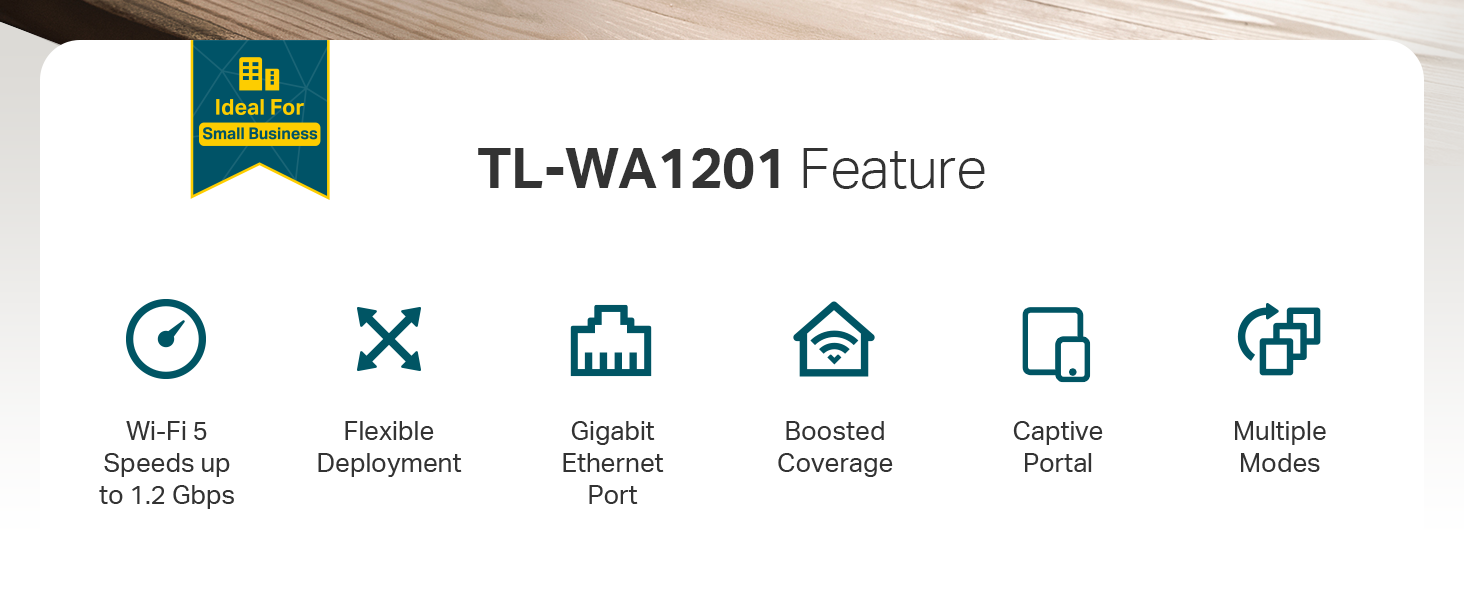
The TP-Link TL-WA1201 is a versatile AC1200 dual-band wireless access point featuring MU-MIMO and Beamforming for superior multi-device performance. It supports four operation modes including Access Point and Range Extender, powered flexibly via Passive PoE. With a Gigabit Ethernet port and advanced WPA/WPA2 security, it delivers reliable, high-speed connectivity ideal for home offices and professional environments.






| ASIN | B08SBXVSF3 |
| Antenna Location | Home |
| Antenna Type | Fixed |
| Best Sellers Rank | #8 in Computer Networking Wireless Access Points |
| Brand | TP-Link |
| Built-In Media | Power Adapter, Quick Installation Guide, RJ45 Ethernet Cable, Wireless Access Point TL-WA1201 |
| Color | White |
| Compatible Devices | Personal Computer |
| Connectivity Protocol | Wi-Fi, Ethernet |
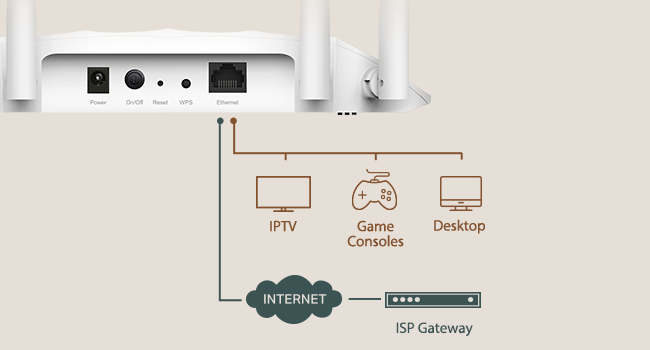
| Connectivity Technology | Ethernet |
| Control Method | Touch |
| Controller Type | Switch |
| Coverage | Extensive coverage |
| Customer Reviews | 4.5 out of 5 stars 1,131 Reviews |
| Data Transfer Rate | 1200 megabits_per_second |
| Frequency | 5 |
| Frequency Band Class | Dual-Band |
| Item Dimensions L x W x H | 8.86"L x 5.73"W x 1.46"H |
| Item Highlight | Desktop WiFi Bridge, MU-MIMO Beamforming, Support Multi SSID Client Range Extender Mode, 4 Fixed Antennas |
| Item Type Name | Access Point |
| Item Weight | 0.3 kg |
| LAN Port Bandwidth | 1000 Mbps |
| Manufacturer | TP-Link |
| Maximum Upstream Data Transfer Rate | 600 megabits_per_second |
| Mfr Part Number | TL-WA1201 |
| Model Name | TL-WA1201 |
| Model Number | TL-WA1201 |
| Number of Antennas | 4 |
| Number of Items | 1 |
| Number of Ports | 1 |
| Operating System | ZyNOS |
| Other Special Features of the Product | WPS |
| Router Firewall Security Level | Moderate to High |
| Router Network Type | Wireless |
| Security Protocol | WPA, WPA2, WPA-PSK, WPA-PSK2 |
| Special Feature | WPS |
| UPC | 840460603102 845973084035 |
| Voltage | 12 volts_of_direct_current |
| Warranty Description | 2 year warranty |
| Wi-Fi Generation | Wi-Fi 5 |
| Wireless Communication Standard | 802.11a, 802.11ac, 802.11b, 802.11g, 802.11n |
| Wireless Compability | 802.11a, 802.11ac, 802.11b, 802.11g, 802.11n |
R**F
Stock firmware is unstable on 5GHz, but OpenWRT works great
TL;dr -- this AP is another case of good hardware, awful firmware. The OEM firmware makes this device unusable, but flashing OpenWRT makes it useful again. Full Review: I bought this access point to use as a wireless client bridge for a computer in my house that gets an extremely poor wireless signal. Initially, I was disappointed because I was limited to a 2.4GHz connection, as the 5GHz connection was too unstable to be used. I'd regularly run into issues watching YouTube videos, browsing the web, or making Zoom calls. The solution was to use the 2.4GHz radio instead. This meant that my connection was limited to ~45-60mbps, which pales in comparison to a typical 5GHz connection speed of ~250-300mbps. For reference, my iPhone 11 is able to pull ~560-620mbps when placed next to the hardwired access point. i initially considered returning the AP, but then I found someone online had ported OpenWRT to this access point. Although this may void the warranty, it solved my issue. No longer do I have stability issues with the 5GHz radio, which means that I have both a reliable and fast connection to the Internet again my home office. OpenWRT is great, although it's far more complicated of an interface than the default TP-Link one. I would not recommend using this device in this configuration unless you're familiar with more advanced networking concepts or are willing to learn. Pros: - Inexpensive - Supports wireless client bridge mode. - Supports PoE using the provided injector. This is extremely beneficial to my setup, since I can place the AP where I best receive a signal, even though I don't have a power outlet nearby. - The Qualcomm Atheros QCA9886 802.11acn wireless radio has excellent performance - Gigabit LAN port (to the reviewer claiming it doesn't have one, this is simply not the case; there's no way I'd be able to pull 300mbps if it had a 10/100 interface). - The default firmware supports bridge mode with DHCP & NAT disabled, which means that every device connected through this AP has its real Ethernet MAC address exposed. If you plan to use this on a college campus or want your connected device(s) to be bridged to the parent network, this is very useful. If you use this mode, you can still control the AP's settings using the assign IP address for the access point itself. Cons: - Default firmware means that the 5GHz radio is unstable. I also had problems with controlling the LEDs and updating settings. Bonus Pro-tip: I only used this device with one computer, but you could easily use an Ethernet switch with the single port on the back of this device to connect multiple computers/devices.
I**Y
Flexible, Reliable, and Seriously Underrated
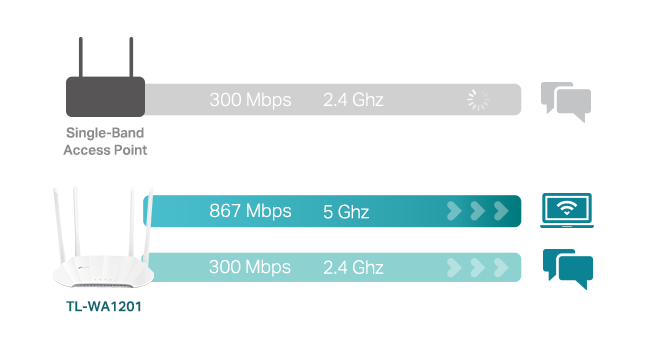
This little beast supports four modes out of the box: Access Point Mode โ turn wired into wireless โ๏ธ Range Extender Mode โ repeat an existing signal โ๏ธ Client Mode โ convert Ethernet-only devices (like a printer or old PC) into Wi-Fi clients โ๏ธ Multi-SSID Mode โ create segmented guest networks with VLANs โ๏ธ I ran this in both Access Point and Extender modes in a tricky layout (concrete walls, multi-floor), and it pushed out clean dual-band signal without any noticeable lag or packet loss. Plus, MU-MIMO and beamforming help direct the signal where it mattersโgreat for multi-device households or streaming-heavy setups. What I Like: Dual-band speeds (867 Mbps on 5GHz + 300 Mbps on 2.4GHz)โsolid for most streaming and gaming Gigabit Ethernet port = no bottleneck on backhaul or client mode Passive PoE supportโclean mounting, especially if you're running it up a wall or ceiling Four fixed antennas deliver real coverage, not just marketing fluff Pro Tips: Pair with a modern router for max benefitโdon't bottleneck this thing with an old base station Use a dedicated SSID in AP mode for clean handoff between routers In Range Extender mode, place it midway between router and dead zone for best balance of signal vs. speed What Could Be Better: Web interface is solid but not quite as slick as newer TP-Link Omada gear Fixed antennas = solid signal but less customization of direction No mesh functionalityโif you want seamless handoff, go Deco instead TL;DR: The TP-Link TL-WA1201 is a super versatile, cost-effective, and stable Wi-Fi extender/access point. Whether youโre bridging old gear, extending signal to a dead zone, or segmenting networks with VLANsโit handles it all quietly and efficiently. No dropped Zoom calls. No gaming lag. Just clean, customizable Wi-Fi wherever you need it.
C**E
Fantastic piece, it's the BOMB!
This piece is the BOMB !! TP-Link TL-WA-1201 I had let two different 'range extender' pieces drive me nuts, their software was hard to use, but once figured out it still didn't work, signal was lame and choppy. So drilled into web and learned superiority of Access Point. Thought I'd try a base monel to learn on. Trust me, TP-Link really knows what they're doing. Instructions were clear, everything I was sent to look for was there, the steps made sense, their website fed back reliably, and within a couple hours IT WORKED! And it waxs LOUD! Signal next to it 76%, outdoors 30-ft from unit is still 65%. Amazing, Software is brilliant, now that I did one, doing the next will take about ten minutes, it's a breeze to work with. BUY THIS, even if you don't need it. Yet. You will, it's a spoiler.
B**R
Purchased to use in Client mode, to get ethernet where I have none
I needed a device that would allow me to connect wired (ethernet) devices to my wifi router located 2 floors above. This router works in 4 different ways and the one I was interested in "Client mode" works perfectly for that and allows me to connect devices on my homes lowest level via ethernet with the assistance of a small ethernet 5 port switch. and that signal transmits from this router to my main WiFi internet router 2 floors above. This Access Point router has very easy to use set up wizards for each of the 4 ways this router can be configured. I followed the wizard for the "Client Mode" and in 5 minutes I had everything connected and talking to each other. Very easy. This TP Link Access Pont uses wifi 5 signals so it is not as fast as a device with wifi 6 ability (assumes you main router is wifi 6 as well). My main internet router usually pulls around 350Mbs speed. My devices on the lower level connected to this via ethernet shows speeds of around 120-140 Mbs, plenty fast enough for streaming hi-res video content. I am not a gamer so I cannot comment on its ability to work seamlessly on gaming, the speed is fast enough but there could be some latency issues with gaming. Latency is not an issues for what I use it for, streaming Hi-rez music and some high rez video streaming. TP_link makes a WA3001 access point which uses wifi 6 which would increase my/your speeds between this and your main wifi router assuming it uses wifi 6 as well. Very pleased with this unit.
S**N
Excellent product
I've recently (last 2 months) bought 2 of these. I use one as an Access Point for cabled connected servers and one as Repeater for some other laptops and devices that are using Wifi. Both AC1200's were real easy to install (although I am a qualified Computer Analyst) and the results have been awesome. The 5Ghz channel on the Access Point is giving me over 260Mbs download on one device alone. I've NEVER experienced such download speeds remotely close to this before. It's a factor 10x better than I've been used to. The Repeater was a saviour for signal loss on Mobile Phones as well some other devices which were getting signal loss due to location of the Router. The Router I was using was an old ASUS Tri-Bandand I've subsequently swapped that out for a TP-Link AX-5400 (Also a Tri-Band) I bought just 2 days ago. Must admit, TP-Link makes installation a breeze on their devices. You can modify your install and customize it if you want so handy for techies too. BTW, an older Desktop is now receiving Downloads at twice the speed just by this switch out of gear. I ended up buying all this stuff because someone in my neighbourhood (new next door neighbour I suspect) is running a powerful WiFi network which was drowning out my older tech network devices according to my Wifi Sniffer. After struggling for a month trying to solve the issues with the older gear, I bit the bullet and replaced all the older network stuff. Very glad I did and very pleased with the results TP-Link have provided me. Should have upgraded sooner :-)
R**N
Works great and easy setup
Need wired internet in my upstairs Ham radio shack to communicate between radio, computer, and other components. The TP-Link TL-WA1201,AC1200 was an economical simple solution.
D**N
Easiest WiFi Setup Iโve Ever Done
I bought the TPโLink AC1200 Access Point to get more reliable WiFi in my office, which is the furthest point from our main router. Setup was the easiest of any WiFi device Iโve owned โ up and running in minutes with zero hassle. Iโm using it as an extender, and the connection is now solid and consistent where it used to drop constantly. Exactly what I needed, and it works better than expected.
D**R
DON'T ENTER YOUR CC NUMBER!!
I set up this using the QR code provided. I was directed to a screen to enter my email and name. Once there, the next screen wanted a credit card number. I felt that was odd but I entered my CC number and within 30 seconds, I received a fraudulent charge alert from my bank for $39.99 at a website I've never visited. This product has been hacked or something else is wrong. I'm returning it as I'm now without my CC for a week until a new one is issued. Total BS!
J**R
Wifi router
Werkt heel goed
D**N
Easy install Wireless Access Point with very good options
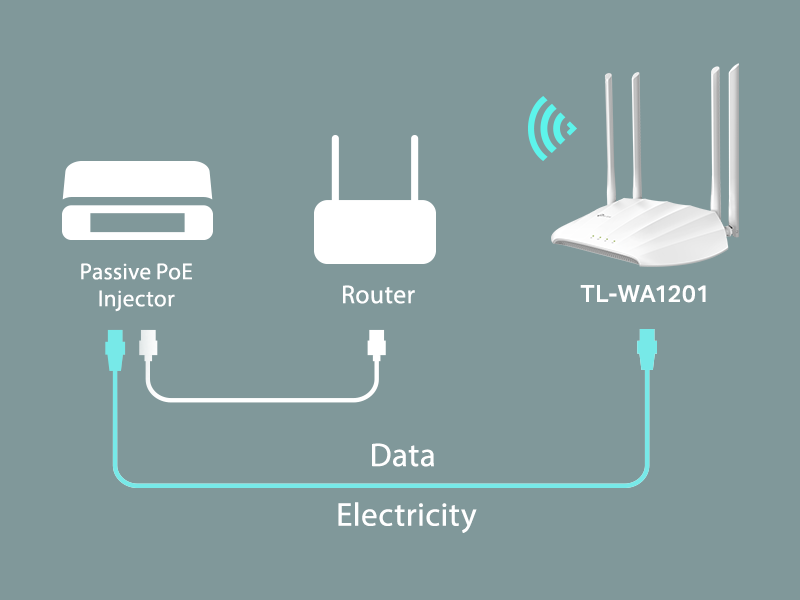
I like this Access Point, it looks like a little alien space ship on top of my DVD tower. I have installed 3x APs in the past and a couple of them were very frustrating to setup. The most annoying requirement was to use an unusual I/P address e.g. 192.168.2.2 This requires re configuring your laptop/PC to match this unusual I/P. With this AP there are no such horrors, you can access the setup page from a PC using Ethernet or WiFi using a laptop or smart phone. it uses the addressing format used by most homes i.e. 192.168.0.XXX The ID and password are on the bottom of the device. Mine I/P was 192.168.0.160 Change these to suit but make sure you write the new details down. You need 2x sets of passwords 1. A user name and password to get back into the setup page. 2. An SSID and a password to enable encryption. The setup menu was very easy to use and worked without any issues. As well as SSID and password you can also select the channel to use for WiFi to avoid conflict with the router WiFi 2.4Ghz and 5Ghz can be separated and given unique SSIDs if necessary. There is also an option for a "Guest SSID" If you do forget the new passwords, reset with the button on the back and start again. Once set up connect the AP to the router via Ethernet cable and you are ready to go. The listing says that the AP supports passive PoE which I've never used and wasn't too worried about. I was pleasantly surprised to find that a tiny PoE injector was included. An Ethernet cable contains 8 wires forming 4x sets of twisted pairs. These are used to send and receive data simultaneously but not all of them are used. PoE sends power to the AP along 2 of the unused wires. This gives you 2 options. Plug the supplied PSU into the AP, the usual method. Plug the PSU into the small PoE adapter. Plug the Ethernet to Router cable into the socket marked "LAN" (Local Area Network) Then plug an Ethernet cable into the adapter socket marked PoE, the other end going into the AP. This made it very easy to mount my AP in the sky on top of a DVD tower with just one Ethernet cable. The supplied PSU lead was not long enough to reach that far. Very pleased with this Access Point 11/7/26 Update I use Powerline adapters to connect to this AP and out to my shed where another wireless AP manages 6-8 IP cameras. I also had temporarily 4 cameras connecting to this AP. I started to "loose" a camera but only when I was using my phone. Google search came up with some suggested changes to the AP settings. I did some changes to the AP settings as suggested by the AI. I normally access APs using my PC. After making some changes I was suddenly unable to access the AP anymore and left it for another day. A day or so later I realised that my phone had stopped connecting to the AP but rather oddly some cameras were still worked fine. I could not connect to the AP via ethernet using a PC, I tried 2 of them. I reset the AP 2 or 3 times no response. I then tried to connect using WiFi and it connected. What seems to have happened is the AP had got locked up mid change to the settings. I had an "allow items" list that contained a few things like my cameras but not the phone. The IP had been reset to none. I made the necessary changes to settings and now all works as it should. Very strange that the Reset button did not work. If you find yourself locked out via PC and Ethernet, try accessing by Wifi It uses the SSID to connect so no IP is not a problem to the AP.
R**N
Excellent item.
Excellent item delivered very quickly. Very easy to set up.
A**Z
Good signal coverage
Excellent WiFi coverage with 4 antennas. I was facing issue for not getting signal after a wall. This AP solves the problem. Ordering again today.
I**A
Legit!
Good Quality!
Trustpilot
4 days ago
2 months ago