Desertcart purchases this item on your behalf and handles shipping, customs, and support to Romania.
๐ Elevate your workspace โ connect more, do more, be more!
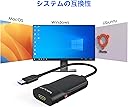
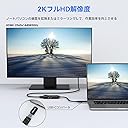
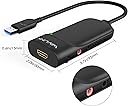
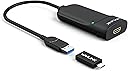
The WAVLINK USB 3.0/USB-C to HDMI Universal Video Adapter is a compact, DisplayLink-certified device that supports up to 6 external monitors with resolutions up to 2560x1440@50Hz. Compatible across Windows, macOS (including M1-M5 Macs), ChromeOS, Ubuntu, and Android, it offers universal USB connectivity (USB-A, USB-C, Thunderbolt) and easy plug-and-play setup with LED status indicators. Designed for professionals seeking to maximize multitasking and productivity, it comes backed by an 18-month limited warranty.


| ASIN | B01CSG7TUC |
| Best Sellers Rank | #72 in Audio & Video Connectors & Adapters #124 in Computer Cable Adapters |
| Brand | WAVLINK |
| Color | Silver |
| Compatible Devices | Apple M1-M5,New Macbook Neo and Intel Macs (with macOS 10.14 or later) /Microsoft Surface line/HP Spectre x360 series, /Dell XPS 13 & XPS 15 / Latitude, Lenovo Thinkpad T series. Latitute 7280/ Latitude 5310 2-in-1; Precision 7730/7750; Laptop 5590, HP Spectre Laptop 13-af001TU/ Spectre x360 13t/ Spectre folio/ Specter x369; Elitebook 840 G5 series/ Elitebook X2/ Elitebook x360 1030 G3/ Elitebook 745 G6/ Elitebook 830 G6/ 2018 HP Elite 800 G4; Envy Geforce mx250/ Envy x360 Laptop (15z-ds100); Z book 15u G3/ Zbook 17 G4, Lenovo Yoga 720-13IKB/ Yoga 730/ Yoga 900-13ISK/ Yoga 910/ Yoga 920/ Yoga 930/ Yoga 940-14IIL; 3rd generation Thinkpad Yoga; Yoga15 Thinkpad Ultrabook Pro; Thinkpad E590/ Thinkpad P72/ Thinkpad T470/ Thinkpad X1 Carbon; Legion Y530; Lenovo C930/ T480s/ X390/ 81N8, Microsoft Surface Book 2/ Surface Go/ Surface Laptop 3; Surface Pro 7,Huawei Macbook Mate10 or later; Google Slate (2019); Chromebook C340-15; SanDisk Cruise Glide; Razer Blade 2017 (gtx 1060); Pixel book go 2019/2020 Compatible Devices Apple M1-M5,New Macbook Neo and Intel Macs (with macOS 10.14 or later) /Microsoft Surface line/HP Spectre x360 series, /Dell XPS 13 & XPS 15 / Latitude, Lenovo Thinkpad T series. Latitute 7280/ Latitude 5310 2-in-1; Precision 7730/7750; Laptop 5590, HP Spectre Laptop 13-af001TU/ Spectre x360 13t/ Spectre folio/ Specter x369; Elitebook 840 G5 series/ Elitebook X2/ Elitebook x360 1030 G3/ Elitebook 745 G6/ Elitebook 830 G6/ 2018 HP Elite 800 G4; Envy Geforce mx250/ Envy x360 Laptop (15z-ds100); Z book 15u G3/ Zbook 17 G4, Lenovo Yoga 720-13IKB/ Yoga 730/ Yoga 900-13ISK/ Yoga 910/ Yoga 920/ Yoga 930/ Yoga 940-14IIL; 3rd generation Thinkpad Yoga; Yoga15 Thinkpad Ultrabook Pro; Thinkpad E590/ Thinkpad P72/ Thinkpad T470/ Thinkpad X1 Carbon; Legion Y530; Lenovo C930/ T480s/ X390/ 81N8, Microsoft Surface Book 2/ Surface Go/ Surface Laptop 3; Surface Pro 7,Huawei Macbook Mate10 or later; Google Slate (2019); Chromebook C340-15; SanDisk Cruise Glide; Razer Blade 2017 (gtx 1060); Pixel book go 2019/2020 See more |
| Connector Type | USB Type A |
| Current Rating | 1 A |
| Customer Reviews | 4.4 out of 5 stars 1,221 Reviews |
| External Testing Certification | Nรฃo aplicรกvel |
| Finish | Hdmi,Mirror |
| Item Dimensions | 8.5 x 6 x 1.6 inches |
| Item Weight | 0.09 kg |
| Item dimensions L x W x H | 8.5 x 6 x 1.6 inches |
| Manufacturer | WAVLINK |
| Mfr Part Number | WL-UG3501H |
| Model Number | WL-UG3501HPDX |
| Number of Items | 1 |
| Number of Ports | 1 |
| Package Quantity | 1 |
| Power Plug Type | Type A - 2 pin (North American) |
| Specific Uses For Product | Monitor, PC |
| UPC | 695536200712 |
| Unit Count | 1 Count |
| Warranty Type | Limited |
S**N
Great for beginners!
I do not know much about laptop systems, but this adapter works perfectly for my needs. It is very easy to use and I highly recommend it.
J**K
Supports Asahi Ubuntu on Macbook Air M1 at 1080p 60Hz!
I have a Macbook Air M1 that is now running Asahi Linux 6.17.0-1001-asahi-arm Ubuntu 25.10. The external display's HDMI cable is plugged into the Wavlink. The Wavelink's USB-3.0 cable is plugged into its included USB-C adapter, which is plugged into a USB-C port on an Anker 6-port USB-C hub. The hub is plugged into the second USB-C port on the Mabook. At first, it didn't work, but after going to the Synaptics website, then to the DisplayLink Ubuntu drivers page, and downloading the "synaptics-repository-keyring.deb" file, then following the instructions, bingo, it started working, there was a second Ubuntu desktop on the external monitor. Stable, colors look right, no evident cursor lag, it just worked. Didn't even need to reboot the Macbook. Slick. Close the lid, and the "main" desktop jumps to the external display. Open the lid, things go back to how they were. The only downside so far is that the 4K external display is getting a 1080p 60Hz signal, which is definitely a lot more useable than no signal at all. Good enough. Though it is kind of hilarious to use a 43" display at 1080p. Until the day comes when the wonderful Asahi team sleuths out HDMI through USB-C on the MBAs, this is a very workable solution. Recommended!
J**S
Updated review, DisplayLink support saves the day - CONNECT A DISPLAY TO TEST!
DisplayLink support was contacted and logs were sent. The support agent said the DL unit reported that no monitor was connected. NOTE: THESE UNITS WILL REPORT THEY'RE NOT WORKING PROPERLY IF NO DISPLAY IS CONNECTED. I use a KVM switch in my setup. By direct connecting the DL unit to the monitor I was able to demonstrate that it worked. I still had a bit of trouble getting it working through the KVM. I was able to get it working though by using a fiber optic HDMi cable from DL unit to the KVM. Possibly the copper HDMI run was too long without the fiber. ***Old Review*** Spent half of a frustrated day trying to get this device to work. Tested on M1 Mini, M1 MacBook Pro, M2 MacBook Air. On all of these machines the DisplayLink Manager requested that I allow USB accessories. This is not required on Desktops, M1 Mini, and was allowed for both the laptops tested. Under system report all three computers showed the DisplayLink Device (WavLink here) was connected properly to the system. I tested using the 1.10 drive and 1.09 driver with no luck. Subsequent internet searches revealed that DisplayLink is no longer working properly since MacOS 14 Sonoma. I was so excited for this hardware to work that the fact that it is no longer working with MacOS really hurts.
B**Y
Wokrs on windows 11. Not on Linux
Works great for windows 11. That was plug and play. Have yet to get it to work on my PCLinuxOS system but my Linux setups have been a hot mess since moving to Wayland. The only way I can get multiple HDMI monitors on my Linux systems is with an HDMI splitter which is not as versatile as this would be.
J**O
Great Adapter for Adding a Bigger Screen to My Tablet
This WAVLINK USB 3.0 to HDMI adapter works as expected and gives my tablet a nice external screen setup. The picture is clear, and it makes the tablet much more useful for watching videos, working, or using a bigger display. One thing I would suggest is using it with a self-powered USB hub or making sure your setup has enough power, especially if you are connecting it to a tablet. Overall, it does the job well and Iโm happy with it.
K**D
WORKS with M1 Macbook Air 2020 and DisplayLink
I spent weeks trying to figure out how the HECK to set up my work Macbook Air to connect to two external displays so I can increase my workflow. After several youtube videos and online forums, I learned the unfortunate truth that the M1 Macs don't support more than one external display by default. I then went on a search to figure out how, if at all, anyone was able to set up multiple external displays. I kept finding videos by companies who were marketing their own products to allow you to have dual displays, however I found that all of these products either had way more than I needed and/or cost an arm and a leg. Now, I don't make much money and getting this figured out would be on my own dime, so I wasn't about to pay more than maybe $50 on what I needed. My company already provided me with an Anker adapter that can charge my laptop, has two USB 3.0 ports, another USB-C port for data, and an HDMI port. I saw from other reviews and videos that you can connect the second hdmi to your adapter via a USB 3.0 port to HDMI, along with DisplayLink. Again, I'm not trying to spend an arm and a leg, so I was hoping any adapter would work, but I was sorely mistaken. I ordered and return 3 different adapters before finally sucking it up and trying to find a better one that could hopefully work. I was happy to find this item with great reviews seemingly matching what I was looking to do and saying that it worked. This item was the cheapest option I've found thus far and so I decided to pull the plug, thinking ahead that if it didn't work again, I would just give up trying and stick with my laptop screen and one monitor. Shipping did take a little longer than I had hoped but wasn't unbearable. I took a breath before I plugged the adapter in and ALAS, it worked IMMEDIATELY!!!! I already had DisplayLink downloaded on my laptop since I was trying out other adapters before this one, so I didn't need to go through all those steps, but I'm certain you WILL need it in order for this to work. The product itself does contain instructions on how to download DisplayLink if it's your first time, so don't worry about having to figure that out. There are also plenty of videos out there to explain it as well. I've experienced no lag with my mouse or keyboard on the second external display, and it's SO nice to be able to finally have two large screens open rather than having to click through several tabs. HIGHLY RECOMMEND THIS PRODUCT IT IS AMAZING!!
C**A
100% funcional, justo lo que necesitaba
Perfecto, funciona de maravilla
C**M
Works as Intended for 3 SEPARATE MONITORS - but WILL stop working permanently at random!
March 15th: Has randomly stopped working again. Do NOT buy this product. Jan 25th Update: 2nd stopped working at random this morning with no changes whatsoever. I'm returning and not giving this product another chance. Appears "StarTech.com USB 3.0 to HDMI Adapter - DisplayLink Certified" does the same thing and I will be giving them a chance as this product must just be built cheap. Good luck guys! *Changed back to 1-star* Dec 2022 Update: The 2nd adapter sent to me has remained working for about 2 months now. Super happy with it (please stay working) - Changing back to 5 Stars Replacement UPDATE 1: Original unit died within 2 weeks and I thought it was ventura 13.0.1 until got a replacement adapter and confirmed it was this unit that died. It works as intended, but I would be ready to ask for a replacement because it seems to die easy. Going to not touch it again and hopefully it'll stay working. ORIGINAL: I've wanted 3 monitors for something but officially apple only supports 3+ on M1 Max and above. Firstly, ignore everyone saying they used this for a second monitor, there's already really simple ways to achieve that that anyone with google can achieve. but to get 3.... it's super tricky. I was about to give up when I read reviews saying to download mac driver on their website? I was ooooaky, and as soon as it download and I approved security to view mac scree, BAM! third one turned on. Good luck! This is the one for 3 extended! NOT MIRRORED, MIRRORED SUCKS
J**S
Bargain multi screen extended desktop
After 10 days of try various cable, docking port and other set ups this adapter has done what I wanted. Now running a Dell Latitude E6430 with built-in display as main screen with 2x Acer K242HL monitors, giving me a 3 screen extended desktop. Easy to set-up. Simply install the drive from CD provided, plug in adapter and monitor and you're good to go. I use USB3.0 connection and not checking backwards compatibility with USB2.0. Also updated my graphics drivers. 10 minutes and I was up and running. And at ยฃ32 it's a bargain. I haven't tested screen rotation and audio output features, I don't need it.
S**T
ใใฃใกใไพฟๅฉ๏ผ๏ผ
windws OSใงใใฃใใไฝๅใใพใใใ ใชใใCore iโฏ 12345ใฟใใใชใจใใใฎๆๅพใซ(F)ใใคใใใคใฏไฝฟใใชใใใใใงใใ ็งใฎใใฝใณใณใฏCore i7 134500ใใใใฎใใคใงFใใคใใชใใฎใงใไฝฟใใใจใใงใใพใใใ ๅฎใไธญ่ฏ่ฃฝใฎใขใใฟใผใฏๅๅฟใใพใใใใชใใ ใใฏ็ฅใใพใใใ ็นใใงใใ็งปใใพใใใใใใคในใฎ็ถๆ ใซใใฃใฆใฏใใใใใใใไฝใๅใใๆฉ่ฝใๅ ฅใใใใใใใใใพใใใ
C**E
Atendeu as expectativas
Estou satisfeito, o produto funcionou perfeitamente!
N**Z
No lo recomiendo
Inestable. Usado durante varios meses en un macbook pro y no hay manera de hacerlo funcionar de manera regular. A veces se conecta y otras veces no.
M**D
Quality of Adapter
Best quality, Go for a buy without a doubts..
Trustpilot
2 weeks ago
1 month ago