Buy anything from 5,000+ international stores. One checkout price. No surprise fees. Join 2M+ shoppers on Desertcart.
Desertcart purchases this item on your behalf and handles shipping, customs, and support to Romania.
✨ Elevate your workspace with sleek precision and effortless style ✨
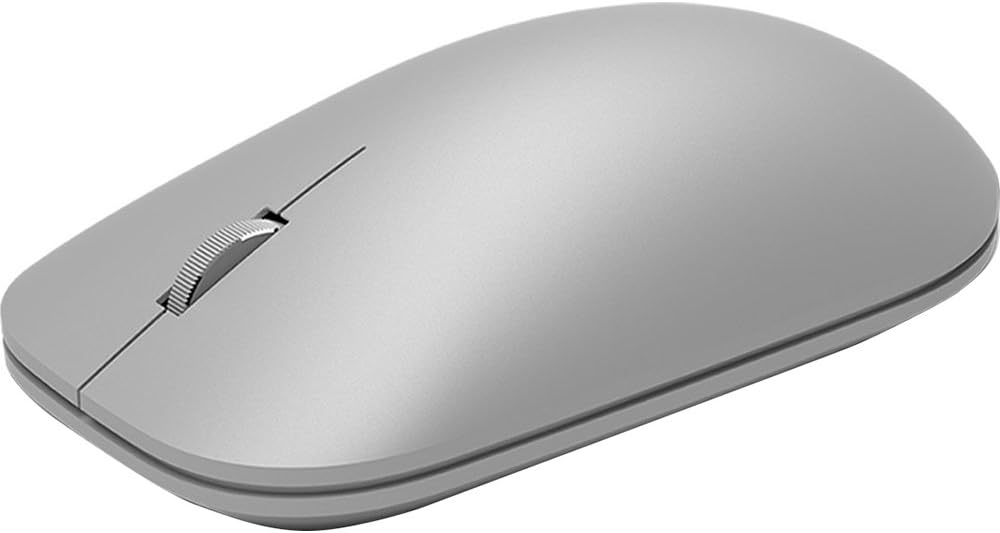
The Microsoft Surface Mouse is a lightweight, ambidextrous Bluetooth 4.0 mouse compatible with Windows, Mac, and Android devices. Featuring a metal scroll wheel for precise control, ergonomic design for comfort, and up to one year of battery life, it’s the perfect minimalist accessory to complement your Surface or any modern workspace.


| ASIN | B01MG4JB12 |
| Additional Features | Bluetooth |
| Antenna Location | Office |
| Are Batteries Included | Yes |
| Are Batteries Required | Yes |
| Best Sellers Rank | #1,256 in Computer Mice |
| Brand | Microsoft |
| Built-In Media | Mouse, batteries, quick start guide, warranty guide |
| Button Quantity | 4 |
| Color | silver |
| Compatible Devices | Personal Computer |
| Connectivity Technology | Bluetooth |
| Customer Reviews | 4.5 out of 5 stars 899 Reviews |
| Enclosure Material | Metal |
| Global Trade Identification Number | 00889842103090 |
| Hand Orientation | Ambidextrous |
| Hardware Platform | Laptop, PC |
| Item Dimensions L x W | 4.53"L x 2.52"W |
| Item Type Name | Microsoft Surface Mouse |
| Item Weight | 0.2 Pounds |
| Manufacturer | Microsoft Surface Accessories - PC |
| Mfr Part Number | WS3-00001 |
| Minimum Required Operating System Version | Windows 10 |
| Model Name | Surface |
| Model Number | WS3-00001 |
| Movement Detection | Optical |
| Movement Detection Technology | Optical |
| Number of Batteries | 2 AAA batteries required. (included) |
| Number of Buttons | 4 |
| Operating System | Windows 10 |
| Power Source | Battery Powered |
| Range | 10.0 meters |
| Special Feature | Bluetooth |
| Style Name | Modern |
| UPC | 889842103090 |
| Warranty Description | 1-year manufacturer warranty |
I**E
Feels good, operates well, minimalist, what you see is what you get.
When I bought this mouse a couple weeks ago I had done enough research into it and knew exactly what I was getting prior to buying it: a very simple mouse with no frills or extras to it. The aesthetic is what mattered to me and was a joint purchase with the Surface Keyboard. The major areas that actually factored into my rating were how well it operated, how it felt in the hand, and how the buttons and scroll wheel felt. Review may be modified later once battery power has been adequately determined since it's too early to tell. Operation - No real operational issues therein. I do feel it's a little bit sluggish once in a while when it's been sitting idle for a bit and then moved, but this is expected behavior of nearly all Bluetooth devices that have been sitting idle. The thing works as a standard Bluetooth device and will pair with pretty much everything, be it your phone, tablet, Mac, or regular PC/laptop with Bluetooth capability. Feel - The contours feel pretty good in the hand and the weight just right, if only on the light side of things. It glides pretty well over most surfaces, but I would still recommend a mouse pad for best results. Buttons - Clicks feel just right with a light press to operate while still resting one's fingers on both without fear of mis-clicking something. Scroll Wheel - The wheel is the only thing made of metal on it. The scrolling has good feedback, but the middle-click feels a little tight. This is probably intended in order to prevent accidental clicks while scrolling. In the end, it's just a very standard, very simple designer Bluetooth mouse. What you see is what you get here and the aesthetic and feel would really need to be the only reason for buying it. It's perfect for an office environment and/or those who are seeking to create a minimalist desk, especially when paired with the Surface Keyboard.
B**H
Highly recommended for those who want to match the look and feel of the Surface line
All of my devices have minimal USB ports available (SP4, SB, Lenovo Helix) and Bluetooth mice have become a necessity in my life. Before purchasing the Surface mouse I used the Sculpt Comfort, designer Bluetooth, and Arc Touch SE as my mice and they were all quality options but didn't match the look and feel of the Surface line. I did my research and found the designer Bluetooth mouse is the precursor to the Surface line but this new model has a higher internal hardware grade and more desirable aesthetics (IMHO). Over the last month I've come to appreciate the slightly larger form factor as it fits more comfortably in my hand and appreciate the matching Surface design. Pros: Quality build and higher end technical components, long battery life, uniform Surface design aesthetics. Cons: higher price than other mice with similar functionality (paying for looks and Surface name), requirement to pair again if switching devices (a Bluetooth protocol requirement that exists on all Bluetooth mice)
A**R
Great to use for any computer!
I personally love this mouse! It is really ergonomic and the surface texture feels good in the hand. The color also works really well with the surface studio computer and keyboard. I tend to like a simple mouse that doesn't have too many functions and this is very minimal and easy to use. The scroll wheel feels really nice as well as the click feel, not to mention the sound is a good click that isn't too loud. The battery life is great and very rarely need to change the batteries, maybe once or twice a year if you are using it a moderate amount. I don't do a lot of gaming with it, mainly work. That being said, I'm sure it would be great for casual gaming if needed. Otherwise it is a great all-around mouse that would be a great addition to any desk setup.
W**F
Minimalist Mouse
I can't seem to find a wireless mouse that just feels neutral during long use. The Surface mouse comes close though. Logitech goes for what I guess are supposed to be ergonomic shapes these days, but with the way I hold a mouse (light outside squeeze) they end up feeling too busy and awkward. All that said they tend to have the best inputs as far as button pressure and scroll wheel damping go. In comes the Surface mouse. The shape feels nice and undistracting, the materials are high quality, and the design is visually pleasing. All the inputs feel really stiff when you first get it. The click effort is higher than most mouses and the scroll wheel is really damped. In time the scroll wheel loosens up though. I like the scroll wheel from both a design and tactile standpoint though. Being metal it feels incongruous with all your other computer input devices and gets cold. It's just distracting. You notice it. It also looks a little silly, this chrome thing in the middle of the minimalist mouse. If they do a 2.0 version of the mouse I'd love it if they replaced it with a plastic wheel in the same pleasing light grey for a monochrome look. Ok, all that said it's a fine mouse. A great option if visual design matters like for a receptionist or client meeting room, or if you are like me and find a lot of modern mice over designed. Is it overpriced? Give me a break, if you are using it everyday for a couple of years and you like it rather than just tolerate or dislike another mouse, it's dirt cheap. It's different enough from other mice on the market where that could easily be the case.
J**T
Beautiful Look And Feel
The fit and finish is on par with the Apple Magic Mouse 2, and maybe even a step above. It doesn't have the aluminum base, but the plastic is finished in a finely matte frosted treatment that makes it feel almost like the Alcantara material they use for the Surface Keyboards. The metal scroll wheel literally feels like a high end watch crown. Like smooth, heavy, well-engineered metal. If you're like me, you'll find yourself scrolling up and down even when you don't need to. I also really enjoy the aesthetic of both this mouse and the companion keyboard. They look timeless and modern atop a desk - I just wish they made the keyboard in a mechanical version. I've tried gaming mice in the past and found them to be either too bulky, over-engineered, too small, or some combination of the three. This mouse feels large enough to have been designed for actual human hands, without having too much bulk on top. It's not a gaming mouse, but I have no issues gaming with it at all. It also happens to be as precise and smooth as any gaming mouse I've ever used - and doesn't require any proprietary software to get it tuned in. It works right out of the box.
C**O
Elegant and Low profile
My favorite low profile and elegant Surface mouse choice!
M**T
PERFECT mouse
One of my biggest pet peeves is a dirty, sticky mouse. After 8 hours of grueling work, most of the mice I use at the office end up sticky and slimy. Every time I'd hear "here, let me show you" followed by a co-worker grabbing my computer mouse, I'd wince in embarrassment. If you could only see how much masking tape I used to cover that disgusting slime coating on my mice. Sometimes it would get so bad that one my drive home from work, I'd transfer this shiz onto my car's steering wheel! After suffering long enough, I decided to give this mouse a try. Low and behold, this thing is a god-send. The battery life is excellent, pairing was easy, the left and right mouse-click noises are satisfying and pointer accuracy is top-notch...most importantly, no more mystery mouse slime. 5 stars for sure from me!
B**R
A really nice looking version of the free mouse that comes with desktops.
Update #2 (first update at the bottom): I wanted to update my impressions about the feel of the mouse, and also a slight problem I've discovered with it in some scenarios. I also wanted to add a few photos of it next to the new Surface Ergonomic Keyboard, which hadn't been released at the time of the initial review. When I first wrote this review, it was after about 24 hours of ownership, 16 of those or so would have been use. For a simple mouse like this, I didn't really think continued use would have much to add so I didn't delay writing the review. At the time, I gave it two stars because it felt very uncomfortable to me. Perhaps a week later, after adjusting my seating height and getting more used to it, I updated it to three stars because it was becoming much more comfortable. Now, several weeks later, I actually find it quite comfortable. It's certainly not the most comfortable mouse I've ever owned (perhaps that'd be the Deathadder or the MX Master), but having adjusted to it, I would definitely say I find it comfortable now. It's still small, so large guys may find it to be a bit unnatural to hold, but for my 5'10 average sized self, it's grown on me. So I wanted to address the comfort issue. I have discovered a slight problem with the mouse though, or at least, a problem for people who need a great deal of precision (Photoshop, first person shooters, etc.). It takes quite a bit of travel to move the cursor one notch over to the left or to the right if done very slowly. This doesn't happen with my other mice and it doesn't even happen to this mouse in vertical movement (ironically, given wide screen ratios, this is the one you need less precision on). It's 100% repeatable on my particular mouse. It doesn't feel like a bug. It seems too consistent to be a bug. For reasons unknown to me, Microsoft seems to have intentionally dialed in a sort of dead zone for it to ignore minor lateral/horizontal input before it moves. For casual users, this makes no difference at all, and you'll likely never even notice. But in graphics, or certain kinds of video games, you really want to get to a single pixel over and it's quite difficult, at least if that pixel happens to be on the left or right of wherever you currently are. These two observations balance themselves out, in my view, so the three star rating remains (for now). Ultimately, this is a mouse that was designed from day 1 to be a good looking casual computing tool. It is an upscale version of the very affordable Designer mouse and it shows. The thing is, because this is a Surface accessory, and because it will eventually be packaged with Surface Studio computers, I can only understand this to be a product aimed at professional users and so I have to evaluate it for their needs. For them/us, this unfortunately is not really up to the task. To get a mouse that looks pretty good next to your Surface Keyboard and Dial (both of which I'm using right now), I recommend the Logitech MX Master in "Stone" color. I liked that mouse so much I bought two of them, the black/bronze and after getting the Surface Keyboard, the Stone to match. Now, having observed the confusion on my initial review in the comments, I'm inclined to add a separate conclusion for casual users who just like how it looks. For you, I'd give it four stars. It does what it needs to, it's comfortable (after an adjustment period, anyway), it's got a good battery life, and arguably most importantly in this segment, it looks good. Do keep in mind, however, you can get almost the exact same mouse for about half the price, albeit in black, with the Designer Mouse. You can also get it as part of a solid value package deal with the Designer Keyboard, which is also pretty similar to the Surface Keyboard (non-Ergonomic), although the Designer Keyboard is a bit more space conscious than the Surface version. So you can have a matching set for quite a bit less, although it'll be in black. (Original, unedited review) I purchased all of the new Surface peripherals that are available today for my desktop and Surface Pro 4, including this mouse. I mostly bought it because I thought it looked beautiful in photos For reference, I mainly use an MX Master for my workstation and a Razer Ouroboros for gaming. Unfortunately, it's been a bit of a disappointment. First off, it looks like it's milled from a block of aluminum, and it actually does look great in real life, but it's just plastic. But I can get over that--metal might even be cold to the touch and a downside. The real problem is twofold: the lack of buttons and the size/shape. The lack of at least a forward and back button is pretty much unforgivable in a device aimed at professionals. On my MX Master, I've got three buttons (back, forward, and task view) as well as a lateral scroll wheel, all of which I use. I can settle for a forward and back button, but alas, you get none. The second problem is even more of an issue. It's far too small for my 5'10 male hands. I'm basically enveloping the whole mouse with my hand. I actually prefer ambidextrous mice and use a claw grip, so in theory this is set up for me, but my fingers are hitting the very outside of the buttons. There is a bright side though. Microsoft doesn't officially say this mouse will work on glass, but having studied the sensor beforehand, I theorized it did, so I went ahead and tried it on my glass table, where it worked fine. I can't guarantee this will work on thinner glass, but it's promising. Ultimately, this mouse is, I'm sad to say, a really nice looking peripheral that really has more in common with the free opticals that come with desktops these days. I suppose that shouldn't be too surprising since it's just an aluminum-painted version of the black "Designer" mouse that goes for quite cheap here on Amazon. Not only is it skippable, I'd say that if you're going to be using your computer for 8 hours a day, as I'm assuming future Surface Studio users will be, it's almost mandatory to avoid. I might keep it around as a portable mouse for my SP4, but it's back to my MX Master for now. Update: I've spent a little more time with the mouse and decided to move it to 3 stars. I was in between 2 and 3 to begin with, but what really changed it for me was adjusting the height of my office chair, specifically lowering it an inch or two. I'm realizing that with this long, but thin, mouse body I shouldn't be approaching it from the same angle as my chunky "pro" mice. Coming at the mouse sort of dead on makes it worlds more comfortable. It's still too small for me, and that's a problem because I think I represent a pretty ordinary size, but it's no longer very awkward to use. I'd also like to emphasize that this is a pretty good sensor from what I'm feeling. I do use mouse pads in my office, basically my entire desk is covered in Corsair black pads, but it has performed what MS said it would in terms of working well on a variety of surfaces (no pun intended). Last night after writing this review, I decided to give it another short on my Surface Pro 4, using it on my bed cover before going to sleep and it tracked just fine there too, so between glass and uneven bedspreads, this should work pretty much anywhere you would hope it would. It's not all rosy updates though. I decided to give Deus Ex: Mankind Divided a shot with this mouse, thanks to my newfound epiphany on seating positions. It's passable, and in fairness, it's not intended for gaming, but I'm going to say it's pretty below the bar here.
M**B
Connection issues
This piece may be defected !
A**P
Loved it
Premium quality and highly responsive. But if you are inactive for a few minutes I think it goes in some kind of sleep mode to save the battery. Then you need to move the mouse a little to awake it.
G**N
Great Bluetooth mouse
Great mouse. It is on the lightweight side but it is perfect for me. Batteries add enough wait so you still feel the mouse. The mouse is made of good plastic. It tracks great. I love the scroll wheel, it is metal, very smooth and quiet. Bluetooth pairing was simple and works flawlessly for me. Love having a Bluetooth mouse for my laptop, no more dongle!
V**M
No me arrepiento de pagar el precio del periférico
Un muy buen producto, cómodo, fácil de usar, elegante. Un ratón caro pero que vale cada peso por su calidad.
T**J
It just connected so well with my Surface!
Looks elegant and is fit for purpose.
Trustpilot
3 weeks ago
3 weeks ago