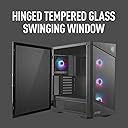
⚡ Dominate your desk with style and unstoppable airflow!
The MSI MPG Velox 100R is a premium mid-tower gaming PC case featuring a tempered glass front panel, four 120mm ARGB fans, and mesh panels designed for optimized airflow. It supports liquid cooling with up to a 360mm radiator, includes a vertical GPU mount, and offers USB Gen2 Type-C connectivity. Designed for both aesthetics and performance, it provides ample space and cable management options to build a powerful, visually stunning gaming rig.


| ASIN | B09HRQQ18B |
| Antenna Location | Gaming |
| Best Sellers Rank | #959 in Computer Cases |
| Brand | msi |
| Case Type | Mid Tower |
| Color | Black |
| Compatible Devices | ATX, Micro-ATX, and Mini-ITX motherboards, graphics cards, liquid cooling systems, 2.5" and 3.5" storage drives |
| Cooling Method | Air, Water |
| Customer Reviews | 4.6 out of 5 stars 429 Reviews |
| Enclosure Material | Tempered Glass |
| Fan Size | 12 centimeters |
| Hard Disk Form Factor | 3.5 inches |
| Internal Bays Quantity | 1 |
| Item Dimensions D x W x H | 18.66"D x 9.09"W x 11.42"H |
| Item Weight | 8.64 kg |
| Light Color | RGB |
| Manufacturer | MSI |
| Material | Tempered Glass |
| Mfr Part Number | MPG VELOX 100R |
| Model Name | MPG VELOX 100R |
| Model Number | MPG VELOX 100R |
| Motherboard Compatability | ATX |
| Number of Fans | 4 |
| Number of Items | 1 |
| Other Special Features of the Product | RGB Lighting |
| Power Supply Mounting Type | Bottom Mount |
| Recommended Uses For Product | Gaming |
| Supported Motherboard | ATX |
| Total Expansion Slots Quantity | 7 |
| Total USB 2.0 Ports | 4 |
| Total USB 3.0 Ports | 2 |
| Total Usb Ports | 4 |
| UPC | 824142252321 |
| Unit Count | 1 Count |
| Warranty Description | 2 year manufacturer |
A**R
Year end review
This case is great. I have had this case for a year with the fans that it came with only and my huge cpu fan because the 5900x runs hot. I haven’t had any airflow trouble or temp issues and i’m running a 4070 ti with 32 gb ram. It looks great and I think is perfect size, enough space to build, especially if it is your first time. Very happy with the overall design and the rgb features that it has. Really wont be going wrong getting this case.
N**N
Vertical GPU is beautiful
Man! the tempered glass really makes the colors pop. I'm loving this case. I used the MSI extender pcie 4.0 cable to do the vertical mount. The bracket comes with the chassis. The cable is pricey and as a lot of people would not use, it is not included. The pictures barely do it justice. A video would be better. My rear fan is currently set to CPU Temp. I can change it to color swirl now. I was watching it for a few days. It stays green even when playing Starfield @ 4k. CPU core temp is a frosty 32'C thanks to the MSI 360 cooler on the CPU. This is a total MSI build. Intel i7-10700K on a Z490 MSI MPG Gaming Pro Wifi, 32Gb of overclocked Ram, the GPU is a MSI rt6800XT. The CPU vertical makes the remaining slot access real tight but I was able to put in a PCIe 4.0 to m.2 adapter with a 2 Tb wd black SSD on a short profile card. With TWO M.2 slots on the MB, I'm now at 4TB total. The case includes an RGB controller. The motherboard has two Jrainbow jacks. I'm not bragging, I'm just darned happy I've been fixing computers since they filled a room. True story - I like MSI because the 1st time I saw one of their motherboards it was junk, the old microstar label. That was a long time ago. About 1987. Next board I saw looked better :-) and it went up at every release. They have grown into a top flight manufacturer. I have built several systems around their products for family and friends. Only motherboards I use.
R**S
Big enough
UPDATE: I will say that the RGB port went out like 6 months ago on my case. The case still looks good but completely black with the RGB hud that doesn't work. Also, cleaning the front of this case, i have yet to figure out how to take the front off to clean it. I love the case and all the fan colors, the only thing I would say, is that the rgb hub on the back has a 3 prong and the mother board I purchased came with a 4 prong. So make sure you buy an adapter or splitter to use for the motherboard. It took me longer to build because I had to order more parts and wait on those to arrive to finish the build.
J**E
Best case I've owned so far
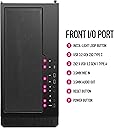
I've built a lot of computers for people, and I've worked with tons of different PC cases, but this case takes the cake for me. I had never really had a nice case for myself, but after building a fancy new PC for someone recently, I decided it was finally time for me to treat myself to a new rig. I sifted through different cases for a while before finally coming across the MSI MPG Velox. Some things that caught my attention were: 1. The tempered glass side pannel is held shut with magnets and swings open easily without the need to undo several screws. This makes it super easy to work on the computer or make quick adjustments to things. 2. The case has a small window that lets you show off your PSU (while still hiding the cables) I love being able to see the graphics on my PSU 3. Lots of ports and buttons on top of the case! :D Power button, restart button, led control button, two regular usb ports, a usb-c port, and your headphone and mic ports. 4. A cool little rgb strip on the side. Everything about this case feels sturdy and premium. I'm really glad I finally bought one for myself.
H**K
Things good to know...
There’s not really anything bad about this case if you want to build a good gaming PC albeit one caveat which I’ll mention at the end. The MSI Velox 100R comes with a bracket for mounting a video card vertically in the case. Depending on your configuration this could be bad, good, or necessary. The problem is this, the necessary Riser Cable is not included with the bracket. So, if you chose to mount your video card via the bracket here are a few things to note about this. First, be careful about buying any third-party cable of low quality which can result in strange issues when you operate your system. Plus, note the portion of the cable that mounts to the bracket. The holes may not be a good match to mount securely. Also, be careful to purchase the proper Riser Cable that is compatible with the PCIe version of the motherboard and video card used. For example, you don’t want to use a PCIe 3.0 Riser Cable with a PCIe 5.0 motherboard and a PCIe 4.0 video card. It will work, it is backward compatible BUT this will inhibit the PCIe 4.0 video card from reaching full performance by half and wasting a lot of bucks spent on expected video card performance. The same advice applies if the video card is mounted directly to the motherboard. More or less, the motherboard PCIe version must be higher than any PCIe version device plugged into it to get full performance, including connecting cables in between. This brings me to the point. There is a high quality PCIe 4.0 Riser Cable preferred for the Velox 100R available from MSI that can be properly mounted to the bracket (it matches the bracket mount) which will be fully compatible with a PCIe 4.0 video card on a PCIe 4.0 or 5.0 motherboard (my situation) but there was an issue discovered while trying to purchase the cable. MSI, at the time this post was made, only used Paypal as their means for online payment. Typically, a one-time payment can be made through Paypal WITHOUT having to open an account with Paypal and this is echoed during the MSI purchase process as “Don’t have a Paypal Account? No worries, PayPal would also let you pay with Debit or Credit Card. And here is HOW.” Clicking on HOW (it was a link) displays a pop-up showing the one-time purchase button labeled “Pay with Debit or Credit Card” and the remarks “Once you have selected this option, you will be moved to the following screen where you will be able to enter your credit card information WITHOUT needing a PayPal account.” But this wasn’t the case, after clicking the “PayPal” button the next pop-up labeled “Check out as a guest” requested my email address. After entering the email address and clicking “Continue to Payment” the next pop-up display wanted the credit card information to complete the purchase BUT the only button available to click at this point was labeled “Create Account & Continue” or a link to log into a PayPal account. There was no option to just continue with the purchase without opening an account (this process began to smell a bit). I tried the available button which did create an account with PayPal (and was later deleted). I even tried different browsers to confirm it wasn’t a browser issue. I have made many one-time purchases from other web sites using the one-time option during the Paypal purchase process but strangely this was not available during the MSI purchase process even though it is offered. When MSI was contacted about this they mentioned “PayPal is currently our exclusive method of payment until further notice.” In their response MSI did not discuss the faulty one-time purchase option explained to them. It’s a shame you’re FORCED to open a PayPal account to do business with MSI. My advice is you had better read closely the user agreement for Paypal and be sure it is acceptable if you choose to keep an account (the Devil is in the details). I’ll probably go third party to obtain the Riser Cable at this point. After decades of building PC’s my first experience with an all MSI build may very well be my last. Now you know!
S**M
Awesome
Absolutely great. Front panel has everything I need, and MSI delivers it all very well. Having the RGB hub for all the lights allowed me to dismantle and daisy chain them all after connecting one to the motherboard. Now the software from MSI functions properly and fully. 4 fans it comes with which is plenty you can add more on the side or even bottom, if you like. I believe a total of 7 fans can be mounted. Building was pretty straight forward and nothing to difficult to understand. This is my first build. The case also easily hold a 340mm radiator for cooling and larger video cards (graphic card). I have an Asus 4060 TI and it holds it well with much room to spare. I really like this MSI case.
K**A
Love it so much!
I love this case so much. I love the door that you can open and even take off to make it easy to get into the case when working on it. I also love the thumb screws just makes life so much easier then trying to find a tool to take the screws out. I will say it was bigger than I thought it was going to be. I wouldn't really say it's a mid tower because I have other mid towers that are so much smaller than this case but it still worked out. It also has so much air flow. I definitely think it's worth the price!
D**O
Nice Case!
The Good- - Aesthetically...really nice looking case, very stylish. - The glass door has a handle! Thank the maker, so many cases lack a simple handle and it's a great thing to have. - Airflow is...ok. I'll be honest, this is not a high airflow design. I think out of all the MSI cases on the market here, this looks like, at least designwise, the best at airflow. - Quite spacious. Lots of room to build, and wide, allowing for large CPU cooling towers. - Back panel is magnetic. No more of those tricky hooks that have been the norm on cases for decades. Getting the panel off and on is not a hassle. - Build quality feels pretty good. - The Bad - Nothing right now. Again, bear in mind if you want copious airflow, this might not be the one. The Ugly - - Nothin
T**D
Fantastic Case - Well Designed
This case was a pleasure to work with. It is well designed and layed out. Easy to get access to parts from the front or back, with a generous amount of room to work with in the power supply area. I really liked that it came with cable management, and rubber-sided cable pass-thrus to the front of the case. The RGB controller easily powered all 10 fans that I ended up putting into the case (including the liquid cooler for the CPU). I ended up removing the hard disk cage (I used SSD drives onlye) which provided even more room for the cables coming out of the power supply.
V**N
Must Buy Product
Durable: Built with high-quality materials, ensuring long-lasting performance. Spacious: Offers ample room for components and easy cable management. Stylish: Sleek design with modern aesthetics that complement any setup. Efficient Cooling: Excellent airflow with multiple fan mounting options. User-Friendly: Easy to assemble with well-designed features for hassle-free installation
B**Z
Excelente gabinete
1. Esta hermoso el diseño 2.viene con 4 ventiladores argb y tiene espacio para poner otros 3 arriba y 2 más por el costado dentro 3. Espacio para cualquier cosa, tengo una rtx 4080 y en mi gabinete anterior no había,en este de sobra cabe. 4. Sé siente de excelentes materiales y se ve que es duradero
P**R
Looks stunning. Feels premium. Loved it.
Pros: Easy to setup. Lot of online tutorials. In-detailed Manual available online. Screws and nuts of premium quality. Cons: Cable management could have been better. Mystic light not working for some reason.
J**E
nice mid tower case
it comes with 4 rgb fans and the chip for rgb is in the case so no need to buy one but a fan pover distributer is needed if u dont have many on your motherboard nice and cleen easy to open
Trustpilot
3 days ago
2 months ago