Desertcart purchases this item on your behalf and handles shipping, customs, and support to Romania.
🚀 Elevate your desk game with the ultimate Thunderbolt 4 powerhouse!
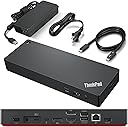
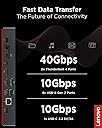
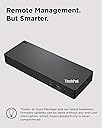
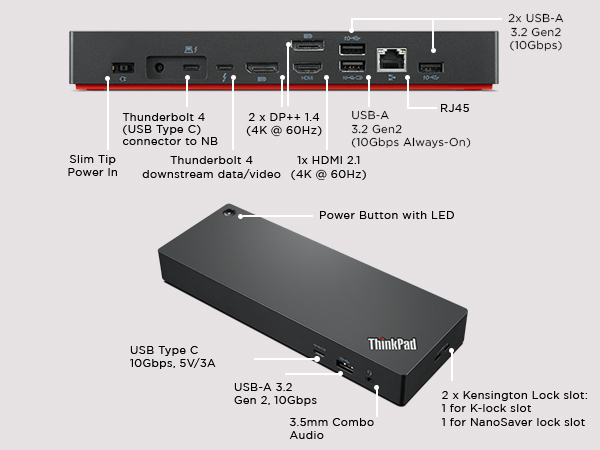
The Lenovo ThinkPad Universal Thunderbolt 4 Dock is a premium docking station designed for professionals seeking maximum productivity. It supports up to four 4K displays or a single 8K display, delivers lightning-fast 40 Gbps data transfer speeds, and offers dynamic power charging up to 100W. Compatible with Thunderbolt 3/4, USB4, and USB-C Windows systems, it features smart remote management for seamless firmware updates and a comprehensive suite of ports to connect all your essential devices.


| ASIN | B09GJJ5C32 |
| Best Sellers Rank | #289 in Computers & Accessories ( See Top 100 in Computers & Accessories ) #39 in Laptop Docking Stations |
| Brand | Lenovo |
| Built-In Media | Item |
| Color | Black |
| Compatible Devices | MacBook Pro |
| Customer Reviews | 3.9 3.9 out of 5 stars (328) |
| Hardware Interface | Thunderbolt 3, Thunderbolt 4, USB Type C |
| Item Dimensions L x W x H | 6"L x 3"W x 1"H |
| Item Type Name | Lenovo Thunderbolt 4 USA Docking Station (40B00135US) With 135W AC and Power Cord |
| Item Weight | 1.2 pounds |
| Manufacturer | Lenovo |
| Mfr Part Number | 40B00135US |
| Model Number | 40B00135US |
| Number of Ports | 11 |
| Total Number of HDMI Ports | 1 |
| Total Usb Ports | 5 |
| UPC | 195348677516 196271925361 195348677271 |
| Unit Count | 1 Count |
| Warranty Description | 3 Year Manufacturer |
| Wattage | 100 |
R**W
Lenovo Thinkpad Thunderbolt 4 Dock does support HDMI 2.1 output with 4k@120hz to LG CX
Recently want to upgrade my Lenovo Thinkpad TB3 dock to this new version, but I found even it fully support Lenovo's own legion laptop with HDMI 2.1 over 4k@120hz. I checked the display info, it shows the card is wired through 'display port' internally. confirmed in game, it's just 4k@120hz, no G-sync, I think it's a limitation on LG CX, it's a special protocol used by LG and nvidia to arrange G-sync compatible. It couldn't output any HDMI signal from my Intel 2019 MacBook Pro 16. I had to use a downstream TB4 port on this dock then connect another USB-C to HDMI 2.0 cable and output to my tv, of course it's limited to 4k 60hz However, it does support my Intel 2020 MacBook Pro 13 and 2021 MacBook Pro 16 which is very strange. Of course, all of them are HDMI 2.0 due to limitation of MacOS And it does USB PD charge with 92w to MacBook Pro but it can't deliver any power to its own Lenovo Legion 7i, even though Legion can support 100w PD charging from TB4 port. Now I'm very confused by this dock. btw, firmware updated to newest 1.07 on lenovo website. Update on 6/5/2023: After a firmware update a while ago, it finally support M1 MacBook output 4k@60hz directly from HDMI port, but too bad due to Mac limitation, it's only HDMI 2.0 signal so no 4k@120hz. But I do "solve" this problem by recent hack from community using a special adapter to convert TB/DP alt signal to HDMI 2.1, I won't go into details, just search Thunderbolt -> HDMI 2.1 solution for M1/2 Mac for solution
M**T
It actually works
I have both a Lenovo X1 Carbon Gen 9 and 10, and I am able to run two external 4k displays (3840 x 2160) at 60Hz over DisplayPort (in addition to the built in display). It also handles all of my USB devices just fine. I'm running Ubuntu Linux on both laptops. I was pretty confused about USB-C vs Thunderbolt, and I had been using the "Cable Matters 8-in-1 Portable 40Gbps USB4 ... , Compatible with Thunderbolt 4" dock but I was only able to reliably get one external 4k display working at 30 Hz. I could occasionally get 2 external 4k displays working at 30 Hz, but I couldn't reliably reenact the magical incantations necessary for this.
E**K
Need to have products for the US if sold in the US
I bought my first Lenovo ThinkPad Universal Docking Station in November 2023, when I bought a new Lenovo Laptop. I registered my ThinkPad with Lenovo and it had a 3 year warranty on it. They thought is was odd because it was set up for Australia they told me by the serial number. I was told to just update the firmware & drivers and it should work fine. Lenovo didn't know much about it, but updated drivers and firmware and told me I had to deal with ThinkPad if I was having issues with it. When I contacted ThinkPad they refused to help me and told me Lenovo had to help me. Went round and round for 6 months. I wasn't certain it was the docking station and not the laptop, but eventually got there. I remembered a week or two ago, when it wasn't working right (The ports on the docking station worked intermittently, and it was getting worse and worse.) that I had an Asurion Policy on it. Asurion took great care of me and had me mail it to the manufacturer. They kept it for over a week and the end of the 2nd week Asurion sent me an email saying they couldn't fix it and sent me my money back. So, I bought another one from the same seller and this one when I registered it said it was for Germany. It was starting to goof up on the same way and I returned it. I bought a used on ebay that is registered for use in the US and still has some warranty left on it. A lot of good that will do with ThinkPad refusing service, but at least I know it is for U.S. use. If you get one for the US it is an great little docking station, but my older HP docking station did better than two made for other countries.
S**T
Does not charge all ThinkPads
This unit will not charge a ThinkPad P16v Gen 1 through the Thunderbolt port, despite what Lenovo sales support told me. For the right laptop, however, it appears to be good quality. Understand that there is only one HDMI port, so if you want two external monitors that connect via HDMI, you must plug one of the monitors directly into the HDMI port on your laptop. If your monitors uses Display Port connections, there are two of those on the brick. I returned this and bought the Thunderbolt 4 which has a separate charging cable from the brick.
J**W
Exactly What you need for laptop plus two Monitors
Exactly what I needed. My set up is a Lenovo lap top which I have on a lap top stand. I hide this underneath the stand so I can free up more space. I have two monitors (Laptop sits in the middle of the two monitors) - wireless mouse and keyboard. All ports hold all of it. Excellent set up for folks with more than one monitor.
M**K
This is the best dock I've owned by far
So I've got both Ryzen and Intel laptops and even though many of my docks worked okay, they had one or more issues with my dual 34" 3440x1440 144MHz setup. Most won't output the 100W PD I need. Others would have graphic issues or audio cutouts - all sorts of things would crop up. This Lenovo dock has worked really well for me. I did run into some issues where my webcam mic would just stop working on calls, but a firmware update a month or two ago fixed it and it has been solid. Really pleased with this unit.
D**I
Worked with Lenovos, not as PnP with other makes.
If you own one or more Lenovo laptops, ignore the stars and buy this; we use the "smart" (remote-admin) version of these docks at work with our Thinkpads and they're perfect. This gets a 3-star review from me due to the behavior trying to use it with pretty much any other brand, such as my personal Dell laptop at home. I bought this to allow either my home or work laptops to use my multi-monitor desktop setup, with keyboard, mouse and outboard audio, only needing to swap one cable to plug in the laptop where I needed the extra real estate at the moment. However, while the Lenovo dock worked fine with any ThinkPad, I could never get my Dell to recognize and use the connected monitors, making this a very expensive USB hub for other peripherals. The counterpart Dell WD22TB4, on the other hand, seamlessly connected *both* Dell and Lenovo laptops to all connected peripherals, completely plug and play. The difference is apparently in the monitor sub-signal; the Lenovo dock uses a proprietary dialect of DisplayPort AltMode, while Dell uses (and expects) a more universal version of the protocol. The advantage of Lenovo's approach is slightly better performance,wl with the tradeoff that only Thinkpads are guaranteed to speak the same language fluently. So if you're a Lenovo house/shop, buy this dock and enjoy. If you have a more eclectic collection of devices, consider a more standards-compliant dock like Dell's WD19S or WD22TB4.
Z**V
Docking station
Great docking station!!!!
A**M
Very good docking station
This docking station works seamlessly with my Lenovo ThinkPad and should also be compatible with other brands. Just make sure you use the Thunderbolt cable, since it can be easy to mix it up with a regular USB-C cable. The build quality and performance are excellent, and I’d definitely recommend it for a home or office workstation setup.
A**M
Received a used , damaged, faulty docking station.
Received a used , damaged, faulty docking station. The device was faulty and keeps disconnecting from display. Luckily i had taken an unboxing video and Amazon helped with a refund.
T**Y
Fonctionne bien!
Fonctionne très bien avec mon Thinkpad. Le prix est élevé mais la facilité de ne brancher qu'un seul fil est un bienfait bienvenu.
J**L
Fonctionne tel qu'attendu.
C'est une pièce d'équipement qui va assurément sauvegarder les connecteurs de mon tout nouveau portable. Il accompagne un ThinkPad T16. Le Thunderbolt 4 fonctionne parfaitement, donc un seul branchement et tout est présent sans hésitations. Je recommande pour tout produit ThinkPad.
J**D
Works fairly well
I purchased two of these to connect my T14s Gen 4 AMD to peripherals at home and work. It works well, not totally problem free (e.g. I have to press the button 2-3 times to get the laptop to turn on), but certainly better than not having it.
Trustpilot
2 months ago
2 weeks ago