


Desertcart purchases this item on your behalf and handles shipping, customs, and support to Romania.
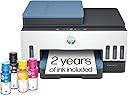
🖨️ Print like a pro, save like a boss — the last printer your home office will ever need!
The HP Smart Tank 7602 is a high-capacity, cartridge-free inkjet all-in-one printer designed for home and small office use. Featuring ultra-high 4800x1200 dpi resolution, wireless connectivity with app and voice control, and AI-enabled print optimization, it delivers sharp, borderless prints with minimal waste. Included are 2 years of original HP ink, supporting up to 8,000 color pages, ensuring low-cost, high-volume printing with mess-free refills and reliable performance backed by HP innovation.


| Additional Printer Functions | All In One |
| Asin | B09CJCNJBL |
| B W Pages Per Minute | 15 pages_per_minute |
| Best Sellers Rank | #55,423 in Office Products (See Top 100 in Office Products) #60 in Ink Tank Printers |
| Brand | HP |
| Built In Media | 28B98A HP Smart Tank 7602 All-in-One Printer; HP 32XL Black Original Ink Bottle; HP 31 Cyan Original Ink Bottle; HP 31 Magenta Original Ink Bottle; HP 31 Yellow Original Ink Bottle; HP Black Printhead; HP Tri-color Printhead; Power cord; Ink caution flyer; Setup guide; Reference guide; Regulatory flyer; Warranty flyer |
| Color | Blue |
| Color Depth | 24 bits |
| Color Pages Per Minute | 9 pages_per_minute |
| Compatible Cartridge | HP 32XL 135-ml Black bottle (~6000 pages), HP 31 70-ml Cyan bottle (~8000 pages), HP 31 70-ml Magenta bottle (~8000 pages), HP 31 70-ml Yellow bottle (~8000 pages) |
| Compatible Devices | Laptops, PC, Smartphones, Tablets |
| Control Method | App, Touch |
| Controller Type | Amazon Alexa, Android, Hand Control, iOS |
| Customer Reviews | 3.8 3.8 out of 5 stars (2,127) 3.8 out of 5 stars |
| Display Type | MGD |
| Duplex | Automatic |
| Hardware Interface | USB 2.0 |
| Initial Page Print Time | A4 Black 14 sec; A4 Color 16 sec seconds |
| Ink Color | Black, Cyan, Magenta, Yellow |
| Item Dimensions D X W X H | 16.83"D x 9.46"W x 14.33"H |
| Item Type Name | Inkjet Printer |
| Item Weight | 19.8 pounds |
| Manufacturer | HP, Inc. |
| Maximum Copies Per Run | 99 |
| Maximum Copy Resolution Black And White | 600 dpi |
| Maximum Copy Resolution Color | Up to 600 x 600 dpi |
| Maximum Copy Speed Black And White | 13 pages_per_minute |
| Maximum Media Size | 8.5 x 14 inch |
| Maximum Print Resolution Black And White | 1200 x 1200 dots_per_inch |
| Maximum Print Resolution Color | 4800 x 1200 dots_per_inch |
| Maximum Sheet Capacity | 250 |
| Model Name | Smart Tank 7602 |
| Model Number | 28B98A#B1H |
| Model Series | Smart Tank 7602 |
| Number Of Drivers | 2 |
| Number Of Ethernet Ports | 1 |
| Number Of Trays | 1 |
| Other Special Features Of The Product | Auto Document Feeder, Auto-Duplex, Display Screen, Refillable Ink Tank, dual band Network-Ready |
| Output Sheet Capacity | 250 |
| Paper Size | 3.5" x 5", 4" x 6", 5" x 7", 8" x 10", 8.5" x 11", 8.5" x 14", A4, A6, half letter, legal, executive) inches |
| Power Consumption | 1.1 watts |
| Print Media | Envelopes, Glossy photo paper, High-resolution paper, Labels, Paper (plain) |
| Printer Connectivity Type | Wireless |
| Printer Output Type | Color |
| Printer Type | HP Thermal Inkjet |
| Processor Count | 1 |
| Resolution | 4800 x 1200 |
| Scanner Type | ADF, Flatbed |
| Series Number | 7602 |
| Specific Uses For Product | Home and small business |
| Total Usb Ports | 1 |
| Unit Count | 1 Count |
| Upc | 195908302605 195908302599 |
| Warranty Description | One year limited hardware warranty from the date of purchase; user replaceable parts have separate warranty periods. |
| Warranty Type | Limited |
| Wattage | 1.1 watts |
User
Great replacement for our old HP.
We purchased this for our small office to replace an old OfficeJet Pro 8600, which had been ol' reliable for about 13 years before it was finally laid to rest. We wanted to make sure to get a printer with similar features, namely the document feeder and the ability to automatically print 2-sided, and wanted to stick with HP since our last one lived so long.The Smart Tank 7602 is definitely an upgrade! It prints faster, the scans are much sharper and clearer, and I love the refillable ink feature (it seems like it will last longer than the cartridges, but I'll report back on that). I also love that the display tells you when the paper is running low. The printer plays a cute little jingle when it's done printing; this feature is adjustable in settings but it's just a quiet twinkling sound so I left it on.Setup was super easy, and installing the two print heads took less than a minute. The only thing I'm having trouble with is getting the printer to scan directly to a network folder, but I know our network is set up weird, so I can't really blame the printer for that. For now, we just scan using the HP app on the computer, which is also very easy to use, and it allows you to save your scans to any folder from there.So far, after a few weeks of daily use, we are very happy with our new printer. We've printed over 100 regular color pages and a couple sheets of labels with no issues.
User
HP Warranty: Know this before buying; Unit malfunction in less than 5 months
UPDATE: Not even 5 months using this printer and there are problems. 1 - the printer's black ink is not working. A blank paper comes out for documents printed in black ink only. The problem: the black ink is not running through the tube that connects the blank ink tank to the ink cartridge. The tube is totally clear. 2 - The ink cartridge does not move to the center when opening the printer cover, preventing access and removal of the ink cartridge.HP Tech Support: Spent about an hour with tech support for them to tell me what I already knew - the printer is defective.HP Warranty: HP is not abiding by the terms of the warranty. According to the standard warranty, HP is to first ship a replacement. To ship the defected unit back, the customer is to use the prepaid shipping label provided by HP and use the box of the replacement unit to ship the defective unit back. Without any advance notification to the customers, HP has indicated to me that this policy does not apply to Smart Tank printers. Smart Tank purchasers are responsible to bear the cost of shipping the defective unit and providing the box. Once HP receives the defective unit, they will then ship the replacement. This policy obviously extends the period the customer is without a working printer. I tried pushing back, but to no avail.Replaced a HP Officejet Pro 8600 printer. The HP 7602 takes up less space, is well made, looks nice and the printing quality is better. The printing speed is slower, which will be much more noticeable when printing multiple, double sided pages. The paper tray does not have a slider from the top to ensure that the paper stays level and in place. It only has sliders on the side. I would have liked to see an Officejet Pro 8600 equivalent tank printer. The cost of ink cartridges for regular inkjet printers can not be justified for someone that does not print much.
User
Impressive multi-functional home printer, A++ touch screen
Note: I've used this printer for almost a month so far.I was very impressed with the unboxing experience of this HP Smart Tank 7600 printer. I had no trouble lifting the printer out of the box, because they actually put it inside a plastic bag with nice handles! It was easy peasy. Everything was nicely labeled and I followed the instructions from the HP Smart app (both on PC and phone) and went through step by step to set up the printer. HP really knocked the basic setup part out of the park with this one. It's the best instructions I have ever seen.It was super easy filling the ink tanks with the bottles. I was expecting some leakage and had paper towels ready but nope, not a single drop leaked from it during filling! It takes less than 30 seconds for each bottle to finish filling the printer. Impressive. Setting up WiFi was easy and it immediately updated the printer with the latest firmware. This part did take 5-10 minutes but once it was done, I was able to print immediately.My favorite feature is the matte surface touch screen. It is bright, responsive, and very intuitive to use. Advanced Features: Since this printer had a lot of advanced features, I tried them out. First, I set up the scan to email feature. This took a while to figure out, with the assistance of online help, I was able to configure Gmail's SMTP server to send out printer scans to other emails. This was complicated to use another SMTP server but not the fault of HP. Next, I set up the device to scan to my NAS drive. I had a slight hiccup because I had to fix my NAS account to allow write permission before it started working. Lastly, I discovered it to be faster to enter email contacts through the HP Smart app address book instead of trying to enter them via the printer's touch screen.The printer itself prints very fast in both color and black and white. While it doesn't quite match the print quality of color laser printers, it's still very impressive for an ink jet printer. Just the fact that the large amount of ink in the tanks versus traditional cartridges or toners will be huge savings for me. The scanning features will make this a lot more useful so I don't need to get another separate scanner. Overall, I really like this printer and it will be my primary family printer from now on.
User
I started my own photo printing shop
Having a printer that performs this well has been great. Setting it up was easy to do with the included instructions. I already have a color laser printer which I use all the time, and you may be wondering why I would go buy an inkjet printer. Photos. You can't print on glossy paper with a laser printer very well. All the photo paper I've purchased clearly says it's for inkjet printers. While this hasn't stopped me from trying. The results have been very poor. Especially if you want to cut the photos to specific sizes. Little bits of toner get everywhere.I've been putting off getting an inkjet because the cartridge system is too expensive and messy. I got more ink on my hands pulling the stickers off the refills than filling every tank on the HP 7602. This printer has all the features you would expect such as Wi-Fi, flatbed scanner, automatic document feeder, 2-sided printing, and even an ID card copy function. If your business provides financing this is something that would really make things easy for you.My wife and I print photos from our phone using the HP Smart app or the phone's default printing app and both produce excellent results. The photos are where you would expect them to be, and the quality is as good as getting them from the pharmacy.Like I said I have a laser printer, but I was curious how this would work just printing some regular documents. It’s not quite as fast obviously but the results are just as good. I love the user interface that is so seamlessly placed into the front bezel. Unless it’s telling you something you would never know it was there. This Printer checks a lot of boxes for me and was 100% worth the investment.
User
Wireless hookup is impossible. See update.
My Brother all in one printer was on its last legs after 12 years. This HP Smart Tank 7602 seemed like the perfect fit to replace it. Even better was the fact that it was offered at a substantial discount. I really liked the idea of being able to buy bottles of ink as needed. The printer is a beauty and set up easily right out of the box. The printing was great, and the speed was acceptable. For the first 3 days I was patting myself on the back for making such a good decision. This is where the problems began. It said it was hooked to Wi-Fi but none of my devices could see it anymore. I fought this problem for the next couple of weeks. Every time I would get it to work, it would only be for a few days at the most. I finally enlisted my daughter and granddaughter to work some magic on this printer. They finally had to call HP for help. Hallelujah, it was working again. I was a happy guy for about a week at which point it ceased to function again. I had pretty much decided to give up and send it back when I called HP for help again. They were not able to get it working. They suggested calling Spectrum to make changes to my router. Spectrum did not agree that this would help but gave us another idea. The router was only about 3 feet from the printer so why not wire it direct. Bingo, problem solved again. We'll see how it goes but I haven't had to throw this printer out the door or send it back. No, I would not recommend it to a friend. Enemy, maybe?Update: Down again after only 2 more days. It's going back while I still have some hair left on my head.Update: my apologies to HP. After returning this printer I purchased a new printer which also worked well right out of the box. It would not cooperate on the second day. I think I have it working now. I changed my rating to 4 stars but left my entire review because others may go through the same challenges.
User
Great printer
Absolutely love this printer! If there is one thing I would change it would be that a light stays on constantly at the paper exit. It is brighter than a night light.
User
Don't by HP Smart Tank. Worked great for a year until it thought the print heads were missing.
I bought this printer April 23, 2025. Today is June 28, 2026. The printer was easy to set up and it worked great until two weeks ago. It stopped printing and the error message said the print head was missing. I removed both print heads and reinserted them. That did not fix the problem. I used Grok to troubleshoot the issue. It recommended removing and cleaning the ribbon on the front of the print heads (not the bottom where the ink comes out) and the pins they touch using distilled water on a paper towel or microfiber cloth, wait 10 minutes, and reinstall them. It took three cleanings, using this procedure, but it worked - for two weeks. I just cleaned them again and it is working. I expected more than a year from HP. In case you're wondering, the warranty is 1 year. It is August 14 and I am cleaning the print heads for the 4th time. I last cleaned them 2 days ago and printed a USPS mailing label. Today I got the missing print heads message again. Since the fix appears to only last for one print job now. Replacement print heads cost $80-$90 for a set, and they are not hp genuine print heads. You can buy them separately, but the error message doesn't tell you which print head is bad. I'll probably throw out this piece or crap and buy a different brand. I guess hp decided they would get into the ink tank business but realized they couldn't make a profit off of selling bulk ink. So they give you the tank and two years worth of ink, but they program the print heads to fail after a year and you have to buy new ones, just like replacing them on earlier models every time you needed ink. I had an Epson Eco Tank for over 5 years prior to this useless hp printer. I got rid of it because of intermittent connectivity issues. I never had a problem with the print heads that once a year realignment didn't fix. This was a very disappointing purchase. hp, you can do better. Learn how to make money without building garbage. If this is truly a rare manufacturer's defect, you should offer replacement after longer than a year since you provide "2 years worth of ink." Ink levels are shown in the last photo. you can tell I don't print a lot.
User
Very Happy with My New Printer - Features Important to You are Worth the Cost
My HP Photosmart 7520 purchased in Dec 2014 finally died. It was inexpensive, but was a faithful servant! I could not resolve a new "printhead not detected" error and although I may still be able to fix, I thought it time to replace. I grew tired of the print cartridge change outs. I just spent a day using this new (my third HP) printer and all is well. I like everything about it. Ease of set up, the paper tray, document feeder, the look/design, and especially the ink. The ink will last a long time given my use and replacements will not be $$. I even like the panel light which duration can be user selected. I could have spent less, but the additional features are worth the cost to me. The set up via my MacBook was easy. Yes, I could have done this with my phone, but I enjoy using my Mac. Registration was seamless. I did have a hiccup. Initially color printing was not available from my Mac OS. HP test pages were fine, but no color via any apps using my Mac OS. I Googled the issue and within 2 minutes I found that a reinstall of the Mac driver from the HP site was needed. That took another 2 minutes and color options appeared in the print settings! Strange, I know, and I don't care why ... just glad that a fix was that easy. So, I examined Canon, Brother, and all the HP models, chose this one and glad I did. I have been messing with this tech since the late '80s and I like how HP has evolved its printers. My laser printer experience was limited to the workplace ... I am an inkjet guy at home so I limited my search to that format. I don't think you will be disappointed. Purchased via Amazon. Delivery within 2 days.
User
Absolutely Delighted with my new HP 7602 printer
This HP All-In-One, scanner, printer & fax is great. It was easy to set up and works fine. The controls are easy to understand ( but very different from my previous printer). HP apparently has an easy system for getting help with the setup but I didn’t need to use it. I have no concern about recommending this HP Smart Tank 7602 All-in-One printer/copier.
User
Exelente
Es lo que esperaba
User
Works awsome, I would recomend
I Love this machine, it works awsome, love the big ink tanks, no more cartridges.Print quality is awsome,
User
Junk
I have never had so much trouble setting up a printer, but after much time and effort, it appeared to work. However, I had a multi-page document to scan and using the HP Smart App, the ADF feature would not work. A most frustrating experience, especially considering the price point of this printer. I wouldn’t recommend purchasing this printer, despite the fact that I have been an exclusive HP customer for over 25 years.
User
overall a good printer with lots of functionality
Overall a good printer. Even tough from a tech point of view it is only an incremental inovation ... the printer is still using cartriges that are filled as it needs from the tank.Some of us remember the day when we were re-filling the cartriges with ink using a syringe to cut ink cost .... so I'm not sure how the smart tank solution is that innovative. Remain to be seen how often these cartriges have to be changed.From an environmental point of view, I have doubts that this is the best solution. I think HP can and should do better!Then the firmware that the printer comes with seems to be buggy. The WebService & firmware upgrade did not worked from the HP Smart.That forced me to do an upgrade from the PC and I got the dreaded 8AF300001 firmware error.Kudos to 'Ryan S' that wrote in his review how to recover the printer. It did worked - I had to try several times until I got the maitenance screen, since the red 'X' button did not react well.Afterwards, the WedService worked & the firmware tool from the HP Smart showed the latest firmware version, etc ...I did not get dirty with ink when I purred in the tanks but I did got dirty when I put the cartriges in.Otherwise the printer seems of good quality. A bit noisy at startup/shutdown.
Trustpilot
5 days ago
2 weeks ago