🚀 Upgrade to the future of home WiFi—fast, smart, and unstoppable!
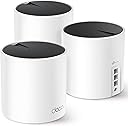
The TP-Link Deco AX3000 WiFi 6 Mesh System (Deco X55) is a powerful 3-pack mesh router set designed to blanket up to 6500 sq.ft. with ultra-fast AX3000 WiFi 6 speeds. Each unit features 3 Gigabit Ethernet ports and supports Ethernet backhaul for enhanced wired performance. Ideal for homes with up to 150 connected devices, it uses AI-driven mesh technology to intelligently optimize your network environment, eliminating dead zones and buffering. Backed by TP-Link’s 24/7 support and 2-year warranty, it’s a future-proof upgrade for seamless, high-performance connectivity.


| ASIN | B09PRB1MZM |
| Antenna Location | Home |
| Antenna Type | Internal |
| Best Sellers Rank | #105,358 in Electronics ( See Top 100 in Electronics ) #101 in Routers (Computers & Accessories) |
| Box Contents | 1 x Quick Installation Guide, 1 x RJ45 Ethernet cable, 3 x Deco X55 units, 3 x Power adapters |
| Brand | TP-Link |
| Brand Name | TP-Link |
| Colour | White and Black |
| Compatible Devices | Laptop |
| Connectivity Protocol | Wi-Fi |
| Connectivity Range | 6500 Square Feet |
| Connectivity Technology | Ethernet, Wi-Fi |
| Control Method | App |
| Controller Type | App Control |
| Coverage | Up to 6500 sq. ft. |
| Customer Reviews | 4.4 out of 5 stars 12,257 Reviews |
| Data Transfer Rate | 3000 Megabits Per Second |
| Frequency | 5 GHz |
| Frequency Band Class | Dual-Band |
| Has Internet Connectivity | Yes |
| Has Security Updates | Yes |
| Is Modem Compatible | No |
| Item Type Name | Mesh WiFi |
| LAN Port Bandwidth | 10/100/1000 Mbps |
| Manufacturer | TP-Link |
| Manufacturer Part Number | Deco X55 |
| Maximum Upstream Data Transfer Rate | 3000 Megabits Per Second |
| Model Name | Deco X55 |
| Model Number | Deco X55 |
| Number of Ports | 3 |
| Operating System | RouterOS |
| Other Special Features of the Product | Access Point Mode |
| Router Firewall Security Level | Standard |
| Router Network Type | Single Network |
| Security Protocol | WPA3-Personal |
| Special Feature | Access Point Mode |
| UPC | 840030703010 |
| Unit Count | 1 Count |
| Voltage | 12 Volts |
| Wi-Fi Generation | Wi-Fi 6 |
| Wireless Communication Standard | 802.11ac, 802.11ax, 802.11b, 802.11g, 802.11n |
| Wireless Compability | 802.11ac, 802.11ax, 802.11b, 802.11g, 802.11n |
M**D
منتج جبار
السلام عليكم ورحمة الله وبركاته اولا لوفيه اكثر من ٥ نجوم راح اعطيه المنتج هذا تمنيت الاقي تقييم وافي قبل اشتري ولكن حبيت اوثق لكم تجربتي كامله النت الرئيسي فايبر بسرعه ٣٠٠ ميقا بالملحق حطيت معاه جهاز ووصلته بسلك واعطاني نفس السرعه ماشاء الله ثم حطيت جهاز بالدور الثاني واعطاني ١٩٠ بالصاله تحت الرئيسي بالضبط ثم الجهاز الثالث والاخير حطيته بالصاله بالدور الارضي واعطاني ٩٠ ميقا تقريبا صراحه منظومة خيالية تستحق كل ريال ينحط فيها وسهله الاعداد للامانه فوق ماتتصور انصح وبقوه غطت لي فيلا دورين وملحق بكل سلاسه
G**G
Works really well and a must for gamers or streamers
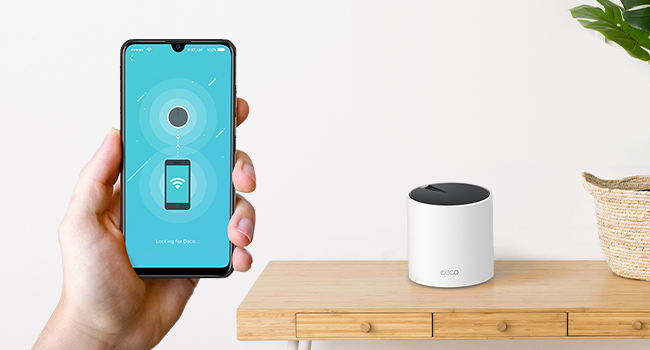
This is a great product perfect for gamers and streaming movies on amazon prime and others seamless maximum internet speed trough the entire house. Always reaching near the maximum speed in any room. The setup is extremely easy, plug any of the boosters on the the main modem then it becomes automatically the main one. I found that where it gets a little tricky is placing the two other boosters. For an optimal performance, you should not have more then one wall separating the boosters from one an other and not have to many electronics around it (magnetic field) otherwise it looses significant speed. but after about one hour trying to figure out where are the optimal places for each unit i get near maximum speed regardless of the room or level I'm on. WIFI 6 is a faster signal but also a shorter one so the units cannot be places to far apart. The time it took to setup and find the perfect spot is really worth the results and hassle free experience of high speed internet the the house. It really is trial and errors on where you place each unit. my suggestion connect the first one on to the router then plug the second unit where you would think is most appropriate then with your phone go on the deco app make sure your phone is connected to the second unit and do a speed test until you get the maximum speed (or at least near it) then repeat for the 3rd unit. An other tip : if you can try to put them at a certain height to get less interference. My las unit is placed near the basement ceiling and just by doing that i gained about half more of the speed. i love the fact that each unit has 3 ethernet ports on the back to be able to plug things that could be too far to reach the maximum speed on WIFI. 3 units was enough to get the main floor and basement covered at maximum WIFI speed. pros: Easy setup app is really easy to use and offers many options create a guest connection in less than 10 seconds small and discreet seamless internet trough the house (does not disconnect when changing unit connection) gives you a weekly report about your WIFI cons: if you have more than one wall separating one unit form another it looses significant speed but this is not due to the product but to the type of signal overall score A+
J**Z
Excelente producto
Hice una investigación previa para reemplazar los dispositivos mesh anteriores que ya estaban siendo intermitentes y degradando la señal de wifi. Fácil de configurar, me funcionó perfecto en una casa antigua con muros de concreto en un área de aproximadamente 240m2 distribuidos en dos plantas, la señal de internet llega perfecto a todos los rincones de la casa y se puede administrar con buenos features de seguridad a través de la aplicación. El diseño es discreto y elegante, en mi caso los coloqué en zonas donde no se ven. Llegaron en tiempo y forma y todo sin contratiempos.
M**A
Perfect for Villas
Great Product, Easy to setup and really good performance.Works perfectly in a 2 storey villa with thick precast walls
F**R
Works PERFECTLY in our Big home
I was having some occasional issues with our Google mesh wifi system, and frustrated with some of the interface limitations, so decided to try this system after looking at reviews for lots of products on the internet. I bought this system some time ago and have been waiting a couple months to see how they would perform. I'm please to say this is the best system I have used in many years. As an electronics engineer maybe I am a bit too critical of products, but I have nothing to critique so far about the TPLink mesh wifi system. Frankly, I used to not be very fond of TPLink products, but I think they have gotten much better in the last few years. Getting to the details: I have a LOT of wifi connected products in the home. 74 devices to be exact and the house is 4200 square feet. These 3 units are more than enough to get complete coverage in the house as well as the patio areas on both sides of the house. I especially like the smart phone interface compared to my previous Google Mesh and the eero system I had before that. It lets me assign some devices to a specific mesh unit which is nice because some competitor systems seem to occasionally connect a device farther away from one that is closer which results in a worse connection. This TPLink system does not have that issue. I also like the fact that I can assign any device to specifically connect to either 2.4 GHz or 5 GHz. A couple other systems I have tried in the past wouldn't allow it. I haven't yet tried the "HomeShield" subscription to other features that might be helpful for a decent price. I'm not sure I need those upgrade features yet. I wanted to try the system with the upgrade first to see how it works. I'll probably try the 30-day free trial later on since there are some features of interest. With the separate backhaul communication between mesh units, I've been seeing really high bandwidth rates without a single dropout. Example, we have 3 TVs that regularly stream 4K content with two of those TVs doing it at the same time. Other devices are high resolution WiFi security cameras connected along with music streaming and all of the other oddball devices I have like light controllers, robot vacuums, appliances, smoke detectors, energy monitors, shades, phones, iPads, garage door openers, sprinklers, a piano, the car, and a bunch of other things I likely forgot. Bottom line is that everything stays connected without issues and I have yet to have a device that didn't connect or see and hangup with the system. I also got a recent software update that installed seamlessly. I surely missed mentioning some other features.
Trustpilot
2 weeks ago
2 weeks ago