Buy anything from 5,000+ international stores. One checkout price. No surprise fees. Join 2M+ shoppers on Desertcart.
Desertcart purchases this item on your behalf and handles shipping, customs, and support to Romania.
๐น๏ธ Fly like a pro, command like a boss โ no gimmicks, just precision.
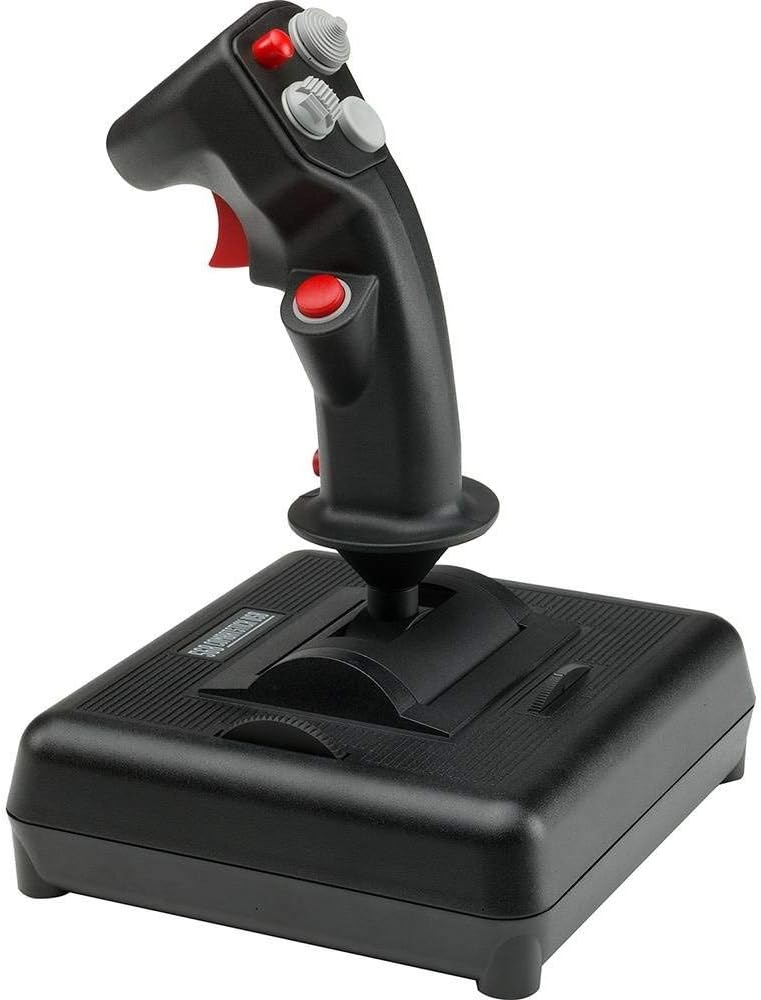
The CH Products USB Combatstick is a professional-grade joystick featuring three-axis control and 18 buttons, including dual rotary trim wheels for fine adjustments. It offers 128 programmable functions through included Control Manager software and supports plug-and-play USB connectivity for both PC and Mac. Renowned for its durable build and precise responsiveness, this joystick is favored by serious flight sim enthusiasts seeking reliable, customizable control without flashy distractions.


| ASIN | B00006B84W |
| Best Sellers Rank | #25,271 in Video Games ( See Top 100 in Video Games ) #204 in PC Game Joysticks |
| Brand | CH Products |
| Brand Name | CH Products |
| Button Quantity | 18 |
| Color | Black |
| Compatible Devices | Mac, PC, Windows |
| Connectivity Technology | USB |
| Controller Type | Joystick |
| Customer Reviews | 4.2 out of 5 stars 136 Reviews |
| Global Trade Identification Number | 00040478205682, 00100177260273 |
| Hardware Platform | pc |
| Item Dimensions | 7.87 x 9.06 x 10.63 inches |
| Item Weight | 287 Grams |
| Manufacturer | CH Products |
| Model Name | CH Combat Stick |
| Package Quantity | 1 |
| Power Source | Corded Electric,Usb Cable |
| UPC | 040478205682 168141474163 100177260273 872182612988 163120560479 |
T**R
It may look outdated - but it's the best quality on the market!
I looked for about 6 months for a good stick and couldn't be happier! I'm writing this review as a first time CH product user. I searched, searched....and searched for a good quality joystick/throttle/HOTAS set up. I usually like to keep it professional and not knock other brands out there - but I looked at the Saitek X52 Pro, Saitek X55 Rhino, Logitech G940, and the Thrustmaster's Warthog. Every single one had some good reviews, and more mixed to bad reviews, some more than others. I was not able to find one that had a almost perfect and overall good review. I was sick and tired of seeing bad reviews on cheap parts, quality control issues, bad quality in general, compatibility, customer service; and yes even the pricey Warthog was not without faults based on it's reviews. I found this unacceptable and aggravating given the prices of some of these HOTAS, shame on them! Ironically, I kept skipping over the CH Joystick/Throttle due to it's outdated appearance, it looks like a blast to 1980s gaming. Desperation led me to check it out and read forums and reviews on it. To my surprise, it had the some of the best. It ranked best (in user reviews) in terms of price, customer service, quality, functionality, durability, and customization. It was difficult to find a bad review; so I bought one. I'm not disappointed! PROS: +Super smooth tension - very light on the touch for very precise movements! +Joystick is VERY accurate and detects even the slightest movement +High quality THICK plastic +Buttons feel thick and high quality (does not feel like they would wear or break) +Scroll wheels on the base to quickly and easily adjust trim +Programming software it comes with cannot be beat! You can make any button do what you want it to do +Can easily adjust it's X-Y sensitivity with the software +You can write scripts in the software (i.e. "At 100% throttle = press button "32" (Close Airbrakes) (Note: This is not a copy/past script, just an example to show functionality) +Thick single 7ft USB plug in (Don't have to connect it to a throttle to work like some other HOTAS) +Does not require drivers, simply plug-n-play +Decent weight +Has a pinky button to act as a "S***" button to double all button functionality. However, you can change this to ANY button you want if you desire +Easily combined with any other Throttles/Joysticks without conflict due to it's own single USB plug-n-play (i.e you could use 2+ joysticks/throttles on a single game and have each do what you want) I am SO glad I decided to go with this joystick and not the others that seem to be just plastic cheap eyecandy with lights, ready to break. That said, being this is a review, I'll provide my negatives - although in no-way do I feel these to be a deal-breaker CONS: -Joystick is large and seems to be made for larger hands. I have to awkwardly move my hand from the base upwards to reach the top left red button on the face of the stick. -The weight almost seems on the borderline of too light and just right. I know I mentioned this as a pro, however depending upon where your using the stick, it may be too light, and in other positions it may be just fine. However, take this con with a grain of salt, it's got weight but I would've like to see just a wee bit more. -The deadzone of the stick is "catchy". In other words, if you're pulling 5% pitch or roll and you're moving through the 0% (deadzone) to advance to -5%, there's a "catch" in the middle deadzone in which acts as a middle-point stopper for the deadzone. However, it's very light and was very easy to get used to to. My other joystick (a cheap Logitech 3D pro) would fluently move from +5% roll/pitch, through the deadzone to a -5% roll/pitch, without you ever feeling the middle deadzone of the stick. Ironically, this can also be a PRO being it allows you to easily detect the center of the stick being this one is much more sensitive than my ol' Logitech 3D pro. OVERALL: For anyone out there looking for a good, high quality, durable, customizable, and affordable stick look no further! You've found it! Get past the 1980s look and buy it! I initially thought this thing was out-dated due to it's looks. I was wrong. I later learned the company CH Products makes joysticks and controls for a variety of professional industries, thus; you can expect high quality from this stick. The reason it's not "flashy" and "high-tech" is because the company makes functional and reliable products - they don't care about it's looks. They care about it's functionality...and they hit bulls-eye!
M**N
Solid Joystick with Good Precision.
In the beginning, I had a horrible stick that felt awful, and made my flight experience horrible. Then I used this one and haven't gone back. Likes: Precision: The joystick works well out of the box and is really precise. The most important axes for precision aiming in flight are pitch and yaw. Rolling is less important, but I am glad the roll axis works great as well. Before this stick, I thought we had entered an era where manufacturers were purposely making products to irritate internet pilot enthusiasts. The Layout: The design of this stick closely follows that of the A-10 and F-16, and it works pretty well for whatever sticking functions you want to put on it. I map firing, targeting, and weapon selection on this stick. When not in VR, I use the 8-way pov to look around and the red button on top to reset my look. The throttle wheel on the left side of the base is a nice dial for scanning frequencies, or adjusting radar range. If you don't have a throttle, it could do that too. Drivers: You don't need any. Configure the stick in-game. It just works. Dislikes: CH Control Manager software is no longer supported for windows 10 and has unfortunately begun to malfunction if installed on a Windows 10 machine, but that has nothing to do with the quality of this stick. Just don't install Control Manager--seriously. There is a considerable amount of jitter at different parts of the throttle wheel and could be really irritating if you were actually using it to control speed. The main stick does not seem to be effected by this, and thankfully so. The nature of potentiometer hardware: Jitter increases over time as the pot begins to wear out. Unfortunately, you will eventually see the stick pots wear out, but I doubt that will happen for at least a decade or so of use. I have had this one for six years and it works fine. Also, if you are tech savvy, you can replace or clean the pots for pretty cheap, if you know what you are doing. Conclusion: Even though the software does not work, and potentiometers can have jitter and wear out. This stick works really well and does not have much drift or jitter to the sticking side of things. As far as the throttle, well, I wouldn't use it as a throttle anyway. Overall, want a precision stick? Tired of using crappy products that cost three times as much or more? Buy this stick, or the Fighterstick, and you won't regret it. It will definitely improve your experience.
W**F
Great No-Frills Hardware
As a licensed pilot, I never got used to the unnatural motion of joysticks that use a twist handle for rudder functions in flight sims. When I finally gave in to the purchase of a set of CH-Pro rudder pedals, and had to replace my twitchy and inaccurate joystick, I re-visited the CH product line of joysticks and ended up purchasing the 568 Combat Stick. This is a smooth, rock-solid product with enough handle functions to satisfy most who fly propeller sims. Well-built. A quality feel. No centering issues. Having two axis-trim-wheels built into the base is a plus. Those with very small hands might feel they have to stretch to reach all the buttons on the large handle. If you elect to use the suggested CH Control Manager software that many pilots use with this product, expect a challenge, though there is plenty of online help available. Not flashy looking like many of its competitors, but a rock-solid and smoothly operating product that feels like it can go the distance.
T**R
Very good, but some small drawbacks.
First off, this review is meant for PC users. Since CH Products is one of the few companies that supports Macs the only joystick better than this one would be their next step up, the Fighterstick. For a Mac I would give this 5 stars. Also, I will be reviewing the CH products Flightstick, Combatstick, and Fighterstick at the same time (using the Combatstick here as the base) since they are all pretty much the same except for the number of buttons. The first and best thing about these sticks and their partner throttle is that they are based of the F-16's flight control system much like the old Thrustmaster systems from the early '90s. This gives them the double bonus of an added realism connection, which all flight simmers want, and a very good choice of buttons and layout. After all, the military used decades of research and experience to arrive at the optimum joystick design when they made the F-16 and almost all other modern fighters have a very similar joystick layout. While the layout may look strange and even a bit cluttered at first glance, it turns out to be very easy to use once you get a hold of it. These joysticks are about 35% larger than the old Thrustmasters, this gives them enough room on the head for the extra 4 buttons hats to be used safely, but also means you will actually be using the side buttons as your secondary ones before the top groups. This takes a bit of getting used to since it's different than all the other joysticks out there, but since they are where you would naturally have your fingers on the joystick when at rest it doesn't take long. I found the layout to be superior to all the recent Saiteks as a result of this attention. The Saitek joysticks of recent years, particularly the Cyborg line, have been designed with looks first, and then a little thought for function. As a result they have been very uncomfortable to use. Another link these CH Products joysticks have with the Thrustmasters of old is that they use springs to hold the joystick in place and measure it's movements. There are both positive and negative results of this choice. The main negative is that the springs will wear out and break before the current digital measurement devices, exactly how much earlier remains to be seen as CH products is rather new in the game market. Given their solid reputation in the commercial sector I'd bet we will still get a hearty number of years out of them. A last and rather small second side effect is that the brand new joystick is that the brand new springs are rather stiff, and you will experience some resistance when crossing the axis' early on. I found this went away completely after 30 hours of use and wasn't much of a problem after the first 10. On the plus side the springs mean that the joystick will snap back to center quickly and consistently, making calibration a breeze and programming in a dead zone a thing of the past. Most importantly, you get even more precise control than with the competitors. Not much considering how good they have gotten over the years, particularly the Logitechs, but it's still better. Finally we get to the major differences between the 3 sticks offered by CH Products, the number of buttons and the price. First, we will start with the "economy" Flightstick, if you can call a joystick with an $89.95 list price economy. However, a quick look at it's features prove that is its role since it only has a trigger, 3 secondary buttons, a standard HAT, and 2 trim wheels. Also, all the secondary buttons are on the head of the stick, which is a bit of a reach. However, since the buttons are rather large (the footprint was intended for a 4-button HAT) that problem is somewhat countered. On the upside, this it the only joystick in the line that isn't molded for a right-handed person. I'm betting most lefties have learned to fly right-handed by now since most are designed for right-handed people, but I imagine that's welcome news for some of you. The next one up is this Combatstick, my personal favorite. With a list price only $20 more than the flightstick, and a less than $10 difference and Amazon.com's current prices, it's well worth the upgrade for an extra 6 buttons and another trim wheel. Also, the secondary buttons are moved off the head of the stick so they are much easier to get to in a hurry. This leaves the buttons on the head for tertiary controls. In fact, with my Il-2 setup I don't even use the 4 button hat. Admittedly I play on the lower end of it's realism scale. If your one of those people who likes to run their games at the highest realism settings you will want the extra buttons of the Fighterstick, because of it's extra hats it has 4 more buttons. Even better it has a mode shift button, basically 'shift' for the joystick. This button toggles the functions off all the other buttons, with the normal hat counting as 8 more. Using this you end up with a whopping 24 programmable buttons. Tack that on to the Pro Throttle with it's HATs and buttons and their special software to add other levels to them and you can have more buttons than anyone should ever need. Assuming you aren't playing flying a bomber in Il-2 with full realism and refuse to use the keyboard. In the end my only gripe about these products is their high cost, much more than I would normally pay for a joystick and the reason I docked them a star. However, I can understand why they are this high a price. Hardcore flight sim enthusiasts have proven time and time again that they will pay whatever is necessary to get the next best advantage in their field. The fact that they also have pretty much a monopoly on controls patterned off of the real thing and the Mac user field probably factors in as well. Since I am a hardcore flight sim enthusiast, I still paid for them, and I was always able to give it a positive spin by reminding myself that I paid as much as the throttle and stick combined for my graphics card and I'll get to use these a lot longer. We just wont even mention the sound system.
F**Y
OK but has several minor flaws.
Just got the Combatstick and have used it a couple of hours with X-Plane. First of all, I'm not a gamer, rather a Private Pilot building an experimental aircraft (RV-9). I take two stars away for a variety of reasons. The first thing I noticed was that the various buttons are only that, buttons. Not even the trigger switch is a real trigger like on an aircraft control stick. The coolie hat switch doesn't move as much as a real coolie hat switch. For the price I expected better. The whole thing is fairly light, and perhaps apt to move under rapid control stick movement, though I didn't experience that because I'm trying to fly a simulated RV-9, not do combat. Finally the two trim wheels on the base feel stiff, sticky and a bit cheap (the left-hand trim wheel is fine). I wish they had not hard-wired those to trim pitch and roll; in my actual RV-9 I use the coolie hat for 2-axis trim, like on most aircraft. I could have used the trim wheels for something else. Come to think of it, I wish they had provided a few buttons and sliders on the base. The installation software is another minus. It did install OK on my Windows 7x64 machine, but the software nowhere mentions Windows 7. I think the highest version it refers to is Vista. Really? Windows 7 is years old and now Windows 8.1 is out. Pluses are a long USB cord and a comfortable grip that fits my average-sized male hand just fine. All buttons within fairly easy reach. Overall an OK but not superlative piece of kit. Hate to think what a cheaper joy stick would be like.
K**S
CH USB 200-568 Combatstick Works, Well Made
The CH Combatstick works on XP Home 32 bit Service Pack 3, Commanche Gold game. It works on Windows 11 Rise of Flight United game Steam version and the downoaded version from Rise of Flight game website. Those are 2 examples of what works. The flight stick is well made, heavy construction, and large. The large foot print keeps it front tipping over all the time like other flight sticks I've had. All the buttons work and are recognized applicable to the games in Windows XP and Windows 11. I have an old CH Flight Stick that I use with a gameport adpter, and it works well too. CH make good products. The X and Y axis repsonse is fast and smooth.
B**P
Great stick
This is my second Combat stick, the first had a game port connection. Needed to upgrade to a USB for the latest computer. Very durable.
M**E
Jitter all over the place
Been using this product for about 6 months and it was a pretty good starter flight stick, has a lot of buttons in well placed positions. The CH software seems to work on win 10 but it crashed my pc for no apparent reason, maybe it was some kind of incompatibility with the thrustmaster software (Which I use for the throttle) or something else. The really bad problems occurred when the Y axis started jittering around 2 months ago, I though I could ignore it and continued using it, but now it has the same jitter in the x axis. The construction is sturdier and it seems to be made to last... as a paperweight
Trustpilot
2 days ago
2 months ago