Desertcart purchases this item on your behalf and handles shipping, customs, and support to Romania.
🚀 Navigate Like a Pro — Never Miss a Signal!
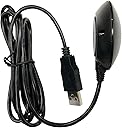
The GlobalSat BU-353N5 is a high-sensitivity, multi-GNSS USB receiver supporting 75 channels across GPS, GLONASS, GALILEO, BEIDOU, QZSS, and SBAS. Designed for professionals on the move, it features rapid satellite acquisition with built-in backup power, a robust magnetic roof mount, and broad OS compatibility including Android, Windows, Mac, and Linux. Ideal for precise, reliable positioning in automotive and mobile applications.



| ASIN | B0B1W1YBZC |
| Additional Features | USB |
| Best Sellers Rank | #29,945 in Electronics ( See Top 100 in Electronics ) #5 in Satellite Television Receivers |
| Brand | GlobalSat |
| Built-In Media | Quick Start Guide, Suction Cup |
| Compatible Devices | Windows, Mac, Android, Linux |
| Compatible with Vehicle Type | Car |
| Connectivity Protocol | NMEA 0183 |
| Connectivity Technology | USB |
| Control Method | Touch |
| Customer Reviews | 4.1 out of 5 stars 28 Reviews |
| Display Type | LED |
| Human-Interface Input | Buttons |
| Item Type Name | USB GPS |
| Manufacturer | GlobalSat WorldCom Coporation |
| Map Types | Global |
| Mfr Part Number | BU-353N5 |
| Model Name | BU-353N5 |
| Model Number | BU-353N5 |
| Model Year | 2022 |
| Mounting Type | Roof Mount |
| Number of Items | 1 |
| Number of Packs | 1 |
| Operating System | Multiple (Android, Windows, Mac, Linux) |
| Screen Size | 5 |
| Special Feature | USB |
| Supported Satellite Navigation System | GPS |
| Touch Screen Type | Resistive |
| UPC | 795945000016 |
| Unit Count | 1 Count |
| Vehicle Service Type | Car |
| Warranty Description | 1 year warranty |
A**R
USB connection makes set-up simple
This a great little GPS receiver and a really good price point. It is NEMA-0183 compliant so it will work with most positioning applications. We use it in our Victron Energy solar installation to automatically track location which helps with solar irradiance forecasting no matter where we roam in our RV. It plugs directly into a USB port on our Cerbo GX (the "brains" of the installation) and required no additional set-up. Even installed in a basement compartment on the Class A RV it is able to track up to 17-30 satellites. You almost can't go wrong with this receiver.
J**.
Works great, quick setup, good instructions
Works great. Downloaded their driver, from their website (no 3rd party stuff) per included instructions and checked com port per instructions and entered data in OpenCPN and it worked first try. Wasted hours with other cheaper GPS from Amazon that I could not get to work and returned. This one works and is accurate.
S**Z
simple GNSS receiver
This is an N version which is their latest model which no longer use mini disc you can get the driver from their website or it installs automatically when you plug in the device. This is the GNSS model which requires your software to be able to support GNSS data. If you are trying to use GPS only or Windows apps you will need different models.
S**L
Did not work well
Was very disappointed that it did not work well in the area that I had spotty service.
J**E
Great for laptop navigation
Perfect for OpenCPN, easy to set up on Mac M1.
J**S
Super easy setup
I bought this to use with my Microsoft Surface running Windows 11 and OpenCPN charting software. Install took 5-10’ and I have now used the puck for a week long trip. It doesn’t seem to be critical for position of the puck. I have used it inside my boat and it still maintained a good GPS fix.
C**A
Troubleshooted for hours
It works for raspberry pi 5, Kali Linux on VM ware on my laptop, but man was it hard to get to work. At first it worked after setting the /etc/default/gpsd file then made udev rule for it to work. It worked for awhile but when on the move it stopped working me thinking it was software related I spent hours debugging it and trying to find out what was the matter. So I thought to myself it must me a hardware issue or something is the matter with the cable so I took it apart and found it worked properly after unkinking a wire linking to the gps module so it worked after that but then it stopped working again due to the the cable being wrapped up since I don’t need it to be so long. So if you are having problems with it just straighten the cord out as much as possible and at the end of the module. I think there just might be interference in the cables or they just kink very easily
S**S
Great GPS option.
I have only used it a few times but I am quite happy with it. My intention is to use it to feed my OpenCPN chart plotting software.
Trustpilot
1 week ago
3 weeks ago