Desertcart purchases this item on your behalf and handles shipping, customs, and support to Romania.
🚀 Upgrade your connection, join the wireless elite!
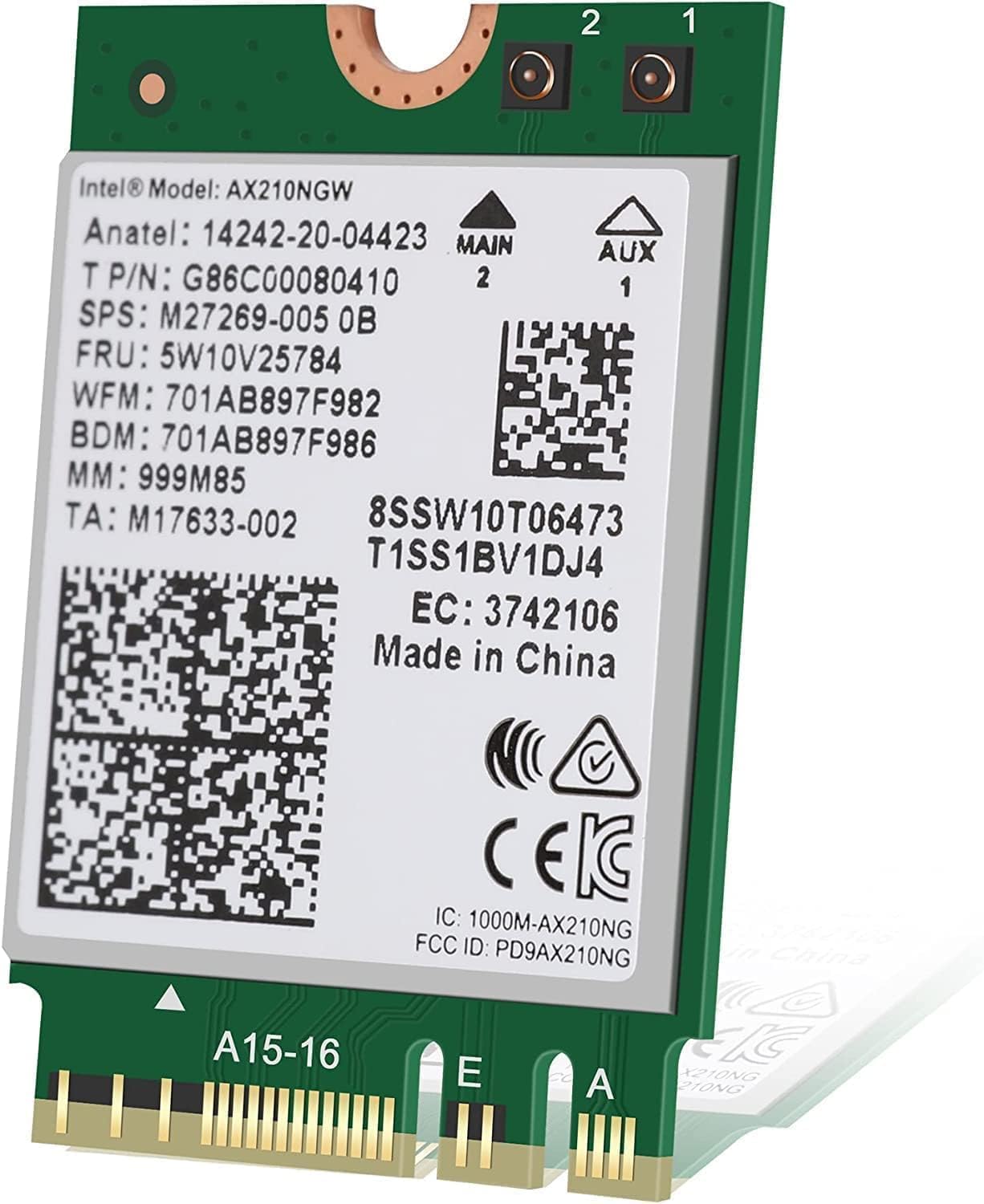
The Intel AX210 Tri-Band Wi-Fi 6E Bluetooth 5.3 Network Card delivers cutting-edge wireless performance with up to 5374 Mbps speeds, tri-band Wi-Fi 6E support, and the latest Bluetooth 5.3 technology. Designed for easy M.2 slot installation, it’s perfect for professionals seeking ultra-reliable, high-speed connectivity on Windows 10 and above.
| Asin | B0B4T696W5 |
| Best Sellers Rank | #11 in Internal Computer Networking Cards |
| Brand | Intel |
| Color | multicolor |
| Compatible Devices | Laptop |
| Compatible Operating System Family | Windows |
| Customer Reviews | 4.8 4.8 out of 5 stars (1,184) 4.8 out of 5 stars |
| Data Link Protocol | IEEE 802.11a |
| Data Transfer Rate | 5374 megabits_per_second |
| Hardware Interface | Bluetooth |
| Item Dimensions L X W X H | 1.2"L x 0.9"W x 0.1"H |
| Item Weight | 3 g |
| Manufacturer | Intel |
| Mfr Part Number | Intel AX210 |
| Minimum Required Operating System Version | Windows 10 |
| Number Of Items | 1 |
| Number Of Packs | 1 |
| Unit Count | 1 Count |
| Upc | 735858471077 |
User
Review for Intel AX210 Tri-Band Wi-Fi 6E Bluetooth 5.3 Network Card
I recently upgraded my asus rog laptop with the Intel AX210 Tri-Band Wi-Fi 6E Bluetooth 5.3 Network Card, and the difference has been impressive! Installation was straightforward—just make sure your device supports M.2 2230 A+E Key slots and that you have the necessary drivers ready (Intel provides them on their website).Performance:Wi-Fi 6E Support: This card takes full advantage of the 6 GHz band, providing faster speeds and lower latency compared to standard Wi-Fi 6. If you have a Wi-Fi 6E router, you’ll notice a big boost in download speeds and reduced interference.Stable Connection: I’ve experienced strong and consistent signal strength, even when multiple devices are connected. No more random drops or lag spikes during gaming or video calls.Bluetooth 5.3: The Bluetooth upgrade is a nice touch—faster pairing, improved range, and more stable connections for wireless peripherals like headphones and controllers.Pros:✅ Blazing fast speeds with Wi-Fi 6E (if you have a compatible router)✅ Improved Bluetooth 5.3 for better wireless device connectivity✅ Stable and reliable performance with low latency✅ Backward compatible with Wi-Fi 6 and older standards✅ Great value upgrade for older laptopsCons:❌ Requires a compatible M.2 slot (not all laptops support it)❌ 6 GHz band only works with a Wi-Fi 6E routerFinal Verdict: ★★★★★ (5/5)If your laptop supports it, the Intel AX210 is one of the best upgrades you can make for faster Wi-Fi, better Bluetooth, and future-proof networking. It’s a must-have for gamers, streamers, or anyone needing high-speed wireless connectivity!
User
Installed super easy and laptop no issues
I bought this in place of an Intel AX200 for my Linux laptop The AX200 did not have driver support for Linux after the new update so ended up getting this it worked as advertised right after I put it in but try band and the speed is higher than the AX200 it has better driver compatibility and works like it should fitment was easy just take the back plate off one screw for the M2 base and it hooked right up it was a little difficult trying to get the little UF connectors on but just go slow with it and it'll be fine I also like the fact that it has the Bluetooth 5.3 connectivity
User
Best WiFi 6E card for Laptops
The Intel AX210 Tri-Band Wi-Fi 6E Bluetooth 5.3 Network Card is an excellent upgrade for those looking to boost their wireless connectivity. With support for Wi-Fi 6E, it unlocks the 6 GHz band, delivering faster speeds, lower latency, and improved network efficiency—perfect for gaming, streaming, and high-bandwidth tasks. The Bluetooth 5.3 ensures better range and reliability for wireless peripherals. Installation is straightforward for most modern motherboards with an M.2 slot, though compatibility should be checked beforehand. Overall, it’s a future-proof, high-performance network card at a great value.
User
Works OOB With Both Windows 10 and macOS Ventura
I have a HP Elitebook 845 G7 with old Wifi and Bluetooth Module. Since I upgraded the Router to Wifi 6 and I want to try a new Intel Wifi and BT module. This AX210 seems to fit the bill. The price is reasonable.The Windows 10 Bluetooth driver didn't work although the Wifi driver worked OOB, I need to download the new one from Intel Website. Uninstalled the device drivers and still BT got the problem until I shutdown, waited for 10 minutes and cold boot again. Bluetooth works.The wifi speed is good on Windows 10 Pro, Bluetooth connected with headset perfectly without dropping signal.I also installed macOS Ventura 13.7.1 on this laptop and both Wifi and Bluetooth work perfectly except no Airdtop because it's not Broadcom module. The speed is also good with macOS.Overall it's a great module for laptop. Since my internet provider only set at 300Mbs max, I do get the maximum speed possible with this AX210. I'm really happy with the module.
User
Works out of the box, direct swap in, great upgrade for old wifi and Bluetooth
Card was correct and direct swap into thinkpad x250 to upgrade wifi and Bluetooth.Speeds went up to hundreds of Mbps on lan which is main reason I chose to update card. Bluetooth works too.Recognized in Debian based Linux after boot up without any need to install any drivers since they appeared to be part of kernel.Checked in Linux, and all the correct intel drivers models loaded.Don't need to use it in ap mode, only as ap client so reported bug regarding ap doesn't affect me but you may look into that if you were to use it as a access point.
User
After some initial hiccups then correct installation, stellar performance and reliability
Bought this to replace the notorious Mediatek RZ616 m.2 wifi card that comes with many AMD-based motherboards. At first, I thought there might be something wrong with this new card because I was still getting random drops (20-30 seconds) from connectivity, though with completely different error messages in Win 11 Event Viewer. Re-seated the card a couple of times, swapped antennas, still had the same issues.Turns out that a tiny flimsy plastic piece that came with the motherboard's wifi module enclosure that I didn't bother installing initially, was actually important because it positions the card at the correct height and location of the m.2 slot located in the I/O section on the motherboard. After I installed the plastic piece / re-seated the card within the enclosure, all the connectivity issues disappeared and it's been rock solid for both bluetooth and wifi. My guess is that without the plastic piece, it wasn't fully seated in the m.2 slot so was giving weird random errors / half working. I'm seeing a few reviews with the same errors I had been getting ("device stopped", etc) so I'm wondering if this is a common issue (card isn't fully seated/properly seated in the slot).Additional info: This Wifi card is PCIE and not CNvio2. This is important because it means you can use it with non-Intel motherboards. The later Intel wifi cards (AX211, etc) are chipset-dependant (some of the functionality they need was offloaded onto newer Intel chipsets) and will not work with many AMD boards, etc. If you're looking to replace a Wifi card on an AMD-based motherboard this is a safe bet.
User
Works instantly with Linux Mint
Needed to upgrade an old laptop because the wifi card was causing problems in Linux Mint. This wifi card dropped in and worked flawlessly.
User
Good replacement for WiFi, bad method of shipping
Product worked well and was easy to replace in my Asus laptop. However my one complaint was not with the product but with the method in which it was shipped loose with no protection in a brown Amazon paper envelope. I count myself lucky that the chip arrived intact.
User
Worth It
I had an AX200 that came with my laptop. With my Rogers modem I could only get 350-400Mbps with the Rogers modem in the next room due to it only being a Wifi5 modem. I upgraded to this AX210 modem and then could get 400-450Mbps speeds. Still not the 500Mbps my Rogers service is supposed to provide.I ended up buying an Asus RT-AX57 (AX3000) router and disabled my Rogers modem Wifi. Used a 15ft Cat7 ethernet cable between the modem and the router. (Dont use anything less than Cat7). With this AX210 modem and that router I can get 500-550Mbps speed now. If your modem does not support Wifi6 then I would recommend getting an AX router and you will get faster speeds (AC is Wifi5).This modem does come with Bluetooth 5.3 (google how to verify) and I have found it has much better support for two bluetooth devices at the same time. With my AX200 one device would drop after about 5-10mins. With this modem I can use my bluetooth mouse with my headphones or game controller at the same time and they work together with no issues.I would recommend an AX210 for every pc or laptop these days.
User
Excelente
Rápida instalación y funcionó perfecto.
User
Leggere le caratteristiche che siano almeno Wifi 6
Che se si ha un nuovo router con caratteristiche Wifi 6 questa scheda ti fa volare la vecchia andava 290 in DL con questa 750 in DL un bel cambiamento direi
User
Riktigt bra wifi
Mitt wifi kort dök inte upp i Windows 11 men däremot under Linux. Blev därför ett byte till ett bättre wifi kort från Intel.Nya wifi kortet dök upp direkt i installationen av Windows 11.
User
funciona
funciona
Trustpilot
1 week ago
1 month ago