


๐ท Capture the Past, Relive the Future!
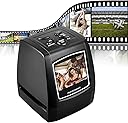
The DIGITNOW 5M/10M Standalone Film/Slide Scanner is a high-resolution device that allows you to convert your film and slides into digital formats with ease. Featuring a 2.4'' LCD display for clear viewing, it supports SD cards up to 32GB and offers 1800 DPI scanning resolution. Compatible with various operating systems, this compact scanner is perfect for preserving your memories.


| ASIN | B01HZXAKZ4 |
| Best Sellers Rank | 87,362 in Computers & Accessories ( See Top 100 in Computers & Accessories ) 63 in Film Scanners |
| Brand | DIGITNOW |
| Brand Name | DIGITNOW |
| Color Depth | 24 bits per pixel |
| Connectivity technology | USB |
| Customer Reviews | 3.8 out of 5 stars 1,034 Reviews |
| Item Dimensions D x W x H | 8.5D x 10W x 8.5H centimetres |
| Item Weight | 269 Grams |
| Manufacturer | BR |
| Media Type | Negatives |
| Minimum System Requirements | Windows XP |
| Model Name | Digitnow!5M/10M |
| Model name | Digitnow!5M/10M |
| Network Connectivity Technology | USB |
| Optical Sensor Technology | CMOS |
| Product Warranty | 1 Year |
| Product dimensions | 8.5D x 10W x 8.5H centimetres |
| Resolution | 1800 |
| Scanner Type | Film |
| Scanner type | Film |
| UPC | 190835032564 |
| Unit Count | 1.0 count |
M**T
Good enough and easy to use.
I paid ยฃ39.99 for this just after 5pm on 17/8/25. It arrived mid afternoon 19/8/25, so delivery was good. Even since then though, the price is now ยฃ10 higher ... Packing inside the cardboard outer was also good - that modern soft-but-still-firm plastic foam stuff, much better than that old moulded polystyrene that eventually fractures and breaks up. This stuff looks like it should be good to keep the scanner & bits safe for years. If you don't already have a suitable 32Gb SD card REMEMBER TO BUY ONE AT THE SAME TIME YOU BUY THE SCANNER! I forgot, decided to buy one through a local store, messed up the Click & Collect thing and had to wait for it. As regards the scanner itself, I had no problem setting it up or using it, once I'd got the hang of it. Negative strips are a bit fiddly to get straight and in the right place in the holder the first time but not a major problem once you've done it a couple of times. Slides are dead simple to do. After that, actually doing the scans could hardly be easier. The image quality seems OK for the price but, for me, it's difficult to say as most of my scans were of 35mm photos that weren't that good anyway. In fairness, I think they were probably taken before autofocus and auto-exposure came along and you had to guess it all out for yourself. If you've never had to do that you have no idea what "fun" you've missed! It's made me appreciate just how damn good even the cameras in modern mobile phones are now, where you can take a pic or video you know will be fine and then have it in front of hundreds of folk all over the world in a few moments. Is this scanner pro-quality? Probably not. But then it's not pro-pricing either. Has it been OK for what I need so far? Yes, though I'm still laughing from seeing old photos where I actually had hair!
J**G
Product: good. User manual: not so much.
Others have said this before me, but the user manual is lousy. However, the product is intuitive enough to use and it was quick and easy to hook up to a TV while reviewing some old slides. My first impressions weren't good; the scanner connects to the TV/PC via an AV lead and the output quality was poor. The slides (when previewed live on screen) looked washed out and the screen swam with faint static. So I wasn't expecting great things from the scanned images that had been saved to the SD card. Happily, however, the scans themselves were infinitely better than the previews on screen. When I plugged the SD card directly into the TV (and later, via an adapter into my PC), the images were excellent. The scanning process itself is very quick and simple, and it's worth pointing out that you don't have to plug the scanner into the TV at all. The preview window works fine for choosing and reviewing the images. The scans are saved to the SD card so all it really needs is the power supply. All in all, then, if you want a device that allows you use the TV/PC connection to run a live slideshow for your family, this isn't going to be your best choice; the preview quality really isn't good enough. You'd need to adopt a 2-stage process: scan first, then show the scans on screen. Do that, and the quality is fine. On the other hand, if you just want to scan old slides quickly and to a decent resolution (5MB is the default) then this will very happily do the job, and at a reasonable price.
C**E
Great item
Bought for uploading old family slides, very easy to use, compact and no problem save images directly to my laptop. Small viewer but I cropped any slide holder edge shadows off the photos once on my laptop. The slides I am up loading are very old , quality of the images are poor but that adds to their charm , plus I am pretty sure my mothers camera was not a high spec model ;) I am most happy with the scanner, does exactly what I wanted it for, for not a crazy price, good value and fun to be able to see and share images that would otherwise be still just sitting in a box on a shelf :)
D**N
Poor - cannot recommend
For the price paid, this is one of the lowest quality items I have yet managed to use. Apart from the tricky to open slide carrier, which requires a lot of pulling power to get it open, so much so that I fear for its longevity. Why the slide carrier doesn't have magnetic catches like its companion negative carrier is beyond me. Strangely however, there are slots inside the slide carrier that could hold the little magnets found in the negative carrier, so either a bit of penny pinching or a quality control issue - you choose. In use, the scanner is fairly straightforward but oh dear in the output quality is abysmal. I was expecting that given the slides a 40 years old, there will be an element of colour deterioration but not of the subject clarity. Given that these were taken with a high quality SLR using Ecktachrome film, the originals were indeed good and sharp and perfectly viewable via a projector or portable viewer. Not so with the scanned images. There is no adjustment possible e.g. dpi, as per flatbed scanners for example. The 10M setting, which I take to be 10 megapixels, is suspect to say the the least. It is just not enough to produce the desired result. The other niggles are that when the scanner is turned off the settings go back to default negative scanning, meaning you have to reset to your desired settings. Finally, the cleaning brush provided is presumably for the scanner but although it goes into the unit easily enough, not so easy removing it. All in all, cannot recommend it - even though it is listed an an 'Amazon's choice' , which by the way if you have seen the recent TV documentary, does not mean what you might be think!
D**R
A reasonable product
This is not too difficult to use and will scan either slides or negatives, though 126-format slides (square) will be cut-off. Once set up you can whizz through sets of four slides or six negatives quickly. Do note that a memory card is not included in the package. My main gripe is with the resolution - even at 10mpg it is not impressive - certainly not what you will see on your projector screen. A slide duplicator attached to your camera will give a much better result.
P**.
just the job for digitising a slide collection
I looked at several different slide scanners before deciding on this one. One thing to beware of (which I only discovered after delivery) is that there are at least three different versions of this although they all look exactly the same. I had viewed an excellent youtube video which persuaded me to buy this scanner, but I only found out when it arrived that this has 5/10Mp output, rather than the 14/22mp output on the video, and it is also missing the converters for feeding in film negatives such as 110 film. There are also different feeders for slides, but the one provided for which you preload four slides and feed them through works fine for me. The menus take some getting used to - it defaults to scanning negatives so every time it is switched on the menu option has to be changed to scan slides. Operation is very quick -probably about 1-2 seconds to scan a slide so I was able to scan a box of 40 slides in under 15 minutes including loading/unloading. There is a counter showing how many more slides can fit on the memory card - for a 32mb SD card (full size type) this was around 28000. 32mb is the maximum size which the scanner can accept. I did encounter one problem - After scanning around 250 slides the machine froze - the only button which worked was the on/off switch. I emailed the support team - to date I have still not received an acknowledgement from them. A few minutes later I managed to work around the problem. I copied the memory card contents to my hard disk and then reformatted the card. The scanner magically started working again. I think I must have reformatted the SD card incorrectly although I was using the windows defaults - there is nothing in the manual to indicate how the SD card should be formatted. I now regularly copy from the SD card to my hard disk to prevent a re-occurrence. In summary - this is a value for money scanner. If you have a good quality original then the scanned copy is very good (considering an expensive quality scanner would probably take several minutes per slide). Loading and scanning is mastered very quickly. Highly recommended
J**W
FIDDLY TO OPEN INITIALLY BUT WORTH THE EFFORT
We 'discovered' almost 400 slides we'd taken in the 80's and regretted not having had them printed as photographs because no-one likes to have to sit through someone else's long family holiday slide show, do they? It's much easier just to look at the odd photograph. The DIGITNOW Slide Scanner Converter provided a quick and relatively inexpensive way to convert our slides into something much easier to consume and we've been delighted with the results and the memories. We're no experts, but would say the JPEG images are as good as the original slides,. It didn't take too long to convert them as we were able to do four at a time, but you need to remember to put them in the correct way otherwise they show up in the viewer as being upside down. It's not a problem as you just press the flip button and it sorts it for you. It's very easy and the little egg timer tells you when each slide has been converted.
D**N
This is actually quite good
Read a lot of reviews on this before I bought but have to say it's a great scanner for the money. Considering I was intending to scan some pretty old prints I appreciated the end results would rely just as much on the slide quality as the scanner. Out of the box it was well packaged and as I had read some negative reviewers about the instructions I decided to ignore them. To be fair the menu is self explanatory and I got it figured it out fairly quickly. Couple of points to help any new buyers. I found the standard settings created a image slightly too bright for my liking so I set the brightness to -1 which gave better results. Also I have some slides from the 1950's to scan and these older thinker slides did not fit the holder very well. I got them scanned but would not want to do too many of them. Agree with other reviews that the slide and negative holders are a bit fiddly but soon got used to it. I've scanned in both 5M and 10m and have to say the scan is lightening fast so takes no time at all to get through a good number of slides. So for someone looking for an inexpensive scanner I'd certainly recommend this. All seems pretty robust and I'm hoping it lasts well under use.
Trustpilot
2 weeks ago
1 week ago