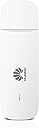
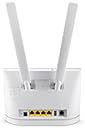
🚀 Stay connected, stay ahead—surf the future with Huawei E3531!
The Huawei E3531 is a sleek, white USB surf stick delivering fast 3G HSPA+ internet with download speeds up to 21.6 Mbps and upload speeds up to 5.76 Mbps. Its plug-and-play design ensures instant connectivity on most notebooks and PCs, making it an ideal portable internet solution for busy professionals on the move.
| ASIN | B00HSZEY34 |
| Box Contents | Huawei Data Stick E3531 |
| Brand | HUAWEI |
| Brand Name | HUAWEI |
| Colour | white |
| Compatible Devices | Personal Computer |
| Compatible devices | Personal Computer |
| Connectivity Technology | Wired |
| Connectivity technology | Wired |
| Customer Reviews | 4.0 out of 5 stars 645 Reviews |
| Data Transfer Rate | 21600 Kbps |
| Frequency | 2100 MHz |
| Global Trade Identification Number | 06920702797227 |
| Included components | Huawei Data Stick E3531 |
| Item Weight | 0.03 Kilograms |
| Item weight | 0.03 Kilograms |
| Manufacturer | Huawei Technologies |
| Manufacturer Part Number | 6920702797227 |
| Model Number | 51070HPL |
| Number of Items | 1 |
| Operating System | Sonstiges |
| Unit Count | 1.0 count |
Y**N
gr8 product, easy setup
really easy to use, just plug in with your sim inside and it will do the rest. instructions are in german, but truethfully not really needed. size is smaller than expected, which is a plus! a gr8 buy! would recommend...
S**H
Good one
Very good for 3g wifi
L**H
Huawei E3531 dongle is good.
It took its time to connect at first but once it connected it does exactly what it says. You can put any broadband sim into the dongle as well. Can't complain
P**R
STAY AWAY FROM HUAWEI
I was told by my mobile provider to buy it for my MacBook and what I got was the worst modem you can think of: doesn't get me connected, doesn't get an operating manual and put a lot of Huawei strange stuff on my Mac (like a process called Runouc, taking up around 98? CPU and using almost 1 gb of memory!!). It went right to the trash along with 45€. STAY AWAY FROM HUAWEI.
T**A
Three Stars
Good.
P**S
Wrong one.
Couple of months i bought one and a couple of weeks i bought another one. I am very surprise because the second USB STICKS is very different than first one and the result is the second one i can not install in my laptoop.
A**C
One Star
No faster than my old one that I'm upgrading. Sent it back. Got a ZTE MF823 instead, much faster download speeds!
L**O
Per il prezzo che ha fa il suo dovere egregiamente
L'ho acquistata per scopi molteplici senza avere grosse pretese considerando che non è LTE ma devo dire che, considerando il prezzo, fa il suo lavoro molto bene ed è configurabile tramite interfaccia web molto intuitiva. Inizio col dire che non ha più nulla a che vedere con la "vecchia" Huawei, il dispositivo è molto solido (a livello software/hardware) nei primi mesi di utilizzo e non soffre disconnessioni, l'esatto opposto delle vecchie chiavette Vodafone anch'esse Huawei ma dal costo decuplicato e dalla vita decimata. E' ovviamente, come già detto, un dispositivo 3G e non 4G/LTE per cui la velocità è ridotta a 21 Mbps (fanno comunque riferimento i parametri dati dall'operatore e soprattutto da una porta USB decente sul PC in uso). Molto leggera di per se, sembra quasi che dentro non ci sia nulla, ma la vedo come nota a favore soprattutto quando la si vuole portare con se. Unica nota: non è possibile utilizzarla con la Vodafone Station che richiede solo chiavette proprietarie, se la volete usare come backup conviene utilizzare un router personale. Traendo le conclusioni, posso ritenermi soddisfatto per l'acquisto e sì, la consiglierei senza problemi.
E**✨
Efficace !
Je l'utilise avec la double carte sim de mon téléphone portable, sur PC et Mac, via un port USB pour avoir internet partout (dans les TGV, en vacances...). ➡️ Le débit est constant et assez rapide, et cela fonctionne parfaitement bien. ➡️ L'installation et l'utilisation sont faciles et rapides. ➡️ Elle consomme très peu d'énergie et ne vide pas la batterie rapidement. ➡️ Un voyant lumineux nous permet de savoir en un coup d'œil si la connections est faite ou non, et de connaître le débit. ➡️ La notice est en anglais, mais elle est vraiment simple à comprendre pour le placement de la carte sim (schéma) et voici la traduction du code couleur : - Absence de couleur : non branché - Vert clignotant 2 fois toutes les 2s : branché - Vert clignotant 1 fois routes les 2s : recherche de la 2G - Bleu clignotant 1 fois toutes les 2s : recherche de la 3G/3G+ - Vert fixe : connecté à la 2G - Bleu fixe : connecté à la 3G - Cyan fixe : connecté à la 3G+ 🔴 Si il fallait lui trouver un défaut : J'aurai préféré qu'elle soit plus fine. Mais je ne regrette pas du tout mon achat ! Je vous la conseille ! J'espère vous avoir utile ! ✅
E**O
Las tres B
La verdad es que cuando lo pedi y habia leido los comentarios no estaba muy convencido. Tenia una tarjeta de datos y quería algo barato para conectar el portatil cuando salgo fuera ya que aunque en casi todos los sitios tienen WIFI hay ciertas operaciones como las bancarias que no confio nada. Me mandaron este modem usb y va a la perfección, es plug and play se conecta fácil a windows10 solo meterle la tarjeta buscar la red y listo. Bueno espero que les sirva la opinión.
D**K
Einfach zu bedienen, voll zufrieden
Für mich tut der Stick genau das, was er soll und was und wie es beschrieben war. Ich verwende ihn unter Win10 und er funktioniert tadellos. Der Surfstick kommt in einer kleinen roten Schachtel, zusammen mit Sicherheitsinformationen und einem Quick Start - Guide. Sowohl die Aufschrift auf der Packung als auch die Beschreibungen sind in Englisch gehalten. Wer Probleme damit hat, kann sich aber an den Bildern orientieren. Da der Stick nicht wirklich aufwändig zu bedienen ist, sollte man in 90% der Fälle auch so zurechtkommen. Entfernt man die Abdeckung, kann man im hinteren Teil seine SIM-Karte einstecken (Mini-SIM). Wer möchte, kann seitlich noch eine microSD-Karte verwenden, die ist aber optional. Sobald der Stick an den PC angesteckt wird, sollte sich die Autorun.exe-Datei des Sticks starten, alternativ kann man sie manuell starten. Im Normalfall öffnet sich dann auch gleich eine "web management page", also eine Seite, auf der man Einstellungen am Stick vornehmen kann oder einfach sieht, ob und mit welcher Geschwindigkeit er mit dem Internet verbunden ist. Dort kann man auch manuell die Verbindung unterbrechen, wenn man Datenvolumen sparen möchte. Der Stick selbst zeigt durch das Blinken bzw. Aufleuchten verschiedener Farben an einer kleinen Lampe an, ob er sich gerade verbindet oder bereits verbunden ist und ob es sich dabei um 2G, 3G oder 3G+ handelt.
L**.
Cómodo y fácil de usar.
Además ocupa poco
Trustpilot
3 weeks ago
3 weeks ago