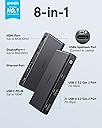
๐ Elevate your workspace with the ultimate 8-in-1 USB4 hubโbecause your setup deserves the future.
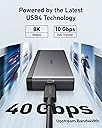
The Anker 556 USB-C Hub (Model A83A8) is a premium 8-in-1 USB4 hub delivering 40 Gbps bandwidth, dual 8K display support, and 100W power delivery. Designed for Windows 10+ devices, it features multiple high-speed USB ports, HDMI, DisplayPort++, and Ethernet connectivity in a compact, durable design, perfect for professionals seeking seamless multitasking and fast data transfer.


| ASIN | B0BM46RVL8 |
| Brand | Anker |
| Brand Name | Anker |
| Colour | Black |
| Compatible Devices | USB Flash Drives |
| Customer Reviews | 4.0 out of 5 stars 129 Reviews |
| Data Transfer Rate | 10 Gigabits Per Second |
| Enclosure Material | Silicone |
| Hardware Interface | HDMI , USB, USB Type C |
| Item Dimensions L x W x H | 13L x 5.4W x 1.7H Centimeters |
| Item Weight Unit of Measure | 145 g |
| Manufacturer | Anker |
| Manufacturer Part Number | A83A8 |
| Model Number | A83A8 |
| Number of Ports | 8 |
| Operating System | Windows 10 |
| Product Features | Pass Through Charge |
| Special Feature | Pass Through Charge |
| Total USB Ports | 8 |
| UPC | 194644116903 |
H**S
Stopped charging laptop after 1 week
Connected to this a 130W power supply and it was working fine, and now it refuses to charge my laptop after a week of usage. Really disappointed in the quality of this product from a brand I trusted. Edit: the customer service was fantastic, they replaced the defective product and it is working better now.
C**G
USB4 Upstream + Premium Build Quality + 30w Turbo Mode for ROG Ally
These past few couple months I have bought and tried many hubs for my new ROG Ally. I have very strict requirements: -Activates '30w Turbo Mode' with proper wattage from power brick, and suitably rated usb-c cables both from the power brick to the dock/hub, and also from the dock/hub to the Ally. -Upstream bandwidth must be fast enough for operation of a hi-speed drive + any other peripheral at the same time -USB ports must be 3.2 gen 2 10Gbit -Must have a minimum of 3 USB ports -HDMI must be true 2.0 specs (4k60, 2k144, 1080p240) <-- *Have not been able to test this part yet* -sd card slot (does not matter if UHS-I) -Ethernet port -Supports at least 65W PD to main device -Able to maintain stable operation when part of a daisy-chain Before this hub, I mainly tested Ugreen hubs. This Anker one is better than the Ugreen ones I tested, but to be fair, all of the Ugreen models were $30 - $60. Material, and apparent build quality is about on par between the two companies. How this will hold up under load (my particular setup in a 3-hub daisy chain), will be the question. Only time will tell how good the circuits are, so I will report back if something goes wrong. This hub and the official Steam Deck dock are the only third-party hub/docks that I personally have tested that activates the '30w Turbo Mode'. Also, I have to mention Anker's support. They are professional, and quick to reply! Thanks, guys!
E**G
Fast and works great with 2023 MB Pro
My previous USB-C hub plugged into a 2017 MBP, and the 4k external monitor had the full range of resolutions when plugged into its HDMI port. However plugging it into a 2023 MBP, I had a reduced number of resolutions and, everything had become much fuzzier. Plugging directly into the computer HDMI port resolved that, but I wanted a hub so I would only need to make a single connection when I plug the laptop in at home. Hence the new hub. I updated it to connect via the displayport, and everything looks just as good as it did before. I did try a displayport-USB-C cable into the USB-C port on the hub. When I did that, the external monitor wouldn't connect. But using the exact same cable straight into the laptops port worked fine.
J**.
Great Travel Hub
There are lots of options out there, this one works well for me to carry with my laptop and use in a flex space where they've got a variety of monitors. It's missing vga but i have a separate thunderbolt dongle for that. Think i also must have gotten it on sale as I paid about 50% of what I saw it posted the next day. Great size for travel if it has the connections you need.
B**N
Probably the best non-thunderbolt dock
I got it as a dock for my secondary setup and for travel, all the features work and it has enough speed for my usb devices and monitor over displayport qhd 144hz, it DOES NOT support variable refresh rate/freesync like I was hoping but I guess it is what it is. It also works fine without a power supply as a portable hub. I got it for $100 and think it is ok for that price, for $150 it is a tougher sell and you should proably just go for a full thunderbolt dock.
Trustpilot
3 weeks ago
3 weeks ago