Desertcart purchases this item on your behalf and handles shipping, customs, and support to Romania.
🖱️ Elevate your workflow—trackball freedom for the modern professional
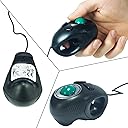
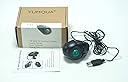
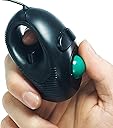
The YUMQUA Portable 4D USB Mini Trackball Mouse offers a compact, ergonomic design that fits both left and right-handed users. Featuring a thumb-controlled 4D trackball, it eliminates the need for a flat surface, making it ideal for cramped spaces like cars or planes. Compatible with all major operating systems and requiring no software installation, this wired mouse reduces wrist strain and enhances productivity for professionals seeking comfort and versatility on the move.
| ASIN | B00DT2Q9OM |
| Antenna Location | Office |
| Are Batteries Included? | No |
| Are Batteries Required | No |
| Battery Average Life | 3 months |
| Best Sellers Rank | 76,244 in Computers & Accessories ( See Top 100 in Computers & Accessories ) 1,492 in Mice |
| Brand | YUMQUA |
| Brand Name | YUMQUA |
| Button Quantity | 3 |
| Colour | Black |
| Compatible Devices | Personal Computer |
| Connectivity technology | USB |
| Customer Reviews | 3.6 out of 5 stars 307 Reviews |
| EU Spare Part Availability Duration | 3 Months |
| Enclosure Material | Plastic |
| Hand Orientation | Ambidextrous |
| Hardware Platform | PC |
| Included Components | 1 x Wired Trackball Mouse |
| Item Dimensions L x W | 8L x 5W centimetres |
| Item Weight | 0.12 Kilograms |
| Manufacturer | YUMQUA |
| Manufacturer Part Number | Y-01 |
| Minimum Required Operating System Version | Windows 95 |
| Model Name | Y-01 Wired Trackball Mouse |
| Model Number | Y-01 |
| Mouse Maximum Sensitivity | 1000 Dots per Inch |
| Movement Detection | Trackball |
| Movement detection technology | Trackball |
| Network Connectivity Technology | USB |
| Number of buttons | 3 |
| Operating System | Linux,Mac,Mac Os,Windows |
| Power Source | Corded Electric |
| Product Features | Portable |
| Product Finish Type | Matte |
| Special feature | Portable |
| Style Name | Modern |
| Theme | Video Game |
| UPC | 702795806521 700358168505 |
| Unit Count | 1.0 count |
J**N
Good value for money - pity there is no scroll wheel.
This little trackball is ideal for use with a laptop. It is comfortable to hold and while it takes a bit of getting used to if you are used to a traditional mouse it is easier to use when you are working on your knee for example as you don't need a flat surface to use like you do with a mouse. I have tried several trackballs and this is the one that I keep returning to time and again. The only downside to it is the lack of a scroll wheel which can be annoying. Also if you drop it regularly the green ball can come loose but is easily replaced back into position. The obvious solution is not to drop it but I found a dab of superglue carefully applied prevented the problem as with two small children it inevitably gets knocked off! Overall I would definitely recommend this trackball for its value for money.
J**M
Interesting variation on a mouse but awkward when typing
The product is a lot less robust than I had imagined. The plastic has quite cheap appearance and the item is quite small. it is an interesting alternative way of interfacing with a notebook/laptop, but it's really hard to use and to type, because it has to be 'worn' on one finger or another and gets in the way of moving between typing and mouse - you either have to keep taking it on and off your finger or somehow try to type one-fingered with it on your finger, meaning that it gets in the way.
B**N
Fiddly but useful
I bought this to help with my RSI. It is a little bit fiddly, getting used to how to hold it and particularly in how to scroll down pages you are viewing (press the trackball down and very gently move it to scroll) but it has helped, I think. Because it is USB operated I've been able to hook it up and use it whenever I want to give my wrist a rest while keeping my normal mouse plugged in. You can use it equally easily right or left handed, and the cord is long enough that I can rest my hand on my lap. Overall, while it is a bit fiddly, I'm glad I bought it, and I use it frequently - though not as my main mouse!
M**B
My experience was dismal but I returned it
My experience was dismal because the handheld trackball mouse wouldn’t work properly with a perfectly standard w10 Dell laptop. The pointer would move but the buttons didn’t work properly. I tried to contact customer services and their chat line. No response. I returned it.
A**N
Works with Linux on Hyprland/Wayland
I switched from a fingertip-controlled trackball (it kept falling off my lap and breaking) to this thumb-controlled trackball. It took an hour or so to get accustomed to the new control. I see why some reviewers complain: the ball rattles in the socket, it needs a custom tool to remove and the USB cable is so thin and delicate I doubt it'll last a year, but that's how all modern products work. They break easily so you have to buy a new one. I need to put a hanging hook up somewhere so I don't tread on it and the cat doesn't chew on it. The device works well, though it's a bit puny in my giant ham hands. I'm using Linux with Hyprland/Wayland. The "4D button" actually sends the "middle button" code and Hyprland has native support for hold-scrolling or toggle-scrolling on middle-mouse-click.
L**Y
It should have been brilliant
This is a great idea but it has one massive fault. The mouse wheel, a green ball as shown in the illustration, is really loose in it's housing. This means that it rotates and rattles about as you hold the mouse even if you're not touching it. In fact, if you do not try to hold it steady, its unusable. This is a terrific shame as the idea of having a fully hand-held mouse is brilliant if you're using a laptop on your lap and don't want to use the touchpad. If there was some kind of damper round the ball, holding it securely but allowing it to roll I would give this 5 stars across the board. As it is, it's of no use and I wish I had returned it within the allowed time. I bought this mouse as a refurbished item from Amazon. It does make me wonder if it is, in fact, faulty, and had been returned for the same fault that I describe here. A quick look by the department which deals with this sort of return probably would not find any issues at all....you have to try using it to see the problem. I would not recommend you buy this model of mouse. I am sure there must be a more efficient design somewhere.
B**B
Brilliant - love it
I'm used to using a trackball on my desktop so when I spotted this I had to buy one for my laptop. I use it on both as I have RSI in my right shoulder and I use my finger-mouse on my left hand. Other people have had problems scrolling, but I find it great . Click the left-hand button on the top, which puts a little up/down icon on the screen. Then track up or down and the screen scrolls in that direction. Speed is adjustable by raising/lowering mouse trail. Great for reading through documents etc. Left click again to stop. Note in some aps you need to keep the left button depressed while scrolling (eg word) but web browsers retain up/down icon on screen without. Simple games are easy to play, but still practising using with my role play games. Only downside is I have to put it down when I'm typing, but then you can't type and hold an ordinary mouse at the same time!
E**K
Comfortable to use, but not for CAD
I bought this mouse when I broke my right elbow. I am a CAD designer and so I use my mouse a lot. This enabled me to return to work and a work with my arm resting in my lap. On the whole it worked well, and I found I adapted to it pretty quickly, but then that is going from a desk top mouse with a scroll ball. There were two points that stopped me from continuing with this mouse once my arm got better. The first and most major one was the lack of scroll wheel. This is something that I use a lot, to zoom in and out. If you are not working on a CAD package this may be less of an issue. The second was hitting the left click by accident. This didn't actually happen as much as I thought it would, but once I did do it, I kept on doing it. It was very comfortable to use and I plan to use it now with my Laptop, just not for my CAD work.
C**A
Prototype à améliorer
J'ai acheté ce produit parce que j'avais un syndrome de la souris, pour soulager mon épaule et mon poignet. De ce point de vue, cela a rempli son office. Je mets même une 2ème étoile parce que c'est ambidextre, ce qui est vraiment pratique. Mais autant c'est pratique au niveau du pouce pour déplacer la flèche, et vraiment très précis (+), autant la fonction "clic" est mal foutue. C'est avec l'index qu'on doit insérer dans l'anneau qu'on a l'effet clic gauche, ce qui oblige sans arrêt à enfiler pour cliquer et ressortir le doigt pour taper au clavier. Cela devient vite contraignant. Je ne comprends pas pourquoi ils n'ont pas placé ce clic au-dessus de la boule verte, à actionner par le pouce. Au-dessus de la boule verte qui sert donc à bouger la flèche, il y a pourtant 2 clics : le clic droit a les mêmes fonctions que sur une souris classique, tandis que le clic gauche extérieur sert ici à actionner la bande défilante (qui ne fonctionne pas sur tous les sites !!). Dernier point négatif, cette souris tombe facilement par terre et la boule saute à chaque fois. Heureusement, c'est facile à remonter, et ça fonctionne encore après réparation. Mais c'est quand même plutôt cameloteux sur la durée... Bref, un gadget utile sur Facebook quand on veut beaucoup cliquer, mais pas quand on a beaucoup de texte à écrire. J'attends un modèle plus adapté au niveau des boutons.
R**H
Sehr gut
Wenn man sich erstmal an die handhabung gewöhnt hat ist es eine sehr gute Maus
M**X
Prodotto pienamente soddisfacente
Avevo bisogno di un piccolo trackball da utilizzare in viaggio e questo articolo soddisfa pienamente le mie esigenze, dopo un breve periodo per abituarmi all'uso del tasto sinistro all'interno dell'anello mi sono trovato moto bene e il funzionamento è sufficientemente sicuro.
A**A
Brazo inmovilizado
Muy bueno, lo usé por una cirugía, sólo la esfera necesita un poco más de estabilidad porque al presionar el botón de click, se desplaza un poco.
A**B
No es cómodo
Malo, no lo recomiendo.
Trustpilot
2 weeks ago
2 months ago