Buy anything from 5,000+ international stores. One checkout price. No surprise fees. Join 2M+ shoppers on Desertcart.
Desertcart purchases this item on your behalf and handles shipping, customs, and support to Romania.
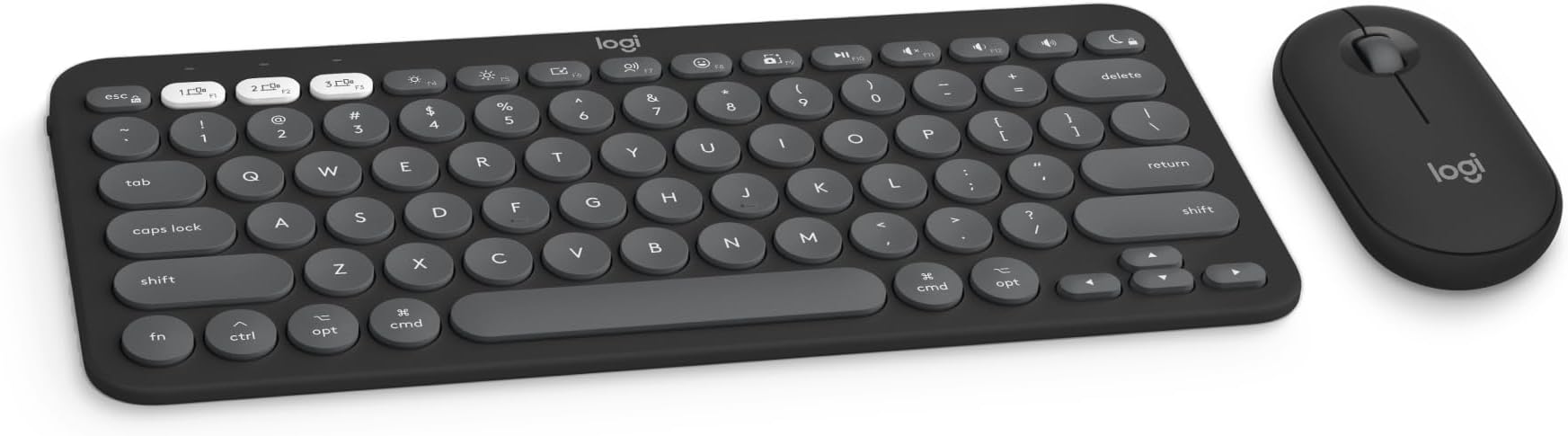
♻️🔋 Elevate your Mac setup with silent power and sustainable style!
The Logitech Pebble 2 Combo for Mac is a slim, portable Bluetooth keyboard and mouse set designed for seamless multi-device use across macOS, iPadOS, and iOS. Crafted with up to 58% recycled plastic, it features quiet typing and clicking with Silent Touch Technology, customizable Fn keys and mouse button via Logi Options+, and long-lasting batteries—3 years for the keyboard and 2 years for the mouse—making it a stylish, eco-friendly productivity essential for professionals on the move.


| ASIN | B0BT4DNHS5 |
| Additional Features | Lightweight, Portable |
| Antenna Location | Personal |
| Best Sellers Rank | #194 in Computer Keyboard & Mouse Combos |
| Brand | Logitech |
| Built-In Media | Item |
| Button Quantity | 6 |
| Color | Graphite |
| Compatible Amazon Tablet Models | Amazon Fire HD 10 11th Generation, Amazon Fire HD 10 13th Generation, Amazon Fire HD 10 5th Generation, Amazon Fire HD 10 7th Generation, Amazon Fire HD 10 9th Generation, Amazon Fire HD 10 Kids 11th Generation, Amazon Fire HD 10 Kids 13th Generation, Amazon Fire HD 10 Kids 7th Generation, Amazon Fire HD 10 Kids 9th Generation, Amazon Fire HD 10 Kids Pro 11th Generation, Amazon Fire HD 10 Kids Pro… |
| Compatible Devices | Laptop, Gaming Console, Television, Tablet |
| Compatible Operating System Family | iPadOS |
| Connectivity Technology | Bluetooth |
| Customer Reviews | 4.5 4.5 out of 5 stars (334) |
| Enclosure Material | Plastic |
| Hand Orientation | Ambidextrous |
| Item Weight | 14.64 Ounces |
| Keyboard Description | Indoor |
| Keyboard Layout | QWERTY |
| Manufacturer | Logitech |
| Mfr Part Number | 920-012200 |
| Minimum Required Operating System Version | Mac OS 12 Monterey |
| Model Number | 920-012200 |
| Number of Keys | 104 |
| Power Source | Battery Powered |
| Style Name | Mac |
| UPC | 097855191175 |
| Unit Count | 1.0 Count |
| Warranty Description | 1 Year Limited Hardware Warranty |
N**D
Multiple device use.
Love this keyboard and mouse combo. Compact and work well with a couple different tablets and phone. Can use 1 keyboard for multiple devices.
W**N
I’d recommend
Good purchase keyboard is pretty quiet and connects very easily to my Mac mini M4. The mouse is very good. Honestly value for money I say yes a big fat yes
A**S
Compact & Versatile Keyboard and Mouse Combo
I recently purchased this keyboard and I’ll admit, after a short time of owning it, I’m very impressed. The purpose for this Logi combo was because my MacBook Air keyboard suffered water damage, leaving the keys to not work properly. Originally I wanted to purchase a more expensive version of this keyboard, but it did not come with a mouse. I found myself selecting this product and I’m glad I did. I absolutely love the look, feel and size of this combo. The buttons are very responsive on the keyboard and the mouse tracking/movement is very fluid. As well, installing the logic options+ app makes it very easy to customize both keyboard and mouse to your liking. Pairing is super easy and quick and a nice touch to pair with multiple devices by the switch of a button. I’d highly recommend anyone looking for a replacement keyboard mouse combo due to keyboard issues, or working with multiple devices at once.
J**Y
Great keyboard for everyday use, ergonomic, light, works well.
Great. just works right away out of the box. not the greatest keyboard for WPM but it certainly does the trick. Well designed.
G**X
Connects easy, feels right in the hand
The Pebble 2 Combo won me over pretty quickly — pairing was smooth and fast, no driver headaches or Bluetooth wrestling matches. Just connected and got to work, which is exactly how it should go. The size is spot on. Both the keyboard and mouse hit that sweet spot of compact without feeling cramped. Easy to handle, comfortable to use for extended sessions, and portable enough to toss in a bag without thinking twice. Quiet is an understatement. If you’ve ever been self-conscious about clicky keys or a loud mouse in a quiet room, this combo solves that problem entirely. Works seamlessly with Mac. The dedicated Mac layout is a small but appreciated touch — no remapping or workarounds needed. Bottom line: A well-sized, easy-connecting wireless combo that makes a strong case for itself right out of the box. A reliable everyday setup worth recommending.
K**S
Substantial weight for both items and great responsiveness
OMG!!! there aren’t enough words to describe how fabulous this product is. I love the substantial weight of the keyboard and mouse and both paired within 2 to 3 seconds to my new iPad Pro with the M4 chip. There was no learning curve using a keyboard with round letters and numbers instead of the square ones on my current keyboard and mouse, and the responsiveness of both was phenomenal. I will really enjoy using this combo and I’m so happy that I bought this. I wish I had bought this years ago if it was available.
A**Z
AWESOME PRODUCT
I love it! Easy to us. Love how it uses batteries, you’re able to turn it off and on and take it anywhere!
M**P
not 100% compatible with Mac
Not 100% compatible with Mac :-( from applestckexchange , this is from Logitech apparently… “ What I've found is that the 'Fn' key on the Logitech MX Keys Mini is designed to function differently from the 'Fn' key on a standard Apple keyboard when used with macOS. Specifically, the 'Fn' key on our Logitech keyboard primarily serves to access the secondary functions printed on the F1 to F12 keys (like media controls, brightness, etc.). You would typically press and hold the 'Fn' key and then press the corresponding F-key to activate these Logitech-specific functions. Dedicated macOS shortcuts that rely on the Mac's native 'Fn' key behavior, such as Ctrl + Fn + C for specific system-level actions, are generally not compatible with the 'Fn' key on third-party keyboards like the Logitech MX Keys Mini. These types of shortcuts are often hardcoded to recognize the specific signal and behavior of the 'Fn' key built into Apple's own keyboards. Therefore, the reason your Ctrl + Fn + C 'center window' command isn't working is likely because macOS isn't interpreting the 'Fn' key press from the Logitech keyboard in the same way it would from an Apple keyboard for that particular shortcut. it's generally necessary to use an actual Apple keyboard to ensure those shortcuts are correctly interpreted by macOS. ”
J**Z
The keyboard and the mouse works very well with my MacBook. There is not a delay between typing or scrolling. The size is just enough to make it portable and comfortable. The steps to connect the devices are simple and easy to do.
N**K
Bluetooth connected seamlessly. Keyboard very similar feel to wireless Mac keyboard. Very happy with this purchase and highly recommend for the price. Mouse great as well, have to get used to the scroll function but connected seamlessly as well and it works great.
R**I
i’ve been using the logitech products from last 20 years, they are always reliable. This keyboard has a sleek design & can be connected to three devices at a time and works perfectly with my smart tv and ipad. Mouse clicks sounds great too
A**A
I didn't mind the keyboard at all, but the mouse was way to thin or flat for me. It didn't fit comfortably in my hand, so it felt weird. I did, however, like the Bluetooth compatibility of both devices, the easy setup, and the easy method of switching between connected devices.
S**1
easy to connect and very conivent because of its size and weight, overally performance is good and reliable! recommend!
Trustpilot
2 weeks ago
1 month ago