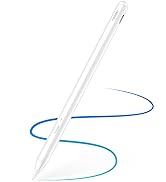
🖊️ Elevate your digital creativity with precision and power in one sleek stylus!
The Metapen Stylus Pen M2 is a premium active pen designed for Surface and select devices, featuring 4096 levels of pressure sensitivity, tilt support, and a tail eraser for intuitive editing. It boasts a rapid 1-hour USB-C fast charge delivering up to 100 hours standby, with 5 minutes charging enabling 24+ hours of use. Dual strong magnets ensure secure attachment to compatible devices, while its aluminum-alloy body and advanced conical tip provide a comfortable grip and precise input for creators, students, and professionals alike.








| ASIN | B0B1CY438Q |
| Batteries | 1 Lithium Metal batteries required. (included) |
| Batteries Included | Yes |
| Batteries Required | Yes |
| Battery Average Life Standby | 100 Hours |
| Battery Description | Lithium |
| Best Sellers Rank | #403,067 in Electronics ( See Top 100 in Electronics ) #32 in Pens for Graphic Tablets |
| Brand | metapen |
| Charging Time | 1 Hours |
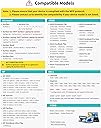
| Compatible Devices | Surface 3 Surface Go, Surface Go 2, Surface Go 3 Surface Laptop, Surface Laptop 2, Surface Laptop 3, Surface Laptop 4, Surface Laptop Studio Surface Pro 3, Surface Pro 4, Surface Pro 5, Surface Pro 6, Surface Pro 7, Surface Pro 7+, Surface Pro 8, Surface Pro 9, Surface Pro X,Surrace Pro 10,Surrace Pro 11 for Business Surface Duo, Surface Duo 2 Surface Studio, Surface Studio 2 Surface Book, Surface… |
| Customer Reviews | 4.4 4.4 out of 5 stars (2,135) |
| Date First Available | 24 July 2023 |
| Item Weight | 14 g |
| Item model number | ME-MPP702 |
| Manufacturer | metapen |
| Model | ME-MPP702 |
| Net Quantity | 1 Count |
| Package Dimensions | 18.7 x 5.8 x 1.4 cm; 14 g |
A**R
Not working Bluetooth
Not support the tab
M**N
Looks quite good. I lost the MS Slim Pen that I had bought to go with my Surface Laptop Studio 2. I didn't use it very often and really did not want to pay the very high price for the MS original, so I decided to give the Metapen a try. It feels decently built and is comfortable to hold. Also seems to work fine on my laptop - decently responsive and positioning seems accurate. As some others have suggested, the tip is quite hard. I was concerned that prolonged use might mark the screen, so this has prompted me to fit the screen protector that I have always intended to buy. Oh, and, despite various reports on the web, it does fit well enough in the "pen garage" on the Laptop Studio 2. Obviously, it will not charge there - that is for MS pens only - and the magnetic attraction is a bit less than I remember from the MS Pen, but it hangs there well enough.
F**Y
Koppelt makkelijk met mijn kobo libre color. Reageert snel op aanraking met scherm. Snel opgeladen. Zeer tevreden over prijs kwaliteitverhouding. Losse tips gekocht omdat ik 'm van de trap had laten vallen (lekker handig) en tip was krom. Werkt nog steeds! Niks mis mee.
P**G
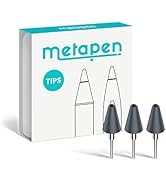
I've been using this pen for several months now and I can definitely say this is a VERY good pen. The M2 feels quite comfortable in hand much like an apple pencil and writes with no lag. The nibs are solid plastic, but not too hard where it'd damage the screen and they rotate on the head of the pen to "roll" across the screen to reduce friction. However, using a "paperlike" or textured screen protector REALLY wears down the nibs fast, so stick with a bare screen or regular glass protector if you'd like to have some longevity to your pen nibs. Switching nibs is pretty easy, just pull em out and pop them in. The M2 also has a stronger magnet than the normal Microsoft surface pen to keep it attached to the device (mine usually stays mounted firmly on the side when not in use). No software or drivers needed to get things going, just hover it over the screen and it's good to go. While it would be nice to have some software to adjust things like pen pressure or remap the eraser/side button, it overall functions just fine for my needs. It charges via USB-C and I typically top off the battery between drawing or while taking a break, typically less than 15-30mins at a time. I typically use my surface for drawing and animating on the go rather than just taking notes, so having a good pen is very important to make the experience more comfortable and to maintain decent workflow for art purposes. One thing I CANNOT stand from most non-wacom styluses is lag and poor accuracy, so the responsiveness of this pen is notably very good for an MMP device. Attached are a couple of doodles I've made with the M2 and my "set up" with the Go and M2 for size comparison. While tools don't make the artist, they certainly can help and this pen makes my drawings on my travel device near indiscernible from quick sketches made on my wacom display tablet and desktop set up. I'd argue this pen is even better than the standard surface pen, especially for the price point. Bonus, it comes with a few extra nibs and some metapen stickers lol
R**B
funkar enkelt och bra. något hårt tipp så låter en del, inget större problem för mig men värt att tänka på. Knappen på sidan är av någon anledning inte lika lätt att använda som microsofts egna surface pen, men den är trots det funktionell.
D**L
Sin duda es la mejor opción si quieres un lápiz para tu Surface o ereader sin comprar los originales. Tanto en Surface como en mi ereader, maneja todas las funciones sin ningún problema. Además, puedo cambiar de dispositivo sin reconectar o reconfigurar nada, es acercarlo, ¡y está! La batería dura muchísimo, con un uso intenso como el mío, da para unas 3 semanas de uso por carga completa. Lo dicho, es la mejor opción, básicamente porque ofrece lo mismo que el original pero por 1/3 de su precio (en caso del original de Surface) o por la mitad (en caso del lápiz del Kobo Libra). Así que si estás pensando qué lápiz comprarte, ¡corre a por este!
Trustpilot
3 days ago
1 day ago