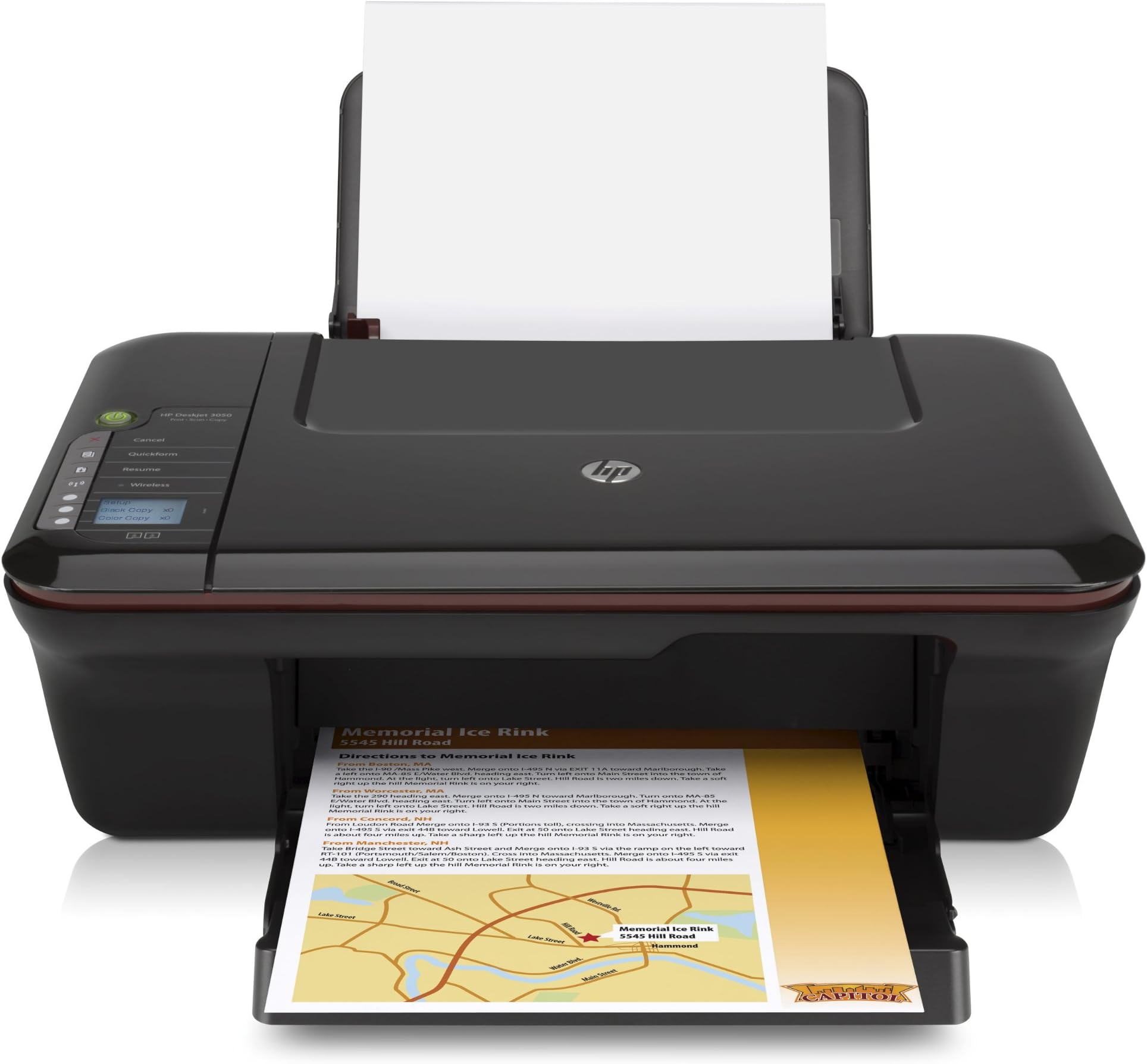



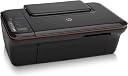

HP Deskjet 3050 All-in-One Printer
Product ID: 56412433
Close-up of the HP Deskjet 3050 Printer. Click here for a larger imageThe HP Deskjet 3050 All-in-One is designed for home and home office users looking for an affordable wireless all-in-one that offers easy set-up, reliable performance and the extra convenience of built-in scanning and colour copying. Do more than just print with this affordable and reliable all-in-oneSimple instructions make it easy to set-up and use so you can print everything you need: documents, web pages and more with the versatility of being able to copy and scan too. The HP Deskjet 3050 All-in-One is designed for users looking for an affordable and easy to use colour wireless printer with a range of basic one-touch tools and cost-saving features, plus the extra versatility of built-in scanning and copying. Enjoy reliability and value with HP’s most affordable all-in-one, get HP reliability at a great price – simple, no frills design gives you all you need and nothing more. Click here to download a specification sheet (PDF). Go wireless and give yourself the freedom to print from any room in the houseShare the performance across multiple PCs notebooks using built-in wireless connectivity from any room in the house.1 Connect to your wireless network in no time convenient one-button wireless set-up.2 Fast print speeds, dual drop weight technology, and borderless photo printingBe sure of great results, with crisp, sharp black text and bright colours with Original HP inks. Rely on HP for good value – get up to 2.5x more black printed pages and 2x more colour printed pages with optional high-capacity replacement ink cartridges.3 Ink cartridge replacement is designed to be as simple as possible too, with easy access via the centre of the printer.HP uses dual drop weight technology to ensure you get the best quality prints every time. Small and large ink droplets are combined to create greater ink coverage on the page, increasing image quality and reducing the visibility of ink droplets. Also, get fabulous photos with borderless photo printing on up to 10cm x 15cm prints. Get an early warning before you need to replace supplies via the low ink indicator light.Get set up and printing in no time with simple installation, one-touch buttons and copying without a PCGet connected to your computer with the minimum fuss – simple step-by-step installation means you’re up and running in no time. Intuitive controls make managing your printer easy too, with just four one-touch buttons: power, black/colour copy and a quick cancel button to save you ink, paper, time and money. You can even make copies without a PC. Plus, use the paper saving option when you print to make the most of your paper supplies. Touch the HP Quickform button to print calendars, games and more – all without a PC.Save energy, save the environmentENERGY STAR qualified, this printer is optimised for efficient energy use. That means it will save you money by reducing energy costs and help to protect the environment without sacrificing features or performance. HP products that earn the ENERGY STAR qualification minimise greenhouse gas emissions and reduce the risk of climate change by meeting strict energy guidelines set by the US Environmental Protection Agency. So you can be sure you are getting a great value printer that won't cost the earth. Design and print beautiful keepsakes with Creative Software. Click here for a larger imageBring Memories to lifeLike to get creative with your photos? With HP Photo Creations you can automatically make beautiful keepsakes with just a few mouse clicks; or you can take your time and customize your keepsakes with over 1,800 high quality artwork designs, 1,300 placeable graphics, placeable text boxes, custom fonts, borders, and dozens of photo editing tools.Count on affordable photo and everyday printingOriginal HP suppliesInk is much more than just coloured water; the unique, hi-tech formula for HP ink is designed to work with all the mechanical parts of the print cartridge, and the printer itself, to deliver high quality results across a wide range of papers, in a variety of environmental conditions.Why Original HP Inks?It takes up to three years to develop new inks, so a huge amount of work goes into producing Original HP Inks, from the selection of superior ingredients to precision engineering of both the chemical formula of the ink and the high-performance ink cartridge components.The print cartridge itself is the product of years of research and development and is much more than just an ink tank. The integrated print head on an HP cartridge includes an intelligent circuit that controls the hundreds of nozzles, each finer than a human hair, which deliver the ink onto the page. Each drop of ink is fired onto the page on the back of a tiny vapour blast of heat 7 times the intensity of the sun that lasts for just two millionths of a second; this energy blast exposes the ink drop to forces up to one million G’s. Some of the latest Original HP ink cartridges can deliver in excess of 29 million drops per second.In many of HP’s home printers, over 50% of the printing technology is contained within the cartridge itself; which means every time you replace your Original HP Ink Cartridge you are installing a brand new print engine. Original HP Inks are developed in conjunction with HP papers to ensure maximum compatibility and performance. The result is the perfect balance of colour, permanence and reliability.Standard Value Packs/XL packsHP offers a range of ink cartridges tailored to the way you print. To help you make smart choices about printing and costs, HP has created a portfolio of cartridge offerings with various price tags for you to choose from.Standard cartridgesFor everyday printing that is precise and affordableBest value for moderate volumes of printingHigh quality and reliable printingValue XL cartridgesFor high volume printing, choose high capacity XL cartridgesBest value for large volumes of printingMore prints with fewer cartridge changesOriginal HP PaperRegardless of what your ideas call for HP offers papers for all occassions: from inkjet paper for everyday usage to transparencies and iron on transfer sheets on to water colour papers for gallery-quality reproductions with brilliant precise colours. For more information go to hp.com/supplies.RecyclingGet free and easy recycling--cartridges returned through HP Planet Partners are recycled responsibly. HP never refills, resells or sends ink cartridges to a landfill. See www.hp.com/recycle for details. Reduced PackagingReduces packaging and waste by using innovative reuseable bags, this product is shipped in 99% recyclable or reusable packaging.1Wireless performance depends on physical environment and distance from access point. 2Requires a WPS router with an integrated push-button; wireless performance depends on physical environment and distance from access point. 3Compared with HP 301 ink cartridges (XL cartridges not included, please purchase separately); based on HP published yields, actual yields vary based on printer used, images printed and other factors (see www.hp.com/go/learnaboutsupplies). Review: Needed a work horse that was flexible for a variety of purposes - Was not disappointed. I initially was apprehensive after reading some reviews but hedged my bets and bought 2 as I needed one as a present for my mum. If I there was a problem with one I could preempt it with mine and sort my mum's out. However when I read through and followed the quick start guide I had mine up and running in 30min. Happy days! Next I tested printing text and pictures and both were of a good standard. The wireless printing function (the major selling point for me) proved efficient and effective too. Laptop downstairs in livingroom, router/modem in hall & printer upstairs. Sent 4 medium res photos to print on one A4 sheet and when I went up to check progress it was already half way through printing on the photo paper! No issue then with wireless speed! Of note when setting up the wireless function of the printer I had to select the 'manual' button when choosing my Wi-Fi network as it is password protected but it was all easy to follow too. When setting up my mum's the process took much less only 20min. Tested it too with same results as to quality and speed. Still to test scanner - but didn't really need this so not too worried. Pros: Easy setup, quiet print operation, print quality is grand, both wireless & print speed good and it looks stylish. Also has an Eco power save mode so I am also saving the planet (cough)! Cons: Rather than leave this blank I'm really being picky when I say there are a few loud whirrs and buzzes when you turn on or off but that is truly a minor point unless your printer is next to a sleeping baby... Review: Very Nice Printer - I bought this to replace an older HP 720c and I have to say I really like this printer so far. There seems to be some bad reviews mainly surrounding borderless printing (which this printer doesn't do nor was it designed to) so it's kind of like buying a Ford Escort then complaining that it doesn't fly.I don't print photos so I'm not concerned with borderless printing. The printer is very light, much lighter compared to the old 720c (which was built like a tank) so I don't know if this is a reflection of advancement in technology or they are just making these things cheaper, in any case it's a good thing so far. Comes with a USB cable (could be a bit longer but at least it come with one), the outboard PSU is very light so I suspect it's a switchmode PSU which again is no bad thing. The cable running to the printer does seem a bit flimsy much like what you would find on a run of the mill 9 volt adapter so not sure how durable it will be but then again once it's plugged in and left alone it won't see and stress or strain. This feature could be better in my opinion but so far hasn't posed a problem. The set up using the supplied software and a USB cable was fairly straight forward but the wireless set up is another matter. I use WEP encription on my netgear router along with the mac address form any wireless device so I needed to find the mac address from the printer which took me awhile to work out. You have to print out the info direct from the printer (this option became apparent when trying to set up the printer wireless) on the paper print out was the printers mac address so I managed to get past that hurdle. The next thing you have to do (if I remember correctly) is then run through the set up for wireless printing via a laptop (after you have run through the initial setup as stated in the manual), then during the install the software will prompt you to connect the printer temporarily to the laptop via the USB cable, this is how you enter the WEP key into the printer. Once thats done "E viola" it works fine. The instructions that come with the printer are pretty basic and don't really cover this in any great detail so marks off for that, they really should have done a better job with the documentation here. I've seen some reviews that state the printer set up in a foreign language even though English was selected but I didn't find this at all, I selected English and it set up in English. I haven't really tried the photocopy feature yet so can't comment on that but the scanning works fine and I can scan straight to PDF (multiple pages as well in to 1 pdf document). The printing is much faster than the old 720c. The printer doesn't make any more noise than any other printer that i've used before, it's pretty average in this department. The paper feed from the top so far doesn't seem to be a problem like the old 720c which fed from the bottom and sometimes grabbed multiple pages. Now about this borderless printing issue, check the printer you are going to replace (if that is what you are planning on doing) does it printer borderless? If not, have you ever noticed this being an issue? If the answer is NO then borderless printing isn't an issue and you shouldn't use that as a reason to rule out this printer. So far I am very happy with this printer in terms of it's operation and the quality of the printing, which is just fine as far as I'm concerned. It's not a laser jet printer so don't expect it to operate like one nor is it a photo printer so again don't expect it to operate like one. If you need a good all in one printer for general home printing etc then this is a good choice. I'm very happy with it so far. I can't comment on how much ink it uses as I haven't had it long enough to know. So far I'm very happy with this printer. If it wasn't for the lack of documentation rgarding the wireless set up, I would give the printer a 5 or a 4.5 so I'm knocking off a point for that as I think it might confuse someone who is less IT savvy.
| ASIN | B0043XYYGQ |
| Additional Printer Functions | All In One |
| B&W Pages per Minute | 5.5 ppm |
| Best Sellers Rank | 348,375 in Computers & Accessories ( See Top 100 in Computers & Accessories ) 604 in All-In-One Printers |
| Box Contents | Ink Cartridges |
| Brand | HP |
| Brand Name | HP |
| Color Depth | 24 bpp |
| Color Pages per Minute | 4 ppm |
| Colour | black |
| Compatible Devices | PC |
| Connectivity technology | Wireless |
| Control Method | App |
| Controller Type | Push Button |
| Customer Reviews | 3.8 out of 5 stars 221 Reviews |
| Dual-sided printing | Yes |
| Duplex | Automatic |
| Hardware Interface | USB |
| Ink Colour | Color |
| Item Weight | 3.6 kg |
| Manufacturer | HP |
| Maximum Copy Resolution Black and White | 4800 x 1200 dpi |
| Maximum Copy Resolution Color | 4800 x 1200 dpi |
| Maximum Copy Speed Black and White | 5.5 ppm |
| Maximum Print Resolution Black and White | 4800 dots_per_inch |
| Maximum Sheet Capacity | 150 |
| Maximum Supported Paper Size | Super A3 |
| Maximum print Resolution Color | 4800 x 1200 dpi |
| Model Name | 3050 |
| Model Number | CH376B |
| Model Series | DeskJet |
| Model name | 3050 |
| Network Connectivity Technology | Wireless |
| Number of Trays | 1 |
| Other Special Features of the Product | Wireless |
| Output sheet capacity | 150 |
| Paper Size | A4 |
| Power Consumption Size | 9 Watts |
| Print media | Glossy photo paper, Transparencies |
| Printer Output Type | Colour |
| Printer Type | Inkjet |
| Printing technology | Inkjet |
| Resolution | 4800 x 1200 |
| Scanner Type | Photo |
| Special feature | Wireless |
| Specific Uses For Product | Home/Office Document Printing, Photo Printing |
| UPC | 885631088647 |
| Unit Count | 1.0 count |
| Warranty Type | limited warranty |
| Wattage | 9 watts |
M**G
Needed a work horse that was flexible for a variety of purposes
Was not disappointed. I initially was apprehensive after reading some reviews but hedged my bets and bought 2 as I needed one as a present for my mum. If I there was a problem with one I could preempt it with mine and sort my mum's out. However when I read through and followed the quick start guide I had mine up and running in 30min. Happy days! Next I tested printing text and pictures and both were of a good standard. The wireless printing function (the major selling point for me) proved efficient and effective too. Laptop downstairs in livingroom, router/modem in hall & printer upstairs. Sent 4 medium res photos to print on one A4 sheet and when I went up to check progress it was already half way through printing on the photo paper! No issue then with wireless speed! Of note when setting up the wireless function of the printer I had to select the 'manual' button when choosing my Wi-Fi network as it is password protected but it was all easy to follow too. When setting up my mum's the process took much less only 20min. Tested it too with same results as to quality and speed. Still to test scanner - but didn't really need this so not too worried. Pros: Easy setup, quiet print operation, print quality is grand, both wireless & print speed good and it looks stylish. Also has an Eco power save mode so I am also saving the planet (cough)! Cons: Rather than leave this blank I'm really being picky when I say there are a few loud whirrs and buzzes when you turn on or off but that is truly a minor point unless your printer is next to a sleeping baby...
N**L
Very Nice Printer
I bought this to replace an older HP 720c and I have to say I really like this printer so far. There seems to be some bad reviews mainly surrounding borderless printing (which this printer doesn't do nor was it designed to) so it's kind of like buying a Ford Escort then complaining that it doesn't fly.I don't print photos so I'm not concerned with borderless printing. The printer is very light, much lighter compared to the old 720c (which was built like a tank) so I don't know if this is a reflection of advancement in technology or they are just making these things cheaper, in any case it's a good thing so far. Comes with a USB cable (could be a bit longer but at least it come with one), the outboard PSU is very light so I suspect it's a switchmode PSU which again is no bad thing. The cable running to the printer does seem a bit flimsy much like what you would find on a run of the mill 9 volt adapter so not sure how durable it will be but then again once it's plugged in and left alone it won't see and stress or strain. This feature could be better in my opinion but so far hasn't posed a problem. The set up using the supplied software and a USB cable was fairly straight forward but the wireless set up is another matter. I use WEP encription on my netgear router along with the mac address form any wireless device so I needed to find the mac address from the printer which took me awhile to work out. You have to print out the info direct from the printer (this option became apparent when trying to set up the printer wireless) on the paper print out was the printers mac address so I managed to get past that hurdle. The next thing you have to do (if I remember correctly) is then run through the set up for wireless printing via a laptop (after you have run through the initial setup as stated in the manual), then during the install the software will prompt you to connect the printer temporarily to the laptop via the USB cable, this is how you enter the WEP key into the printer. Once thats done "E viola" it works fine. The instructions that come with the printer are pretty basic and don't really cover this in any great detail so marks off for that, they really should have done a better job with the documentation here. I've seen some reviews that state the printer set up in a foreign language even though English was selected but I didn't find this at all, I selected English and it set up in English. I haven't really tried the photocopy feature yet so can't comment on that but the scanning works fine and I can scan straight to PDF (multiple pages as well in to 1 pdf document). The printing is much faster than the old 720c. The printer doesn't make any more noise than any other printer that i've used before, it's pretty average in this department. The paper feed from the top so far doesn't seem to be a problem like the old 720c which fed from the bottom and sometimes grabbed multiple pages. Now about this borderless printing issue, check the printer you are going to replace (if that is what you are planning on doing) does it printer borderless? If not, have you ever noticed this being an issue? If the answer is NO then borderless printing isn't an issue and you shouldn't use that as a reason to rule out this printer. So far I am very happy with this printer in terms of it's operation and the quality of the printing, which is just fine as far as I'm concerned. It's not a laser jet printer so don't expect it to operate like one nor is it a photo printer so again don't expect it to operate like one. If you need a good all in one printer for general home printing etc then this is a good choice. I'm very happy with it so far. I can't comment on how much ink it uses as I haven't had it long enough to know. So far I'm very happy with this printer. If it wasn't for the lack of documentation rgarding the wireless set up, I would give the printer a 5 or a 4.5 so I'm knocking off a point for that as I think it might confuse someone who is less IT savvy.
B**6
HP Deskjet 3050
I had been looking for a wireless printer for some time, I had read all the reveiws on many different models that are currently available and it basically came down to the cost of replacing the ink without the loss of quality and performance. You can get a good sellection of printers between £50 and £150 if you know where to look, but I would strongly advise looking at the price of relacing the inks before you buy the one that looks the best. The HP Deskjet 3050 came out really well, it looks good and the proper HP inks are about £25 for both colour and black, you can get cheaper versions on the internet but at that price why would you bother, it also has the option of XL inks which are 2.5 times as big as normal for just £45, which on some printers is a basic black ink. The wireless set up took about 5 minutes and was really easy to do, I have copied and printed wirelessly with ease and the printer itself is very quiet considering the price. I am only going to be a moderate user, mainly for letters and photos, which I have tried and both printed out in very good quality. I am very pleased with this purchase from Amazon which arrived within 4 days even though it was the Easter holidays.
C**T
HP - the worst products ever
This is the last product by HP that I will buy as they are invariably bad quality: laptops last less than a year (luckily they are still in warranty), the mouse lasted two days and the printer is not any better. I bought this about a couple of years ago after my beloved Lexmark broke down. The price was reasonable, it is (or supposed to be) wireless and there is a scanner. The printer in itself does the job. It prints decent quality documents, but the running costs are extortionate. The cartridges last very little and if you purchase the refilled ones to save some money the printer most of the times refuses to work (do not buy this printer if you plan to use it a lot as the cheap price is deceitful, the running costs are too high). The wireless function is a pain: difficult to set up, it keeps on disconnecting. After I have installed Mavericks (I have now moved to Apple, which is MUCH better than HP, hands down) it took me half a day to reconnect it. The scanner can scan only one page at a time. If you manage to set up the wireless (which can take hours even if you are tecky) it keeps on disconnecting and stops working all of a sudden. The ridiculous thing is that if you disconnect the wireless altogether and try to use the cable it does not work either! The printer in not an e-printer and it is not compatible with iphone/ipad, but luckily HP has a free app that will allow you to use the printer for smartphone and alike (this justifies two stars). Overall a big miss. I am looking for a different model that has lower running costs: a cartridge with 2ml of product at +£12.00 is a plain rip off. I use it mainly with the quick draft mode to save ink unless I need the document for something serious. Avoid this product unless you plan to use it very little.
K**X
Great!!
First of all, I am thrilled with the fast shipping of the product. Secondly, I was surprised and feels relief as I did not expect that the printer will come with one colour and one black cartridge. I was firstly skeptical to buy this printer. Firstly because it is wi fi, thus, With kind of illiteracy in computing, I am afraid that it would be of no use to me. Secondly, because it is all in one. Printing, scanning and copying... It is more prone to damage in a short period of time, as this was my problem with my first printer, which is also HP. When the Product arrived, it was actually easy to set up. But, somehow, I have pressed the button English during set up, and location Europe. The display then was in I don't know, may be Spanish or French. I wasted about 10 minutes in trying to fixed this. It was so unfortunate that nothing is being mentioned in the accompanying documentation. So I googled the internet "setting language HP 3050". Luckily, In just one click, I found the correct site, which is a forum about the printer. I follow the instructions and there I am, I sort my problem. I found then it safer to set the language to English and put the location as Asia Pacific, so the language would stay in English. Other than that, the printer is relatively easy to set up and paired up with my computer. Good quality printing, at a cheap price, this is more than a bargain. With a free usb cable from amazon, this printer is quality for money. I would recommend this printer. I gave it 4/5 because of the inadequacy of information on setting up the language at the initial set up. Great job HP!
Z**R
Very good purchase
I bought this printer 3 months ago. Installation was very easy. In general it is quick, very good photo printing quality, specially when using high quality photo papers. Once set-up the wireless connection with the router, you can print easily from any desktop or laptop within the network. The great thing about it also is that you can download "HP iprint" application on I-phone which is pretty easy to use and it allows to print any document or photo from mobile directly (but it is slower than printing from computer or laptop). Scanning and photo copying functions are good as well. I haven't used them heavily, but I'm quite happy with the result of testing them. All in all it is a very good purchase in terms or quality, ease of use, price and also the availability and price or ink cartridges.
R**D
Cheap and Poor
Bought this from Amazon at a good price, but found it to be just that - cheap and poor. Have for several years been using a Canon MP510. Very pleased with it. Bought 'cheap cartridges with the chip, and in fact had a stock of them when it decided not to communicate anymore with the PC. Asked Canon but they came back with all the obvious things I had already tried and then ceased to communicate. The son works for HP and got upset every time he saw my Canon so instead of buying the MP495 (which also won't take the bundle of cartridges I have), went for this one. The poor points compared with the Canon: Scan and it doesn't include the date I found most helpful; doesn't print within 15mm of the bottom of the page (which I overlooked in the reviews but is so important whne you print forms by others and print drawings from CAD). Didn't find it wanted to 'go wireless' especially with XP which i use on the PC to run with CAD. Also cover isn't designed to scan a book. Yes, very dissapointed and likely to go out and buy the Canon in frustration shortly as this printer is almost useless to me.
S**S
good for it's price
when i received the printer, the first upset was that it came with an UK power plug, so I couldn't plug it and turn it on. if you're buying this from a country which doesn't use this sort of three pinned plug, please make it clear in an observation when doing the purchase. the good thing is i sent an email to amazon and they promptly apologized and gave me 5£ so i could buy an adaptor. then, i was glad because it came with the usb cable, unlike other models of HP. i can't seem to use the wireless, 'though. i configured it as asked when installing the printer, it connected to my router, but i can never print something without connecting the printer to my pc with the usb cable. that kind of sucks, but it's ok, because wireless was really just a bonus, not a requirement. the printer in itself is good, i guess. it's as good as the money they charged and a good printer if you just want to print some stuff now and then. the scanner is kind of slow, but it does the job. certainly good enough for me and my pocket.
J**O
HP CH376B#BEV - Impresora multifunción de tinta (5.5 ppm)
PRODUCTO BUENO Y PRECIO AJUSTADO,ESTOY MUY CONFORME CON LA COMPRA. buen producto funcional, que es lo que importa. Pros: - Imprimo desde cualquier habitación - La calidad de la impresión es exelente - Es rapida imprimiendo - El cartucho es recargable - Es compacta - con bolsa para transporte FACIL INSTALACION Y ES MUY PRACTICA, NO PESA DEMASIADO. SU USO ES MUY SENCILLO. Contras: LA DESVENTAJA ES QUE LAS IMP O COPIAS A COLOR GASTAN MUCHA TINTA Y SE ACONSEJA USARLA BASICAMENTE PARA COPIAS E IMPRECIONES A COLOR YA QUE USA MUCHA TINTA NEGRA Y NO SE LE GANA TANTO. - no copia hojas de tamaño oficio - La pantalla es monocromatica - LA ENTREGA A VECES SE DEMORA POR PARTE DE LA COMPAÑIA DE PAQUETERIA - no se puede scanear oficios de papel tamaño oficio.
F**O
fatima soneira loureiro
cumple muy bien con las funciones encomendadas. Estoy contenta con la misma, por su tamaño, precio y funcionalidad. Espero dure mucho.
T**Y
Suprema
Por lo mismo que cuestan los cartuchos de tinta tiene una impresora multifuncion con wifi y (con los cartuchos incluidos.
Trustpilot
1 day ago
2 weeks ago