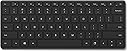
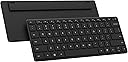
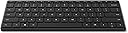
โจ๏ธ Elevate your workspace with sleek power and portability
The Microsoft Designer Compact Keyboard is a lightweight, ultra-slim Bluetooth QWERTY keyboard designed for Windows 10 users. Featuring a sleek black finish and powered by included lithium metal batteries, it offers a portable and stylish typing solution ideal for professionals seeking a clutter-free, efficient workspace.


| ASIN | B08J8BLRZF |
| Antenna Location | Everyday Use |
| Box Contents | USB Cable, USB Dongle |
| Brand | Microsoft |
| Brand Name | Microsoft |
| Button Quantity | 78 |
| Colour | Black |
| Compatible Devices | Laptop |
| Compatible devices | Laptop |
| Connectivity Technology | Bluetooth |
| Connectivity technology | Bluetooth |
| Customer Reviews | 4.4 out of 5 stars 849 Reviews |
| Enclosure Material | Plastic |
| Hand Orientation | Ambidextrous |
| Item Weight | 15.2 Ounces |
| Keyboard Description | Wireless |
| Keyboard description | Wireless |
| Language | English |
| Manufacturer Part Number | 21Y-00001 |
| Model Name | 21Y-00001 |
| Model Number | 21Y-00001 |
| Number of Keys | 78 |
| Power Source | Battery Powered |
| Product Features | Wireless |
| Recommended uses for product | Everyday Use |
| Special feature | Wireless |
| Style Name | Modern |
| Switch Type | Tactile |
| UPC | 889842668223 |
L**O
Buen diseรฑo y calidad.
Buena calidad de materiales, diseรฑo minimalista agradable, conexiรณn sencilla. Lo devolvรญ porque preferรญ un MX Keys Mini para hacer match entre el teclado de mi computadora y el de mi tablet, pero es una opciรณn sรณlida.
E**U
Great Build Quality and Feel, with some Concerns about Longevity
5 Build quality 5 Typing feel 3 Longevity 4.5 (rounded to 5) Overall Overview Microsoft's Designer Keyboard arrives dressed to impress, and for the most part it delivers. Slim, solid, and refreshingly stable underhand, it makes a compelling case for those who spend long hours at the desk and want hardware that looks as good as it performs. A few nagging surface-finish questions, however, mean it isn't quite flawless. Build quality & construction Pick it up and the first thing you notice is the weight โ or rather, the lack of any flex. The chassis feels hewn from a single piece, with zero twist or creak no matter how you torque it. The low-profile scissor switches sit flush and level across the entire deck, and crucially every single key depresses with an identical, planted feel. There is no lateral wobble, no rattling stabiliser, no variance between the spacebar and a pinky-reach function key. For a wireless keyboard at this price, the consistency is genuinely impressive and speaks to tight manufacturing tolerances throughout. The feet grip the desk with conviction too โ the board stays exactly where you put it. Low-profile experience The slim deck sits comfortably flat on a desk without a wrist rest, and the shallow key travel strikes the right balance between feedback and fatigue. Long typing sessions remain comfortable well into hour two. The keycaps are well-spaced for a compact layout, and the legends are crisp and legible at any angle. It's the kind of keyboard that disappears beneath your fingers in the best possible way โ until you glance down and appreciate just how refined it looks. Concerns: soft-touch surface & longevity Here is where the Designer Keyboard invites some genuine scrutiny. The soft-touch coating on the keycaps is a tactile delight in the box โ velvety, warm, unmistakably premium. But it brings two problems that owners of similarly finished devices will recognise immediately. First, and somewhat counterintuitively for a matte surface, it smudges. Fingerprints and skin oils collect on the keycaps in a soft haze that is far more visible than on a standard glossy or textured plastic key. A clean wipe only temporarily improves things โ within minutes of use the bloom returns. For a keyboard marketed as a centrepiece of a tidy, aesthetic workspace, this is an awkward irony. Second, and more pressing in the long run, is the question of durability. Soft-touch coatings have a well-documented tendency to degrade over time: they can become tacky, peel at the edges, or develop shiny wear patches on high-frequency keys like E, A, and the space bar. Microsoft has not published any accelerated-wear data for this finish, and there is no meaningful long-term track record to draw on yet. Buyers who plan to keep peripherals for several years should weigh this carefully before committing. Verdict The Microsoft Designer Keyboard is, structurally speaking, one of the better-built wireless keyboards you can buy at this price. The solid chassis, rattle-free keys, and wobble-free typing experience are hard to fault. The soft-touch finish is its own double-edged sword โ appealing on first contact, but likely to test the patience of clean-desk devotees and raise questions as the months go on. If Microsoft can resolve the smudging and prove the coating's longevity, this becomes a very easy recommendation. For now, it is excellent hardware with a surface-level asterisk. Pros Rigid, twist-free chassis Wobble-free, consistent key action Slim, comfortable low-profile design Excellent desk grip and stability Clean, premium aesthetic Cons Soft-touch keys smudge surprisingly easily Long-term coating durability unproven Tacky/peeling risk on high-use keys over time Fingerprint haze returns quickly after cleaning
K**E
Excellent membrane keyboard.
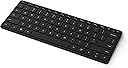
Great keyboard! Low profile and very responsive, works perfectly with Windows. Keys are big in spite of the smaller size and fingers fall perfectly in place. It's made of heavy plastic and it doesn't wobble when typing. It's by far the most comfortable membrane I have owned of this type. Keys are rubberized and have a very smooth silky texture. Other reviews don't lie, more keyboards should be like this one. Bluetooth synchronizes instantly and I haven't noticed any delays or connection loss, sometimes the keyboard turns off to save battery but it takes like a second to turn on and back to where it was. Can sync to 3 other devices and setup is a breeze, you can switch the function keys with the Microsoft Mouse and Keyboard Center. If you want a keyboard for productivity that takes no space in your desk and feels like it's made for Windows look no further, this is it!.
K**M
Great little keyboard!
To preface, I did purchase this keyboard during a sale, though nonetheless I would strongly recommend this keyboard to anyone looking for a standard piece of their work station. The cons, I wish it was backlit as I often work late into the evenings and like to dim down the lights around me. But this definitely has not been a deal-breaker due to the other useful tools integrated into the keyboard. Pros, I love the feeling of the keys (easily to type, coming from a macbook air user of 5 years this was an incredibly easy shift), my typing speed has varied between 85-95 wpm consistently. There are also several 'tool' buttons that I love, such as the screen capture button, and you can connect the play/pause button to spotify open on your desktop. While I haven't often used the emoji button, I personally find this to be a really cute addition, and I would never have reached for the ctrl button that would have normally been in that place. Additionally, I have used this keyboard for casual gaming and it has worked great! It has always responded quickly, and consistently while in use. To respond to the issue of the keyboard taking a while to wake up - this 5 seconds is longer than any other wireless keyboard I have used in the past, but to be completely honest it doesn't bother me! While at the computer I just press the arrow or space key knowing it takes a second to load up, but once awake this keyboard has no delays what so ever. Overall love the keyboard, and hope to use it for years to come.
N**G
Perfect size for a stylish or small workspace and easy to pair to multiple devices
I have owned the Microsoft Designer Compact Keyboard for about 9 months, and it has held up very well. I use it for work and gaming with a Windows PC, so it gets a lot of use. It was easy to set up, and I have it paired to two Windows PCs and an iPad mini. The Bluetooth setup is straightforward, and I did not have any issues with this; device switching only takes a short press of the Bluetooth button. The size is excellent. I have a smaller height-adjustable desk, and this is a great space-saver that lets me keep a notepad, phone, etc., on my desk while still leaving enough space. Battery life has been great. I replaced the original battery a month or two ago. The function keys on the keyboard include everything I need; I've not had an issue with any key options being missing. The noise level is about what you get on a standard laptop keyboard, for an excellent price. Highly recommend this if the size fits your needs.
Trustpilot
3 days ago
2 weeks ago