🎨 Build Bold, Cool Fast, Connect Faster!
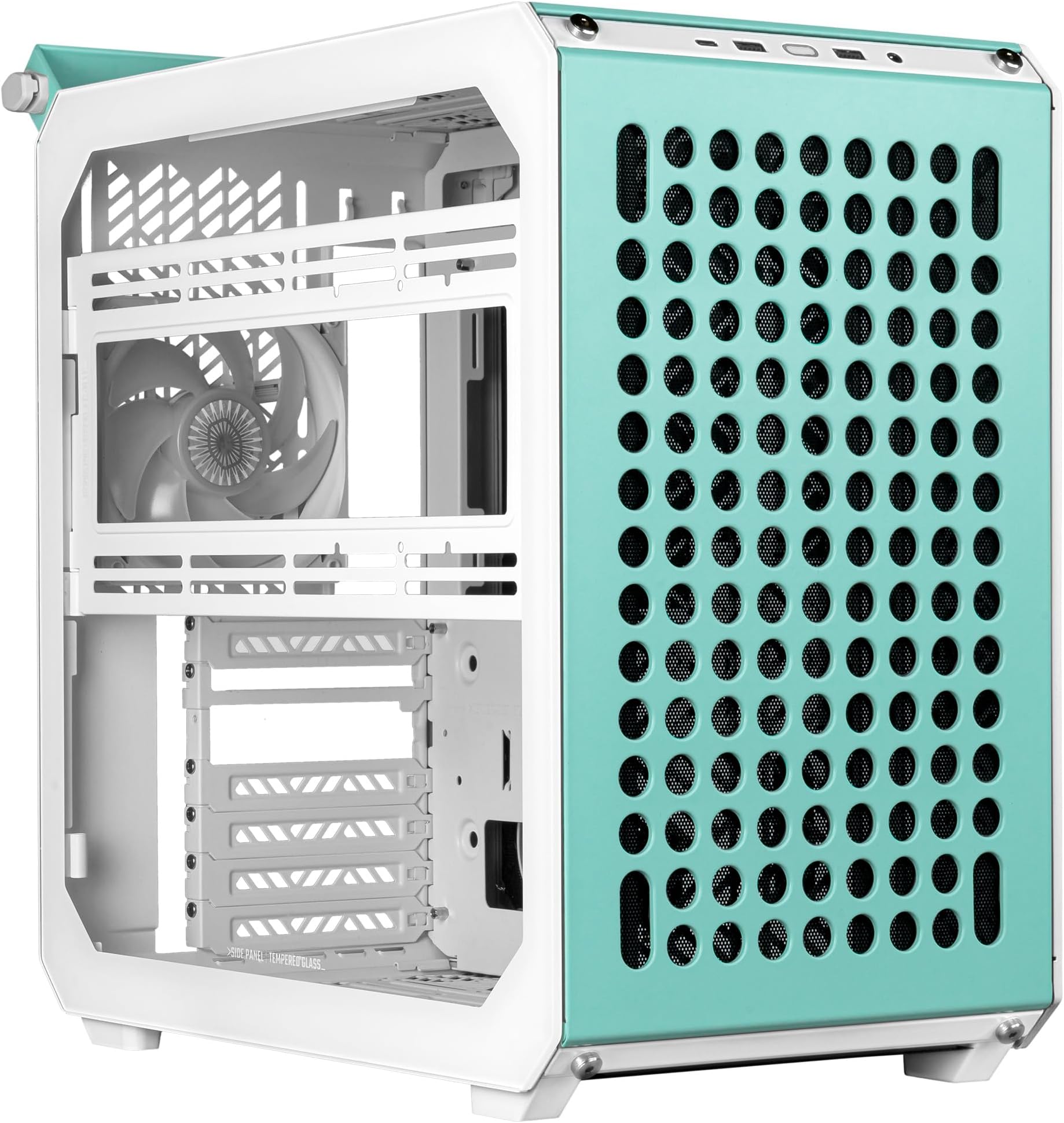
The Cooler Master Qube 500 Macaron Edition is a fully modular mid-tower ATX PC case designed for extreme customization and high thermal performance. It supports large E-ATX motherboards, multiple cooling options including up to 8 fans and dual 280mm radiators, and features versatile orientation with tempered glass to showcase your build. With advanced connectivity including a USB 3.2 Gen 2x2 Type-C port, it’s engineered for professionals who demand style, performance, and flexibility in one compact chassis.
| ASIN | B0CD7ZRRWT |
| Best Sellers Rank | #98,732 in Computers ( See Top 100 in Computers ) #788 in Computer Cases |
| Item model number | Q500-DGNN-S00 |
| Manufacturer | Cooler Master |
| Product Dimensions | 40.6 x 23.1 x 41.5 cm; 7.8 kg |
P**N
Älskade att bygga ihop detta chassi! Lätt att dra kablarna hur man vill ha det. Tar inte mycket plats trots ATX stöd. Rekommenderas!
K**S
Super obudowa, dzięki dużej perforacji pozwala na dobre odprowadzanie ciepła ze środka. Wymienne panele wymieniają się łatwo, a mimo to dobrze trzymają się konstrukcji. Składanie tej obudowy daje sporo frajdy, ale polecam robić to z filmikiem z internetu ;)
F**I
Adorei a opção de poder deixar ele todo colorido. Mesmo sendo menor, continua sendo pesado. Montar ele é engraçado, parece que estou montando um lego. Muito legal essa opção de poder escolher se coloca a fonte na parte da frente ou embaixo. Preferi deixar embaixo pra colocar 2 ventoinhas na parte da frente. Ele é bem fácil de montar, porque é o mesmo parafuso pra tudo. Minha placa mãe é m-atx, por isso consegui colocar a fonte na parte de baixo. Super fácil colocar HDD/SDD nele, são umas borrachinhas que encaixa no gabinete e uns parafuso que você coloca no ssd/hdd, depois é só fazer uma pressão e pronto, instalou. Minha placa de video é 3070 da palit, então sobrou espaço de sobra pra colocar as ventoinhas na frente. E eu optei por uma fonte um pouco menor (SFX-L) pra ficar escondidinha ali na parte de baixo. O gabinete é um caixotinho, então não espere conseguir esconder os fios, vai ficar aparecendo não importa em qual posição estiver a fonte. Outra coisa, como a fonte fica dentro do gabinete, lembre-se de deixar ela ligada antes de instalar. Um detalhe bem importante: se colocar a alça na frente do gabinete, vai te atrapalhar a colocar qualquer entrada usb/c na frente. Demorei 1 ano mais ou menos pra montar esse pc mas adorei o resultado!
A**C
Review: I recently built a system using the Qube 500 Flatpack (Black Edition), and it was an enjoyable experience overall. Here's my breakdown: Pros: Flatpack Design: This concept is brilliant. Assembly revolves around just 12 screws for the main panels, making it straightforward. With a bit of refinement, this design could set a new standard for budget-to-mid-range cases. Packaging Quality: Excellent, though it could benefit from clearer instructions, especially regarding the layer-by-layer assembly. Cable Management: Surprisingly spacious and well-thought-out behind the motherboard tray. There are plenty of tie-down points, even for non-modular PSU users. Construction Quality: Sturdy and premium-feeling, elevating the look of my older components. Screw Uniformity: Using a single screw type simplifies assembly. Kudos for this smart choice. Cons: Documentation: The instructions felt scattered and unpolished, making it harder for new builders. A clearer step-by-step or color-coded guide would significantly improve usability. Cooling: Only one fan is included. For a case at this price point, an additional fan would be expected. Radiator Bracket: The hinged bracket feels underutilized. Without a mesh side panel, it adds little value. Customization Options: No additional accessories or replacement panels were available at purchase. A modular case like this begs for a catalog of add-ons. Screws & Aesthetic Choices: Silver screws on a black case feel mismatched, detracting from the overall finish. Tips for Builders: PSU Positioning: If you're using a non-modular PSU, note that the case design provides ample clearance for long GPUs by routing cables cleverly. Cable Management: Plan and route cables early in the build process, especially around the motherboard. Cooling Adjustments: Consider adding extra fans. The case supports a variety of configurations, including a bottom-corner intake. Panel Prep: Fully route cables and connect motherboard components before locking in panels for easier assembly. Avoiding Snags: Pre-route the included fan’s cable to prevent interference with the rear panel. Suggestions to Cooler Master: Better Instructions: Collaborate with IKEA for clear, visual step-by-step guides. Even a simple layer diagram would elevate the experience. Include More Fans: A case of this caliber deserves better stock cooling, ideally two or three high-quality fans. Hexagon Patterns: Lean into your brand identity. Incorporate hexagon designs in ventilation, buttons, and cutouts for better airflow and aesthetics. Modular Accessories: Offer customizable panels, attachments, and replacement parts for a true modular experience. Radiator Bracket Redesign: Make side panels reversible or interchangeable. A mesh option would justify the radiator bracket’s inclusion. Premium Screws: Stick to uniform screws but offer black ones for black cases. Minor details matter. Side Panel Options: Replace the glass panel with mesh for improved cooling, especially for builds focused on airflow. Final Thoughts: The Qube 500 Flatpack is innovative and enjoyable to work with. Despite a few shortcomings, it’s a step in the right direction for modular PC cases. With some refinements in documentation, cooling, and customization options, it could be a game-changer. Rating: 8/10 – Great potential but room for improvement.
S**E
An dem Cooler Master Qube 500 Flatpack White hatte ich meine wahre Freude, es zusammenbauen zu können. Den mitgelieferten Lüfter habe ich entfernt und dem Gehäuse 3x 120 Lüfter und 3 x 140 Lüfter zugestanden. Damit ist das Gehäuse nun gewiss kein Hitzkopf. Die Möglichkeit, den PC invertiert umzusetzten, habe auch ich genutzt, da er auf der linken Seite meines Setups stehen soll. Beschreibenung dazu findet man im Netz. Für meinen PC habe ich einen CPU-Luftkühler verwendet, das CM Qube bietet genug Platz für die meisten Kühler (164mm). Wer eine Wasserkühlung (AIO) einsetzen möchte, sollte darauf achten, dass eine Radiatorgrösse von maximal nur 280mm möglich ist. Meine Grafikkarte habe ich normal eingebaut und kann daher nicht beurteilen, wie die vertikale Einbauweise wäre. Diese Möglichkeit besteht - siehe dazu in die mitglieferten Beschreibung. Ein Riserkabel muss man sich dazukaufen, sollte man sich für den vertikalen Einbau entscheiden Wer also etwas Ahnung hat und gerne PC's zusammenbaut, wird seine Freude an der modularen Aufweise haben Klare Kaufempfehlung!
Trustpilot
3 weeks ago
2 months ago