Desertcart purchases this item on your behalf and handles shipping, customs, and support to Romania.
🚀 Upgrade your network, upgrade your workflow!
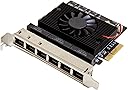
The IO Crest 6 Port 2.5 Gigabit PCI-e x4 Ethernet Network Card leverages the powerful Realtek RTL 8125B chipset to deliver ultra-fast 2.5Gbps speeds across six ports. Designed for seamless plug-and-play installation, it supports both Windows and Linux environments, making it ideal for professionals seeking reliable, high-performance network expansion for desktops, gaming consoles, and servers.
| ASIN | B0CHXF1YVX |
| Best Sellers Rank | #136,777 in Computers ( See Top 100 in Computers ) #383 in Network Cards |
| Brand | IO Crest |
| Built-In Media | CD Driver, User Manual |
| Color | black / black |
| Colour | black / black |
| Compatible Devices | Desktop, Gaming Console |
| Compatible Operating System Family | Linux, Windows |
| Compatible devices | Desktop, Gaming Console |
| Customer Reviews | 4.2 out of 5 stars 10 Reviews |
| Data Link Protocol | Ethernet, Gigabit Ethernet |
| Data Transfer Rate | 2.5 Gigabits Per Second |
| Data link protocol | Ethernet , Gigabit Ethernet |
| Data transfer rate | 2.5 Gigabits Per Second |
| Hardware Interface | Ethernet, PCI |
| Hardware interface | Ethernet , PCI |
| Item Weight | 0.22 Kilograms |
| Manufacturer | IO CREST |
| Number of Items | 1 |
| UPC | 850039353246 |
| Unit Count | 6 Count |
S**I
Great NIC expansion card.
Works well in my unRaid server for giving virtual machines their one direct IP.
A**T
Works for pfSense 2.7
Was able to get this working for pfSense 2.7. You have to install the Realtek package. Try to do this prior to installation of the card or it’ll be impossible to get the packages (you need a working WAN port). 1. Enable secure shell in Advanced settings and SSH as admin to your firewall management address 2. Select 8 for shell and run “pkg install realtek-re-kmod” (the package installer will instruct you to do the following) 3. Edit boot “ee /boot/loader.config” 4. Add the two lines if_re_load=“YES” if_re_name=“/boot/modules/if_re.ko” 5. Save file by pressing ESC and answering leave editor and save 5. Reboot by typing reboot
J**T
Worked well with ProxMox hypervisor
I have a Dell T630 tower server running ProxMox. The NIC worked with OS native drivers - no custom driver installation was required. All I had to do was edit the /etc/network/interfaces file and now all the interfaces are available for use by guest VMs.
K**A
Compatible with Debian 12
Under Debian, if you see error messages in the log regarding the Realtek firmware (something like "failed to load rtl_nic/rtl8125b"), just run "apt install firmware-realtek", however, the network card works as-is, even without the extra package.
J**F
it works perfectly
works as expected. Proxmox sees all network cards. I can make a pass to vms for all of them
Trustpilot
2 months ago
1 month ago