Desertcart purchases this item on your behalf and handles shipping, customs, and support to Romania.
🚀 Elevate Your Perspective — Capture Life in 8K Brilliance!
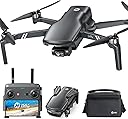
The Holy Stone HS900 Drone is a lightweight, FAA-compliant 4K drone designed for adults seeking professional-quality aerial photography and video. Featuring a 48MP SONY CMOS sensor, 3-axis brushless gimbal for stable shots, and an impressive 20,000ft transmission range, it combines advanced tech with beginner-friendly controls like AI Follow Me and QuickShots. Fast charging and OTA firmware updates keep your drone ready and evolving, making it the ultimate tool for capturing stunning, smooth footage with ease.


| Age Range Description | Adult |
| Asin | B0CYG1L5V7 |
| Battery Capacity | 2250 milliamp_hours |
| Battery Cell Composition | Lithium Polymer |
| Best Sellers Rank | #184,093 in Toys & Games (See Top 100 in Toys & Games) #572 in Hobby RC Quadcopters & Multirotors |
| Brand Name | Holy Stone |
| Color | Black |
| Connectivity Technology | Remote Control |
| Control Type | Remote Control |
| Customer Reviews | 4.2 4.2 out of 5 stars (4,567) 4.2 out of 5 stars |
| Effective Still Resolution | 48 mp |
| Included Components | Battery, Holy Stone HS900 Drone *1, Propeller*4, Remote Control, USB Type-C Cable |
| Item Dimensions L X W X H | 8.54"L x 6.57"W x 2.44"H |
| Item Weight | 249 g |
| Manufacturer | Holy Stone |
| Material | Plastic |
| Maximum Range | 20000 feet |
| Media Type | SD |
| Model Name | HS900 |
| Number Of Items | 1 |
| Optical Sensor Technology | CMOS |
| Part Number | 900US |
| Remote Control Technology | Radio Frequency (RF) |
| Skill Level | Advanced |
| Special Features | 20000Ft Transmission Range Drone with Camera for Adults, 3 Axis Brushless Gimbal, Level 5 Wind Resistance, No Need FAA/Remote ID, 249g Lightweight, Quick Shots, Follow Me Drone, SONY 1/2.3'' CMOS Sensor, f/2.6 Aperture, 48MP 4K Camera |
| Supported Image Format | JPEG |
| Video Capture Format | MP4 |
| Video Capture Resolution | 4K |
| Video Output Resolution | 1920x1080 pixels |
| Wireless Communication Technology | Wi-Fi |
User
Awesome Product and here’s why!
This is my first drone. I was scared to fly it at first because I suppose it’s so small and fragile looking but honestly its easy to use with customized control settings, altitude is controllable for a setting and other awesome software options. I put a 400 GB card in it and actually crashed it into a tree flying too low on accident and it was perfectly ok. I had 2 crashes. Makes sure to put the battery in until you hear it snap in. I failed that and luckily at about 5 feet alititude doing my preflight inspection it lost power and dropped on cement. Still perfect and no damage to it. With the tree crash I had to replace two propellers, which this purchase came with extras just for this purpose.It was easy to replace them with the included tool. As a first drone, flight control is great, and controls are easy to understand right away just after a few minutes of preflight inspection procedures. 4k camera is awesome, the gimble calibration is great and you have options for video and picture quality’s in a wide range. Drone is fast and also has a stable mode for beginners and making dramatic media clips. Drone is small and I doubt anyone can spot it at a glance during flight. Remember to get your safety certificate and understand all the applicable laws in your area before flying. I will definitely give this a five star.Battery life is about 30 minutes depending on how you fly. I don’t mind that at all, and I also purchased two extra batteries and a speed charger for longer flights. Batteries are durable and mine withstood a fall from about 5 feet. Make sure to inspect your craft if that happens before flying. Overall five stars for first time drone pilot and I will purchasing more of these in the future! Product comes with a small carrying case and can be used with an IPhone or Android device. I love how small it is and I love how easy it is to set up and put away!
User
Pretty Cool
Melissa Jacob <[email protected]>Sun, Aug 26, 1:21 PM (3 days ago)Total Drone newbie. Wanted to get one to oversee construction of new home from above. Overall, this is a really neat device. If you are TOTALLY new to drones and have never used one and have no help from anyone that has used one, just know to be patient in some parts of the assembly and setup. Read instructions and seek out YouTube videos for help. It is well worth it when you are done with setup. But here are some things I learned:First step - Charge your controller and your drone battery. Do this FIRST. Both use USB cord provided, but only one is provided, so you will need two. My battery came ~3/4 charged and my controller was fully charged.Second step is drone assembly: 1) putting on propellers. This is the most difficult part. The screws provided - those in the same bag as the black fixed ring) are quite small. It took me a good half an hour to do all four propellers, but you get better as you go along (screwdriver provided is magnetic and does help with attaching screws. Just be patient and make sure you have something to catch the screw because it will fall before you finally get it screwed in, and you don't want it to bounce. They do provide extra screws, but just make sure you work with something under you to catch the screw. The rest of the assembly is easy (2) propeller guards, 3) push in CHARGED battery). 4) Landing gear comes already assembled as does SD card.Third step is pairing with your phone (I haven't yet tried it without phone). I have iPhone 7.1) Download the Holy Stone app on your phone - free2) Turn on the controller3) Turn on the battery on the drone - the lights on the battery will indicate charge level - 4 lights is fully charged; the lights on the drone will flash white and pink/red before successful pairing and calibration4) In your phone settings, go to your WIFI and select the Holy Stone WIFI signal5) Open the Holy Stone app and click the enter device button in the center of the opening page of the app6) CALIBRATE THE DRONE - this part did not work for me a couple of times, but it was MY fault. I was rotating the drone the wrong way. Make sure you watch the Holy Stone You Tube videos to get this part right)Calibrate step #1: With the drone sitting on the ground normally, rotate the drone counterclockwise in this plane - stand over it and look down on it aerially, and rotate it as it stands on the ground counterclockwise like you are turning off a faucet. Two of the lights on the drone should stop blinking and turn blue when this is successful.Calibrate Step #2: This is where I messed up---- rotate the drone with the propeller guards perpendicular to the ground (turn the drone 90 degrees as if it is on its side) and rotate the drone with the propeller guards rotating in a plane parallel to the ground - do not rotate the drone as if you are turning a car steering wheel which is what I did. Watch the video and it is clear. Once you rotate the drone successfully the second time, the second two lights stop blinking and turn white. So you have all 4 lights on the drone not blinking; two of them are white and two of them are blue.If you are inside (which I don't recommend unless it is a big space) you have to turn off the GPS button (button with compass picture on it on the controller on the left side) as you don't get GPS inside. Just go outside to an area that is free of trees, phone/electrical lines, etc.You are ready to fly. Get familiar with the controls (up and down, left and right, rotate). This part was actually the easiest. The Follow me function worked great! Really neat and actually a little creepy.... The video and picture buttons also worked fine - in fight, press the video or picture button to record the flight (video needs to be off to take a picture). These videos and pictures went directly to my iPhone camera Roll.The battery life was about 15 min. This is typical. Go get extra batteries. I have also learned the rotating part to calibrate is also typical of drones. But once you have done it once, it is super easy to do it again. All of these instructions are probably unnecessary for those that have used a drone at least once before in their life. These are meant for those that have NEVER touched a drone. And you should only need these instructions once...I recommend planning your fight a little before you start as battery life is precious, The drone lights will start blinking red when the battery is low, and if you are using your phone, the drone and controller battery life is shown in the app.So very happy with my purchase. Seems like a good mid-range drone for a hobbyist, Can't wait to see the videos from our construction.
User
Great drone at a great price
This drone is built rugged with great flight time and a really good camera setup. It performed well in below zero Temps with minimal excessive battery drain, it's stable and at a great price.
User
Easy to Setup and Fly; Reasonable Price; Feature Packed
I’ve been in the RC flying Hobby for 40+ years. I have avoided Helicopters/Drones because they are notoriously known to be hard to setup, maintain and fly. The HS100 is an amazing EXCEPTION. Assembly, Setup and Flying is unbelievably EASY. The HS100 has many features that are in much more expensive drones. If you want to get into Helicopters and Drones this is the product to buy. The RTH (Return to Home) and Auto Takeoff and Land features get you into the air and back down on the ground very quickly, with little risk of crashing. The camera and SD Card worked better than I expected. The HS100 price is just right. Not too expensive for all the features you get and NOT so inexpensive that it is feature lacking. The HS100 is feature abundant!Some Recommendations:Read the instructions carefully and a number of times before doing anything.Inventory the parts carefully before assembling the Drone.(I couldn't find some washers which were stuck down deep inside the box which I finally found).Make sure everything is fully charged, HS100, Transmitter and your Cell Phone.Insure your WiFi is turned on in your cell phone.You can fly the drone without a cell phone, but using one gives you a lots of extra status information so you get the HS100 flying quickly.Install the propeller guards. Some people think they may not look that great. They work and it beats replacing props in the event of an oops.A Good Routine:Have a spotter with you on your first few flights.Check and recheck everything before your first flight.Make a Check List. The instruction manual has a very good first flight check list (Good Starting Point).DON’T fly if you see something wrong, FIX IT First!Buy an extra battery. 12 minutes is about average flying time.Some people complain that it's too short. Believe me, you have to concentrate on flying any RC model, 12 minutes is a long time.After flying, take a break, think about what happened and what you want to improve on.Take notes. Holy Stone provides a notebook (great idea). All good pilots use log books.Recharge the batteries then fly again (Drone & Transmitter).If you fly at a park with no power, you can get an inexpensive charger that runs off a 12v car outlet.Wether you fly full size aircraft or models, the rule is check and recheck to minimize something not setup correctly, thus avoiding the chance of a crash.When you are learning how to fly, the less distractions the better. Try to fly your first flight on a zero wind day (either early morning or in the evening when the wind is calm). The HS100 is very light, and very stable, so wind (if strong enough) can make the drone drift if you are not under GPS control.Remember: The HS100 has the auto controls so you can take off and land with almost no experience.However, if you want to start flying your drone far away and/or navigating around objects, you have to learn that the controls reverse as you change direction.When the Drone is flying away from you: the Left control turns the drone Left; the Right control turns the drone Right; This is from your view point to the drone.When the Drone is flying towards you Left control turns the drone to your Right, the Right control turns the drone to your Left. This is from your viewpoint to the drone.A real good thing to do is find a friend that has an RC flight Simulator so you can get the hang of flying an RC model if you never have flown one before. Simulators are not necessary, but they can help you master the controls without having to think about it. The more instinctively you can control the drone the less chance of a crash. Some hobby shops now offer using a Simulator for a few hours at a time. The more you practice, the better you will get at flying. No magic here, just practice!Once I got the hang of flying the HS100, I did a roof inspection on my house and my neighbors house which is a good use for Drones.Sorry for being so long winded. I wish I had someone giving me some tips so I could have avoided some of my oops. I hope my review will get people excited about flying and help them get into flying the HS100. The HS100 is an EXCELLENT product and a heck of a lot of FUN to fly!
User
Definitely not a toy! This drone is amazing for the price!!
I am beyond impressed with the Holy Stone HS900. The first thing I noticed was how solid and well-built it feels right out of the box—definitely not a “toy” drone. The setup was quick, and within minutes I was flying smoothly. The GPS lock is spot-on, which makes flights stable and reliable even on breezy days.The camera quality is fantastic for this price range, with crisp video and sharp photos that really capture detail. The return-to-home feature works flawlessly, giving me peace of mind whenever the drone gets a little far out. Battery life is solid, and having multiple flight modes makes it perfect whether I want to practice simple maneuvers or get cinematic footage.What surprised me most was how user-friendly it is. Even as someone who isn’t a professional pilot, I felt confident flying it after just one session. This drone strikes the perfect balance between performance, features, and value.Highly recommend the HS900—Holy Stone really nailed it with this one!
User
Simply amazing capability for the price
This is a thoroughly amazing piece of equipment. For the price it's hard to beat. The drone will hold its station very stabley and shoot photos that are clear and crisp. It has an automatic mode and a pro mode. On the auto mode the device will fly itself and set its own camera settings, but in the pro mode you can set it to be able to fly whatever altitude you want and then whatever speed you want, and you can set the f-stop and the aperture and the white balance of the camera to get the best shot possible. I live in new orleans, and I use it to take photographs from angles that no one else can get.Some things I should bring up however. The first is that the drone will not do point of interest photography. POI is the shot that has the drone fly in a circle around one location to shoot a video from all around. It will however follow you as you walk and it allows you to set a predetermined course that it will fly and you can set the camera to point ahead or down directly below the drone and it will shoot a video as it moves. The other point I would like to bring up is that the camera really does not function well around sunrise and sunset. I tried to use it recently and the white balance simply did not work out well. It was either too red or too green or too brown but I couldn't get it exactly right. Finally the radio control of the camera gimbal is kind of spotty. Sometimes it works, and sometimes it doesn't. Since I bought the drone specifically for photography, this is a bit of a problem for me. So far I have not run into a situation in which I couldn't get a shot, but sometimes it takes several attempts.I think this drone is well worth the price I paid for it and the two drawbacks wouldn't be enough to convince me not to buy one.
User
The drone seems well-designed, but the app needs work
I received a drone, an RC transmitter, two rechargeable batteries, a charging station, various connection cables, and some spare parts. The charging station's power input is a USB-C port. I connected it to a USB-C power adapter, put in the batteries, and left it to charge overnight. It didn't charge the battery. According to the user manual, you can also charge the battery in the drone. I snapped the battery in the drone and plugged the power adapter into the drone's USB-C port. The battery overheated. Once it had cooled, I was able to wiggle the battery out with a good deal of effort, but it had swollen and would not fit in again. A quick Web search showed that these batteries are very sensitive to which USB cord you use. The included charging cord was USB-A to USB-C. I plugged the included cord into a USB-A charger and the USB-C port on the charging station, and snapped in the remaining battery. It charged easily.The transmitter requires you to download an app to your smartphone and connect the phone's USB-C port to the transmitter. It uses the phone's screen to give a first-person view from the drone's camera. That worked great. Then the app said I needed to download 4 firmware updates. It downloaded 3 of them, but when it got to the camera firmware update, it froze. I restarted the app and found it had lost the 3 updates it had downloaded. I restarted my phone and tried again. It downloaded the updates in a different order, and when it got to the camera update, it froze again.After several hours of trying to download the updates, I decided to see if I could fly without them. I followed the pre-flight instructions, set the drone on a smooth, flat surface, and revved the motors. When I tried to take off, the app froze. No matter what I tried, every time I tried to take off, the app would either freeze or insist on downloading the firmware updates and then freeze.My phone is a Moto G Play 2023. I wonder if people with other phones have the same problems, or if I just found the one combination that won't work.
User
Great flying drone. Expensive batteries, had catastrophic failure.
I really wanted to like this drone. It flies nice, good videos, seemed like it would be fine. I flew it less than a day (3 flights) before it started wobbling in flight. The videos with the gimbals were fine, though. I recalibrated gimbal, gyro and compass. The next flight was the same. Recalibrated everything after removing and replacing the battery. Started the major wobbling, so I headed back to the landing spot. Checked the video and and the video was shaking so bad I couldn't watch it. I was still 1 day to be still in the return window, so I returned it. I really wish it would have been better.
User
Jamais reçu Jamais
Jamais reçu
Trustpilot
2 weeks ago
1 month ago