Desertcart purchases this item on your behalf and handles shipping, customs, and support to Romania.
🖨️ Print Smart, Label Fast, Stay Organized!
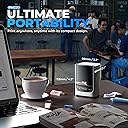
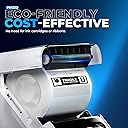
The Nelko PM220 is a sleek, Bluetooth-enabled thermal label printer designed for professionals who demand efficiency and style. Compatible with iOS, Android, and PC, it features AI-powered app tools for creative label design, prints high-resolution 203 dpi labels without ink, and offers a compact, portable form factor ideal for dynamic workspaces and on-the-go organization.


| ASIN | B0CVWZR8N1 |
| Additional Printer Functions | Print Only |
| B&W Pages per Minute | 45 |
| Best Sellers Rank | 6,832 in Business, Industry & Science ( See Top 100 in Business, Industry & Science ) 67 in Label Makers 115 in Labels & Labelling Equipment |
| Box Contents | 1 |
| Brand | Nelko |
| Brand Name | Nelko |
| Color Depth | 1 bpp |
| Colour | Silver |
| Compatible Devices | Smartphones |
| Connectivity technology | Bluetooth |
| Control Method | App |
| Controller Type | Android, iOS |
| Country of Origin | China |
| Customer Reviews | 4.2 out of 5 stars 2,771 Reviews |
| Dual-sided printing | No |
| Duplex | No |
| Hardware Interface | Bluetooth |
| Ink Colour | White |
| Is Electric | Yes |
| Item Dimensions D x W x H | 13.4D x 8W x 10.3H centimetres |
| Item Type Name | Multifunction Printer |
| Item Weight | 380 Grams |
| Manufacturer | Nelko |
| Maximum Copy Resolution Black and White | 203 dpi |
| Maximum Copy Resolution Color | 45 dpi |
| Maximum Copy Speed Black and White | 48 Pages per second |
| Maximum Print Resolution Black and White | 203 dpi |
| Maximum Sheet Capacity | 1 |
| Maximum Supported Paper Size | 50mm x 30mm |
| Maximum print Resolution Color | 203 x 203 DPI |
| Model Name | PM220 |
| Model Number | PM220 |
| Model Series | PM |
| Model name | PM220 |
| Network Connectivity Technology | Bluetooth |
| Number of Drivers | 1 |
| Number of Trays | 1 |
| Other Special Features of the Product | Network-Ready, Portable |
| Output sheet capacity | 1 |
| Paper Size | 40 Millimetres |
| Print media | Labels |
| Printer Output Type | Monochrome |
| Printer Type | Thermal |
| Printing technology | Thermal |
| Processor Count | 1 |
| Product Warranty | 1 |
| Resolution | 203 x dpi |
| Scanner Type | Portable |
| Special feature | Network-Ready, Portable |
| Unit Count | 1.0 count |
D**H
I wish I had got this labeler ages ago
Amazon Review for Nelko PM220 Label Printer I had wanted a label printer for some time. I keep all sizes of screws etc. on shelves in my shed in containers left over from our Chinese take aways. Very handy but finding a particular sized screw or bracket is not so easy. Labeling each individual box of screws and brackets would make finding the correct size of screw or type of bracket very simple. I mentioned to senior management that these labelers would also be extremely useful for organizing anything in the kitchen; jams, other pots of sauces, anything. A labeler could help to organise sewing items, boxes of buttons, in fact there’s no end… I was allowed to look for a labeler. I chose the Nelko PM220. I’m so pleased I did. It seemed a pity to open the box when it arrived; it was so neat, wrapped like a very expensive mobile phone and about the same size. The box contained the labeler, a roll of labels, an instruction book, charging cable and instruction card. Loading the roll of labels was extremely easy. Plugging the Nelko into the computer was very easy but linking it to the computer via the app was a bit of a faff and I would be a liar if I said it wasn’t. But, after a number of false starts (and you know what they say, “As a last resort, read the instructions”) I did it. I registered and logged on to the Nelko website and followed the short video on YouTube. And if I can do it, believe me you can. Charging the labeler was a doddle. It needs to be fully charged before first use. While the Nelko was charging I brought some boxes in from the shed to start labeling them up, but the first thing I actually printed was a label for the Nelko labeler’s charging cable. How many cables have I lost because I can’t remember which cable goes with which item? Never again! Watching that first label emerge was extremely satisfying. Then I printed labels for boxes with screws in and others for boxes containing right-angled brackets. Brilliant. It is so easy. You can adjust size, font, position, anything and for good measure there are any number of templates and pictures. You can even print QR codes. I had another idea – I always retain the instruction booklets for power tools. And now I can organise them properly. I put each instruction booklet into separate Ziplock bags and printed out labels to identify each one. Voila! At first, I printed labels on my mac desktop then others on the iPhone using Bluetooth. Easy. It all worked a treat. I am sure that printing would be just as successful on a PC and Android. I can’t recommend this labeler enough.
B**I
Excellent Little Printer
Really impressed with this little printer, it’s fantastic for the money. We’ve recently moved to a new home so have began the laborious task of finding places for all our stuff and organising into storage boxes etc.. I’d been looking for a small portable printer that could be used to label them. Decided on this due to its reviews and features. I’m not disappointed. Opening the box, the first thing I did was to download the app. Switched the printer on which was charged at 75% approximately and connected it straight away with no issue. It also connects within seconds of opening the app and switching it on. The app comes with a multitude of pre loaded templates but you can also download or create your own. There is a lot of customisation available including fonts, frames, free form, time etc. I’ve also used it to make small stickers for my daughter’s school bag and books, she loves them. She’s asked to do some for her wee friends at school too. When you’ve decided what you need printed, one click of the print button and it appears seconds later. I can’t comment on compatibility with other devices yet but it has worked flawlessly with my iPhone. Battery life seems to be decent too, with the amount of use it’s had, it still has over half a charge in it. Charging is done via a type C cable. Overall, I highly recommend this to anyone looking for a small label printer.
T**H
Outstanding
Why did you choose this product over others?: I chose this label printer over others that do similar for a more higher price. It's a dinky little thing, albeit robustly built to withstand being knocked about as it's ideal to be carried about and fits into most office bags. Setting up was a breeze using the app and so far, the software looks promising. It's quick, clear printing too. Well worth the money, if you're into labels and organisation.
A**M
Great printer (but buy larger paper!)
This printer looks nice and neat, is easy to set up and prints well. Particularly like that it uses Bluetooth rather than WiFi, makes it much quicker and easier. All I’d say is the paper that comes with it is very small (1.5in by 1inch if I had to guess), just to be aware. I tested printed a photo and the quality wasn’t amazing, but for text and barcodes it more than does the job.
D**S
Worst product I’ve ever bought?
I bought myself a Nelko P21 label maker a few months back and loved it. I’m disabled and have difficulty with my hands, so these products are really helpful to me (when they work). Based on how great the P21 is, I bought this PM220 to replace a Dymo label printer. I love the idea of being able to quickly print addresses straight out of my iPhone contacts without needing to hook it up to a PC etc. For someone with dexterity problems, I hoped this would really speed up doing my Christmas card addresses this year. The product itself looks decent, but it doesn’t function correctly. The labels do not align straight and the grips don’t hold the roll tight enough. The labels either come out completely wonky, the text is very wavy, or the stickers get stuck in the mechanism. I’ve used up over half the roll just trying to repeatedly line it up straight, to no avail. The text also isn’t crisp or smooth. I’m sat here at my desk with a mountain of used labels that have jammed or come out wonky. I can’t show them as they contain addresses, but hopefully the video and photo give the idea. Such a waste of a label roll! I’m so disappointed. This would be brilliant… if it worked. What an absolute waste of money. I’m gutted.
M**M
Great value
Great little product. Got me out of trouble when I needed labels in a hurry. For the money you can't go wrong
K**K
Amazing little printer
Amazing label printer fast and efficient, makes great quality in no time easy to connect via Bluetooth to your phone either iOS or Android and can also be connected to your Mac or pc if you prefer. Has a sleek design compact build that is small enough to be put into a bag without taking loads of room .The Nelko app you use to create and print label from is easy to use and has several different templates for all different kinds of labels and size. the label are a sticky enough to stay attached to things and are also water and oil proof and don't leave any residue if removed. More Labels can be ordered from nelkos Amazon store inany different sizes to suit your needs with fast delivery.
C**N
Good app, 'prints' consistently well
Love this product, had it for months now and still in regular use. App is great, easy to use and connects first time. Seeing the prompt to review this has reminded me I wanted some different sticker roll
S**N
Funktioniert super
Artikel ist ein super Produkt
A**E
Erwartungen übertroffen
Wow, jetzt muss ich tatsächlich auch mal eine Bewertung hinterlassen, da mich der Etikettiermaschine wirklich begeistert. -öffnen, App laden, Rolle einlegen, drucken Dieser ganze Prozess hat einfach in 3min geklappt und ein Druck kommt binnen 3sek raus. -man kann unterschiedliche Größen einlegen, sogar rund 50mm Durchmesser u zusätzlich wird automatisch vom Gerät das eingelegte Format erkannt -die App zum Designen der Labels ist sehr gut gemacht, wirklich sehr gut. Man kann alles abspeichern, auf andere Formate ändern. Es besteht sogar die Möglichkeit Fotos von handy einzufügen mit nur einem Klick ohne landezeit Ich muss echt sagen, 35€ (50% reduziert)für den Nelko PM220 ist echt jeden Cent wert, auch wenn die originalen Nachfüllbänder recht teuer sind. Für die runden bezahlt man ohne Angebot ca. 20€ für 150 labels a 51x51mm, mit dem 50% Angebot jedoch ist es wieder voll OK
C**E
Very good value
perfect for what I needed. Love the fact I can charge it versus spending money on batteries. Print quality is clean and crisp. App is very easy to use. I do have one suggestion. How about a variety pack for blank labels?
G**A
prodotto eccellente ed utile
stampante eccezionale, la uso molto per etichette per scuola e generiche comoda la connessione al pc e tramite app, prodotto davvero comodo
圭**圭
使いにくい
初めから付いてくる用紙がテープ部分が小さく区切られていて使い道が限られるのかなと思います アプリを入れて本体の電源を入れると簡単に接続が出来ますがやはり本家テプラ程便利では無いのかな
Trustpilot
2 months ago
2 days ago