Desertcart purchases this item on your behalf and handles shipping, customs, and support to Romania.
🚀 Elevate your storage game with speed and style!
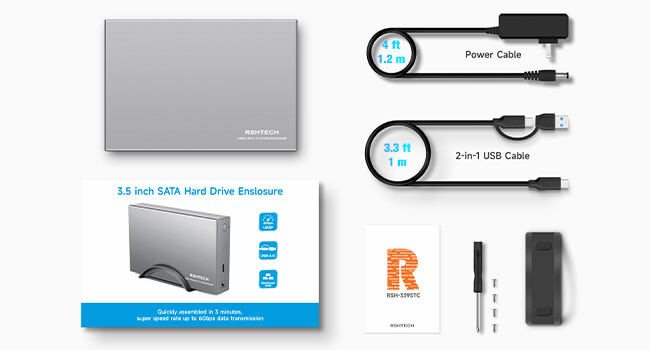
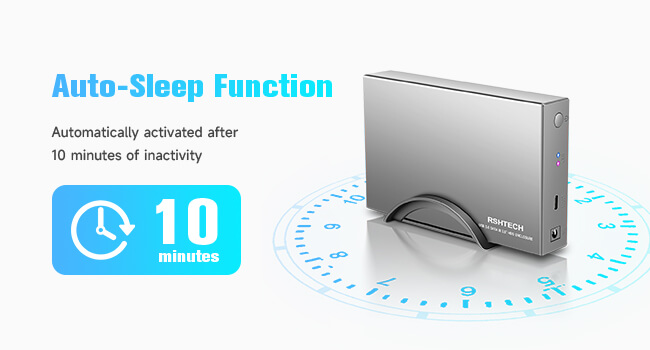
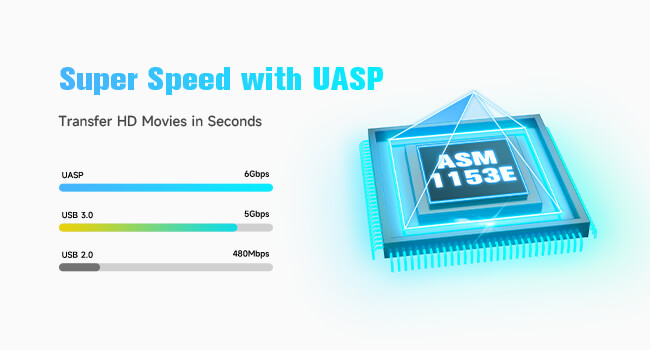
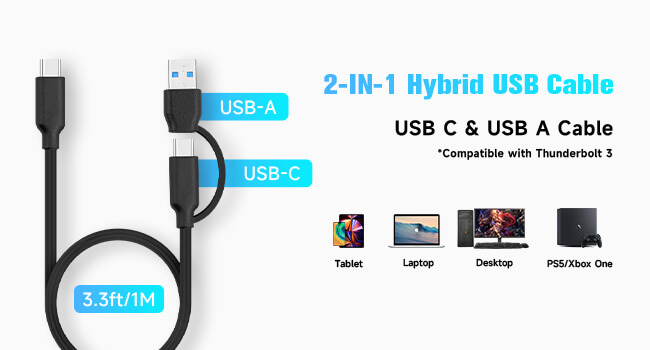
The RSHTECH 3.5" Hard Drive Enclosure is a premium aluminum USB-C to SATA dock supporting up to 24TB HDD/SSD. Featuring ultra-fast 6Gbps UASP data transfer, dual USB-C/USB-A compatibility, and smart sleep mode, it ensures reliable, high-speed access across devices. Its durable aluminum build with heat dissipation and flexible vertical or flat positioning makes it perfect for professionals demanding performance and longevity.


| ASIN | B0D45F4DT7 |
| Best Sellers Rank | #58 in Enclosures |
| Brand | RSHTECH |
| Built-In Media | USB-C/A to SATA |
| Color | Silver |
| Compatible Devices | Desktop, Gaming Console, Laptop, Smartphone, Tablet |
| Connectivity Technology | USB |
| Customer Reviews | 4.4 out of 5 stars 2,164 Reviews |
| Data Transfer Rate | 6 gigabits_per_second |
| Enclosure Material | Acrylonitrile Butadiene Styrene (ABS), Aluminum |
| Hard Disk Form Factor | 3.5 inches |
| Hardware Interface | SATA 6.0 Gb/s |
| Hardware Platform | USB-A/USB-C to SATA |
| Item Dimensions L x W x H | 7.1"L x 4.3"W x 1.25"H |
| Manufacturer | RSHTECH |
| Material | Acrylonitrile Butadiene Styrene (ABS), Aluminum |
| Memory Storage Capacity | 24 TB |
| Mfr Part Number | RSH-339STC |
| Model Number | RSH-339STC |
| Number of Items | 1 |
| Product Dimensions | 7.1"L x 4.3"W x 1.25"H |
| Supported Devices Quantity | 1 |
| Warranty Description | 18 months warranty for non-human damage |
R**S
Seems good and reliable
These came on time, a good price, were easy to set up, and worked without problems. That is how it ought to be.
A**R
Excellent enclosure. Tip for those complaining about the screw holes.
I have bought this enclosure a number of times now for hard drives made by a variety of different manufacturers and I have been very happy with it. The aluminum shell did an excellent job of dissipating heat from the hard drive (which is important for the longevity of the hard drive) and also allowed the data to be transferred at the max rate that the drives supported. I've been using the enclosure with my most-used hard drive for about two years now and the free tool (you can search for it online and it is NOT made by the enclosure manufacturer) that I use for checking hard drive health statuses says that the hard drive is still as good as when I first got it, despite getting hot very often. So the enclosure has been working well. One minor issue with this enclosure is that not all screw holes may align with what are on the different brands of hard drives. For example, for a Seagate hard drive that I had, all the supplied screws fit per the instructions that came with the enclosure. But a Toshiba hard drive I bought did not have all the screw holes that were described in the enclosure instructions. It had only one set of screw holes, instead of two (each set consists of two screw holes; you will understand if you get the enclosure and read the instructions). Furthermore, those holes were too short for the screws that the instructions said to use, causing the drive to jiggle around inside the enclosure. The solution was simple. Use the shorter screws that came with the enclosure and that perfectly did the job of securing the hard drive to both the internal tray and to the enclosure so that it firmly stayed in place and did not jiggle around. So those who are complaining about the screw holes in the enclosure not matching the holes in the hard drives need to re-examine the holes and pick the right set of screws to use. This type of situation will also occur with other enclosures where you also need to screw the hard drive in place within the enclosure, because all of these enclosures have screw holes per the SATA drive standards, so switching to a different enclosure probably will not solve your problem.
3**T
decent inexpensive enclosure
goes together fast. works fine. well vented.
G**I
Good product
Works well
A**R
Quality, Slim and thin aluminum case with good heat dissipation
Solid quality aluminum case, fit my old 3.5” SATA-II drive nicely, also thin and slim but with very good heat dissipation, was turned on and copying files from my laptop for more than 20 hours nonstop, the outer case metal only feels a little warm; if u have older bulky drive floating around (like my 1TB drive), this case is must have! Wish they make dual drive case so I don’t need to buy another case for my other disk drive. No fan so no noise, installation is very easy with all installation hardware screws included!! The USB cable is also a solid quality cable, fast data transfer supported.
C**S
Works well with the right cable
We're downsizing and I'm working on eliminating a ten year old box running Windows Server 2012. I've moved a couple of things over to my adjoining workstation and want to move all data over to an external drive. For $25 this looked like a good investment to replace the current 3.0 enclosure, since the RSHTECH supports the faster UASP. It goes together easily and is noticeably faster than my old enclosure. I'm using a 4 TB WD Purple. One caution is to use a good quality cable. I initially used the cable that came with the device, but wanted to move it into a rack mount enclosure nearby. The cable was a bit short, so I popped on an extension. That was a mistake. Windows Explorer quickly went into a loop and froze up my desktop. I disconnected the USB, moved the device back, and all was well again. Have an 8 foot USB on order that's rated for USB 3.1 Gen 2. Hopefully that will allow me to relocate the RSHTECH. All and all, I'm pleased with the purchase.
M**N
Good for older hard drives for storage
Works great so far no problems with it.
R**R
Appears to work so far, but design to mount drives is flawed, and no airflow for cooling
UPDATE TO REVIEW: The cable connection was not the problem. This unit takes 5 to 10 seconds to "boot" itself after its USB cable is inserted into a USB port. Simply wait a bit and the other device will see it. One other annoying issue is that the power brick will spark when being plugged into an outlet. Not good and could be a fire hazard. These inexpensive electronic devices that use external power adapters appear to have this in common. I ran a CrystalDiskMark benchmark on the SATA II drive I inserted into this unit and the speed rating was good through my USB 3 port, so it appears to be running at USB 3 speeds. The unit also is noisy because the plastic case rests on the hard table. I will put 4 rubber feet on the bottom to eliminate some of that (and improve airflow), however, the sound also goes through the top cover. Its actually quieter with the top cover removed because the top cover does not secure tightly. If you use an SSD drive in this then you will not experience this vibration noise. However, as I stated before, you will need to tape it down. The first time I connected this device to my computer it was not detected. I pushed the usb connector harder into the device and then it came up. That connector does not give me a secure feeling. If it continues to act up I will return the unit. Only a full-size 3.5" hard drive can be screwed down into this unit. There are no holes to secure 2.5" drives or SSD drives. They will probably connect, but nothing will hold them in. One reviewer used tape to hold his SSD drive in. This could be corrected with simple snap-in mounting clips. I would prefer this over screws anyways because I will probably be swapping drives in and out of this unit. The top part of the case is also not secure. It lightly slides on and snaps into place. However, if you carry this device by grabbing the sides, the top will slip off and your drive will plummet to the floor. Either put a piece of tape to secure the top lid or be sure that part of your hand grasps the bottom. The next issue is lack of cooling air flow. Hard drives can get hot. There are slots in the bottom, however, there is no place for the hot air to move upwards and out. The housing traps it, making the slots on the bottom useless. Furthermore, the housing is made to fit a 3.5" drive, with no room to spare. The air could not get around the drive because it is such a tight fit. If you use this device, I suggest using it with the top cover removed. Also, if they would have made the housing out of metal, the housing would have acted like a heat-sink. I wish the manufacturer would have included a FAT32 formatting utility program. Windows 7 and 10 will not format a drive in FAT32 that is larger than 32GB. Not even the command prompt level will allow it. I needed to find a separate program to do this. While this is not really a mark against the manufacturer of this device, I am sure that people will be using this device with spare drives to be used on non-computer devices that use usb sticks. Most of these devices require a FAT32 format. I was able to format a 700GB hard drive in this device at FAT32 after finding a piece of software that could do it. I will be using this device to record TV shows from a digital tuner/recording device (that requires FAT32) on its usb port. I will update this review when I see if it works. I have not used this device with files yet. I did not test the speed of the drives in this unit. That would be valuable information to know. My guess is that SATA III drives will be slower in it because of the limited speed of USB 3. However, SATA II and SATA I drives should perform normally... in theory. I purchased this device because my video recorder said that USB sticks are too slow. That may be true. Hard drives are made to be more efficient in mass storage than a usb stick. We'll see.
D**R
Très bien
C'est mon 2ème boitier que j'achète. J'ai testé avec un 24tb de Seagate (21tb en vrai après que le système est prit ce qui faut pour le tampon mémoire ) . Je l'ai fais viré pendant des jours. J'ai transféré 10 tb sans coupure. Donc, le commentaire ci-bas qui dit que le boitier coupe pendant un film, je dirais que cela vient de son appareil ou du disque dur.
A**R
Easy to Assemble - But ........
Well made item. But the plug supplied isn't suitable for an Australian power outlet without a converter
M**Z
Muy recomendado!!!
Excelentes condiciones y fácil de instalar, respalda y lee los archivos sin problema, la conexión se da sin problema con la máquina.
R**C
Muy bueno!
muy bueno, cumplio su funcion y viene con las herramientas para su uso, el manual/instructivo me sorprendio porque explica muy bien como puedes solucionar problemas comunes a la hora de conectar el Disco Duro a una Windows o una Mac y como formatearlo.
G**Y
Fonctionne mais pourrait être amélioré
La boîte était endommagée ce qui m'a fait craindre un produit en mauvais état. (voir photographie) Heureusement ce n'est pas le cas. Par contre le cable de l'adaptateur secteur est sérieusement trop court. Le boîtier semble fragile et de moindre qualité mais, l'appareil fonctionne bien. Livraison dans les délais prévus.
Trustpilot
2 days ago
3 days ago