Desertcart purchases this item on your behalf and handles shipping, customs, and support to Romania.
🚀 Unlock your laptop’s full potential with the ultimate 6-in-1 USB-C hub!
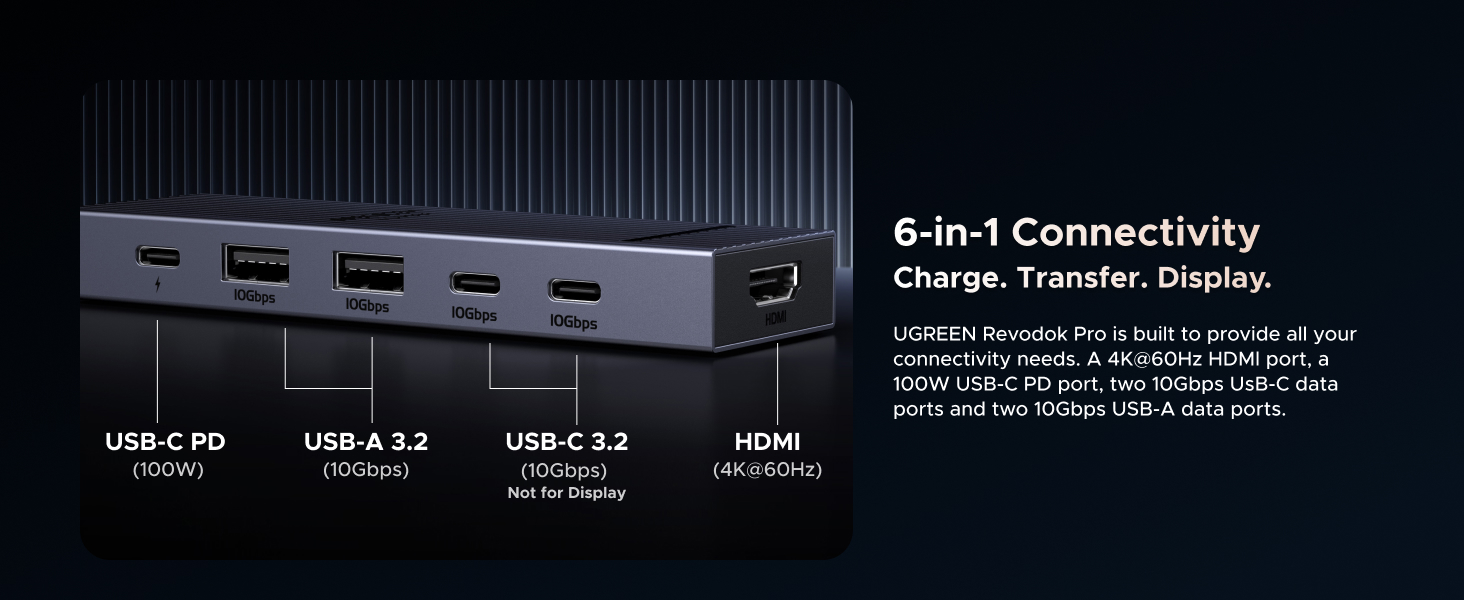
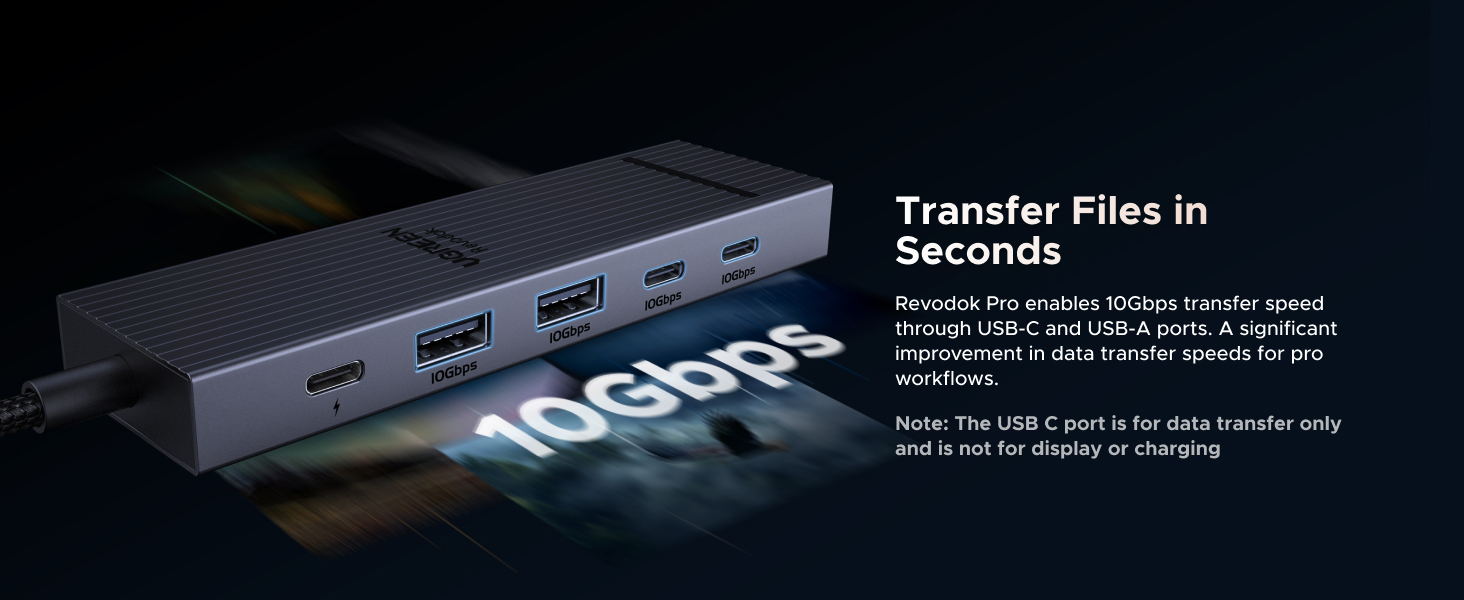
The UGREEN Revodok Pro is a versatile 6-in-1 USB-C hub featuring dual 10Gbps USB-C and USB-A ports, 4K 60Hz HDMI output, and 100W power delivery. Designed for professionals and multitaskers, it supports a wide range of devices including MacBook Neo/Pro/Air, iPad Pro, and gaming consoles like the Nintendo Switch. Its lightweight aluminum build and braided cable ensure durability and portability, making it an essential all-in-one docking solution for modern work and play setups.


| ASIN | B0D1XLNWP2 |
| Additional Features | Portable |
| Best Sellers Rank | #14 in USB Hubs |
| Brand | UGREEN |
| Color | silver |
| Compatible Devices | MacBook Neo,MacBook Pro, MacBook Air, MacBook M1, M2,M3,M4,M5, iMac, iPad Pro, iPhone, Chromebook, Surface, Steam deck, Rog Ally Compatible Devices MacBook Neo,MacBook Pro, MacBook Air, MacBook M1, M2,M3,M4,M5, iMac, iPad Pro, iPhone, Chromebook, Surface, Steam deck, Rog Ally See more |
| Customer Reviews | 4.5 out of 5 stars 6,725 Reviews |
| Data Transfer Rate | 10 Gigabits Per Second |
| Enclosure Material | Aluminum, Plastic |
| Global Trade Identification Number | 06941876243631 |
| Hardware Interface | HDMI , USB, USB Type C |
| Item Weight | 180 Grams |
| Manufacturer | Ugreen Group Limited |
| Mfr Part Number | AMUH12H |
| Minimum Required Operating System Version | Windows 7 |
| Model Number | AMUH12H |
| Number of Ports | 6 |
| Operating System | Mac OS 9, Windows 10, Windows 7 |
| Special Feature | Portable |
| Total USB Ports | 4 |
| Total Usb Ports | 4 |
| Unit Count | 1.0 Count |
| Warranty Description | 2 Year Manufacturer |
T**D
UGREEN Revodok Pro 6-in-1 USB-C Hub - Perfect for Kids' Rooms and Multi-Device Use
Purchased 4 of these and put them in each of my kids' rooms (yes I have 4 kids). Pros: - Supports Chromebook charging and connecting to monitors/TVs - 10Gbps data transfer and 4K 60Hz HDMI - 100W Power Delivery for charging devices - Works with Nintendo Switch as well - Multiple ports for keyboards, mouse, Ethernet, and more Cons: - None noted Great little docks that make it easy for the kids to connect everything they need. Highly recommend for family setups or anyone needing versatile USB-C expansion. Would I recommend? Yes, 5 stars.
P**O
Amazing affordable USB-C Hub, works with M1 Pro 14, Windows 11 Laptop, and Nintendo Switch 1.
Due to just one problem, I would rate this more of a 4.5/5. Very rarely, I'll have issues with power draw, and the hub won't work while connected. However, after just unplugging and plugging things back in, it fixes the problem fast. Of all USB-C hubs I've looked at, this one is probably the most affordable (I bought at 16 USD) and has the best HDMI, USB-A, and USB-C ports for the price. I've used this on my MacBook M1 Pro 14, my Windows 11 laptop, and what surprised me was that it even worked on my Nintendo Switch 1, for display and power. It's very versatile. Ports: With the single HDMI port, I can connect my 1440p monitor at its max refresh rate (144Hz), and I tested my 4K TV (60Hz) all without problems, unlike some USB-C Hubs that can have stuttering. I've tested the USB-A ports with my keyboard and mouse, which work flawlessly. For my main use, I connect a data cable from the USB Hub (connected to any of my devices) to my KVM switch, so if you want to use it for a KVM setup, I highly recommend it. The USB-C ports also worked really well with my external drives. I do some light video editing, but even 4K video on my editing timeline worked amazingly. Build Quality: The shell itself is nothing spectacular; it's good and gets the job done, absolutely no complaints. The cable actually feels way better than the other USB Hubs I've had. It appears to have a braided cable, but all I know is that it isn't rubber, which is what I prefer. Because of that, I feel confident putting it in a bag without worrying about the cable getting squished, bent, or damaged (though I don't plan to). It's also very light and thin, adding to the portability. Nitpicks: The HDMI port is kind of in an awkward spot (at the end of the Hub rather than next to the USB ports) compared to other USB Hubs I've used; however, it's not a problem at all. Like all USB Hubs, it gets hot; however, it's not been a problem for me, even with all my devices plugged into it. Finally, the power draw issue. I've only had this happen to me twice, usually after changing the USB-C PD plug (right now a 67W charger, but I will upgrade to a 100W), but every time it would fix after unplugging and replugging everything back in, which is mildly annoying. If anything changes, I'll update my review.
W**N
Small Hub, Big Performance
I’ve been very impressed with this USB-C hub. The build quality feels premium, the 10Gbps data transfer is fast and reliable, and the 4K 60Hz HDMI output delivers a crisp, smooth display. The 100W Power Delivery keeps my laptop charged while using multiple accessories, making it perfect for a clean, productive setup. UGREEN did an excellent job balancing portability, performance, and value. Highly recommended!
J**L
Perfect Port Expander for M1 MacBook Air & M4 Mac Mini – Frees Up Ports Without the Hassle
I own a 2020 MacBook Air M1 (16GB RAM, 256GB storage) for mobile work and a 2024 Mac mini M4 (16GB RAM, 256GB storage) for my home office, and port limitations were driving me nuts, especially on the Air with just two USB-C ports. The UGREEN Revodok 105 5-in-1 hub, snagged for around $25, has been a lifesaver for expanding connectivity while keeping things simple and affordable. It’s plug-and-play on macOS Sequoia for both machines, and it perfectly hits my needs: charging, external displays, and legacy USB-A devices without dongle chaos. Here’s my experience after a week of heavy use. Pros: On the MacBook Air, this hub is a port-freeing champ. It uses one USB-C port and lets me charge via its 100W power delivery port with my 30W Apple adapter, leaving the second USB-C free for a Thunderbolt drive. I connected a 4K Dell monitor via HDMI (3840x2160 at 30Hz, sharp and stable), a USB-A keyboard, and an external HDD to the USB-A 3.0 port, which transferred a 50GB video project in under 5 minutes. No lag or disconnects. On the Mac mini, with its three USB-C and two USB-A ports, the hub adds flexibility. I plugged it into a front USB-C for a second 4K monitor via HDMI, using the native HDMI for my main display, and it handles dual displays like a dream. The USB-A ports ran my old USB stick and printer without issues. The aluminum build feels sturdy, stays cool even with all ports active, and is compact enough to toss in my bag with the Air. Battery life on the Air stays strong at 15+ hours. For the price, it’s a steal compared to Apple’s pricey adapters. Cons: The HDMI is 4K at 30Hz, great for work or editing but not ideal for gaming needing 60Hz—look at Thunderbolt hubs if that’s you. The two USB-A 2.0 ports are slow (480Mbps), so use the 3.0 port for fast drives. No SD card or Ethernet, but I didn’t need those. It warms up slightly under heavy load (charging, HDMI, data), but never hot. Tip: For the Air, connect hub, PD charger, then HDMI for a clean setup; pair a Bluetooth mouse to avoid USB-A clutter. On the Mini, use System Settings to extend displays for dual-monitor productivity. This hub is a must for Apple Silicon users needing more ports on a budget. It’s reliable, sleek, and does exactly what I need. Highly recommend!
M**S
Great USB C hub, can also serve as a dock
I bought this to use with a Minisforum mini PC I have to expand one of the rear type C USB 4 ports, not only for more connectivity, but to prevent regular plugging and unplugging from the computer itself. It's a great little hub with all of the IO I need, including an HDMI port which, honestly, I don't really need since the PC itself has both an HDMI and a DisplayPort connection. It provides 2 USB type A ports, two 10 Gbps type C ports and a third type C port that is capable of 100 watt power delivery. That combined with the HDMI output means this hub could also feasibly be used as a dock for something like a Steam Deck, ROG Ally, a laptop PC, etc. I tested it with my Steam Deck OLED and it worked just fine and was able to output an HDR signal to my LG television while charging the Deck at full speed since the Deck's charger puts out way less than 100 watts. It feels reasonably sturdy, has a braided cable and even a faint little LED to let you know when it's actually plugged in. The cable could have been a little longer, though it's serviceable since it spends its time just sitting on a desk right beside the PC. When I tested it with my Steam Deck though, to test whether it could serve as a dock for that, it was short enough that the hub couldn't lay flat on the desk behind the Deck and was sort of suspended in the air by the tension in the cable, which would probably damage it over time, so if you want to use this as a dock for another device I would consider mounting it to the back of the device's stand or to the wall or something to keep it from just hanging from its own cable. I also think more companies should consider opting for the more open Displayport instead of the more proprietary HDMI. Not having to pay licensing fees to use HDMI could have brought the cost down a little bit. Overall though it's easy to use, turns my otherwise hard to reach rear facing USB 4 port into something more accessible and can even charge attached devices at up to 100 watts. I'm pretty happy with the purchase and will definitely consider UGreen for my needs in the future.
D**C
Perfect Hub for iPad Air M4 DJ Setup
⭐⭐⭐⭐⭐ I bought the UGREEN Revodok Pro USB-C Hub specifically to use with my iPad Air M4, and it works perfectly. I needed a reliable hub to connect my Mixtour Pro DJ controller, an SSD, and keep my iPad charging at the same time — and this hub handles everything without any issues. The build quality feels premium, the design is sleek, and the size is perfect for a compact mobile DJ setup. I also own several other UGREEN products, and they have all been excellent. This company consistently makes high-quality accessories that I highly recommend. If you’re using an iPad setup for music, DJing, or productivity, this hub is definitely worth it.
J**D
Great all-around hub
Works great as a mini-docking station for my Samsung Galaxy Book5 laptop. I put the hub behind my laptop so I can't see it or the cords. This makes for a tidy desktop with a single cable running to the laptop. My setup runs power from a USB-C brick into the hub. Also connected to the hub is an Elgato Stream Deck, Creative Pebble X speakers, a Logitech wireless mouse, and an HDMI 4k 60 Hz external monitor. As others commented, this dock has an extremely solid build feel. It's seemingly made from a single piece of aluminum, which looks nice and dissipates heat well. The color matches the Samsung grey almost perfectly. Other users have reported low data speeds with external peripherals. This is expected given that this is a USB-C hub, not a Thunderbolt hub. Different worlds. With any USB hub, I recommend connecting data storage devices directly to your laptop ports. Or, invest in a Thunderbolt hub.
E**E
better than expected
I originally bought this usb ports hub because i needed to plug in additional ssds into my laptop, but the side of my laptop was getting too crammed, so i had to opt in for a ports hub, and after about a month of using this thing, I can say that its really good, although I wish the ports were a bit spaced out a bit. For 13USD, the pricing on this is not bad, although the 10Gbps transfer speed really shows when multiple flash drives and external SSDs are connected and running at the same time. The PD port is also reliable, as I have not experienced any charging problems with this ports hub. The light on the top of the dock is a little less visible in daylight, but nonetheless, it still helps to see an indicator showing that the ports hub is on. The hub works on my Windows laptop, my MacBook Pro, my iPad, and even my phone without any problems. It's safe to say that I have not run into any compatibility issues while using the ports hub. The cord length is a bit short for my liking, although the cord itself seems extremely high quality and durable, although it does get a bit hot after long periods of use, but nothing too out of the ordinary. Another problem is that while using the HDMI port connected to an external display, the transfer speeds dip really low, although it's not that big of a surprise, seeing that the max speed of this thing is only 10Gbps anyways, but it would have been even better if it used all 40Gbps of my thunderbolt 4 speeds. Overall, if you really need a new ports hub, I would go for this one, because it's extremely compatible, and it seems to be able to go for years without a replacement.
ぜ**ん
金属でかっこいい。性能も十分。しかも安価で助かります。
iPad Airに接続 →HDMIにて50インチ大画面に出力して使用しています。 (別途HDMIケーブルは必要です) 映像・音声ともに問題なく出力され非常に快適です。 PD充電ポートもあるため、充電しながらの接続が可能です。 出張先など、ほとんどのビジネスホテルにテレビは付属されていますが、 サブスクの動画アプリやyoutubeを表示するにはログインしなければならず怖いですよね? そういうとき非常に便利です。快適な時間を2,000円で手に入れられて非常に満足です。 本体は金属(アルミ合金?)でできていて堅牢です。充電時の熱も心配ない。 購入し2週間ですが、すでに出張セットのスタメンになりました。 壊れても安いし買いなおすと思います。ありがとうUGREENさん。
T**L
Great hub
It’s a well built usb hub with a decent amount of ports. The braided cable for the usb c connector is very nice to have and I hope more companies start making this a standard. Specs wise it’s an absolute value for money but since I’ve only been using it for one day, I’ll update this review with time. One thing I will say you should keep in mind especially if you’re using it for MacBook to connect to an external display via the hdmi cable is that the ugreen hub and Mac don’t communicate well when using an external monitor so the colours may look very pinkish out of the box (check pics for reference). To fix this, you’ll need to go to your monitor settings and change the colour space from RGB to YUV or auto. It’ll display colours the way you expected it to. Note that this does not happen when connected to windows so it’s mostly a Mac and hub issue but not a manufacturing defect. It’s just how the hub communicates with the Mac. It’s perfectly fine for majority of the people. Also note that in order to keep your display on and MacBook’s lid closed, select your monitor as an external monitor and connect the charging cable to either your Mac directly or via the usb hub’s power delivery port. Another very good thing I noticed was that it doesn’t get hot at all when connected to an external display, charging cable and mouse and keyboard (both wired in my case). It may not seem as a big deal but in the longer run, it pays for sure. So overall it’s a great hub for the price and I do recommend it so far.
Y**D
Extraordinario
Excelente producto cumple su función a la perfección en todos sus puestos y no presenta fallas ampliamente relacionado
T**L
UGREEN
Rewelacyjnie spisuje się jako hub usb c do Xiaomi Redmi Pad II i klawiatury gamingowej. Polecam.
C**A
Muito bom.
Carrega meu MacBook, conecta o meu monitor, stream deck, teclado e mouse.
Trustpilot
5 days ago
3 days ago