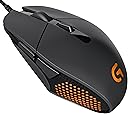
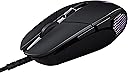
🎮 Elevate your game with precision and style — don’t just play, dominate!
The Logitech G303 Daedalus Apex Performance Edition is a wired gaming mouse engineered for pro-level accuracy with its exclusive Delta Zero optical sensor. Weighing only 204 grams, it offers ergonomic comfort and durability with buttons rated for 20 million clicks. Customize your setup with vibrant RGB lighting and adapt instantly with 5 DPI settings ranging from 200 to 12,000, making it the perfect tool for serious gamers on Windows 11.


| ASIN | B00TKFD51M |
| Antenna Location | Gaming |
| Are Batteries Included? | No |
| Are Batteries Required | No |
| Brand Name | Logitech |
| Button Quantity | 6 |
| Colour | Black |
| Compatible Devices | Mac |
| Customer Reviews | 4.4 4.4 out of 5 stars (998) |
| Enclosure Material | Plastic |
| Global Trade Identification Number | 00097855112620 |
| Hand Orientation | Ambidextrous |
| Hardware Platform | PC |
| Item Weight | 0.45 Pounds |
| Manufacturer | Logitech |
| Manufacturer Part Number | 910-004380 |
| Model Number | 910-004380 |
| Mouse Maximum Sensitivity | 12000 Dots per Inch |
| Movement Detection | Optical |
| Network Connectivity Technology | USB |
| Operating System | Windows 11 |
| Power Source | Corded Electric |
| Product Features | Lightweight |
| Range | feet |
| Style Name | Modern |
| Theme | Rainbow |
| UPC | 796327872962 097855112620 734911501669 |
A**R
I've been using a Logitech G303 for about a year and a half. I bought this as a second mouse to replace my original g303 as the scroll wheel had become worn out (this only happened because I put more pressure on the scroll wheel than normal, for an extended period of time, the mouse still works fine and I actually still use my other mouse for my laptop... even the scroll wheel works fine, I just don't like the feel of it). Some more information about my use of the mouse. I play CS:GO at a high level to the point where I fairly frequently play with professional players. As CS:GO is a "twitch shooter" (requires quick, accurate crosshair movement and response time), I need a mouse that I can control with a lot of precision and with a good sensor, which doesn't jitter when the sensor gets a piece of hair or something in it. I came upon the G303 after replacing my Razer Death Adder a couple years back. I couldn't be happier. The sensor is probably the best sensor I've ever seen on a mouse (and I work with computers for a living). It was immediately noticeable how smooth the movement of the cursor was. While I mentioned the scroll wheel breaking on my old one, the scroll wheel itself is not too cheaply made (in fact, it's way sturdier than the death adder I had). Again, it only wore out because of how I was using it (not normal use). For anybody looking for information on how the mouse feels: It's a small mouse, especially when compared to the death adder, zowie fk2, g402 or similar mice. If you like using a full palm grip this isn't the mouse for you (if you have a bit of an "in-between" grip like myself it's really good, though). I find the most comfortable way for me to use the mouse is to have the upper 1/4 - 1/2 of my palm resting on the mouse while using my thumb and 4th/5th finger to maneuver the mouse. If this is your natural grip this mouse is a great buy for you. Once you get used to the different shape of the sides (they're a bit sharper than normal mice), it feels amazing. I believe it would also be good for people with "claw" grips. Finally, some pros and cons. Pros: -Amazing sensor. I can't say enough how good this thing tracks, and I've never had an issue with it jittering due to hair, dust, etc. on my mousepad, ever. I use my other one on flat tables at the college and it still tracks perfectly. -Feels great with a palm grip so long as you don't rest your entire hand on the mouse. I don't have a claw grip so I can't say for sure... if you have a claw grip I suggest you try one of these out in stores, or read a review from somebody with a claw grip. -Would probably feel good for a full palm grip if you have small hands (I would check one out in store before purchasing, though) -Feels well made. As long as you don't throw it at the wall or drop it every day it shouldn't break on you -Customizable RGB? (If this matters to you, personally idc if my mouse looks like an office mouse if it preforms well) -2 programmable buttons (I use them mostly for back/forward in web browsing, pulling out grenades in CS, and binding abilities in other games). Not ideal if you're looking for a mouse for an MMO with lots of extra buttons. -Braided cord (less likely to randomly break than traditional plastic wrapped cables) -Can be programmed with multiple DPI settings (anywhere from 0-10000 iirc) and switched using the button below the scroll wheel seen in the picture. I don't use this but it's handy for somebody who wants a different sensitivity in a program when the program doesn't allow fine control of sensitivity settings (note: These dpi settings are actually saved on the mouse itself so if you bring your mouse to another computer it'll have the same DPI options saved - and assuming the sensitivity levels are the same on that machine it'll feel just like your "normal" computer). Cons: -Not built for people with large hands. If you have larger hands you might like a Logitech G402 or Zowie FK2 more - just some suggestions, everybody's tastes are different. -Not a lot of extra programmable buttons (I included this in both con and pro since this largely depends on your needs - but then, why are you looking at a G303 if you need a mouse with 15 extra buttons? I couldn't live without at least 2 extra, but any more is unnecessary to me) -Honestly that's about it. Overall: 5/5, for somebody who plays a game that absolutely requires a precise mouse with a natural grip (thing feels like an extension of my hand now) and reliable sensor, this mouse exceeded my expectations. I'll be using this mouse for years until I'm forced to switch. I even bring my second to work to use instead of the office mice. One final thing, the mouse is shaped a bit differently so you might be initially turned off but I highly recommend you try it out for a couple hours if you feel this way. It really does start to feel like its design should be a standard among mice after a while.
D**H
TL;DR: I love this mouse because I have large hands and use a fingertips-only style grip. If you use a palm or claw grip there's a good chance this mouse won't work for you unless you have smaller hands. --------------------------------------------------------------------------------------------------------------------------------------------------------------------------------------------------- After using this mouse for about a year, I think I've finally ended my search for the right mouse for my hand size and grip style. I have large palms (4.5" from wrist to bottom of middle finger) compared to my fingers (3.5" from bottom to top of middle finger). In total my hands are a little larger than average for my height (6' 1"). I hold the mouse with a fingertip-style grip - base of palm resting on mousepad, only touching the mouse with the tips of my fingers, and moving it with a combination of finger contraction and wrist pivoting along with frequently lifting the mouse completely off the pad to place it in a better position for continued movement. I've tried forcing myself to use a palm grip on a mouse intended for it and I just can't get used to having to move my entire arm to control the mouse. Definitely not the most common style, but it's just what naturally has always felt and worked best for me while playing games. I tend to use DPI of about 1200-1600, as that's the level I like for everyday productivity usage, and then set sensitivity in games to whatever feels right. Generally, in any genre of game, I use a fairly high sensitivity to the point that it allows me to do a complete 180 turn in an FPS by just moving the mouse an inch to the right or left. After buying at least 10 mice in the last 10 years trying to find one that feels "right", this is finally the one that does it for me. It's smaller and lighter than the bulky, heavy mice intended for use with a palm grip and has a base that's just enough smaller than the top to make it super easy to lift and reposition the mouse while holding with just my fingertips. That same inward/downward vertical slant of the sides also makes it super easy to maintain my grip on the mouse without having to press super tightly like I have in the past with other mice whose bases are wider than their tops. Much less hand/finger fatigue while using this mouse for prolonged periods of high activity. As I've come to expect from Logitech mice, the sensor/buttons/wheel are all very high quality and feel solid and well-made. It tracks really well and the software you can install on your computer to tweak the mouse settings and set up profiles gives you lots of nice customization options. At the price I paid for this mouse (in the low 40 dollar range) it's a tremendous value and I would happily buy it again at double the cost if this one died. All that being said, if you do use a palm grip this mouse may not be the one for you, unless you have smaller hands. The smaller your hands the easier it will be to use this mouse with a palm or claw grip style, as it's not a large mouse. If you have hands around my size, using this mouse with a palm grip would be almost impossible - when I hold it in that way the end of the mouse barely reaches the top of my palm, so there's no more mouse left on which to actually rest my palm. Pros (specifically for me, based on hand size/grip style): - Small and light - Base smaller than top, making edges very grippable - Just enough buttons to do everything I need without a bunch of superfluous ones getting in the way - High quality sensor and mechanical parts - Logitech mouse software is generally easy to use and has nice features - High quality, braided cord that doesn't get tangled or feel too stiff - Great price for what you get Cons: - Honestly, I have to try pretty hard to come up with any cons for myself. I guess one would be that the scroll wheel isn't as high quality as some of the much more expensive Logitech mice, and doesn't have left-to-right scrolling by tilting the wheel to either side. - If you use a palm or claw grip and don't have pretty small hands, I would say this mouse probably won't work for you.
N**Y
Me encanta el mouse por la facilidad de configuración que tiene ya que el software de Logitech es muy sencillo de usar. Antes usaba un G400s y el cambio si es algo notable, este mouse es más ligero y un poco más pequeño pero su forma me es más práctica que la del G400s. No recomendaría este mouse para personas de manos muy grandes o acostumbradas a un agarre diferente de claw grip. Para juegos como Dota 2 o LoL este mouse es más que adecuado. Aun no lo he probado con FPS pero con 12000 DPI como máximo no creo que tenga problema alguno para jugarlos tranquilamente.
S**R
Pros - Great shape(personal opinion), best mouse sensor ever, perfectly balanced weight distribution, the button clicks feel so damn good, RGB, inuilt memory, glides like butter on hot paratha One of the best mouse for FPS gamers who cant spend more than 5k on a mouse. Cons - Not officially available in India, Software keeps resetting RGB setting sometimes, braided cable Really great mouse and it was a huge upgrade over my Logitech G90, would definitely recommend this mouse to everyone looking to play FPS games.
G**Y
I've been using the G303 for about a full day of gaming now and here are my impressions. Sensor: Feels fine, appropriately snappy and responsive, doesn't malfunction at any speed I can reach, etc. I don't have superhuman perceptions but I thought the DA 2013 (with Synapse) was a bit laggy and I don't think this is laggy. I'm sure there is a whole range of responsiveness between DA 2013 w/ Synapse and 'fine' but take what you will from my assessment. Shape: Surprisingly comfortable. The way my thumb and pinky pinch slightly inwards when I grip the mouse curls the base of my palm inwards, making a natural 'pocket' where the thin rear of the G303 fits really nicely. I hate to disappoint the naysayers but there may have been an actual ergonomist involved in the mouse shell. The inward sloping front lets the thumb grip it while in a very natural, relaxed posture. The pinky similarly is able to sit along the right side very naturally but the front becomes so thin that the longer ring finger doesn't really have a natural place to sit. I find myself most comfortable with 3 fingers on top of the mouse, where normally I have 2, ring and pinky both gripping the right side. Vertically the area of the mouse you would grip is \_/ shaped (like the Zowie FK etc.) so it's very easy to lift with minimal pressure. It could stand to be a bit lighter, but the Ninox Aurora spoiled me that way. Buttons: M1 and M2 are probably the best buttons on any mouse I've ever used. They click as easily and lightly as any 20M Omrons but they have that crisp, resilient feel of Huanos. They make the G502 buttons feel mushy by comparison! If you hunt for pre-travel you can find some (less than 1mm) by pressing the very front edge of the switch, but at least where my fingers naturally sit there is none. M3, M4, M5 are nothing special, and in my opinion M4 and M5 should be wider or located further down, as I need to move my thumb slightly to activate them. Wheel: The scroll wheel has a nice notched feeling similar to the newer Zowie mice but with more defined stops, and a pleasant, rubbery texture. If you have 3 fingers atop the mouse you will find it in a good position, but if you only have 2 fingers atop the mouse I think you will find it's located slightly too far back. Cable: The cable is thick and braided but flexible, and Logitech wisely chose to ship it loosely wrapped instead of bundled so it doesn't arrive already kinked and tangled to **** . The only issue I have is it sometimes gets caught on the rough edges of my Hayate, which I solved by pushing my monitors together and just throwing the cable over top of them so it naturally curves upward. Despite its thickness it's not too heavy, and besides the Artisan pad issue I haven't noticed any resistance. Overall Impressions: While I still feel there is room for improvement in the ergonomics, specifically in the right side (which would make it 'almost-ambidextrous' but why worry about that when there are already only side buttons for righties) and in the placements of M4, M5 and the wheel, the G303 is still the most comfortable functional mouse of the 15+ I've used to date and has earned its place as my new daily driver.
Trustpilot
1 month ago
2 days ago