Desertcart purchases this item on your behalf and handles shipping, customs, and support to Romania.
🚀 Elevate Your Laptop to a Desktop Powerhouse — Don’t Just Work, Dominate!
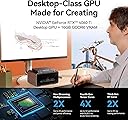
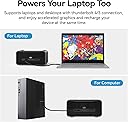
The Khadas Mind Graphics Card RTX 4060 Ti is a cutting-edge external GPU dock featuring 16GB GDDR6 memory and PCIe 4.0 x8 interface, delivering up to 128 GT/s throughput. Designed for professionals and creatives, it supports 8K resolution at 60Hz across multiple displays, connects via Thunderbolt 4/3 with 85W laptop charging, and integrates premium audio with dual speakers and noise-reducing microphones. Its compact 2.5L form factor includes a 300W GaN power supply and a secure Mind Lock connection, making it the ultimate performance and expansion hub for laptops craving desktop-level graphics power.


| ASIN | B0DHCNSKFH |
| Antenna Location | Gaming, Office, Professional |
| Best Sellers Rank | #504 in Computer Graphics Cards |
| Brand | Khadas |
| Built-In Media | 1× Mind Graphics, 1× AC Power Cable, and 1× Manual |
| Compatible Devices | Desktop, Laptop |
| Customer Reviews | 3.8 out of 5 stars 30 Reviews |
| Display Maximum Resolution | 8K |
| Display Resolution Maximum | 7680*4320 pixels |
| GPU Clock Speed | 2310 megahertz |
| GPU Series | NVIDIA RTX 40 Series |
| Graphics Card Interface | PCI Express |
| Graphics Card Ram | 16 GB |
| Graphics Coprocessor | NVIDIA GeForce RTX 4060 Ti |
| Graphics Description | 4060 Ti |
| Graphics Processor Manufacturer | NVIDIA |
| Graphics Ram Size | 16 GB |
| Graphics Ram Type | GDDR6 |
| Item Dimensions L x W | 7.83"L x 5.24"W |
| Item Weight | 2.7 kg |
| Manufacturer | Khadas |
| Memory Clock Speed | 2310 MHz |
| Model Name | Mind Graphics 16GB |
| Model Number | Mind Graphics 16GB |
| Number of Fans | 2 |
| Video Output Interface | HDMI |
| Video Processor | NVIDIA |
D**N
It's literally plug and play
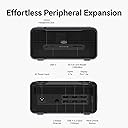
Very easy to use. I just plug it into my rog ally and it works. I downloaded the nvidia app later so I could optimize performance. It has decent speakers and lots of ports (usb, hdmi and display port). The only flaw is that it has just one usb-c port, but it's thunderbolt 4 so that's good.
E**Z
Pc didn't recognize it
It doesn't do plug and play. Not sure if what I got was defective.
T**N
Mind 2 must have this to game right
Coupled with the mind 2 this wonderful gadget is shweet! 16 gigabyte vram and it plays hogwarts legacy very well. It does though become hot. Not a gamers choice for those of us who intermittently game and then return to work, an extreme gem due to its petite size.
M**R
Connection issues
This is a great device when it works and if you had the mind pc it goes with I'd say it would be a slam dunk amazing experience. I used this on a regular mini pc with a thunderbolt 4 port and my results varied from amazing to seriously frustrating. I'd give no thought to buying this if I had a mind pc this hooks to, but I'd give serious thought to buying this for any random pc with a thunderbolt 4 port. The good It's amazing, performance is amazing, gaming was top notch when it was working, it was like having a gaming rig coming out of this small box, loved it, wish it had worked flawlessly forever. The bad. There is alot to take in here, my experience with computers, electronic devices, ect is very high, I don't say these things as someone who has never used devices like this in the past, and well it was honestly very frustrating. Firstly I have a 680m amd chipset on an apu in a mini pc, I un-installed it's graphics drivers, installed the NVidia drivers for the 4060 here, changed bios settings to use the Nvidia graphics, and it did work, however the problems going forward were overwhelming, I used it 3 days and had to uninstall it and re install to my original amd drivers, now this could be my apu/cpu, if you had an Intel chip maybe this wouldn't be an issue, but for me it was total chaos. My mini pc will only go into bios thru windows no hit f1/delete/ whatever at startup, this was an issue as the 4060 would shut down I'd try to reset pc then no video, this was a vicious loop, and finally after several attempts I'd get video, this happened several times as the 4060 would reset without warning then I couldn't get into windows to change to my apu graphics or get safe mode displayed, to say this was a problem is an understatement. If you plan to buy this make sure your pc has a hotkey for bios, I googled mine, mine literally has none, its name brand is firebat. I finally got a display after a day of resetting it....literally...then I installed my drivers back changed my bios settings back to my igpu and un-installed the Nvidia drivers and got my pc back, this was unfortunate as I'd much prefer to use the 4060, but also I don't want my pc bricked or virtually bricked with no way to access windows for the ufi bios settings...due to no display after changing to igpu to get the 4060 to wwork.in bios. Be careful what you pair this with. It's amazing if it's working correctly, I'd advise getting a mind pc, I didn't have one and reviewing this it didn't state I needed one, I did have thunderbolt 4, which should be all I needed, but the software arrangement on my pc led to utter chaos, please don't let this happen to you. I like the unit, but make sure your pc is properly equipped for it, as mine supposedly was, but clearly was not. I hope that helps somebody, I almost lost my mini pc over it. Also for review purposes I'd advise mind to give the mind pc with the 4060box for proper reviews moving forward, or not say it can be used with any pc with thunderbolt 4, because that clearly led to all sorts of issues I couldn't troubleshoot properly due to 4060 shutting off randomly while in use then not being able to get a display after multiple resets and power cycle attempts. Would have solved alot of troubleshooting issues. Also better directions would be preferable for consumers who plan to use a thunderbolt 4 pc that is not mind brand. Or my 4060 was a dud since it kept powering off while in use on its own, hard to say honestly with the issues I was having with the no display after a power cycle, if I have no display 5 minutes after a power cycle I consider that an issue for troubleshooting. Still a good device, would love to get it running better, but will have to find a pc that boots into bios not in os to consider it.
I**8
Power in a small package!
So far it's a great little power house!
G**Y
Ehh, it's good with quarks.
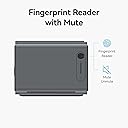
First off, the device is really nice, it plays most video games at mid to high settings, DLSS, so on. Now for the down sides, it has this flashing light that never turns off even when you turn the machine off that is connected to, the machine has a fan on inside that is always on, and the buttons on the side do nothing UNLESS you have the app downloaded to your machine that you have to get off of their homepage, and that app is always uploading information... Why? You ask. No clue... So, I uninstall the app and now thos buttons on the side do nothing. It also clams that it can do 4 to 8k gaming, it sort of can but runs best at 1080p. Not worth the solid k for it, I would pay 7 hundo for this with out any issues.
M**N
Ensure that the graphics have fully started for all your dedicated graphic demading tasks.
I paired it with the original Mind 1 and it's Tiny and Mighty.
A**1
Don’t spend money on trash that does not work
DO NOT BUY GPU PROBLEMS DOES NOT WORK AT ALL, ITS LIKE BUYING TRASH BUT worse
K**T
Mind専用?GuraphicBoad
小さくできていてMaind専用でしょうか?ともかくLLMに使い役立っています。小型なのが有難いです。
C**N
Khadas Mind Graphic parfait
Une carte graphique externe et plug and play avec n'importe quel équipement ! Je recommande tous mes jeux tourne et parfaitement meme ceux ne bénéficiant pas du DLSS
A**R
Great piece of kit!
A great piece of gear! I have purchased this in addition to my Khadas Mind Mini PC that I bought a while ago and it works flawlessly. However, as other reviews had mentioned it took me a couple of tries to set it up to work with another pc as an external graphics card, but I did eventually got it working on my Dell laptop and it’s graphics processing performance went through the roof. I currently use at the office in combination with Khadas Mini PC for 3D model rendering, I used to have a bulky desktop pc which was running old to perform for my needs. The unit itself is relatively heavy and chunky, but it fits my needs perfectly as I only need to carry it to another desk once in every while. I love the fact that it can sit on your desk, next to the monitor so if I need to move it, it’s basically effortless as it only needs 3-4 cables, power, USB-C/HDMI and ethernet to plug into another machine or if you have Khadas Mini PC just sit it on top of the graphics unit and it works as a dock. To conclude, it doesn’t have any noticeable noise levels, I guess that it’s a relatively good value for money since I wasn’t able to find many competitive external graphics cards on the market and my favourite part is that it feels and looks premium with a great build design.
G**.
Gute Aufwertung aber mit sehr lautem Lüfter
Ich bin begeistert von dem Khadas Mind 2 und finde das System so toll das der Khadas mein Notebook ersetzt hat. Habe bereits die Mind Dock die wirklich toll funktioniert. Aus diesem Grund habe ich mir jetzt die Dockingstation mit der integrierten 4060 ti 16GB Grafikkarte gekauft. Positiv. Der kleine Mind bekommt eine ordentliche Portion extra Leistung durch die Grafikkarte. Das Gerät ist sehr kompakt, massiv und fühlt sich wertig an. 1. Kritikpunkt Das Gerät war nicht neu. Es waren einige kleinere Kratzer auf der Oberfläche und auch Staub auf dem Gerät! 2. Kritikpunkt Wenn ich den Rechner boote dann bekomme ich erst ein Bild wenn der Windowsbildschirm erscheint. Ich habe den Monitor direkt an der Dockingstation mit Hdmi angeschlossen. Ich komme nicht ins BIOS wenn der Khadas Mind 2 auf der Dockingstation steht. Mit der kleinen Mind Dock habe ich dieses Problem nicht. Nervt etwas. 3. Kritikpunkt Das Gerät zieht im ausgeschalteten Zustand Strom! Es wird warm und macht ein leises pfiependes Geräusch! Ich musste eine schaltbar Steckdose dran anschließen um ihm den Strom zu nehmen. 4. Kritikpunkt Die Lüfter der externen Grafikkarte drehen sehr laut auf. Man hat keine Möglichkeit die Lüfter zu steuern. Entweder gehen sie ganz aus oder sie drehen auf volle Last hoch. Eine Steuerung per App wäre hier sehr wünschenswert. Im BIOS des Mind 2 (was aussieht wie wie vor 20 Jahren) gibt es leider auch keine Einstellungsmöglichkeit. Ich bin mir nicht sicher ob ich das Gerät behalten soll. Das Gerät ist kein Schnäppchen. Die Leistung der externen Grafikkarte ist zwar gut und wertet den kleinen Mind 2 ordentlichen auf, aber die Grafikkarte ist leider auch nicht mehr auf dem neuesten Stand. Für mich ist aber das größte Manko die Lautstärke der Lüfter. Sie drehen auch im Idle Betrieb sporadisch voll auf. Das stört doch sehr. Ich musste ihn 2 Meter von mir entfernt aufbauen.
H**Y
mindに最適なグラフィックボードユニットです
KHADAS mindを使用しているので、問題なく使用できています。大画面のでレスポンスが格段に上がり、画像の作成も楽になりました。 説明書が日本語対応でないので、星1つ減らしました。 個人的にはディスプレイポートが使用できるので良かったです。 セットアップ上は、マニュアルに従って、mindとグラフィクスのbiosを最新にしてあれば、すぐに使えました。
Trustpilot
4 days ago
1 day ago