Desertcart purchases this item on your behalf and handles shipping, customs, and support to Romania.
๐ Elevate your maker game with color, clarity, and efficiency!
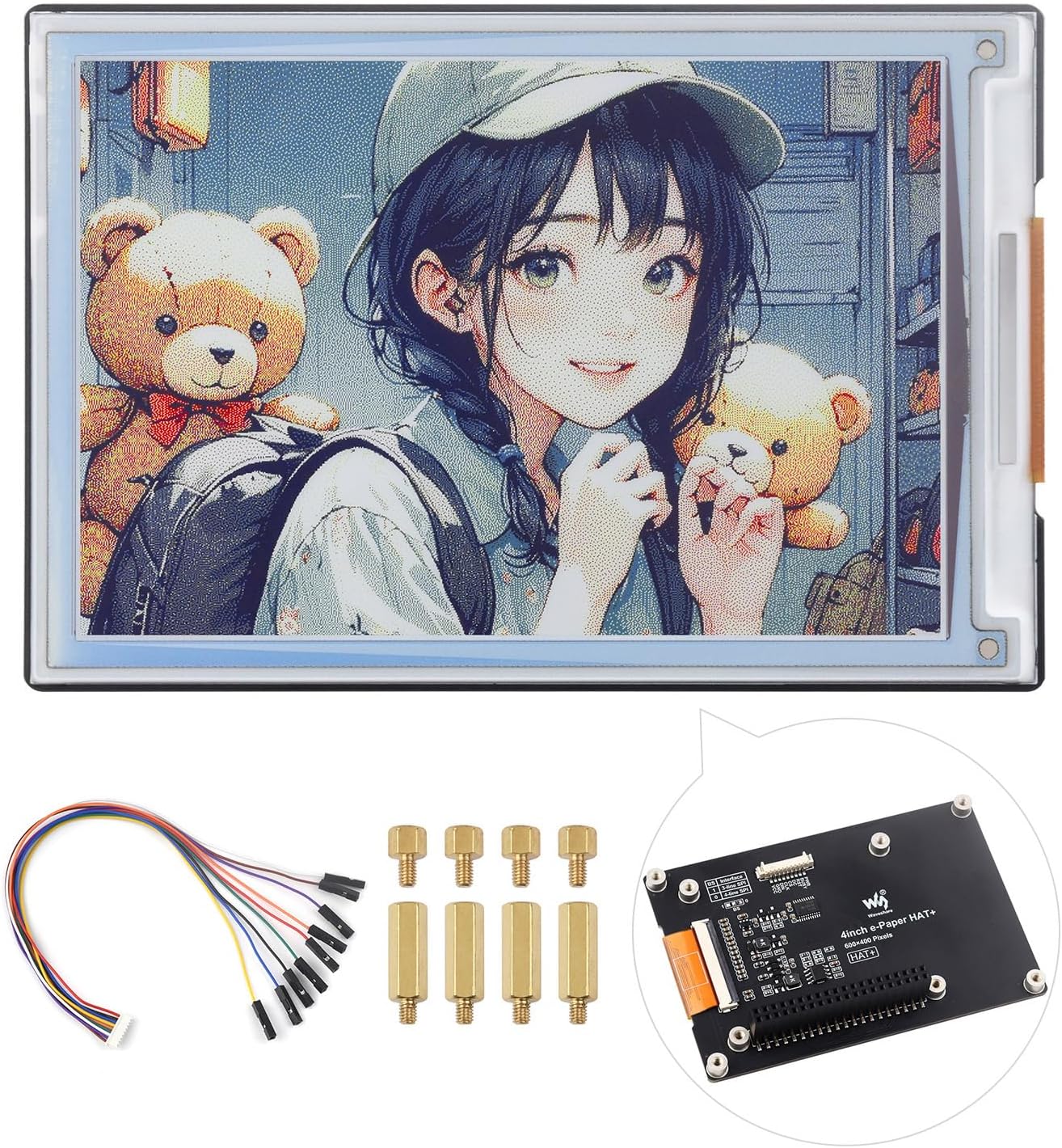
The Waveshare 4-inch E Ink Spectra 6 (E6) Full Color E-Paper Display delivers a unique 6-color e-ink experience with ultra-low power consumption and persistent image retention. Designed for Raspberry Pi and compatible boards, it features a standard 40PIN GPIO header and HAT+ driver board for easy integration and rapid development. Ideal for projects requiring vibrant visuals without constant power draw, this display balances innovation with energy efficiency.


| ASIN | B0DHTNHRRY |
| Best Sellers Rank | #629 in Single Board Computers (Computers & Accessories) |
| Brand | waveshare |
| Built-In Media | 4inch e-Paper HAT+ (E) |
| Compatible Devices | Raspberry Pi 5, Raspberry Pi 4B, Raspberry Pi 3B, Raspberry Pi Zero, Raspberry Pi Zero W, Raspberry Pi Zero 2W, Raspberry Pi Pico, Raspberry Pi Pico W, Raspberry Pi Pico WH, Jetson Nano, Jetson Orin Nano, RDK X3 |
| Connectivity Technology | SPI, HAT |
| Customer Reviews | 3.0 out of 5 stars 8 Reviews |
| Included Components | 4inch e-Paper HAT+ (E) |
| Manufacturer | Waveshare |
| Mfr Part Number | 4inch e-Paper HAT+ (E) |
| Model Name | 4inch e-Paper HAT+ (E) |
| Model Number | 4inch e-Paper HAT+ (E) |
| Operating System | Linux |
| RAM Memory Technology | LPDDR4 |
| Warranty Description | 1 year |
| Wireless Communication Standard | 802.11ac |
| Wireless Compability | 802.11ac |
A**N
Good but expensive
It is true full color so ignore the idiot that doesn't understand the color spectrum. You have red green blue and black, which means you can dither colors together to make any color. My two complaints are that my unit came damaged (you can see the smudge behind the screen in the lower right corner of the picture), and second is that the refresh rate is an honest to God 30 second redraw cycle. Use this for projects that won't update but a few times a day to avoid the annoying redraw time and to take advantage of power savings.
Y**O
Not "Full Color"
Previously had a good experience with Waveshare products, unfortunately not this one. This screen is advertised as a "Full Color" display, but it's actually a 6-color display, as in it only displays 6 colors as defined in their firmware: #define EPD_4IN0E_BLACK 0x0 /// 000 #define EPD_4IN0E_WHITE 0x1 /// 001 #define EPD_4IN0E_YELLOW 0x2 /// 010 #define EPD_4IN0E_RED 0x3 /// 011 #define EPD_4IN0E_BLUE 0x5 /// 101 #define EPD_4IN0E_GREEN 0x6 /// 110 Don't be fooled by the "Spectra" branding, this looks nothing like the demos of full-color Spectra 6 eink displays.
S**E
Worth It, Decent Resources
Their GitHub repo has decent example code and their website has a good wiki. Had a few kinks getting it going, but I'd recommend or buy more in a heartbeat.
G**E
not working
I've worked through their manual for both Python and C with a Raspberry Pi 5 and am not able to get the display to show anything.
J**Y
Really good display for RPi projects.
This has been a great e-ink display for some Raspberry Pi projects. It's full color as described, but still plenty of colors for making a great display. They are slow to update, but for static displays and infrequent updates, it has been working great.
F**K
Good but slow
I got one of these directly from Waveshare and have two more on order. Planning on ordering an additional four. I have it displaying a custom informational screen that gets updated every ten minutes. It works well and the colors are nice. My only complaint is the update time. I'm using their sample python code to do the clear and update and it takes about 50 seconds. And that is 50 seconds of the display flashing random colors or blank, it is unreadable during most of that time. The C sample code had about the same time.
J**Y
High quality color e-ink display ready to drop onto Raspberry Pi
The Waveshare 4-inch e-ink display comes with the driver board on the back, and has built-in mounting options for Raspberry Pi and other devices (Arduino etc). For a Raspberry Pi you have a couple of mounting options depending on your application. You can drop the board directly onto a Pi board with the 40-pin GPIO block such as Pi 4 or Pi 5, or a Pi Zero if you have the pin headers. Or, the package also contains a connector which breaks out to 9 individual pins, and you can wire them in yourself one by one. This is also how you would connect to Arduinos or other controllers. The package includes the display, the wiring breakout connector, and a set of brass standoff hardware. THere are no printed instructions included but the Waveshare website has a wiki which lists step by step instructions for software installation and example code in Python. Look for the letter E to guide you through selecting which hardware wiki page to look at. Colors are understated and response time is what you'd expect for e-ink. This is not for video or fast moving displays, but it's crisp and readable and best for relatively static and slow moving updates.
T**T
Crisp quality screen
This Waveshare E Ink display has made my Raspberry Pi 5 project from ordinary to exceptional. The 4-inch Spectra 6 full color e-paper technology delivers surprisingly vibrant colors while maintaining the core benefits of e-ink - perfect visibility in direct sunlight and ultra-low power consumption. The color reproduction isn't LCD-vivid, but it's remarkable for e-paper, with distinct, clean separation between hues that make data visualization projects pop. Installation and setup proved straightforward with the included HAT+ driver board, which connects directly to the Raspberry Pi's GPIO pins without requiring additional wiring or soldering. The documentation is comprehensive with plenty of code examples in Python that made implementation significantly easier than expected. Refresh rates are typical for e-paper (not suitable for video or animation) but entirely acceptable for my data dashboard application that updates every few minutes. The display's compatibility across the entire Raspberry Pi ecosystem is genuinely valuable, allowing experimentation across different platforms without purchasing multiple displays. I've successfully tested it with both the Pi 5 and Pi Zero 2W with identical results. For makers working on low-power outdoor displays, weather stations, information kiosks, or any application where battery life and sunlight readability are priorities, this display offers an excellent balance of color capability, readability, and power efficiency that's difficult to achieve with traditional screen technologies.
Trustpilot
1 month ago
3 weeks ago