We remain fully operational. Our teams are working around the clock to ensure your deliveries continue safely.

DOWNLOAD THE APP


Customer Services
Copyright © 2025 Desertcart Holdings Limited
DOWNLOAD THE APP


Buy anything from 5,000+ international stores. One checkout price. No surprise fees. Join 2M+ shoppers on Desertcart.
Desertcart purchases this item on your behalf and handles shipping, customs, and support to Romania.
⚡ Power up your game, wire-free and worry-free!
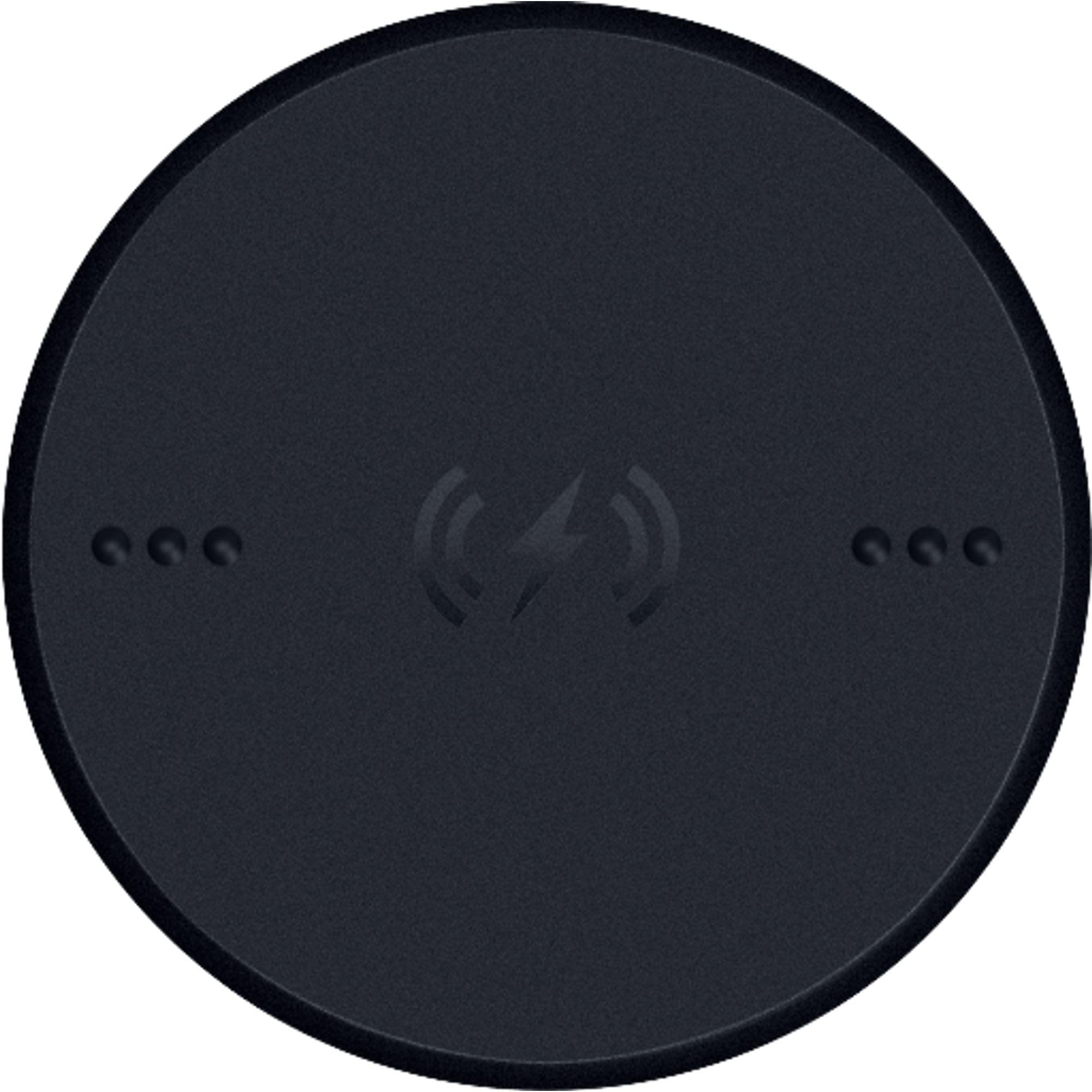
The Razer Wireless Charging Puck is a lightweight, ultra-thin wireless charging module designed exclusively for Razer’s top-tier gaming mice like the Basilisk V3 Pro, Naga V2 Pro, and Cobra Pro. Delivering up to 10 watts of power, it supports Qi wireless charging standards and works seamlessly with Razer’s Mouse Dock Pro and Charging Pad Chroma, ensuring your mouse stays charged without interrupting your flow. Mouse and dock sold separately.


| ASIN | B0DG6H4QS7 |
| Additional Features | Wireless Charging |
| Brand | Razer |
| Built-In Media | Razer Wireless Charging Puck |
| Color | Black |
| Compatible Devices | Mouse |
| Connectivity Technology | Wireless |
| Connector Type | Proprietary |
| Customer Reviews | 4.4 4.4 out of 5 stars (97) |
| Enclosure Material | Plastic |
| Input Voltage | 120 Volts |
| Item Weight | 0.02 Kilograms |
| Manufacturer | Razer |
| Model Number | RC21-01990200-R3U1 |
| Number of Items | 1 |
| Output Current | 15 Amps |
| Output Voltage | 5 Volts |
| Portable | Yes |
| Power Plug | Type A - 2 pin (North American) |
| Power Source | Battery Powered |
| Total Usb Ports | 1 |
| UPC | 840272905913 |
| Unit Count | 1.0 Count |
| Warranty Description | 1 Year Manufacturer |
| Wattage | 10 watts |
E**O
Light and efficient
Works perfectly with any QI charger and it doesn't add any weight to your mouse at all.
L**O
Nuce and simple
Easy to instal and works very good
P**O
Works as intended. Definitely paying a premium to add Qi charging abilities to your mouse
Works as intended, but it’s definitely a pain if you don’t have Razer’s specific dock or a decent charging pad. I have it installed on my mouse, but I still find myself just using a USB-C cable to charge instead. I’m using a basilisk v3 pro mouse so my experience documented will be mostly tailored around that. *Maybe if I had one of those mats that charges the mouse while it’s sitting idle, it would be more useful. If you’re not using a weighted or mounted charging pad, the magnet may lift the pad when you pick up the mouse. You also have to position the mouse just right on a pad or dock for it to actually start charging. I originally used it on an Apple MagSafe Qi charger and got tired of constantly repositioning it to find the sweet spot to get a charge everytime(it’s the only portable Qi charger I use). The only time it works well is with the one I have mounted to my desk at home. Maybe owning the official Razer charging dock would improve the experience, but creating more reliance on proprietary accessories kind of defeats the point that I purchased it for (to enable generic qi charging) Make sure you install the puck correctly by locking it in and pay attention to the direction you need to rotate it when inserting it into the slot after removing the original puck (it’s basically a rotate and lock once u line up the grooves.) If you travel a lot and need to store the USB receiver, you’ll have to remove the puck and place it back every time unless you use Bluetooth instead. Removing it can be a bit tricky: flip the mouse upside down and use two fingers (like your thumbs) to apply downward pressure on the puck and rotate it. It should pop out once it’s no longer locked. If it doesn’t, try giving the mouse light taps while upright — that usually does the trick. Charging speed is decent. not noticeably fast or slow, as expected with 15W pad compatibility. Simple enough. It looks like the original puck in design, with just the added charging capability, so don’t get them mixed up~ one has markings for the charging capability on it and metal components. The fact that this doesn’t come with the original mouse product raises some questions. I won’t speculate too much, but it’s definitely a premium add-on you have to pay for if you want to enable Qi charging on your Razer device.
D**G
Seemed pricey for what it does, but honestly I love the convenience!
Bought this for my Razer Basilisk V3 Pro. Very worth it. I don't like to plug in things over and over and wear out the port, so decided to try the fancy Puck option! The box is extremely tiny and has VERY small text so bring a mag if you got bad vision. Was a tad confused about how to install it at first, and accidentally had it upsidedown and I didn't know if the Puck was bad or the Charging Pad was bad! Just make sure the 4 gold circles are on top and the other 2 are on the bottom and you're good. It's kind of hard to take out once it's in and it's highly sensitive to scratches and oils. It works great with the RapidX charging pad and probably other Qi charging pads, just make sure the mouse is in the middle.
P**.
Qi charging means never a dead mouse
Works as expected. It’s installed in a Basilisk v3, I drop the mouse onto a Qi charging pad at night, awaken to a full charge in the morning. That’s my routine; it doesn’t take all night to charge…probably 3-4 hours if I had to guess. It’s nice not to have to plug in the mouse to recharge. Totally worth the $20, especially compared to the price of the mouse.
T**R
Great item
Great item, great quality, awesome charging ability, functions as should perfect size
A**H
DO NOT BUY - died after only a few months
only 5 months of use and the chip inside that handles charging is already fried. DO NOT BUY. I guess this is one of those things you have to buy OEM to not get scammed by the chinamen
C**H
Way better than a cable.
I will say I didn't buy this with the best of confidence after reading the terrible reviews already left. At time of purchase, it had a whopping 1.4 stars. I opted for this instead of the mouse dock pro since I already have a wireless charger on my desk for my phone. I had planned to buy the mouse dock pro if this didn't work but it charges my razer naga v2 pro perfectly. Just have to make sure the puck of the mouse is directly in the center of my charging pad. I have a feeling some of the bad reviews saying it doesn't charge is user error and they aren't positioning the mouse correctly. My first time I had to find the perfect spot but once you know where to set it, it's easy. Way more convenient than using a cable to charge.
S**A
Works great with my Razer Cobra Pro and mouse dock pro.
A**I
ممتاز
Trustpilot
1 month ago
1 month ago