Desertcart purchases this item on your behalf and handles shipping, customs, and support to Romania.
🔒 Unlock the future of secure logins—because your digital life deserves elite protection.
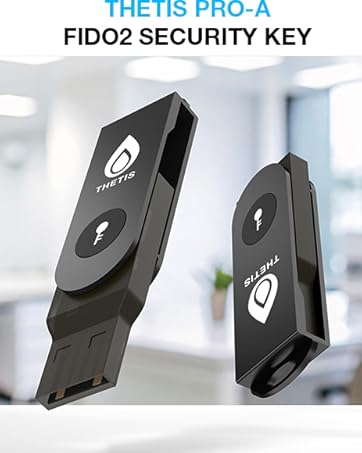
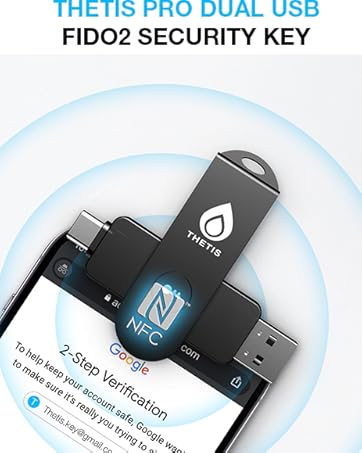
The Thetis Pro-A FIDO2 Security Key is a compact, durable two-factor authentication device featuring USB-A and NFC connectivity. It supports passwordless FIDO2 logins and TOTP/HOTP codes, compatible with major platforms like Windows, macOS, Linux, Gmail, Facebook, and GitHub. Designed for professionals seeking robust, portable security, it offers easy setup via Thetis Manager apps and integrates with popular password managers, ensuring versatile, enterprise-grade protection without batteries or network dependency.


| Asin | B0D7DPG6PB |
| Best Sellers Rank | 20,759 in Computers & Accessories (See Top 100 in Computers & Accessories) 248 in USB Flash Drives |
| Brand Name | Thetis |
| Colour | Black |
| Compatible Devices | Windows, Mac OS X, Linux (Debian Based or Red Hat Based) and Chrome OS |
| Compatible Phone Models | Windows, Mac OS X, Linux (Debian Based or Red Hat Based) and Chrome OS |
| Country Of Origin | China |
| Customer Reviews | 4.4 4.4 out of 5 stars (450) 4.4 out of 5 stars |
| Flash Memory Type | USB |
| Hardware Connectivity Technology | USB Type A |
| Hardware Interface | USB |
| Item Dimensions D X W X H | 45D x 16W x 9H millimetres |
| Item Type Name | FIDO2 usb A flash drives |
| Item Weight | 0.3 Ounces |
| Manufacturer | Thetis |
| Manufacturer Part Number | MB000476 |
| Model Name | Thetis FIDO2 Security Key - USB A & NFC |
| Model Number | MB000476 |
| Network Connectivity Technology | NFC, USB |
| Number Of Items | 1 |
| Number Of Packs | 1 |
| Product Features | Lightweight |
| Product Warranty | Standard Express Warranty |
| Read Speed | 480 Bytes Per Second |
| Unit Count | 1.0 count |
| Upc | 850065774008 |
| Write Speed | 40 MB/s |
User
Easy set up
Very easy to use and set up happy with my purchase
User
Value for the price!
Security key to help you minimise using 2FA on your phone. You can set this up with with apps or login credentials and just plug into your PC/Laptop to confirm your 2FA.
User
Say goodbye to two factor authentification
I ordered the Thetis Pro-A FIDO2 Security key. I am very choosy about passwords and online ID and I actually think I have found something that a) works for me and b) makes my life easier. At last.I have had enough of two factor authentification, and I won't entertain biometric ID at all. This key enables me to skip two-factor authentification on a great many (larger) sites, [like Google, Microsoft, Dropbox, Github, Facebook/Meta, Twitter/X, and Apple (sometimes)], and unlike some Security keys out there, (the ones they will sell to you as more fancy) it doesn't need biometric ID to do so. It also doesn't send your data to servers overseas - the data you have stays in the physical key itself. All of these are big tick boxes for me. You don't even have to do anything with the device per se. It uses a thing called NFC (near field...something) which is the same technology that contactless payments use. You just hover it in the vicinity of your phone or laptop and it will communicate with it on your behalf.Downsides: Don't lose the key or you will lose access to your accountsMitigation: set up password recovery questions or processes for your accounts, BEFORE you lose the key :-DHonestly I'd pay a lot of money not to have websites send five digit codes to my phone for security purposes. And I only have to pay £25.99, so that's good.As of May 25, this is the latest model from this maker.Five stars
User
Thetis
product serve the what I need to do
User
USB-A & NFC Passkey for Strong 2FA/MFA Protection Across Platforms
✅ Pros:FIDO2 & U2F Support – Provides strong authentication for enhanced security across multiple platforms.USB-A & NFC Connectivity – Works with both desktop (USB-A) and mobile devices (NFC) for flexibility.TOTP/HOTP Authenticator App Support – Can store one-time passwords (OTP) for additional security layers.Multi-Platform Compatibility – Works with Windows, macOS, Linux, Gmail, Facebook, Dropbox, GitHub, and more.No Batteries or Bluetooth Needed – Reliable plug-and-play operation without worrying about power issues.Enhanced Security Against Phishing – Protects against hacking, credential theft, and unauthorized access.❌ Cons:Not USB-C Compatible – Requires a USB-A port (adapter needed for USB-C devices).No Biometric Support – Lacks fingerprint authentication, unlike some advanced security keys.Requires Service Compatibility – Only works with platforms that support FIDO2/U2F authentication.Learning Curve for New Users – Setup and usage may require technical knowledge for beginners.🔍 Best for: Users needing strong, hardware-based security for 2FA/MFA authentication across multiple platforms.❌ Not ideal for: Those who need USB-C support, biometric authentication, or a fully beginner-friendly setup.
User
Brilliant
The Thetis Pro-A FIDO2 Security Key Passkey Device is an essential tool for anyone looking to enhance their online security and ensure safe, password-free authentication. With USB A and NFC compatibility, this security key offers a versatile range of connection options, making it easy to use with various devices and platforms. It's designed to support FIDO2 and WebAuthn, allowing users to authenticate their identity without the need for traditional passwords. This key is particularly beneficial for those who prioritise security and want to implement Two-Factor Authentication (2FA) or Multi-Factor Authentication (MFA) across different accounts.The TOTP/HOTP Authenticator App integration further strengthens the security process, generating time-based or event-based one-time passwords for even more protection. The Thetis Pro-A works seamlessly with Windows, macOS, Linux, Gmail, Facebook, Dropbox, and GitHub, among other services, ensuring that your digital life is secured across multiple platforms. The simplicity and ease of use are notable—once registered with your accounts, you can quickly authenticate with just a tap or a plug, eliminating the need for typing passwords or entering codes manually.Beyond the technical features, the design of the Thetis Pro-A is both compact and durable, ensuring long-lasting performance. It's lightweight and portable, making it ideal for both home and on-the-go use. This security key is a fantastic investment for anyone looking to protect their sensitive data and online accounts from hacking or unauthorised access. Whether you’re managing work-related accounts or personal ones, the Thetis Pro-A FIDO2 Security Key is an excellent tool to implement the highest level of security with ease.
User
Instructions not clear
Put it in the bin
User
An excellent extra level of security.
I’ve never used an authentication device before, but decided I needed one to protect my PayPal account. I’ve already set up an extra layer of security by adding the need for an OTP every time I log on. But every couple of months PayPal decide that they don’t want me to use it. I phone them, get it reinstated, but it doesn’t matter-a month or so later and it happens again. So, I want to add this passkey device to my PayPal account for peace of mind that only I can access my money.Setting up this Thetis device was a doddle. Downloading the Thetis key management tool started the process. 20 seconds later I was heading for PayPal.com and clicked to 2-factor authentication, then use an authenticated app. From then on it was enter the generated password and that was it-this Fido2 was up and running.Thinking about possible future issues I wondered what would happen if I lost the passkey? I’ve decided I’m going to buy a second Fido2, clone them and put the duplicate in a safe place. At present I only have one passkey and from what I’ve read I’m hoping I can work out how to make copies!To look at the device it could be mistaken for a USB drive, which makes it innocuous and highly unlikely to be recognised for what it really is. If you want to make sure that only you can access various sites in the easiest way possible, this Thetis Fifo2 is the way to go.
User
Fonctionne parfaitement pour sécuriser les accès. Indispensable pour une sécurité renforcée.
Fonctionne très bien pour sécuriser vos accès à vos applications auto-hébergées qui acceptent la double authentification par clé de sécurité et ce quelque soit le système d'exploitation utilisé pour y accéder (linux, windows ou même macos et ios).Pour le prix, il n'y a pas mieux je pense, NFC et USBA pour une connectivité excellente sur tous les matériels et surtout un sentiment de sécurité renforcée.Petit conseil, en acheter une deuxième au cas ou vous la perdiez ou la cassiez, une fois les applications configurées avec les deux clés, cela permet d'avoir une solution de secours.Indispensable selon moi, à l'heure ou les simples mots de passe sont trop facilement hackés ou dans la nature suite aux fuite de données.
User
Facile d'utilisation et fonctionnelle
Fonctionne parfaitement, facile d'installation sur PC.
User
La migliore dei suoi competitor
Dato che pensavo fosse più che facile comprare e usare una security key, ho deciso di farlo; però mi sono perso in un mare di informazioni e dubbi, che ho deciso di racchiudere qua per chi ne avesse bisogno. Scrivo questa recensione principalmente per dare qualche informazione tecnica, per il resto vi lascio alle altre che descrivono questa security key.(Non ho idea del perché non vengano menzionate)Esiste un "limite" di account che potete memorizzare. Ma ci sono delle differenze, perché potete usare questa security key in due modi diversi:- per accedere usandola come "credenziali residenziali" (spesso chiamate passkey)- o "credenziali non-residenziali"In generale, se il sito lo supporta, potete usare questa chiave per entrare nel vostro account senza scrivere né email né password, ma solamente inserendo la chiave, premendo il pulsante, e digitando il pin che viene scelto quando si configura la chiave la prima volta. Tuttavia, potete farlo per un massimo di 200 account diversi;mentre, se volete utilizzarla per proteggere un vostro account, come classico secondo metodo di autenticazione, non avete nessun limite. Dovrete entrate usando username/email e password + questa chiave, invece che il codice a 6 cifre che arriva per email o sms.(non è escluso che il sito supporti entrambi e non necessariamente solo una delle due)Un'altra funzione che ritengo utile è la possibilità di memorizzare e generare i codici TOTP (quelli a 6 cifre che scadono dopo 1 minuto) direttamente in questa chiave. Utile se, per esempio, il sito non dà la possibilità di usare una security key, ma possiamo usare un nostro authenticator di fiducia.Possiamo tranquillamente memorizzarlo anche con questa chiave. Molto comodo se cambiate spesso (anche una volta all'anno) telefono, o preferite memorizzarli su qualche applicazione per pc, e non usate applicazioni che salvino i vostri codici attraverso un account (però a quel punto dovreste fidarvi dell'applicazione, e che li salvi in modo sicuro).Il limite di codici (o, per meglio dire, frasi impronta) TOTP che possono essere salvate è 50.È disponibile anche la possibilità di salvare un singolo codice HOTP (se non sapete cos'è, difficile che vi serva, e comunque è ormai caduto in disuso).Dato il numero (quasi) precario (a seconda del numero di account), consiglio di salvare solo quelli per account che ritenete importanti, e gli altri di continuare a usare usare un authenticator per telefono, come applicazione sostitutiva.Aggiungo anche che la chiave supporta l'estensione WebAuthn PRF (se non sapete cos'è, probabilmente non vi serve).Una serie di accorgimenti:Se arrivate al punto di utilizzare una security key, che per la maggior parte di noi, immagino, sia per paranoia di vedere uno dei nostri account più importanti con la password cambiata, ricordo di rimuovere ogni tipo di metodo di autenticazione che non sia veramente sicuro, come gli sms (che, difficilmente ma possibile, potremmo vederci la sim clonata), o il codice per email (magari di una per cui siamo impossibilitati ad usare la giusta sicurezza, come, per esempio, molte email istituzionali...), e di usare, dove possibile, unicamente la security key.Quando salvate un codice TOTP, sappiate che, al contrario di come fanno molte app, sarà impossibile recuperare la frase utilizzata per generarlo. Raccomando di avere un backup dei codici qr o direttamente delle frasi.Il pin che configurate la prima volta che utilizzate la security key (potete utilizzare caratteri alfanumerici), di solito viene chiesto solo se dovete cambiare qualche impostazione della security key, o quando usate una delle vostre "credenziali residenziali", ma fate in modo che sia qualcosa che vi potete ricordare.Inoltre, per protocollo, in caso sbagliaste il pin troppe volte, un massimo di 8 volte, che non può essere cambiato, a meno che non si abbia voglia di smanettare con programmi a terminale (fido2-token), la security key non potrà più essere utilizzata per l'accesso senza password, e per farlo bisognerà completamente resettarla dall'applicazione, e perderete la possibilità di accedere a tutti i siti per cui l'avete utilizzata; rimarranno memorizzati solo i codici OTP.(continueranno a funzionare tutte le varie funzioni, ma dovrete riconfigurarla per tutti i siti utilizzata precedentemente, insomma non è da buttare)Dati i motivi che ho elencato, è solitamente consigliato avere e usare almeno due security key per account, così se, per esempio, una la doveste perdere, potete utilizzare l'altra per accedere. Io questo lo trovo, personalmente, inutile. E, invece, consiglio di salvare il salvabile in un dispositivo che siete abbastanza sicuri andrete ad utilizzare solo voi, e per un lungo periodo. Mi raccomando di salvare sia i qr, o le frasi, utilizzate per generare i codici OTP, e, soprattutto, scaricare e salvare i codici di recupero dell'account, che, se non sapete, sono quelli che, di solito, compaiono dopo avere inserito l'autenticazione a due fattori, oppure che potete trovare sotto qualche impostazione di sicurezza, con voci come "Codici di recupero". Difatti io lo trovo inutile proprio perché ho salvato tutti questi codici in un password manager locale.Ora faccio una rapida comparazione tra questa security key e una dello stesso prezzo, con un nome, se non il nome, più grosso per quanto riguarda questo tipo di chiavi, la Yubico Security Key. Prima inserisco questa della Thesis, e poi quella della Yubico:Numero massimo di passkey o "credenziali residenziali" memorizzabili: 200 – 100Numero massimo di codici TOTP: 50 – 0Numero massimo di codici HOTP: 1 – 0Beh, direi che ho fatto bene a scegliere questa. Anzi, ho risparmiato anche €10, dato che la Yubico mi costerebbe €35 (avrei potuto risparmiare ancora di più, che questa, a periodi, la vedo anche sotto i €20).A parte gli scherzi, ho ricercato, penso, non meno di 100 security key differenti, e tra tutte questa mi è sembrata la migliore sotto l'aspetto tecnico, da qui il titolo di questa recensione. Inoltre, uno svantaggio-vantaggio è che è fatta in metallo, mentre le altre sono solitamente tutte in plastica (dato che quelle in plastica sono costruite apposta per essere il più resistenti possibili e impermeabili, solitamente).A dire la verità, questa la metto personalmente al secondo posto, perché una che ho trovato, da parte di Token2, un'azienda Svedese, sembra tecnicamente migliore, ma non ho avuto il piacere di provarla, perché acquistabile solo attraverso il loro sito.Per quanto riguarda la configurazione, tutte le funzioni possono essere gestite tranquillamente da windows attraverso l'applicazione dedicata.Se però non voleste averne a che fare, tutte le security key che funzionano per il web seguono il protocollo FIDO2, compresa questa; il che significa che usando un browser che accetta una security key (praticamente tutti quelli più o meno utilizzati), potete configurare il pin, e gestire tutte le vostre passkey attraverso le impostazioni del browser. Mentre se voleste salvare dei codici OTP, potete utilizzare l'applicazione per telefono.Non ho esperienza, ma per iPhone dovrebbe essere la stessa cosa, mentre nell'usarla con MacOS, l'applicazione che scaricate non ha la possibilità di configurare le vostre passkey, il che significa che dovrete modificarle attraverso un browser.Impressione personale: mi sono trovato veramente bene, e non ho avuto praticamente alcun problema, neanche con l'applicazione per Windows, che alcuni lamentavano non funzionasse. A dirla tutta, ho riscontrato due problemi:sulla versione base di Chromium (non Chrome) non riuscivo a registrare la chiave per gli account Google;inoltre, quando si va ad utilizzare la funzione NFC, il chip di lettura è davvero poco potente (il che potrebbe essere una buona cosa, così nessuno può, paradossalmente, usarla mentre l'abbiamo in tasca nei pantaloni), rendendoci necessario trovare il punto preciso del telefono dove poterla utilizzare. Però, una volta trovato, basta metterla là qualche secondo e funziona senza problemi (ricordo che per funzionare la chiave deve essere "aperta").Io ho comprato questa con l'interfaccia USB-A e NFC perché volevo poterla utilizzare con più dispositivi possibili, avendo già un adattatore da USB-A a USB-C, e immaginando un possibile scenario dove non ci sia nessuna di queste porte, ma almeno abbia l'NFC (qualche vecchio iPhone). Però sappiate che ci sono anche altri modelli, sempre della Thesis, che, se non si fosse capito, consiglio altamente, con già l'interfaccia USB-C e NFC, se preferite, o anche, direttamente, doppia uscita, sia di tipo A che tipo C. Inoltre, c'è anche un modello con la scansione dell'impronta, che però sconsiglio perché, anche se non ho avuto alcun tipo di esperienza, viene visto male perché col tempo potrebbe raccogliere polvere e malfunzionare (anche se basterebbe coprirlo con una semplice cover e stareste tranquilli).Insomma, ho scelto questa prevedendo che nei prossimi 5 anni di utilizzo non dovrei avere alcun tipo di problema, e, in caso, comprare un altro adattatore da portarmi sempre dietro.A titolo informativo, come ultima cosa, sappiate che questa security key è prodotta in Cina (anche se quando l'ordinate arriva dalla Spagna), ma potete stare tranquilli che è impossibile succeda qualcosa ai vostri account solo perché l'utilizzate.
User
Good for the price
Perfect, the only thing missing is the challenge response mode but for the price it's no problem. Works with Google and Bitwarden
User
購入注意
OSログインに対応していそうですが、できません。一般ユーザー向けでは無いようです。購入注意です。(Azure Active Directory (現 Microsoft Entra ID) を使用する企業環境 (Enterprise edition) のユーザーのみが、Windows Helloログイン経由でThetis FIDO2キーを使用してWindowsにサインインできます。ジェミニ)
Trustpilot
2 weeks ago
2 weeks ago