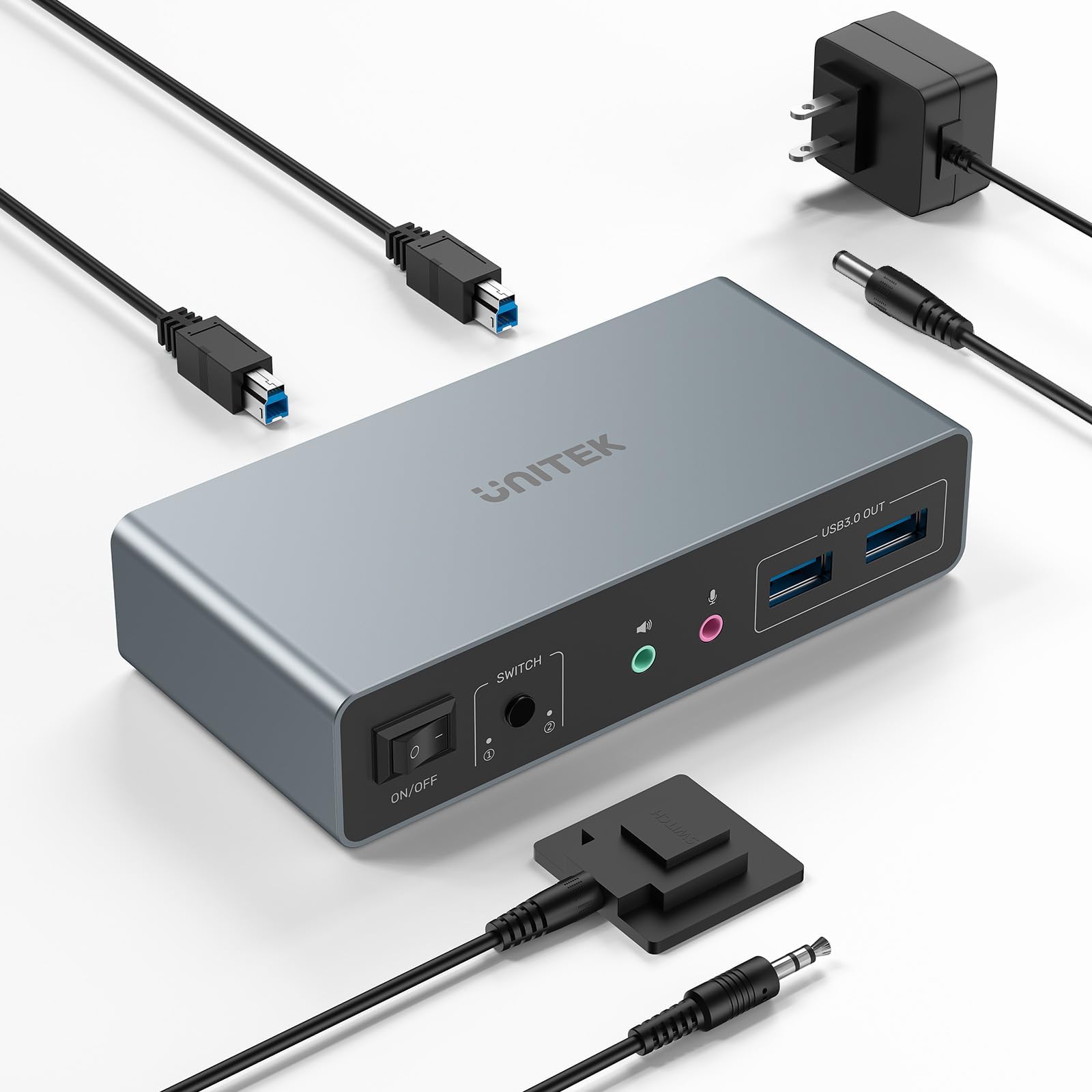
🚀 Elevate your workspace: Dual 4K power meets seamless control—don’t get left behind!
The Unitek KVM Switch enables professionals to control two computers across dual 4K@60Hz monitors using HDMI and DisplayPort inputs. Featuring four USB 3.0 ports with 5Gbps transfer speeds, it supports a wide range of peripherals including keyboard, mouse, hard drives, and audio devices. Compatible with multiple OS platforms and plug-and-play ready, it offers quick switching via a one-button or wired remote controller. Its sturdy aluminum design and included 5V/2A power adapter ensure reliable, high-performance multitasking for demanding work-from-home or office setups.


| ASIN | B0DBYMBMKN |
| Additional Features | Plug and Play |
| Best Sellers Rank | #6 in KVM Switches |
| Brand | Unitek |
| Built-In Media | cable |
| Color | DP+HDMI |
| Compatible Devices | Keyboards |
| Customer Reviews | 4.5 out of 5 stars 3,049 Reviews |
| Data Transfer Rate | 5 Gigabits Per Second |
| Enclosure Material | Aluminum |
| Hardware Interface | USB 3.0 |
| Item Weight | 0.5 Kilograms |
| Manufacturer | Unitek |
| Number of Ports | 2 |
| Operating System | Linux, Mac OS X, Windows 10, Windows 11, Windows 7, Windows 8, Windows Vista, Windows XP, macOS |
| Special Feature | Plug and Play |
| Total USB Ports | 4 |
| Total Usb Ports | 4 |
| Unit Count | 7.7603 Ounce |
| Warranty Description | 1 year |
S**E
Outstanding KVM at a reasonable price
I've been using the Unitek KVM with 1 HDMI and 1 DisplayPort for a few months. It works flawlessly. The little metal box is solidly built. Even after a full day of work between two computers, I have never noticed the box was hot. Especially important to me was the fact that the DP was compliant with v1.2. I have two 2k monitors in a daisy chain configuration using DP inputs and both are working at their max resolution. To connect my laptop I use a DP to USB-C adapter into my USB-C alt DP port and it works great. Other reviews noted issues with getting audio to work. I was able to, but it took a little experimentation. On my setup, the audio is channeled from the computers via the USB connection between the computer and the Unitek KVM. So on each computer I needed to select the correct USB audio device as the output. On my Linux computer it was called Speakers Audio Adapter (Unitek Y-247A), and on my Windows 11 laptop it is called Speakers 2 - USB Audio from the Settings > System > Sound menu in Win11. The Amazon description says that the KVM is not compatible with laptops. I don't know why it says that. I am using it with a Dell windows laptop and a Dell Linux desktop and it works just fine on both. I will say that if you use a KVM on a Linux machine, there seems to be an issue with the picture returning to the monitor after the computer wakes from a long sleep. I thought it was the KVM, but it isn't. I'm not sure if it's the way the DP drivers work in Linux and it wouldn't happen if I used the HDMI insteasd, but what I have found is that it's important to switch to the Linux computer on the KVM before waking up the Linux computer itself. If you end up with a black screen but it seems like the computer is working fine, that's because it is. I have not found a fix for this but have been managing the symptom instead.
D**N
Nice KVM! Quick switching!
Smooth button, Very quick switching between work and gaming right. Audio and mic jacks work awesome also. Much more quality than expected for the price.
J**N
Dang...It Works!!!! Yeah Boy-ah!!!
Well it took some doing, a few extra cables, but once my Logitech wireless keyboard and mouse were recognized through the system, bang, in just like a champ. Needed a wired Logitech keyboard and mouse for initializing, and then having my Logitech set up for multiple mice and keyboards. Now I am operating two computers, which was a necessity and displaying two screens. One for me the other for clients when I want them to view what we are working on. Awesome.
A**R
A Nice Unit, but...
This is actually a nice device. it was easy to setup and worked right out of the box. However, and the reason for only 4 stars, the audio did not behave like I expected. There are no audio inputs from the connected computers. So, unless your computer is routing Audio through the HDMI cable, you get nothing on the front panel audio output. Update: I was able to get Audio from my Linux box to pass through the HDMI cable by selecting a different Audio device.
T**M
It just works exactly as it should. Excellent KVM.
This thing is fantastic. I have 2 external monitors as well as peripherals and it works flawlessly. I love it. It keeps my KVM switchable between my gaming rig and my work computer. It never loses connectivity, doesn't take up much space, and switches flawlessly.
J**H
Excellent quality and easy to setup
When I saw the price of this model compared to others I was skeptical. After using it for a couple of months I can say that it is solid. It works exactly as described in the listing and the included button switch is very convenient. In my use case I have the KVM and button mounted under my desk and it works flawlessly.
B**A
A Year Later
Received this HUB device on Oct 24, 2018. I like that it has a 4' cable to plug into the PC. Some reviews and answers to my questions indicated that it had only a 12 inch USB cord. It definitely has 4'. Be sure that you select the right item above when ordering the HUB. The selection above has different USB cord lengths at different prices so be aware of this as you purchase it. It did NOT come with a charging cable so I cannot rate that portion of the device. That is why I give it an overall four stars. I have used all four USB 3.0 ports and they work very well. Each port holds the USB 3.0 device firmly and it is not difficult to insert the USB 3.0 devices into them like some other brands tend to do. So far, I've had no problems with this product. Pros: Besides those pros listed above, I give it a five stars for not being expensive. The individual ports are NOT lighted which I like a lot. It does have a tiny dot of light at the top of the unit that shows that it is on or not. With many other brands, the lighted USB ports are too bright when using them at night. Four USB 3.0 ports are the most we needed and this works out just perfect for our uses. It does not take up much room on the table. While I do not have the HUB affixed to the wall where the extra length of the cord would be beneficial, it is nice to be able to use what I need and fold the extra out of the way. Those HUBs with only 12 inches or less cord lengths would have been useless. It is 3 3/4 inches long, 1 1/8 inches wide and just under 3/4 of an inch high so it really fits just about anywhere you want to place it. Cons: Would have been nice if it also came with the USB/transformer charging cable. For those who need the HUB to stay in place on the desk, either buy a heavy aluminum unit or one with double back sticky tape on it. This unit is very lite and can move easily on its own. But, the positive of this is that it is easy to move, takes up little space and can be moved out of the way when necessary. For some, the CONS will be a problem. However, for our needs, and because it does work without any problems (hopefully, no problems occur), we are very satisfied with this HUB. Update Sept 2019 Changed star rating to 5. This USB port plug has worked great for the past year without any problems. It is used daily.
J**T
Works great, needs to be plugged into power
I bought this so I could easily switch from my home PC to a work laptop, using 2 monitors, on work from home days. Now I can switch back and forth by pushing one button. Be aware that this device does need to be plugged into an outlet to function. My advice: you're going to need more HDMI cables than you think.
Trustpilot
1 month ago
1 week ago