Buy anything from 5,000+ international stores. One checkout price. No surprise fees. Join 2M+ shoppers on Desertcart.
Desertcart purchases this item on your behalf and handles shipping, customs, and support to Romania.
⌨️ Light up your command center with the ultimate mini wireless keyboard!
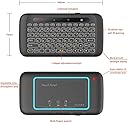
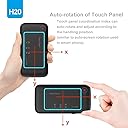
The Dupad Story H20 Mini Wireless Keyboard combines a full-size, auto-rotating touchpad with a compact QWERTY layout, featuring RGB backlighting and a rechargeable 300mAh battery. With a stable 10-meter wireless range and built-in IR learning for remote control, it offers seamless compatibility across Android TV boxes, PCs, Raspberry Pi, and more—perfect for professionals seeking versatile, stylish control at their fingertips.


| ASIN | B07C2V97T1 |
| Additional Features | Backlit, Rechargeable |
| Antenna Location | Office |
| Best Sellers Rank | #815 in Computer Keyboard & Mouse Combos #1,780 in Computer Keyboards |
| Brand | Dupad story |
| Built-In Media | USB Cable |
| Color | H20 3 in 1 Keyboard |
| Compatible Devices | Laptop, PC, Projector, Smart TV, Smartphone |
| Compatible Operating System Family | Linux, MacOS, Windows |
| Connectivity Technology | 2.4GHz wireless, USB-A |
| Customer Reviews | 3.9 3.9 out of 5 stars (553) |
| Enclosure Material | Polycarbonate |
| Generation | 3rd Generation |
| Hand Orientation | Ambidextrous |
| Item Dimensions L x W x H | 4.92"L x 6.3"W x 0.63"H |
| Item Weight | 0.21 Pounds |
| Keyboard Backlighting Color Support | RGB |
| Keyboard Description | Ergonomic |
| Keyboard Layout | QWERTY |
| Manufacturer | Dupad story |
| Mfr Part Number | 8541649328 |
| Model Name | H20 |
| Model Number | 8541649328 |
| Number of Batteries Required | 1 |
| Number of Keys | 104 |
| Number of Sections | 1 |
| Power Source | Battery Powered |
| Series Number | 8541649328 |
| Style Name | Contemporary |
| Switch Type | Membrane |
| Theme | Keyboard |
| UPC | 650985808513 |
| Unit Count | 1.0 Count |
| Water Resistance Level | Not Water Resistant |
M**T
Perfect HTPC keyboard/touchpad
My bedroom TV is also the monitor for my HTPC and I was sick of having a keyboard in bed lol. This device is AMAZING. Size of a cell phone/remote control. Buttons are clicky, though the device is light it doesn't feel cheap. Sensors work great for flipping it to the keyboard side (like how your phone auto rotates from portrait -> landscape). LED backlight is great, colors and brightness are adjustable or you can turn it off. Maybe the best part is it's rechargeable via micro usb so there's no batteries and the charger isn't propietary so if the charger breaks you don't need a whole new device. The touchpad works well, that's what I use most. Gestures work great, up to 4 finger gestures work on it. This is exactly what I was looking for couldn't recommend it enough. If there was a nicer $100 version of this I would buy it. I can't speak to battery life yet after just a few days use (still on my first charge) but with the micro usb that doesn't concern me, charging will be easy.
E**N
Great remote for media computer. I've been using it for years!
I love this little device. I use it with a media computer hooked up to a TV. I found wireless keyboards and mice cumbersome, but this little thing revolutionized using my computer as a media station. I bought it in 2021, and I use it almost every day and only have to charge it every couple of weeks. I will admit that some of the reviewers who say the touchpad is fiddly for selecting things are right, but it is possible and you can get the hang of it. I've more than gotten my money out of this little thing. Very happy I bought it, and I highly recommend it. Recommendations for use: don't leave it on. Memorize where the power switch is and thumb it on to use it, and then thumb it off. Not only will the charge last longer that way, but you'll avoid unwanted selections. It's highly vulnerable to vibrations. Familiarize yourself with the finger tap combinations, and avoid resting all of your fingers on it because that changes the color. Don't use it when it's plugged in to charge. Charging seems to distort the signal and you can get some really weird responses. I usually unplug it to make a selection (start a video or something) and then turn it off and plug it in until I need it again. But I only have to do this when it starts blinking red indicating low battery while I'm actively using it. Usually, I just randomly pick a night and put it on the charger when I go to bed. It has an amazingly long battery life if you keep it off rather than letting it sleep when not in use. Cons: click and drag is nearly impossible. It can be done but usually takes a lot of trial and error to get the double tap just right to select something to drag. It is very vulnerable to vibrations. Leave it in sleep on the couch next to you and it will randomly stop your video when you shift on the couch. Just turn it off when you're not actively using it. Some of the keyboard combinations are a little weird, and if you have poor eyesight, even the lighted keys can be difficult to read. Finding punctuation is the hardest. Don't expect to do a ton of complicated typing with this. It's a remote keypad not a keyboard. Direct line of sight is necessary. If you have other electronic devices in use, don't put them between the remote and it's dongle. Pros: long lasting battery, good range, durable and dependable. I've been using it for years and have no real major complaints.
S**N
It's cool
It's a cool product. I was getting it for my phone because I thought the Bluetooth was built into it. But it comes with a USB Bluetooth adapter you need to plug in, so I use it for my TV instead. It takes time to get use to and if your laying down, the TouchPad can be accidentally triggered if you tilt it to far up. Still like it, and I'm keeping it. I've used it a few time to type in movies, instead of using my remote, so it is helpful and gets the job done.
B**Y
I love these keyboards, super convenient and work on almost anything.
I use em with my laptop on the TV and my Nvidia Shield. Power key is a little inconveniently placed, but otherwise great chicklet keyboard. Track pad is the best I've used on a remote. It has a gyro and knows which side you are using and disables the other side. It also knows its track pad orientation, so you can scroll in landscape or portrait. I probably only charge em 2 or 3 times a year. They have a physical power switch which is nice but they also go to sleep. While I wish these would get an update to include Bluetooth and usbc charging, I've tried a bunch of other keyboards, remotes and air mouses and this is what I keep falling back on. Perfect companion to the Nvidia remote.
P**L
Junk from China
The keyboard worked fine but for the past 2 months the device would just corrupt the drivers for the PC and the mouse functions are not working right. In the web browser you click a link and it would open a new tab. You cant type anything either until a reboot of the system. Then it would work fine for a few weeks until it failed again to this weird state. This is just cheap junk from China. No quality control. They have a great device if they put QUALITY components in it.
K**L
Great product. I highly recommend.
is wireless keyboard worked well in my PC and Android TV. Connected quite well, easily and quickly. The price was very good too.
P**E
I own a fair number of BT and RF remotes and this one has by far the best keyboard. It feels great and responsive and the backlighting really works. It is very light and compact. The only difficulty is with clicking and dragging with the buttonless trackpad. Overall it works really well. I just wish it had a BT version as well.
A**R
Works good out of the box (after fully charging it). Not 5 stars but greater than 4. Exponentially better than any Rii units you see in this (these) sites. Touch pad X-Y easily following what side is up is nice.
R**E
Convenient, but my last one only lasted less than 1 year, than the receiver stopped working.
C**N
i like the size and how it feels in hand thumb typing is easy backlite is good the touchpad is finicky sometimes the position of the kybrd makes the cursor go wonky having to turn it over to use the other side is a bit annoying but maybe ill get used to it update: the next day, the battery indicated it needed another charge having been used for one day only very disappointed. i won't use a kybrd that requires charging everyday buyer even needs approval of seller to return it! same with the D8 kybrd!
M**.
I'll try the Enter key on another computer.. though on Linux.. it types Q instead of doing a return.. Other than that.. easy to use. mouse doesn't function while you are typing. Therefore, it is very practical. One thing would've been nice is to have a small compartiment to put the USB key inside the keyboard.. if I loose it.. I can't use it anymore..
Trustpilot
1 month ago
3 weeks ago