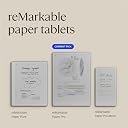
Desertcart purchases this item on your behalf and handles shipping, customs, and support to Romania.
📝 Elevate your note-taking game—because your ideas deserve to be remarkable.
The reMarkable Paper Pro Bundle features an 11.8-inch full-color e-ink display with a natural paper-like writing experience powered by the Marker Plus stylus. Designed for professionals craving distraction-free productivity, it offers up to two weeks of battery life, advanced note organization with handwriting-to-text conversion, and seamless cloud integration. The bundle includes a premium Mosaic Woven Book Folio cover with a magnetic pen holder, ensuring your digital notebook stays protected and stylish wherever you go.


| Age Range Description | Adult |
| Asin | B0DGBDR2PM |
| Aspect Ratio | 16:10 |
| Battery Average Life | 2 weeks |
| Battery Cell Type | Lithium Ion |
| Brand | reMarkable |
| Color | red (burgundy) |
| Compatible Devices | Smartphone, Tablet, desktop |
| Connectivity Technology | USB |
| Customer Reviews | 4.2 4.2 out of 5 stars (589) 4.2 out of 5 stars |
| Display Resolution Maximum | 2160 x 1620 ピクセル |
| Display Type | Electronic Ink |
| Graphics Description | Integrated |
| Hardware Interface | USB Type C |
| Human Interface Input | Touchscreen with Stylus Support |
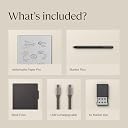
| Included Components | reMarkable Paper Pro, Marker Plus, 6 Spare Marker Tips, Bookfolio, USB-C Cable |
| Item Dimensions L X W X Thickness | 38.2L x 23.7W x 4.2Th cm |
| Item Weight | 526 g |
| Lithium Battery Energy Content | 19.25 Watt Hours |
| Manufacturer | reMarkable |
| Memory Slots Available | 1 |
| Memory Storage Capacity | 64 GB |
| Mfr Part Number | RM83C-1001NW |
| Model Name | RM83C-1001NW |
| Model Number | RM83C-1001NW |
| Native Resolution | 1872x1404 |
| Operating System | Linux |
| Other Special Features Of The Product | Color display, reading light |
| Ram Memory Installed | 64 GB |
| Screen Size | 11.8 Inches |
| Set Name | Mosaic weave |
| Size | reMarkable Paper Pro Bundle with Folio |
| Software Update Supported To Date | unknown |
| Specific Uses For Product | Draw, Lighting, Painting, Student, classroom |
| Wireless Compability | 802.11a, 802.11b |
User
書き心地のちょうどよいメモ帳。日本語対応はしていないので日本語を読ませると文字化けする
仕事でノートに大量にメモするので重宝はしている。いくらでも書けるので助かる。紙に書く様な触感はあるが完全にとはいかない。紙の引っかかる重い感じに比べると、もう少しプラスチック寄りの滑りを感じる。しかしながら、このくらいが良いのではないのかとも思える。表現としては、ザラザラな画面にプラスチックのペンで削りながら書いている様な印象を持っているという書き心地。実際はそんな削れいてるわけではない。デメリットは応答速度は良いが、更新速度が遅い。書けば書くほど、色が乗れば乗るほど重たくなる。結構これだけで動かなくなるか。と言う場面は正直多々ある。これから購入を考えている方は個人的に更新の遅さの改善と日本語パッチがハードルになると思う。気に入ってはいるが、★3が限度かなと。もっさり感と日本語が当たっていない(◻︎マークになる)動画を参照してもらいたい。
User
Should have bought it sooner!
Very great to use. I thought about this for along time (over a year) before I actually bought it. The only complaint I have is that I waited so long. It’s convenient to have a “tablet” writing pad that’s not a tablet. There are no games or distractions. The brightness settings are cool for low light but you can turn them off to save battery.I love how you can have folders as well. Highlighter function is very cool.The remarkable is very user friendly. Writing isn’t quite like paper but pretty darn close for electronic.Very much worth the money and I would recommend it over and over again.
User
Extremely happy, even after six months!
I purchased the reMarkable Paper Pro about six months ago and waited to write a review in order to truly offer a long term perspective on its use.The reason I purchased the Paper Pro is because I am a doctoral student and prefer paper documents to digital. I found the pile of printed articles and written notes we’re accumulating to the point they were challenging to keep organized, so a friend showed me her Paper Pro. The moment I tried hers I knew it had potential to solve my paper problem without sacrificing the simplicity of hard copies that I really love.That potential turned into reality, for sure. I use my Paper Pro almost daily. Once I figured out how to make separate notebooks and folders, I was easily able to organize my written notes and PDF articles (which I live to annotate!). I use it for work and school.The weight of the stylus feels to me like writing with a pen, and I easily switch between writing and highlighting. I would add, if you’re looking for this notebook in terms of creating artwork, it might not be the best choice. The colors, while identifiable, are somewhat dull. Other than that, the display is great, clear, and aligns perfectly with where/how I write with the stylus.The tablet doesn’t connect to the internet (which is something I love about it) but I can easily upload PDF files from Google Drive with WiFi. I’ve had no issues uploading PDFs at all. As for battery life, a few hours of charging lasts me at least two days of battery. The fact that the screen will set to sleep after a certain amount of time helps as well. The stylus charges when attached to the tablet. So far, the stylus has not run out of battery.I guess the only small detail of this digital notebook I would find fault with is that the resetting screen takes a little time to get used to. I barely notice it now, but at first it was a little off-putting. Honestly, very minor. Sometimes, when it’s resetting, it takes a minute to respond to scrolling up and down a page. Again, minor, but might be annoying to some who are used to scrolling on a phone or computer screen.If you are like me and prefer paper over digital but are overwhelmed with piles of paper, this is an excellent choice.
User
Excelente
Sin duda Remarkable es el mejor cuaderno y lector electrónico y el Paper Pro es una verdadera maravilla. Muy recomendable este producto. Aunque su precio puede resultar elevado lo vale al 100%.
User
If you write- this amazing tool is for you.
It’s been now many months since I purchased this and can give the Pros & Cons in detail:Pros:1. Amazing writing tool. No distractions like an iPad that I have.2. Writing experience is smooth like paper. Unlike writing on a glass surface like iPad.3. Organizing notes is super easy. Adding new books or pages is as simple as a click.4. We can add different types of page styles like ruled, plain, dotted etc.5. The bundle pen that came along has an excellent grip. Does not roll over as it is not round. Has a strong magnet and has never fallen ever since I purchased.6. Simple erasing techniques where selection tool to erase is there. Also, back of the pen gives you erasing option.7. Converting handwritten text to typed text is an option that I haven’t used much.8. You can create tags to written contents to easily search them when needed.9. Great battery life. Mine lasts for a week. C type charging is there.10. Folio case that came as a bundle is of top notch quality.11. There’s option to send email of your handwritten notes too.12. You can access your handwritten notes from the remarkable app of your phone or laptop. So data syncs on all platforms.Cons:1. Although the device charge lasts for a week but this could had been more.2. There is back lit option too to use in dark. The light though is not too bright. So I do not use it.3. There’s option to create colour highlights or color ink. However these colours are little faded types. So I use black 99.9% of times.Overall, if you have it, you’ll definitely find it useful and people around you will be inquisitive to know what it is.
User
Great upgrade to the ReMarkable 2!
I was a ReMarkable 2 user. I upgraded to the ReMarkable Paper Pro (RPP).ReMarkable are the only paper tablets I've used and this upgrade was well worth it. Amazon's own pay in 3 options really helped as it's well documented just how expensive this product is, but as an avid note taker for work on a daily, hourly basis it's a tool that has saved me countless notebooks (although I'm nowhere near having saved the cost of 2x remarkable devices in saved notebook expense). What it has saved me is storage space and time and effort in organising and finding my notes with the help of tags. Start using tags immediately -finding your notes without them once you're several months in can be a pain.Everything that I wanted to be improved from the RM2 has been upgraded for RPP. Colour and backlight are also well documented and both very delicate yet effective. Less well publicised is the slightly larger screen and the improved detail possible with pen styles and widths. Where the RM2 was prone to blurring and flaring the strokes at the screen edges this one maintains tight and improved detail throughout. While heavier and slightly larger, mine is always desk bound and so remains comfortable to use or rather holding it is never an issue for me.The addition of colour is very good. There are many different types of colour from highlighters to R,G,B, magenta, orange, cyan, yellow, grey... plus shaders which give you different depths and strengths of each colour. Don't expect OLED vibrancy of colour however... The colours are pale, (washed out even) on the RPP's own screen, which is fine for note taking - but they're strong and vibrant once you open your document on PC, phone or tablet screens.There was nothing about this purchase that I regret, but it definitely comes down to the balance of price versus need as it's not cheap.
Trustpilot
2 weeks ago
1 day ago