


Buy anything from 5,000+ international stores. One checkout price. No surprise fees. Join 2M+ shoppers on Desertcart.
Desertcart purchases this item on your behalf and handles shipping, customs, and support to Romania.
🖱️ Elevate your workflow with ergonomic precision and wireless freedom — because your wrist deserves the best.
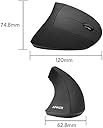
The Anker 2.4G Wireless Vertical Mouse combines ergonomic design with adjustable 3-level DPI sensitivity (800/1200/1600) and 5 functional buttons, including forward/back navigation. Compatible with Windows and MacOS, it offers a comfortable handshake grip to reduce wrist strain, a reliable wireless connection up to 5 meters, and an impressive 18-month battery life (2xAAA batteries required, not included). Perfect for professionals seeking comfort and efficiency in daily computing.




| ASIN | B00BIFNTMC |
| Additional Features | Ergonomic design, additional buttons |
| Amazon Bestseller | #6,767 in Computers ( See Top 100 in Computers ) #206 in Computer Mice |
| Antenna Location | Gaming |
| Are Batteries Included | No |
| Are Batteries Required | Yes |
| Battery Average Life | 18 months |
| Brand | Anker |
| Button Quantity | 6 |
| Color | Black |
| Compatible Devices | Personal Computer |
| Connectivity Technology | wireless |
| Customer Reviews | 3.6 3.6 out of 5 stars (51,873) |
| Embellishment Feature | LED, logo |
| Enclosure Material | Plastic |
| Finish | Matte |
| Global Trade Identification Number | 08536692579774 |
| Hand Orientation | Right |
| Hardware Platform | Laptop |
| Item Dimensions L x W | 12L x 6.3W cm |
| Item Weight | 127 g |
| Manufacturer | Anker |
| Model Name | 2.4G |
| Model Number | AK-98ANWVM-UBA |
| Mouse Maximum Sensitivity | 1600 Dots per Inch |
| Movement Detection | Optical |
| Number of Batteries | 2 AAA batteries required. |
| Operating System | Windows, Mac OS X, Linux |
| Power Source | Battery Powered |
| Range | 8 meters |
| Style Name | Modern |
| Theme | People |
| UPC | 848061077438 848061079456 |
| Unit Count | 1 Count |
K**V
以前は通常のマウス(Logi)を使っていたが、仕事中に手首が痛くなってきて、ためしに購入。最初は使いずらかったが、一か月ほど使っていたら、手首の痛みもなくなり、前のマウスには戻れなくなった。
ツ**ウ
他メーカーで既にこのタイプの有線マウスを試しており、気に入ったため無線でかつ新品1000円とお安くなっていたため購入。 端的に感想を言うと、個人的には大変満足。ただし個人差があることは間違いない。 以下気に入っている点を箇条書きする。 ・手を添えるだけで無理なく操作できる ・滑りにくい素材のため握りやすい ・一般的なマウスと比べて大きいため、窮屈でない ・非常に軽いため操作しやすい ・電池が少なくなってくると側面のランプで知らせてくれる ・無線だが接続に不安定さなどない(自分の環境では) 以下少し気になる点。 ・マウスの土台の先端が丸っこくなっているため、カッチリとした操作感をしようとすると、マウスがお辞儀をするように前に傾いてしまうため少しブレてしまう。以前使っていたのだと、先端の土台はしっかりと地面と接していたためブレることはなかった。 以上他に気になる点はない。 このタイプのマウスを使うようになってから、一般的なマウスがいかに小さく、そして使いにくいかしみじみと感じる。 しかし何度も書いているように、使いやすいかどうかは本当に人によるため、1度お店などに出向きどのようなものか触ってみたり、実際に使って自分に合わなければフリマアプリで即売るなどしないと大変損すると思われる。 ただし、1度試して見る価値はある。
あ**ー
縦型マウスとしては握りやすく、操作もスムーズです。 しかし、自分の手には少し大きく、人差し指の付け根が当たって長時間使用すると痛くなります。 慣れれば使えるかもしれませんが、手のサイズに合うかどうかを確認した方が安心です。
A**R
人差し指に痛みを感じており。手首の詰まる感じもあったのでエルゴノミクスマウスを試してみたのですが、このマウスは私の手には大きくぱっと手に取ると人差し指が丁度いい位置に届きません。何度も握り直したり、少し遠い状態で左クリックをするため指の痛みは悪化しました。もっと小さいものに買い換えます
吉**田
とにかく持ちやすい。マットな質感で2000円に見えないし、クイック音が心地いいから作業が楽しい。
め**ん
母指球が痛む 腱鞘炎に秒でなる 向き、不向きがあるのか、自分は全く向いてなかった。 イメージとしてはドアノブをずっと握ってマウス操作する感じ。 少なくとも、小さいマウスを探している方には確実にお勧めしません。
K**A
今まで3~4個購入して継続して使用しています。エルゴノミクスマウスは比較的高価なものが多かった印象ですが、このマウスは普通のマウス位の価格で購入でき、エルゴノミクスマウスの入門としてはとても使いやすいと思います。 その一方、この手のサラサラ加工にありがちな加水分解は1~2年で発生、また、ホイールのチャタリングも起こりやすくなり、寿命としては1年半程度かなと思います。買った最初のサラサラが好きです。 それらを考慮しても安価で操作感も良いので頻繁に買い替えるのが苦でなければおすすめです。DPI変更は3段階らしいですが、一度決めてしまえばほぼ変えることはないです。2画面行ったり来たりもそこまで大変ではない感度です。
コ**バ
1年使用して思ったこと。 このマウスにしてから手の痛みは軽減されました。 肩こりは治らず。 戻るボタンは結構使用します。問題なく使えてます。 ただ、スクロールがいまいち。 動くのですが、細かな動きはしません。 ちょっと下にと思ってもかなり動いてしまいます。 スクロールを少し動かしても動きません。 結構動かさないと動作しないので、結構下まで行ってしまいます。 細かな動きをするものを探しています。
S**A
souris parfaite. Cela fait maintenant 10 ans que j’utilise des souris ergonomiques. Elle réponds à mes attentes.
M**R
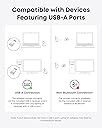
I had never heard of ergonomic mice before and for years I had quite happily used a 'normal' mouse for computer work. Until I had an injury to my dominant arm and using a normal mouse was just so painful. The ergonomic mouse was a game changer. So I continue using these mice even though my arm is better. How you hold the mouse ergonomic is so natural and comfortable to use. A few weeks ago I bought the same mouse but wired. The wired mouse is brilliant but the wire kept getting in my way. Now I have got the wireless one. Identical to the wired one. Easy to use and go back pages. I love it. It comes with a USB for the computer and requires 2 AAA batteries for the mouse. Once the batteries are in it is ready to go. There is no need to go to settings to set it up.It works straight away. However, I have returned it. There was nothing wrong with the mouse apart from the red light not coming on when I was using it. It is hard to explain.The wired mouse's stripe lights up red when you use it, which I liked. I could see the computer was on and ready to go. However the wireless mouse same model just wireless the light strip does not light up at all. So it looks like a dead mouse. I have got used to seeing the red light on the other model. So, I don't know if it is a fault or just how its designed. I SENT THE WIRELESS MOUSE BACK AND GOT ANOTHER THE SAME. tHE SAME THING THE STRIP DOES NOT SHINE WITH ALIGHT LIKE THE WIRED ANKER. i CONTACTED ANKER AND THEY SAID THE WIRELESS MOUSE DOES NOT LIGHT UP. I like anker but I also like a wireless mouse with lights so I sent this back again.
J**Z
Me gusta mucho este mouse, tengo varios años usándolo y este es el tercero que compro
A**D
عملي وتجربة مميزه
J**J
This mouse has been a tremendous help for me. I didn't know such "ergonomic mice" existed, but recently my tennis elbow got so bad that I couldn't work and I had to find some alternative to a traditional mouse. I quickly found the Evoluent mouse, but since it costs to $100 and I had never tried an ergo mouse, I was unwilling to spend that much on an experiment. Then I found the Anker Vertical Mouse. It's not quite as vertical as the Evoluent, which I thought might an issue for me, but it was cheap enough that I thought I'd give it a try. i figured if it helped at all, I'd then give the Evoluent a shot. Based on a few weeks of use, I don't think I'll bother with the Evoluent and instead buy more of these. The relief was almost instant. I hadn't realized how uncomfortable I was with the regular mouse. The angle of the palm on the Anker mouse is enough to provide relief from the pain, and yet still "flat" enough that you don't have to learn to use the mouse. To make the cursor move left, you just move your hand to the left - just like a traditional mouse. I think the more-vertical Evoluent mouse might be better for my wrist, but then "left" becomes completely "toward your palm" which won't feel as natural. I have been using high-end Logitech mice for years. The Anker mouse feels very similar. The foward/back buttons under the thumb are right where they should be and work just like the Logitech. The scroll wheel feels just about like the Logitech as well. The button clicks feel "appropriate". I suppose the mouse feels a little cheaper than the high-end Logitech mice, but who cares? If I have any complaints, they are trivial. The mouse is maybe 3.5 inches tall. I keep knocking it off the desk as I shuffle papers or reach for the phone. Not really any fault of the mouse, but I do it often enough that I thought I should mention it. Also, the mouse itself goes to sleep after some time without use. I am used to waking up my PC by moving the mouse - this doesn't work. I now have to click a mouse button to wake up the mouse itself, then it will wake up Windows. A silly change in habits, but one I have yet to learn. I have big hands, and I wouldn't mind if it was a little bit bigger, but it's perfectly fine with me as is.
Trustpilot
1 month ago
4 days ago