Desertcart purchases this item on your behalf and handles shipping, customs, and support to Romania.
🔗 Connect Smarter, Switch Faster, Work Cooler
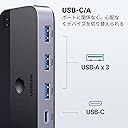
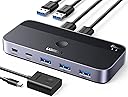
The UGREEN USB3.0 Switcher empowers professionals to share up to 4 USB devices—including USB-C and USB-A peripherals—between two computers with ultra-fast 5Gbps data transfer. Featuring both remote and button switching modes, it streamlines multi-device workflows while reducing desk clutter. Compatible across major OS platforms, this compact, sky-gray switcher is a must-have for efficient, modern workspaces.
| ASIN | B0C8MSP967 |
| Amazon 売れ筋ランキング | パソコン・周辺機器 - 2,375位 ( パソコン・周辺機器の売れ筋ランキングを見る ) 切替器 - 6位 |
| おすすめ度 | 5つ星のうち4.3 2,930 レビュー |
| カラー | スカイグレー |
| コネクタ | USB-C、USB-A。 |
| コネクタタイプ | USB-C、USB-A。 |
| コントローラーの種類 | プッシュボタン |
| コントロール | スイッチング。 |
| ブランド | UGREEN |
| ブランド名 | UGREEN |
| メーカー名 | Ugreen Group Limited |
| メーカー型番 | 15705 |
| モデル番号 | CM662 |
| ユニット数 | 1.00 個 |
| 位置調節の数 | 4 |
| 作動電圧 | 5 ボルト (DC) |
| 保証内容 | 24ヶ月 |
| 動作モード | ON-OFF |
| 動作電圧 | 5 ボルト (DC) |
| 原産国 | 中国 |
| 取り付けタイプ | サーフェスマウント |
| 商品の入り数 | 1 |
| 商品の重量 | 0.34 キログラム |
| 商品本体サイズ | 12.3 x 5.3 x 1.8 cm |
| 回路タイプ | 2-way |
| 対応アイテム | キーボード, デスクトップパソコン, プリンター |
| 操作モード | ON-OFF |
| 材質 | ABS |
| 消費電力(ワット数) | 10 W |
| 端末 | 物理的 |
| 端末タイプ | 物理的 |
| 素材 | ABS |
| 防水性 | IP55 |
A**ー
Exactly what I needed
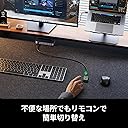
This has 3 really great properties which make it absolutely awesome: 1) supports 3xUSB-A + 1xUSB-C device, and lets me easily switch them between my two computers. 2) it's powered by USB-C but barely draws any power and it passes thru my devices instead of emulating a random kb/mouse. 3) the switcher remote button lets me move the huge cable mess under my desk on a cable tray, and all I have on my desk is the remote switcher button. The setup is so clean thanks to that switcher remote button, and it's really nice not having a million cables up here. Of course, the switcher itself works perfectly and is so much better than constantly swapping cables between computers.
ろ**べ
使えます
二台のパソコンでディスプレイ、キーボード、マウスを切り替えるために購入しました。切り替え器としては問題ないです。 ただ、付属のケーブルがもっと細ければ良いかな。 あと、リモコンの1側がLED光らないのは仕様?
A**S
PCを切り替えたい方におススメ
コスパ最高です。重宝しています。
A**ー
いい
ワンタッチで切り替えできるから古いパソコンが活かせる
は**。
リモコンの耐久性は注意
2ヶ月ほどで延長のリモコンが効かなくなった、1日1〜2回ほどの切替量です。初期の頃は正常で1ヶ月経過後に2回くらい押さないと反応しなくなり2ヶ月目でお亡くなりに。仕方ないので本体をデスクへ乗せて使用しています。本体の性能は可もなく不可もなく、必要十分です。
カ**ー
優秀なサボりツール
リモートワークで仕事用PCと個人PCが分かれているため、仕事中に個人PCでサボるのに有効なため購入しました。物理ボタン一つで素早くデバイス切り替えできるため重宝してます。
B**N
WindowsとLinuxパソコンで使用、買ってよかった製品です
2台のデスクトップパソコン(Windows11 11th-CPUとUbuntu24)に有線マウスと無線キーボード(2.4GHz)を共有するため購入しました。接続して、両方のPCで何の設定もなく認識(モニター接続は2台ともDP、HDMIで別途) これまで有線マウスは2台使用して各パソコンに接続、無線キーボード受信機をパソコン切り替えるたびにUSBポートから抜き差しでした。リモートキーでパソコン切替できるため、机の上がスッキリしました。切り替えに多少のタイムラグあります、気にならないレベルです
P**R
問題なし
特に問題なく使えます。 外付け延長リモコンがあるので便利です。 補助電源は接続した方が安定します。
S**E
USB switch that can be used for Nintendo Switch
This works perfectly as a usb switch / hub for pc and Nintendo switch 1 and switch 2.
O**K
Çok kaliteli ürün
Kaliteli ürün rahatlıkla alın kullanın işini gecikmesiz anında yapıyor.Geçişler hızlı ve stabil.
A**L
Great Product!
Good build quality, easy to use, and works perfectly. No connectivity issues even with multiple devices connected. Compact design and excellent value for money. Highly recommended.
S**O
Switch OK
COmprato lo switch per gestire le sorgenti USB per due pc in contemporanea e funziona bene, niente da dire.
M**U
The Perfect KVM Alternative for High Refresh Rate Gamin
The Perfect KVM Alternative for High Refresh Rate GamingIf you run a dual PC/Mac setup with high-end gaming monitors, this USB switcher hub is the missing piece of the puzzle. I needed a way to share my mouse, keyboard, and headset between my work MacBook and my gaming tower.I initially looked into KVM switches, but KVMs bottleneck monitor refresh rates. When you are running 540Hz and 720Hz ASUS ROG monitors, you absolutely cannot run your video signal through a standard switch—you need the monitors plugged directly into your GPU. This USB hub solves that perfectly. It handles only the peripherals. One end is plugged into my Mac's dock, the other into my PC, and everything switches over instantly with a single button press. It’s cheap, incredibly reliable, and allows me to keep my raw display performance completely intact. Highly recommended for any hybrid workstation/gaming setup.How My Dual Setup WorksBuilding a seamless dual setup without a KVM requires very specific wiring so that you get the raw power of your Mac for work and the maximum framerate of your PC for gaming. Here is exactly how I have it routed.1. The Video Routing (No Compression)The Work Setup (MacBook Pro M4 Max): The Mac is connected to the iVANKY dock. Because the dock uses a dual-cable connection to the Mac, it provides enough uncompressed bandwidth to run all four monitors using the Mac's raw GPU power. Since my ASUS ROG monitors don't have native USB-C, I use four HDMI-to-USB-C cables running from the monitors directly into the dock.The Gaming Setup (PC Tower): My gaming tower (running an RTX 5090 and Ryzen 9 9950X3D) is wired to the exact same four monitors using standard DisplayPort cables. Because they plug directly into the graphics card, I get the full 540Hz/720Hz experience with zero lag or compression.2. The Peripheral RoutingInstead of plugging my keyboard, mouse, and headset directly into the computers, they all plug into the USB Switcher Hub.Output cable 1 goes from the hub to the iVANKY dock.Output cable 2 goes from the hub to the Gaming PC.3. The Switching ProcessBecause the monitors are plugged into both systems simultaneously, here is the exact process to flip the entire desk from work mode to gaming mode in about three seconds:1.Switch the Peripherals:Press the single button on the USB switcher hub. Your keyboard, mouse, and headset instantly disconnect from the Mac and connect to the PC.2.Lock the Active Computer:Lock the screen of the computer you are currently using. If moving from Mac to PC, lock the MacBook. If moving from PC to Mac, press Windows Key + L.3.Wait for Monitor Auto-Switch:By locking the screen, you kill the active video signal. The ASUS ROG monitors will automatically detect that the signal has dropped and scan for a new one, instantly picking up the feed from your other computer.
Trustpilot
1 week ago
1 month ago