


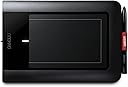

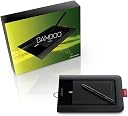
Wacom Bamboo Pen Graphics Tablet
Product ID: 91513952
A mark of personality Bamboo Pen offers a wide range of inspiring choices forn personalising everything you do on your computer It's time to unlock your creative personality – with your Bamboo Pen All with a stroke of a pen. Review: My first tablet: excellent! - I bought this tablet a few months ago, wanting it so I could draw directly onto the computer instead of using the old pencil, paper and scanner. Overall this is a brilliant tablet, ideal for beginners who want to get into digital art. Installation was quick and easy, and a tutorial afterwards helps you get to grips with using the pen. The only thing I did have a little trouble with was trying to register the product so that I could download the free Artrage 2 program. I can't quite remember how I did it now (I think it was luck to be honest!) but I remember that the Wacom EU site didn't work for me, and the other one was in Japanese! After a little bit of trawling on the internet I found a way to register my tablet and I downloaded the Artrage program, which is excellent! Although not as professional as Photoshop, it is still pretty good as you can chose the texture of the canvas you are painting on, even (for a bit of fun) tin-foil. The art supplies you can use on it are also very realistic, as the oil paint brush actually does run out of paint if you drag it across the canvas for too long, and some of the landscape paintings I have done with this tool look as if they have been sitting in a museum. (I'm not boasting about my skills, they really do make your work look great!) The chalk really does look chalky, and the palette knife, if dragged across the canvas, makes the different colour paints merge into one. All in all, I'd say that Artrage is a casual, easy to use program that makes your artwork look traditional, not like it has been done on a computer. Drawing is still quite difficult for me as it takes a bit of getting used to, but colouring my pictures is so much easier than using the mouse. With the pressure setting on the pen I can get into smaller spaces on the picture without having to change the width of the pixels, and it also leaves more room for expression like a real paintbrush, as I can make the lines fine or bold. Shading is also a possibility with this. With the addition of the Bamboo Dock and the games and applications that come with it, this graphics tablet will be used by myself for years to come. The only thing I do worry about from time to time is the nib on the end of the pen, which seems to be wearing down with use, but this doesn't matter too much because it came with plenty spare. Overall a brilliant product for the novice digital artist, or even a cheaper option for someone who has far more experience! Review: Good but ... - This tablet has postcard sized playing area (ie approx A6). For years I had a WACOM Graphire tablet, also with an A6 playing area. I was very happy with it but eventually it started to lose connection intermittently so the Graphire having apparently been superseded by the Bamboo Pen the latter seemed the obvious replacement. When it arrived the first thing I noticed was that the long side is physically longer than the Graphire's was, and the cable comes out at the side, so the combined effect is that the playing area begins a full 7cm from the side of my laptop, which is much further than I want it to be. In the case of the Graphire the cable came out of the top and the device was narrower so it was possible to have the playing area much closer. A partial workaround with the Bamboo is to select the left handed option while leaving the device on the right hand(!) but this looks very untidy and the left handness does not kick in until very late in the computer's start up. Why oh why did Wacom alter a winning design? The next thing I noticed was that the pressure sensitivity did not work. I thought that there was something wrong with the pen but after a phone call to customer support it turned out that the new device driver could not coexist with the old Graphire device driver so the latter had to be removed. Why couldnt the installation have detected that? It all works fine now that I have got used to it, and I would not be without it, but I still think the Graphire was a better product.
| ASIN | B002Q4U4AE |
| Active Surface Area | 10 x 6 inches |
| Box Contents | Integrated pen holder, ArtRage painting software and additional bonus software via software download |
| Brand | Wacom |
| Brand Name | Wacom |
| Colour | Black |
| Compatible Devices | Desktop, Tablet |
| Connectivity technology | USB |
| Customer Reviews | 4.3 out of 5 stars 204 Reviews |
| Included components | Integrated pen holder, ArtRage painting software and additional bonus software via software download |
| Item Weight | 395 g |
| Manufacturer | WACOM |
| Manufacturer Part Number | 4949268614900 |
| Model Number | CTL-460-EN |
| Network Connectivity Technology | USB |
| Operating System | Windows, macOS |
| Operating system | Windows, macOS |
| Product Features | Lightweight |
| Special feature | Lightweight |
| Specific Uses For Product | Painting, Drawing, Designing, Animation, Editing |
| Specific uses for product | Painting, Drawing, Designing, Animation, Editing |
| Target Audience | Teacher |
R**S
My first tablet: excellent!
I bought this tablet a few months ago, wanting it so I could draw directly onto the computer instead of using the old pencil, paper and scanner. Overall this is a brilliant tablet, ideal for beginners who want to get into digital art. Installation was quick and easy, and a tutorial afterwards helps you get to grips with using the pen. The only thing I did have a little trouble with was trying to register the product so that I could download the free Artrage 2 program. I can't quite remember how I did it now (I think it was luck to be honest!) but I remember that the Wacom EU site didn't work for me, and the other one was in Japanese! After a little bit of trawling on the internet I found a way to register my tablet and I downloaded the Artrage program, which is excellent! Although not as professional as Photoshop, it is still pretty good as you can chose the texture of the canvas you are painting on, even (for a bit of fun) tin-foil. The art supplies you can use on it are also very realistic, as the oil paint brush actually does run out of paint if you drag it across the canvas for too long, and some of the landscape paintings I have done with this tool look as if they have been sitting in a museum. (I'm not boasting about my skills, they really do make your work look great!) The chalk really does look chalky, and the palette knife, if dragged across the canvas, makes the different colour paints merge into one. All in all, I'd say that Artrage is a casual, easy to use program that makes your artwork look traditional, not like it has been done on a computer. Drawing is still quite difficult for me as it takes a bit of getting used to, but colouring my pictures is so much easier than using the mouse. With the pressure setting on the pen I can get into smaller spaces on the picture without having to change the width of the pixels, and it also leaves more room for expression like a real paintbrush, as I can make the lines fine or bold. Shading is also a possibility with this. With the addition of the Bamboo Dock and the games and applications that come with it, this graphics tablet will be used by myself for years to come. The only thing I do worry about from time to time is the nib on the end of the pen, which seems to be wearing down with use, but this doesn't matter too much because it came with plenty spare. Overall a brilliant product for the novice digital artist, or even a cheaper option for someone who has far more experience!
A**S
Good but ...
This tablet has postcard sized playing area (ie approx A6). For years I had a WACOM Graphire tablet, also with an A6 playing area. I was very happy with it but eventually it started to lose connection intermittently so the Graphire having apparently been superseded by the Bamboo Pen the latter seemed the obvious replacement. When it arrived the first thing I noticed was that the long side is physically longer than the Graphire's was, and the cable comes out at the side, so the combined effect is that the playing area begins a full 7cm from the side of my laptop, which is much further than I want it to be. In the case of the Graphire the cable came out of the top and the device was narrower so it was possible to have the playing area much closer. A partial workaround with the Bamboo is to select the left handed option while leaving the device on the right hand(!) but this looks very untidy and the left handness does not kick in until very late in the computer's start up. Why oh why did Wacom alter a winning design? The next thing I noticed was that the pressure sensitivity did not work. I thought that there was something wrong with the pen but after a phone call to customer support it turned out that the new device driver could not coexist with the old Graphire device driver so the latter had to be removed. Why couldnt the installation have detected that? It all works fine now that I have got used to it, and I would not be without it, but I still think the Graphire was a better product.
A**R
Excellent Well Priced Product
This is the first graphics tablet that I have bought, and i am very impressed with its features and functionality. It is very easy to use (once you get used to it) and works on my Adobe CS3 software, as well as on Autodesk sketchbook pro - the two applications that I needed a graphics tablet to create high quality drawings. It also produces much better results compared to using a mouse to draw or cut something, from a photoshop image for example. The software available to use with the tablet allows you to sketch directly 'into' your pc, producing images that look as if they've been drawn with paper and pencil. The downloadable Bamboo Dock software has fun little animation software, some silly games, a couple of basic drawing packages and the option to download software such as Art Rage - although this annoyingly appears to have a usage limit on it. Overall it is a well priced, great product that is very fun to use and I've been recommending it to my friends non-stop!
R**T
Screen mapping problem with XP
This is my first tablet and like most other reviewers I find it great. I have only used it in photoshop so far but this makes everything so much easier than using a mouse. However, although the tablet worked fine when I first installed it, after a reboot I found the area of the entire tablet would only map to the top left quarter of my screen (so holding the pen at the bottom right of the tablet placed the pointer near the middle of the screen). I tried to google the problem with no luck, then decided to call the tech support number. The guy who answered was excellent and diagnosed the problem and talked me through the solution in a couple of minutes. Apparently it is a known problem with XP which I am still running. Anyway, I just thought I would add the solution here in case anyone else gets the same problem:- 1. Right click My Computer and choose properties to bring up the system properties window. 2. Click the Hardware tab, then the Device Manager button. 3. In the device manager expand the Human Interface Devices section, and at the bottom of that right click on Wacom Virtual Hid Driver, select Disable and confirm you really want to do that. 4. Reboot the system when prompted and Bob's your uncle. I guess it's a bit annoying that you have to do this, but I still think it's worth 5 stars. It's a good quality product, very precise, decent value for money, and any stars I would have taken off have been earned back by their tech support people. Thoroughly recommended!
I**E
Yes, it's as easy as using pens (etc).
Having read all of the previous reviews for this, there is a lot that needn't be repeated. The big question for most having tried to draw with a mouse is; "is this much better"? More to the point, my exact question was; "is it AS easy to use as pens/pencils (etc) on paper"? An important question, given that the £50 outlay is for many a reasonable amount of hard-earned money to shell out (if there is risk of packing it all in and reverting to the more traditional pens & paper)... This was a present for my daughter, who is (in many people's opinions) a talented (amateur) anime artist. Her stuff done on paper is excellent, and she has very high standards of finish. To this end, we were both concerned that she could achieve a similar finish with this tablet as with more traditional materials. The simple truth is that although using this tablet is at first fiddly, there is a very steep learning curve that soon (maybe following a few days of use) results in an ease of use that produces work of the same quality of that done by hand. Get a good graphics art programme to go with it, and the results are truly excellent... I couldn't find a review that emphatically convinced me of how good this tablet would be (ie: was it as good as traditional methods/materials). I am happy to report that it is, and that users at all levels should purchase it without fear. My daughter tells me that she still likes to draw with pens & paper (on occasion), but only because she sometimes misses the aesthetic qualities of traditional materials. She uses the tablet for over half of her work, and it is of the same quality of her hand drawn stuff (which she scans onto her art programme & then colours on the PC). Highly recommended.
J**W
Excellent Tablet
Initially I was looking to buy myself a Wacom Intious 4, but due to the substantial cost and my urgent need of a graphics tablet I decided to buy the Bamboo pen. This tablet certainly isn't as fancy as the Intious 4, what with it not having features such as tilt recognition and 2000 levels of pressure sensitivity. However, for the novice or amature graphic designer this is more than enough to teach you the ropes of using a graphics tablet. Very reliable and very accurate. I had a trust graphics tablet with 500 levels of pressure sensitivity and half the time on a quick stroke of the pen, it would only recognise half of the stroke because it's response time was so low. However, I haven't once come across that problem with this device. Admittedly, I would prefer an intious or even a cintiq but for someone looking for their first graphics tablet. I really suggest you splash out a bit more for one of these as apposed to a cheap lower quality one. Many people give up with their tablets because they find them difficult to control, but this is usually because of getting a low quality tablet. If you want results this is your buy! I gave this 4/5 because the intious 4 has more features and the cintiq has on tablet display. Two things that put them distinctly ahead of this one, but this product is a very good tablet for a beginner or amature.
E**7
Disappointed
When I saw this on Amazon, I got all excited, mainly because of the price. After reading the description I thought this was a bargain. Unfortunately the description is misleading as it doesn't have the 'touch' facility which I discovered when it turned. The Amazon description goes on about the brilliant new touch and pen facility, which this tablet just doesn't have. That said, if all you require in a graphics tablet is the ability to draw, this is a must have.......it's just a shame the Amazon description doesn't reflect this.
G**E
GREAT VALUE BAMBOO PEN TABLET
The Bamboo Pen Tablet CTL-460 is a well designed item, a pleasure to use, and excellent value for money. It is easy to install, and includes a tutorial and PDF manual. The only adjustment I needed was to soften the tip-feel for use with a pressure sensitive drawing app. Also included was a free download of ArtRage2.6, an excellent drawing and painting package (well worth the normal download cost of £16), and Bamboo Dock for downloading free mini-apps, including games, an image editor & painting app, and an animation app. Three spare nibs are included with the unit. However, further spare nibs are excessively expensive, merely consisting of 50mm long 1.7mm diameter plastic wire, at about £12 for five! My only criticism of the product is that the matte-textured surface of the tablet is too rough, and drawing results in a scracthy-noise: it is not to my liking and will cause excessive wear of the pen nibs, and will itself be worn down by the pen nib. My solution is to affix an A5 sheet of uncoated acetate over the tablet, resulting in a friction-free, smooth and slightly soft surface, which results in a pleasant smooth and silent drawing movement, protects the tablet surface from wear, and should prolong the life of pen nibs. Update, June 2011: I have been using the tablet for about 3 months, and find that I now prefer the tablet-pen to a mouse! I have an Apple Keyboard USB wired to my Mini Mac. The keyboard has 2 USB sockets: I have the mouse plugged into the left-hand socket, and the tablet plugged into the right-hand socket (I am right-handed). Connections work well since the mouse and tablet are not used simultaneously. I rarely use the mouse now, but I keep it available for use by my toddler-grandson.
Trustpilot
3 weeks ago
1 month ago