We remain fully operational. Our teams are working around the clock to ensure your deliveries continue safely.

DOWNLOAD THE APP


Customer Services
Copyright © 2025 Desertcart Holdings Limited
DOWNLOAD THE APP


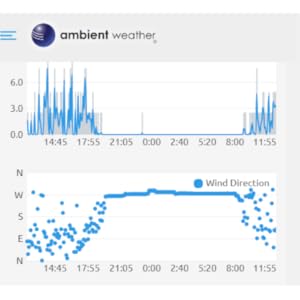
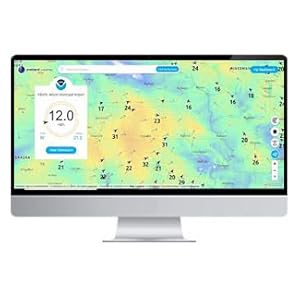
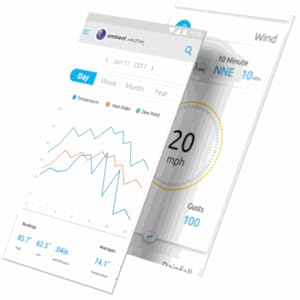
Product description The Ambient Weather WS-8482 monitors indoor and outdoor conditions including indoor and outdoor temperature and humidity, heat index, and dew point. The console measures locally, and up to 7 sensors can connect for remote monitoring. Channels 1-7 for the remote sensors display with an auto-scroll feature. The console supports both imperial and metric units of measure and displays min/max data, allowing you to set up independent alerts for all parameters. The time and date automatically synchronize to the Internet NIST time server. Includes optional temperature and humidity calibration to maintain the utmost accuracy. Features an easy to use Web Page to configure the console's WiFi settings and connect to your WiFi Router. No apps to download! The Indoor/Outdoor Thermo-Hygrometer The TX-3110B wireless outdoor thermo-hygrometer passes data through to your WS-8482 console. It will support both imperial and metric units of measure. Important Notes and Specifications The weather station console includes two levels of wireless connectivity. The sensors connects to the console via RF (915 MHz), and the console connects to your router (2.4 GHz). WiFi RF transmission in open air up to 80 feet. A wireless signal will not pass through solid metal, earth or ground. Place the console at least three feet away from computers, TVs and wireless phones. Features 7 dip switch channels Auto resync 60 second update rate (console + WiFi) 915 MHz frequency 300 ft line of sight (100 ft in most conditions) The Floating Pool & Spa Sensor The TX-3107 floating pool & spa thermometer is ideal for home owners that wish to monitor and send alert notifications when the pool or spa is too hot or cold. The waterproof sensor both displays the water temperature and wirelessly transmits it to the display console. Floating Sensor Notes & Specirfications The floating pool & spa sensor is designed to float. It should not be submerged or kept under a cover. Use a tether (string) to fix the sensor in the pool or spa. For best results, place within 100 feet of the console. Optional Sensors (sold separately) The WS-8482 supports up to 7 sensors. Mix & match from our TX-31 series of thermo-hygrometer sensors, soil moisture-temperature sensors, and pool/spa thermometers. 150 ft line of sight (100 ft in most conditions) Screw on lid with double gasket & locking design Ambient Weather Network With our weather stations, sensors, and cloud service, Ambient Weather has developed a suite of tools that seamlessly stream real-time weather conditions to the internet, enabling a community of weather professionals and enthusiasts who, together, create a rich network of weather data spanning the globe. Quickly view detailed information with our animated expandable modules. Features dials, gauges, graphs and text reports for every parameter. Monitor indoor and outdoor conditions, including wind speed, wind direction, rainfall, UV, solar radiation, indoor temperature, indoor humidity, barometric pressure, dew point, heat index, wind chill and more. Our mobile friendly and responsive design allows you to customize your dashboard, analyze graphs, generate reports, and send email or text alerts to protect your possessions in and around your home or business. AmbientWeather.net works with IFTTT, desertcart Alexa, SmartThings, Home Assistant, Weather Underground and PWSWeather, to name a few. The Ambient Weather Network app is also available at Google Play and the Apple App Store. Easily accessible to anyone with an internet connection, this community offers robust, meaningful weather information—right from the backyard of a trusted neighbor, friend, or colleague. Our mapping platform combines our large weather station network with live radar, temperature and wind overlays, and accurate pinpoint forecasting for any location on earth. Visualize your data with daily, monthly and yearly graphs, or customize your graphing interval. The expandable tiles and handy charts and graphs allow your to analyze your data. To further analyze the data, download csv files. If you just need a quick update, set up email or text alerts for high and low conditions for every parameter. You can send multiple alerts for the same parameter, and view all past alerts in a handy timeline. Connect to Ambient Weather Responsive Design Public Dashboard Extensive Data Integration Options Virtual Assistants The Ambient Weather skill for Alexa and Google Assistant provides Ambient Weather personal weather station owners with the ability to get real-time, and past weather information generated by the devices they have been linked to. IFTTT Applets The AmbientWeather server features a handy timeline for tracking IFTTT triggered web services, applets, and devices like blinds, rain gauges, and lights. API & Third Party Apps Developers, retrieve your own real-time and historical personal weather station JSON formatted data, or build 3rd party apps and get data from multiple devices. Weather Networks Connect to the world's largest personal weather station network, Weather Underground, in addition to WeatherCloud and WeatherBug. Review: Finally, a good quality wireless thermometer! - I have several wireless thermometers. My main complaint with them is the lack of accuracy. I did some research and found the product line from Ambient Weather. I bought this one because it came with the wireless temperature sensor for the pool, as well as a thermometer/hygrometer outdoor sensor. I read the other reviews on desertcart and saw that many people expressed extreme frustration with the setup of the device. I experienced none of those frustrations. I have quite a bit of experience setting up similar devices such as WiFi-connected garage door openers, doorbells, cameras, and other weather gateways. That experience helped for sure. I also work in information technology and so my technical skills are probably higher than the average person. Regardless of technical skill level, the setup of this device is actually very straightforward as long as you follow the instructions carefully. The key to setting up this device is connecting your computer to the device's internal WiFi access point. That is how you connect your computer (or smart phone) to the device during initial setup. Then you put in the information for your own WiFi so the device can then connect to your network and from there, to the internet. You don't have to set up the wunderground.com and ambientweather.net if you don't want to. But it's easy and kind of fun. So record the MAC address that is shown when you connect to the configuration page of the device, or just look on the back for the sticker that has a number such as "00:AB:12:34:CD:EF" and then head over and register an account and your device there. Then fill out the appropriate fields on the device while you're setting it up. It did take me two tries to get my device connected to my home WiFi. But the entire setup process probably took about 30 minutes. I did run into a little trouble with the sensors. One of them kept coming up as "Er" in the display. I ended up removing the batteries, changing the channel, and reinserting the batteries. (If you change the channel, you have to remove and reinsert the batteries in order to get it to actually change the channel.) After a bit of minor fiddling, the device was able to receive data from both of the sensors and also send data to the two websites. I installed the Ambient Weather app, signed in with my account and now I see the data displayed on my phone as well. I've only had this device up and running since last night, but it's dialed-in and working perfectly. Don't let the negative reviews deter you if you have some technical wherewithal and the ability to follow instructions carefully. You will likely have no serious problems. A word of caution regarding the water-resistant pool temperature probe: Make sure that the o-ring is carefully pressed into the groove in the top part of the casing. It would be a good idea to use some silicone grease as well. The o-ring may pop out of the groove when you open the case to insert the batteries or change the radio channel. Be very careful to ensure that you replace it properly or your device could fill with water and cause damage. Review: The product was more than reliable - Last winter I vacationed in Florida the month of January. When I returned to Wisconsin my hot tub was nearly frozen over. Luckily I was able to get a technician out to replace a circulating pump before any damage was done to the piping. Before going to Florida this year I searched for a wi-fi enabled thermometer that I could access while in Florida. I found very little information on available systems. Comments on the Ambient Weather System did not give me comfort that the signal would penetrate the 5in. cover so I decided to wing it. A week before we were to leave I made a last minute decision to purchase this system and see how it worked. When I set it up, the signal was received by the receiver and I could monitor temperature via the internet. The first week in Florida I logged on and saw the temperature was dropping. I had a neighbor go check on the hot tub and the breaker was tripped and would not reset. The technician came out and replaced a defective heater. A week later the same situation occurred and again I called the technician. Turns out he had jostled the hot tub plug and the water level dropped shutting off the hot tub. Without this product I would have had thousands of dollars in damages and probably would have had to replace the tub. I'm back in Wisconsin in February and everything is a little better when you have a hot tub.








E**.
Finally, a good quality wireless thermometer!
I have several wireless thermometers. My main complaint with them is the lack of accuracy. I did some research and found the product line from Ambient Weather. I bought this one because it came with the wireless temperature sensor for the pool, as well as a thermometer/hygrometer outdoor sensor. I read the other reviews on Amazon and saw that many people expressed extreme frustration with the setup of the device. I experienced none of those frustrations. I have quite a bit of experience setting up similar devices such as WiFi-connected garage door openers, doorbells, cameras, and other weather gateways. That experience helped for sure. I also work in information technology and so my technical skills are probably higher than the average person. Regardless of technical skill level, the setup of this device is actually very straightforward as long as you follow the instructions carefully. The key to setting up this device is connecting your computer to the device's internal WiFi access point. That is how you connect your computer (or smart phone) to the device during initial setup. Then you put in the information for your own WiFi so the device can then connect to your network and from there, to the internet. You don't have to set up the wunderground.com and ambientweather.net if you don't want to. But it's easy and kind of fun. So record the MAC address that is shown when you connect to the configuration page of the device, or just look on the back for the sticker that has a number such as "00:AB:12:34:CD:EF" and then head over and register an account and your device there. Then fill out the appropriate fields on the device while you're setting it up. It did take me two tries to get my device connected to my home WiFi. But the entire setup process probably took about 30 minutes. I did run into a little trouble with the sensors. One of them kept coming up as "Er" in the display. I ended up removing the batteries, changing the channel, and reinserting the batteries. (If you change the channel, you have to remove and reinsert the batteries in order to get it to actually change the channel.) After a bit of minor fiddling, the device was able to receive data from both of the sensors and also send data to the two websites. I installed the Ambient Weather app, signed in with my account and now I see the data displayed on my phone as well. I've only had this device up and running since last night, but it's dialed-in and working perfectly. Don't let the negative reviews deter you if you have some technical wherewithal and the ability to follow instructions carefully. You will likely have no serious problems. A word of caution regarding the water-resistant pool temperature probe: Make sure that the o-ring is carefully pressed into the groove in the top part of the casing. It would be a good idea to use some silicone grease as well. The o-ring may pop out of the groove when you open the case to insert the batteries or change the radio channel. Be very careful to ensure that you replace it properly or your device could fill with water and cause damage.
M**H
The product was more than reliable
Last winter I vacationed in Florida the month of January. When I returned to Wisconsin my hot tub was nearly frozen over. Luckily I was able to get a technician out to replace a circulating pump before any damage was done to the piping. Before going to Florida this year I searched for a wi-fi enabled thermometer that I could access while in Florida. I found very little information on available systems. Comments on the Ambient Weather System did not give me comfort that the signal would penetrate the 5in. cover so I decided to wing it. A week before we were to leave I made a last minute decision to purchase this system and see how it worked. When I set it up, the signal was received by the receiver and I could monitor temperature via the internet. The first week in Florida I logged on and saw the temperature was dropping. I had a neighbor go check on the hot tub and the breaker was tripped and would not reset. The technician came out and replaced a defective heater. A week later the same situation occurred and again I called the technician. Turns out he had jostled the hot tub plug and the water level dropped shutting off the hot tub. Without this product I would have had thousands of dollars in damages and probably would have had to replace the tub. I'm back in Wisconsin in February and everything is a little better when you have a hot tub.
L**X
Great when it works, but inconsistent.
I bought it for the API, so that I could automate things based on the temperature. The API is incredibly inconsistent, with a history of days-long outages. I eventually had some luck using the "unofficial" API used by their web UI, which seems to be separate and more reliable. That only works if you set your weather station public, which is obnoxious because I didn't want to do that. Eventually, the outside thermometer stopped working. I've been using the pool thermometer as an outside thermometer. That worked for awhile, but the base station loses it more and more often lately, and I've finally given up. I ultimately just bit the bullet and bought an ESP8266, put micropython on it, and hooked up a set of temperature sensors off Amazon. I had really wanted to avoid rolling my own, hence buying this item. Turns out, it was super easy to wire up my own sensor and hook it up to a free grafana account. Way more reliable and a fraction the cost, and I have a pool and outside sensor. No humidity but I can add a sensor for that if I want to. Now this item is going in the trash.
C**N
It works fine, manual could use a major overhaul
Setup is easy if you know how it’s done, the instructions for it... not so much. It could be so much easier for first time users: 1) Insert backup battery in display 2) connect display unit to power 3) Connect with tour phone or a WiFi enabled computer to the new WiFi that’s generated by the base 4) go to http://192.168.0.1 and enter your existing WiFi (2.4ghz) credentials 5) wait for the light in the back to be steady blue 6) open up the batterie compartments of each sensor you have and set the switch of each to a unique channel 7) power up the first sensor, wait for it to be displayed in the main unit, repeat for the second. If no sensor is found, press the scan button on the base. The rest of the steps depend on if you want online functionality, install the app, follow instructions. I set it up in 5-10 minutes. Integration into home assistant was a bit trickier, but this was only due to the instructions being unclear (this time from home assistant). In the end, all works well.
A**R
Il a bien fonctionné 2 mois puis a commencé à indiquer mauvaise température. Ils ont remplacé tout le kit au complet et il a cessé lui aussi de fonctionner après 2 mois.
M**.
tres compliquer a a configurer avec un iphone
Trustpilot
2 weeks ago
3 weeks ago