
DOWNLOAD THE APP


Customer Services
Copyright © 2025 Desertcart Holdings Limited
DOWNLOAD THE APP


🚀 Unleash Your Office Potential!
The HP OfficeJet Pro 8025 is a versatile all-in-one wireless color printer designed for the modern home office. With fast printing speeds, smart home integration, and HP Instant Ink compatibility, it streamlines your workflow while promoting eco-friendly practices.



| B&W Pages per Minute | 20 ppm |
| Color Pages per Minute | 10 ppm |
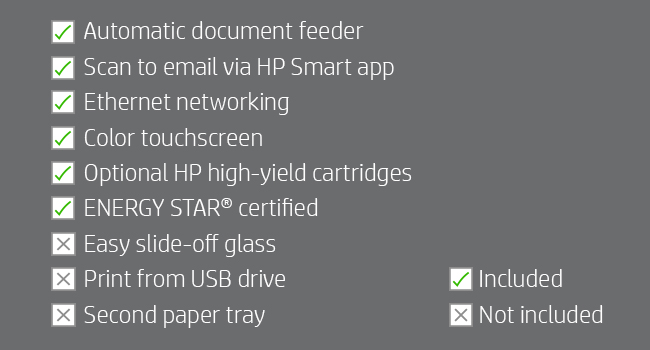
| Hardware Connectivity | Ethernet |
| Connectivity Technology | Wi-Fi |
| Ink Color | Color |
| Resolution | 4800 x 1200 |
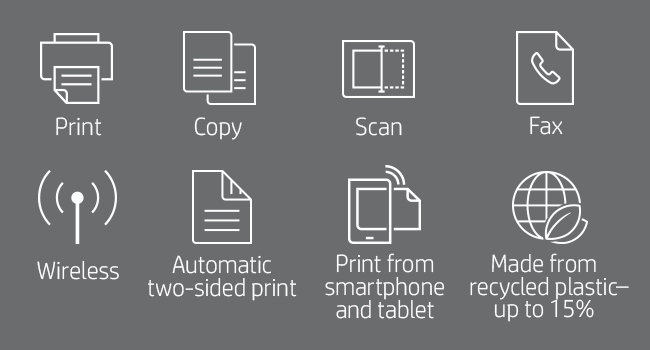
| Additional Printer Functions | Copy, Scan, Fax |
| Control Method | Voice |
| Controller Type | Vera, Amazon Alexa |
| Print media | Envelopes, Paper (plain), Card stock, Labels, Glossy photo paper, High-resolution paper |
| Scanner Type | Flatbed |
| Maximum Copy Speed Black and White | 20 ppm |
| Display Type | Capacitive Touchscreen CGD |
| Compatible Devices | Smartphones |
| Printer Type | Inkjet |
| Additional Features | Touchscreen, Energy Star Certified, Auto Document Feeder, Scan, Fax |
| Printer Output Type | Color |
| Item Weight | 18 Pounds |
| Item Dimensions D x W x H | 9.21"D x 18.11"W x 13.43"H |
| Paper Size | 3.5 x 5; 4 x 6; 5 x 7; 8 x 10; 8.5 x 14 |
| Maximum Sheet Capacity | 225 |
| Media Size Maximum | 8.5 x 14 inch |
| Wattage | 21 watts |
| Power Consumption | 21 Watts |
| Duplex | Automatic |
| Color | Basalt |
K**Y
Instant Ink Add On is Good To Have
We purchased this 3-In-One Printer/Copier/Scanner to replace another HP model - this was its replacement. Since we are all working from home, it was essential that we have this right away. It came quickly and set up was easy - that's the good news! Unfortunately, we had just found and purchased color ink cartridges for our older model after not being able to get them for months, and literally a few days later, even before we ever printed anything in color, the unit stopped working. We were also unable to get the brand new cartridges out of the machine either since the carriage was frozen - that was one of the unit's issues. This machine was literally only 2 years old, so I feel like it might be planned obsolesence at this point. We ordered this unit because it was the replacement unit for the one we had and hoped we could possibly get the cartridges out of the old one to use with the new machine - no need - pretty identical machine, but uses a different numbered cartridge!!!!! We just threw $40.00 down the drain. Even if we couldn't use the cartridges, we asked around if anyone we knew could use them as we were willing to break the old machine to get the cartridges out with no luck. No one could use those anyway. We decided to order the new unit with Instant Ink since many of the reviews and our own experiences lately have shown us that ink is hard to come by these days. The initial amount of ink that comes with this units is not much and it ran out of black and cyan within two-three weeks!!! The message on the unit said we were to install our instant ink, which we should already have on hand - NOT!! Our "Instant Ink" had not being shipped and got a message from a Virtual Bot Assistant that said they didn't know why. We eventually had to call HP to get customer service to assist in the delivery - they were great and our "instant ink" arrived within a few days. Hopefully going forward we won't have this issue, but it was frustrating. Not sure if it is from COVID work restrictions within the company or where the ink cartridges are manufactured and being sent from (overseas??) The machine runs great and the prints are wonderful, but the situation has been very costly. Lets hope this unit lasts us more than two years!!!
T**A
Easy to set up!
I just received my printer yesterday and set it up late last night. It was easy to get out of the box because before it was stuffed in the Styrofoam, they put it in a plastic bag with handles so you can easily take it out of the box! Brilliant idea guys as this is such a struggle for most!Setting up the printer was not so bad, I wished the instructions would have been a little clearer and wish that there was more troubleshooting tips. Since I haven't owned a printer and ink cartridges in years, I had no idea what the orange plastic lock on the bottom was. I eventually got it down, but clearer instructions saying something like "yes, force is okay when you turn this" would have been a good assurance that I wasn't about to break it.I did also struggle with the paper tray and then after pulling it all out and putting it back in a few times, it finally made sense. The printer would just "print" a bunch of blank pieces of paper about 6 times if it wasn't aligned properly.Setting up the WiFi was VERY easy. Once I chose for my WiFi on my computer what printer I had, it did all the work. Then when I subsequently put the app on all of our phones in the household, etc. the work was done. Literally just download the app and everything was selected and done! (Probably those genius idea-makers again from the plastic bag that streamlined this so much!)I did a couple of test prints with, of course, pictures. The first picture I printed I just let it fill the whole page and the picture quality was good, especially since I wasn't using picture paper, but just regular computer paper. The second picture I played around with in the app and made it smaller. This definitely adjusted the quality of the picture so it wasn't as clear. I sum this up to be my fault.Overall, I think I'm going to really like this printer and continue to check out the abilities that it has!
Trustpilot
3 days ago
1 month ago