
DOWNLOAD THE APP


Customer Services
Copyright © 2025 Desertcart Holdings Limited
DOWNLOAD THE APP


⚡ Power your Ryzen build with ASUS ROG Crosshair VIII Hero — where speed meets style and control.
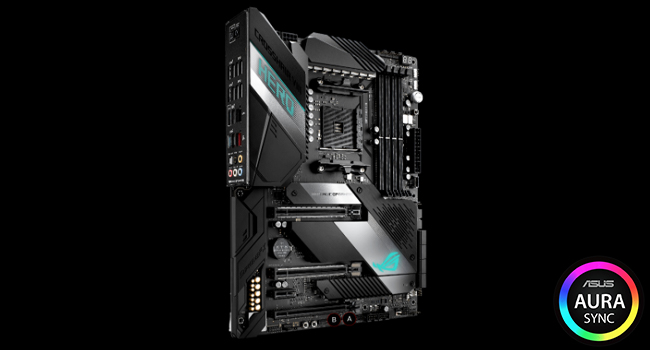
The ASUS ROG Crosshair VIII Hero X570 motherboard is a premium ATX board designed for 2nd and 3rd Gen AMD Ryzen processors. It features PCIe 4.0 support, integrated 2.5 Gbps LAN, USB 3.2 Gen2 ports, advanced thermal solutions including active PCH and M.2 heatsinks, and Aura Sync RGB lighting. With 5-Way Optimization for automated overclocking and cooling, plus a DIY-friendly design with pre-mounted I/O shield and BIOS Flashback, it delivers high-end performance and reliability for enthusiasts and professionals alike.




| ASIN | B07SYW3RT2 |
| Best Sellers Rank | #1,726 in Computer Motherboards |
| Brand | ASUS |
| CPU Socket | Socket AM4 |
| Chipset Type | AMD X570 |
| Compatible Devices | Personal Computer |
| Compatible Processors | amd 2nd gerenration ryzen |
| Customer Reviews | 4.4 out of 5 stars 1,258 Reviews |
| Global Trade Identification Number | 00192876393758 |
| Graphics Card Interface | PCI Express 4.0 |
| Item Dimensions L x W x H | 12.28"L x 4.25"W x 14.57"H |
| Item Type Name | ASUS ROG Crosshair VIII Hero X570 ATX motherboard with PCIe 4.0, integrated 2.5 Gbps LAN, USB 3.2, SATA, M.2, ASUS NODE and Aura Sync RGB lighting |
| Item Weight | 2.2 Pounds |
| Main Power Connector Type | 24-Pin |
| Manufacturer | Asus |
| Memory Clock Speed | 5100 MHz |
| Memory Slots Available | 4 |
| Memory Storage Capacity | 2.5 GB |
| Model Name | ROG CROSSHAIR VIII HERO |
| Model Number | 90MB1100-M0EAY0 |
| Number of Ethernet Ports | 2 |
| Number of Ports | 11 |
| Platform | Windows 10 |
| Processor Socket | Socket AM4 |
| RAM Memory Technology | DIMM |
| Ram Memory Maximum Size | 128 GB |
| S/PDIF Connector Type | Optical |
| System Bus Standard Supported | SATA 3 |
| Total Number of HDMI Ports | 2 |
| Total PCIe Ports | 4 |
| Total SATA Ports | 6 |
| Total Usb Ports | 11 |
| UPC | 192876393758 |
| Warranty Description | 3 years |
R**T
Great Motherboard for Ryzen Systems
First off, I want to say that the way this was packaged was unacceptable. It came in the retailer box without any other box or packaging. I was very angry about the way this expensive and crucial part was shipped. With that being said, it worked on the first try. I was able to easily update and setup the UEFI/BIOS with no issues. I've had my system built for over a month now, and I have no complaints. Everything works just fine. I just wanted to make a statement about how it was shipped. I didn't dock any stars because the product itself is fine despite the horrendous packaging (or rather lack thereof) job. Update: There was no Q-Connector in the box. I am currently going through Amazon support to see if I can get one. Will update when I find out how it goes. Update 10 Mar 2020: Amazon was unable to help, but they did send me to ASUS Customer Service. The rep told me via chat that they could send one to me. As of now, I am waiting for the Q-Connector. I will update this review when I get the connector. Update 16 Mar 2020: I received the Q-Connector but it was the wrong one. However, I found one that works so I'm using that. Update 26 Sep 2020: After removing RAM to better access the CPU and AIO cooler, the B DIMM slots have stopped functioning. I have reached out to ASUS and am attempting to RMA this board. We shall see how that goes. I know that these boards are weird when it comes to memory, but I tried every trouble-shooting technique I could think of and could not get them to work. I was extremely careful when removing and reinstalling the RAM and all modules work in both A slots. At this point, I am docking stars and taking it to a two because this should not have happened. If the RMA process is smooth, then I will put the stars back. Update 14 Oct 2020: The RMA process was approved, but the motherboard came back with the same exact problem -- both B DIMM slots do not work. I will again have to contact support to get this fixed. I payed $360 for this board. There should have never been a problem to begin with, but at the very least when it was sent back for repair, it should have been repaired. It's as if they did nothing to fix it at all. One star now, ASUS. What a shame as this board was rated nearly a five by me originally. Update 27 Oct 2020: I received a replacement board and all issues have been resolved. The customer service was outstanding, thus I have increased the rating to five stars.
C**I
Great board so far with lots of USB 3.x ports
I will say I originally wanted the WiFi version but it was out of stock everywhere, and I can't actually use WiFi 6 right now nor am I currently using a WiFi connection at all though that may change again. So I wanted it more for "just in case" than anything. The only other difference between this board and the WiFi model is no bluetooth which I wouldn't use on a gaming PC either. So, with that said let's move on. The board is solidly built and the BIOS software seems decently laid out but I'm coming from an older Intel board from Asus so I was pretty familiar with how Asus does their BIOS layout anyway. The lighting features are nice, I was worried about the "Hero" logo being too much but it's actually pretty muted (and I think can be turned off individually in the Aura software). Since I'll be going watercooling I was intrigued by the high current pump header but I've realized nobody seems to actually make a 3-4 pin pump connector that can go on a mobo header, they're all Molex or Molex with a 4pin mobo connector for a PWM feed. So I have to wonder if Asus knows something is coming. One of the big reasons I went with this board over the Gigabyte Master is USB support. They both support the same overall amount of ports, however the Asus board ALL of the USB ports are USB 3.x where Gigabyte 4 of the rear USB are 2.0 still. My case supports 4x USB 3 ports and a type C port so Gigabyte would have won there due to having two USB 3 front panel headers where the Asus only has 1, however Asus has basically put those on the I/O panel. The Hero has 11 ports plus the rear Type C. The Gigabyte board is 9 plus the Type C but 4 are 2.0. I was initially hesitant since I really wanted to enable all 4 front panel ports, but having things in the rear I/O is just cleaner anyway. Perhaps in the future they'll get rid of USB 2 headers entirely and replace with 3.0 The top M.2 slot is a bit finicky to get to since part of the mounting is under the chipset fan shroud, but that's the one you want to use first as it's directly linked to the CPU. The other slot goes through the X570 chipset first, and disables some SATA ports in the process. It would be nice if there were 3 like the other boards, but there are limited resources and it's always a tradeoff. I suspect that ditching USB 2.0 on the rear panel and having a bunch of 5Gbit/s USB superspeed ports didn't allow for a 3rd M.2 slot. Other thoughts: My first board with built in I/O shield. This is very nice, and you can't forget it during install now M.2 built in heatspreaders with thermal pads is a plus. Some PCI 4 drives come with heatsinks but they're big copper blocks and won't blend in if that matters to you. These would eliminate the need to use them. Asus still needs to refine the BIOS but it's early days still. They're one of the ONLY board manufacturers without the ability to set fan profiles for the chipset fan. It does run pretty quiet. I can't hear it over the stock cpu cooler I'm using for now. However once I go water cooling it's possible it might be noticed. VRM is more than enough for up through the 3950X at least. Buildzoid didn't have a lot of criticism for it vs Asus Z390 boards.
R**3
Excellent board...This is worth the price!
So this has a bit of a story to it: when I was ordering parts for my new rig in the Spring (which I put together over Labor Day Weekend) I first settled on a different motherboard than this one (MSI MPG X570 Gaming Plus). I did further due diligence after getting that board and thanks to a certain PC Hardware YouTube channel I discovered the Power VRM system on the MSI board was rather lousy. So I returned it for a refund and went with the Republic of Gamers (ROG) Crosshair VIII Hero. Let me first begin by saying it is my first ROG motherboard. Also, as I've been in the IT Professionals field for 20 years I am aware that with ASUS you better get a fully working board in the box because if it is faulty or DOA ASUS Support is a gigantic pain to deal with. Fortunately I got a nominal, fully functioning board and being that I did I can tell you this board is worth every penny you spend on it. It's feature set is rich and you get a lot of great options to work with when building your PC with this being such a key piece of the jigsaw puzzle which is a computer build. It's fast, rock steady stable and a joy to have in your build. Of what I can recommend about working with this board first the obvious: when you get your entire PC together and power it on for the first time make sure you flash the BIOS to the most current version right then and there. Then check for new BIOS revisions every 3 months or so. Then, setup your memory profile (XMP or what DOCP) and then install Windows (as long as you aren't OCing your CPU. Also, have the drivers for the motherboard on-hand on a USB flash drive before you plug into the Internet for the first time. In the end, this is a great high-end board and a worthy addition to any build so long as you want to spend for it. That all I got from here and until next time I am out!
B**C
High quality
The first thing that I did was flash the bios using the flashback feature with a USB 2.0 flashdrive that only had the 1.0.0.3AB bios on it. Then I installed the 3900X amd processor with the stock wraith prism cooler along with the Crucial Ballistix Sport LT 3000 MHz DDR4 CL 15 memory 16GBx2. I encountered the error Q-code 02 and I figured out that my CPU fan was not starting, but the lights would work. So I ordered the Dark Rock Pro 4 CPU cooler. Now everything works like a charm and my PC idles at 37C. I tried running the memory at 3333, but my PC would freeze up after a while. I need to work on the timings. However, 3200 and the FCLK set at 1600 will work fine via DOCP settings. Update: I have updated the bios to 1.0.0.3ABB (C8H.CAP). The PC boots up faster. 4 of my logical processors run at 4575 Mhz. Also, I did install the latest AMD chipset driver 1.07.29.0115. Update 2: I had to set my Power & Sleep Settings for AMD Ryzen Balanced Plan -> Hard Disk -> Turn off hard disk after -> Setting (Minutes) -> Never I was encountering freezes and this was the fix, since I'm using a NVMe SSD. Also, I disabled the auto updates for the Logitech G HUB software and my temperature went down to 33C while ambient is 21C. Update 3: I have updated the bios to BIOS 1001 - 1.0.0.3ABBA (C8H.CAP) and the amd chipset driver to 1.8.19.0915. Now 2 cores are running at 4625 MHz, 2 cores at 4600 MHz and 2 cores at 4575 MHz. It seems that the 3900x has one really good 6 core chiplet (3600x maybe) and one average 6 core chiplet (3600 maybe). Also, I have my memory overclocked to 3400 MHz and FCLK 1700 via DOCP. I haven't changed anything else for the memory settings. I kept the defaults. Update 4 Final: My pc with the same hardware and settings is still up and running fine. I did update my OS to Windows 11. Todays date is May, 20, 2025. NOTE: I disabled installing Armoury Crate in the bios and I setup to start in stealth mode in the bios. I don't want the lights. Hardware: Case: Phanteks Eclipse P600S CPU Cooler: Dark Rock Pro 4 Graphics Card: ASUS GeForce RTX 2080 O8G Dual-fan OC Edition GDDR6 Memory: Crucial Ballistix Sport LT 3000 MHz DDR4 DRAM Desktop Gaming Memory Kit 32GB (16GBx2) CL15 BLS2K16G4D30AESB Processor: 3900X AMD SSD: Samsung 970 EVO Pro plus NVME m.2 1TB SSD: XPG SX8200 480GB 3D NAND NVMe Gen3x4 M.2 2280 PSU: Seasonic Prime 850 Titanium SSR-850TR 850W OS: Windows 10 Pro
C**R
ASUS ROG Crosshair VII Hero
I have used ASUS mobo a long time and have tried MSI, Gigabyte and biostar but I always come back to ASUS. They cost a little more but they are stable and well built. The bios has a lot of options and for overclockers its a dream. This mobo is an excellent board! Very stable runs cool and looks great! AMD RYZEN 2700x and Im running 2x Samsung 970EVO NVMe RAID 0 and is super fast. Running this RAID some are concerned on the limited PCIE bandwidth for the GPU but I have only seen a miniscule drop in FPS. I have my ram running @ 3333 Mhz14 14 14 31 1T and Im using the auto level 4 OC and have seen clocks as high as 4.375 Ghz. Im using a corsair H115x AIO cooler and it does a great job keeping my temps down. Runs idle at 24C and when under stress no higher than 59C. Usually runs no hotter than 48C under normal loads. System specs: CPU: AMD Ryzen (2nd Gen) 2700X Motherboard: ASUS ROG Crosshair VII Hero Memory: Teamgroup 2x8GB (16GB) DDR4 T-Force Dark Pro 3200 CL14-14-14-31 1.36V Graphics: EVGA GeForce 1070Ti 16GB Storage: Samsung 970 EVO NVMe 500GB x 2 RAID 0 Western Digital Black HDD 1TB x 2 RAID 1 CPU Cooling: Corsair H115i Pro RGB 280MM AIO Power Supply: Corsair HX1200i Platinum Case: bequiet! Dark Base 700 w/ 2 140MM Silent Wings 3 fans
S**L
Absolutely worth higher price over other Asus X470 chip mbo.
I highly recommend this board. It's very much worth the higher price even compared to the Rog Strix X470-F Gaming motherboard. Was building a Ryzen 2700x system & initially ordered the Strix x470-f gaming board. System would not POST and the q-led was showing video error- mostly.. Oddly, a couple times the qled gave a DRAM error instead. It would not provide the audible beep codes, so I bought a 10 pack of system piezo speakers, to be sure the lack of beeps wasn't a sys spkr issue. Still no beeps. Removed from the case to do "breadboard" testing, confirming the case was not causing a short. This issue was either the Strix x470-f, or the 2700x processor. The next step was finding my old POST test card which would give me an actual error code to reference- Or returning both items (it's generally standard practice to consider both faulty, unless you do have a 2 digit code to go on). I couldn't find my POST tester, and while looking for a new one, I discovered that the Crosshair Vii has a 2 digit display that gives you those error codes (plus many other excellent features, including other useful tech tools built on to the board). I returned the Strix and ordered this Crosshair Vii. Installed processor and it was in fact a dead processor. Ordered a new 2700x and everything is perfect. Love this Crosshair Vii for many reasons. I love the Ryzen 2700x, and the G.SKILL 32gb RAM (each purchased separately). Everything works well together. To end your confusion regarding Ryzen and RAM- the issues were on the previous 1xxx Ryzen processors. The 2xxx Ryzen processors are much less annoying, but they are often not very fond of using more than 2 sticks of ram. I'm using: G.Skill Ripjaws V DDR4-3200 16GBx2 CL16-18-18-38 ( F4-3200C16D-32GVK ) Which are actually "intended" for Intel motherboards, but that does NOT matter. This RAM is not even on the Asus QVL (qualified vendor list), there's almost no 32gb kits on that list. Just keep that in mind when youre spending hours trying to determine what RAM will work for the system. The list is not the only things you have to choose from, it's merely what they've tested and know to work. I do recommend this G.Skill kit, as well. (also, if you go with an M.2 NVME SSD, use the lower slot and move the heatsink to it. You can Google the reason, it's not a functional issue at all, either slot works fine of course, it just splits some lines with the GPU. Apparently has no affect on operation, but at least you'll not be physically hiding it with your GPU, in the event you need to get to it.) Buy this board. It functions flawlessly for me, has many fan headers, many other capabilities, and simply looks excellent. Good Luck
D**B
Needs BIOS upgrade for Ryzen 3000/4000 series support.
This is a great high-end board at a mid-range price, that price due to it being a generation old. I chose this for my high-budget gaming system because I refuse to have proprietary fans built into my motherboard, as is true for almost all X570-series boards. The benefits of X570 are of no consequence to most users, so I went with an older, proven design from the trusted "ROG Crosshair" series. The board is fantastic, as every one of the 15 or so Asus ROG Hero-series boards I have used. Amazingly configurable and usable BIOS (though its help text could use some detail), wonderful layout, plenty of USB and other ports, rock-solid, overclockable, very good (but not amazingly good) power distribution (See the excellent GamersNexus review on YouTube titled "Massive Overkill"). Would buy again...and again and again and again. As I mentioned, though I bought this new, many months after the Ryzen 3000 release, it would not boot with a Ryzen 3000-based chip. I had to borrow an old AMD chip from a friend to enter the BIOS setup and apply an update with newer CPU support. I may have received old stock, though I suspect it is more likely considering my timing that Asus has just not shipped boards with a recent BIOS.
B**O
Worst Republic of Gamers board ever made.
To start, I am an Enthusiast benchmarker on hwbot.org, at one point I was #14 in the US Enthusiast (air/watercooled) league, and nearly broke top 100 worldwide, with over 75 cups and medals as well as 40 gold cups at one point. So a competitive benchmarker and overclocker. I am also a highly respected user of overclock.net with over 300 reputation points. I have been overclocking since 1998. I have also pretty much used exclusively ASUS and Republic of Gamers mainboards since I have been building, and have owned and overclocked and configured: ROG Crosshair V Formula, ROG Strix Z170H, ROG Strix Z270H, ROG Maximus VI Hero, and now this ROG Crosshair VIII Hero. To say I know what I'm doing, well, I don't believe the problems I am constantly having are a result of user error. Additionally, I went to school for IT, have Cisco certification for repairing PCs, laptops and printers, and achieved a 4.0 for the entirety of my degree. This is the worst ASUS or ROG product I have ever used, and until they fix this board, the bugs, the slowness in the OS, and get their stuff together, I will not be recommending or using their motherboards and will be warning users in the communities I visit, reddit, Twitter etc. to avoid this product and all ASUS ROG products I'll be fair and say that the construction of the motherboard itself is very solid, impressive with a brushed metal finish, the VRMs are best in class, the Daisy Chain topology for memory overclocking has allowed me to achieve very high memory overclocks at low timing, and it runs my R9 3900X at high clocks easily, while staying cool. As far as overclocking goes, and the features provided through the BIOS, I have no issues. However, there are NUMEROUS issues that have caused me to have to reinstall Windows 10 numerous times, that are totally unacceptable. Today, for example, the AURA lighting program and service are throwing an error, I have been reinstalling them all morning with no luck- and because I liked the lighted HERO logo on the board, I purchased a Phanteks Digital RGB 5050 kit. Just 5 days ago or so, I opened AURA and it worked fine. No configuration changes to my system were made in that time. Now, upon opening the program, it says "The Aura lighting service is not running"", when services.msc clearly says that the service is on and running, as well as their "AsusUpdateCheck" background service that you cannot terminate (I generally block this in my firewall..). I am using the standalone AURA software from the support section of ASUS website, which is no longer available for download, that was present on the release of the motherboard. (Again, it worked fine on Windows 10 Pro 1909 with all updates until...today) I even tried installing their terrible, buggy, rootkit, data collection software "Armoury Crate" that they are trying to push on everyone. Because it has AURA in the app. This "program" is a universal Windows application (read: a Win10 app) that runs around 8 services always running I counted in the background (for what purpose I do not know), has a EULA you have to agree to that mentions data collection, and also installs a rootkit service called "ROGSLLiveInstaller" (or something like that), that does not get removed when you uninstall Armory Crate and all the junk it installs, and constantly tries to reinstall all this spyware nonsense if you leave the service enabled. I have used Microsoft Autoruns, Ccleaner uninstaller, looked through Group Policy and Task Scheduler, and have found no way to remove this service. Oh, and yeah, even though the app has AURA control built into it, it didn't work there either- it just said "No Aura Devices Found" (really? There's AURA lighting built into the mainboard I/O cover). Too bad I bought some fancy Phanteks blinkenlights and can't use them! Moreover, it gets worse: the boot times with a brand new, fully up-to-date firmware, Samsung 970 Evo gen3 M.2 drive are horrendously slow. I run a dual boot of Linux (because who really would use Windows 10 if you know how to use Linux- I have Win10 solely for gaming), have OtherOs enabled in BIOS, have tried Fast Boot on and off, the Secure Boot keys were erased, as Linux generally needs all this done, and Windows 10 "Updates" will erase GRUB on your boot partition. Anyway, when I first got the board and set up a dual boot, boot times for Windows 10 were what I consider slow (20 seconds), however around a month and a half ago they suddenly became much longer for no explainable reason. On the order of 70 seconds (a minute plus). I have read that this is some kind of known issues with Windows 10, X570, and specifically the Ryzen 3900x processor. Unfortunately, AMD and Asus have essentially decided that they will only release drivers for the NVMe and USB 3 support for Windows 10, and not Windows 7, or I would simply return to that. Additionally, not only are the boot times atrocious, but the desktop is slow too- it feels like I am running Windows off an old mechanical hard drive. Seriously, I have a Macintosh SE (1986) I repaired and restored with a 400kb floppy drive and that thing boots off a floppy disk and opens programs faster than this brand new build. What the heck. What did I spend over $1400 on? Programs open slow, navigating explorer is slow, shutting down or rebooting is slow. I still have a box that has an FX-8350 and Crosshair V Hero, DDR3-2400 and a Samsung 850 Evo running Windows 7 x64 fully updated (my old setup from 2011)- it boots Windows 7 in about 3 seconds after the POST screen with the flying colored orbs, all the startup programs load in about 5 seconds from logging in, there is no 5-10 second delay when opening programs, etc. The odd thing is that the install of Linux on the M.2 boots in about 2 seconds flat and upon login loads everything basically instantly, uses around 1300mb less RAM (well, this is a Windows thing) including multiple conky widgets, etc. etc. Programs open instantly with no delay. But I cannot game on Linux. So for the last three months instead of gaming, benchmarking (which can crash a lot causing you to reboot, and if it takes over a minute to boot it is essentially tedious and not worth doing), and so forth I have reinstalled Windows 8 times, including once since it started taking forever to boot up (made literally no difference and took 2 days because of installing drivers etc.). Now I will most likely be reinstalling again since AURA stopped working for no reason I can determine, including hours reinstalling, troubleshooting using reddit/Google and other users posts (which I also did to fix the slow Win10 boot times to no avail, for basically 2 weeks straight before reinstalling), pouring through Event Viewer and log files, and so on. Finally, the boards BIOS was a mess. With the earliest bios versions for this board (0702 I believe), there was a bug that would silently corrupt your Windows install until you could no longer boot and would BSOD. They fixed that, but then there was the boost fiasco. On top of that, it was the laziest ROG BIOS launch I have ever seen- previous platforms had color-coded voltages (white for safe, yellow for high, pink for risky and red for LN2-level voltages). They've added this now but for the first few BIOS revisions all the voltages stayed white no matter what. Every other ROG board I've had had this feature to begin with. The layout of the BIOS is poor, all of the Advanced AMD CBS settings for overclocking that are shown in Ryzen DRAM Calculator need to be moved and exposed through the main Extreme Tweaker menu. Finally, a user told me that the Crosshair VII and Crosshair VI (x470 and x370 chipsets) used to have Boot DRAM Voltage, and this new board does not. Those allowed you to install Windows 7 if you wished, as well. Bottom line: unless you want to be spied on by Armoury Crate and have it consume a bunch of system resources in the background, have a slow and buggy NVMe implementation, have formerly working services and programs suddenly stop functioning, etc. look elsewhere. I paid $1400 for a system that is faster in synthetic benchmarks than real world use. I miss my Maximus VI + delidded SL binned 4790k @ 4.9GHz, but it's sold now. I don't know if the other vendors boards are better with Ryzen 3000 but I doubt it. I can't return the board now and don't want to rip my system apart. So I'm stuck with a slow, buggy, malfunctioning board Specs: Ryzen 9 3900x @4.4GHz CCD0, 4.2GHz CCD1, ~1.360v 16GB G.skill Flare X 3200MHz 14-14-14-34 @ 3800MHz c16-16-16-16-32-48 (B-Die Single Rank), 1900MHz IFclk 970 Evo pcie 3.0 m.2 WD Black 2TB, WD Blue 4TB, WD Blue 6TB (SATA III), Samsung 840 Evo (SATA III) EVGA GTX 1080ti FTW3 SLI COOLERMASTER V1000 PSU (Seasonic) Corsair H100i v2 w/ Arctic Bionix F120 fans
Trustpilot
4 days ago
1 month ago